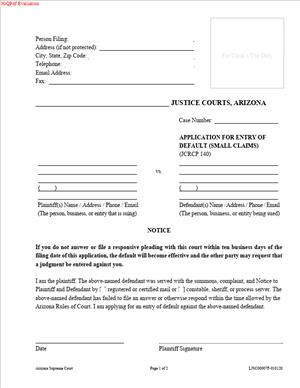
LJSC00007F – Application for Entry of Default (Small Claims)
Fill out nowJurisdiction: Country: United States | Province or State: Arizona
If the other side in your small claims case has not responded, you may be looking at the LJSC00007F – Application for Entry of Default (Small Claims). This form is used to ask the court to officially note that the defendant failed to file a required response within the allowed time.
When you file a small claims case, the defendant is given a deadline to answer. If that deadline passes without a response, the case does not automatically end in your favor. You must take another step. This form is that step.
The LJSC00007F – Application for Entry of Default (Small Claims) tells the court that proper service was completed and no answer was filed on time. It asks the court to enter a default, which can lead to a judgment in your favor.
If you are representing yourself, this form can feel technical. Once you understand its purpose and structure, it becomes much more manageable. The key is knowing what the court is confirming and what information you are required to provide.
What is LJSC00007F – Application for Entry of Default (Small Claims)?
Clear definition
LJSC00007F – Application for Entry of Default (Small Claims) is a court document used in Arizona small claims cases. It is filed by the plaintiff when the defendant has failed to respond to the complaint within the required time frame.
By submitting this form, you are asking the court to formally record that the defendant is in default. A default means the defendant did not file an answer or otherwise defend against the claim within the deadline set by court rules.
This document does not decide the case by itself. Instead, it is a procedural request. It moves the case forward toward a possible default judgment.
Who typically uses this form?
Most often, the plaintiff uses this form. The plaintiff is the person or business that filed the small claims lawsuit.
You might be an individual seeking payment for unpaid rent, property damage, unpaid services, or a loan that was not repaid. You may also be a small business owner trying to collect on an unpaid invoice.
In small claims court, many people represent themselves. That means you are responsible for tracking deadlines and filing the correct documents. This form is commonly used by self-represented plaintiffs after they confirm that no answer was filed.
Court clerks and judges review the form, but they do not prepare it for you. You complete it and submit it to the court for review.
Why might you need this form?
You need this form when the defendant does not respond in time. Filing a complaint alone is not enough to obtain a judgment.
After the defendant is properly served, the law gives them a specific number of days to file an answer. If they ignore the case or choose not to respond, you may request entry of default.
Without filing for default, your case can remain inactive. The court does not automatically enter default just because the deadline passed.
Using this form signals to the court that you are ready to proceed. It keeps your case moving forward and may lead to a default judgment if all requirements are met.
Typical real-life scenarios
- You file a small claims case against a former tenant for unpaid rent and property damage. The tenant is properly served but never files an answer. After the response deadline passes, you complete and file this form to request entry of default.
- You perform repair work for a client who never pays the invoice. You file a claim in small claims court and have the client served. Weeks pass, and there is no response. You use this form to inform the court and request that a default be entered.
- You loan money to a friend, and the loan is not repaid. You sue in small claims court. The friend receives the paperwork but does not file an answer. You file this form to continue the case toward a default judgment.
- You sell goods to a customer who pays with a check that later bounces. After filing your small claims case and confirming service, you wait for a response. None arrives. You then file this application so the court can formally recognize the lack of response.
- In each situation, the common issue is the same. The defendant was properly notified but did not act within the allowed time.
When would you use LJSC00007F – Application for Entry of Default (Small Claims)?
You use this form after three main things have happened. First, you filed your small claims complaint. Second, the defendant was properly served with the complaint and summons. Third, the deadline to respond has passed without an answer being filed.
Timing matters. Courts rely on strict deadlines. The response period usually begins on the date the defendant was served, not the date you filed your complaint.
If the defendant files an answer, even at the last moment, default generally cannot be entered. This form is only used when there is no timely response.
You may also use this form if a defendant filed something that does not qualify as a proper answer, depending on how the court treats that filing. Courts often review the docket to confirm whether a valid response exists.
In small claims cases, the process is designed to be simpler than in higher courts. Even so, procedural steps must still be followed. This form is one of those required procedural steps when a defendant does not participate.
If there are multiple defendants, the situation can be more complex. One defendant may respond while another does not. In that case, a default might be requested against only the non-responding party, depending on the structure of the claim.
Legal characteristics of LJSC00007F – Application for Entry of Default (Small Claims)
This form is procedural in nature. It does not argue the merits of your case. Instead, it confirms certain facts for the court. These usually include that the service was properly completed and that the response deadline has expired.
For the application to be effective, the service must have been valid. If the defendant was not properly served according to court rules, the court may reject the request for default. Service errors are a common reason for delay.
Another common issue is filing too early. If you calculate the response period incorrectly and submit the form before the deadline has passed, the court may deny or return the application.
Accuracy is important. Case numbers, party names, and service dates must match the court record. Small clerical errors can create confusion or require corrections.
In Arizona, small claims procedures are intended to be streamlined. However, courts still verify that due process requirements were met. Entry of default affects a party’s rights, so courts review these requests carefully.
It is also important to understand what this form does not do. It does not automatically award you money. It does not enforce payment. It does not create a lien or start collection. It is one step toward a possible default judgment.
Is it legally binding?
The application itself is not a judgment. Filing it does not immediately create a legally binding order against the defendant.
When the court grants the request and enters default, that entry has legal significance. It means the defendant has lost the opportunity to respond as a matter of right, unless the court later sets aside the default.
After a default is entered, the court may proceed to enter a default judgment. A default judgment is legally binding and can allow collection efforts, depending on the circumstances.
However, a default can sometimes be challenged. A defendant may ask the court to set aside the default under certain conditions, such as mistake or excusable neglect. Courts consider these requests on a case-by-case basis.
So while the application starts the process, the binding effect comes later, if the court enters default and then grants a judgment.
How to fill out LJSC00007F – Application for Entry of Default (Small Claims)
Step 1 – Review the case information
Begin by gathering your court documents. You will need your case number, the full names of all parties, and the date the defendant was served.
Check the court docket, if available, to confirm that no answer has been filed. Make sure the response deadline has passed based on the service date.
Step 2 – Complete the caption section
At the top of the form, fill in the court name, case number, and the names of the plaintiff and defendant exactly as they appear on the original complaint.
Do not shorten or change party names. The information must match the court record.
Step 3 – Identify the party in default
Indicate which defendant is in default. If there is more than one defendant, clearly state the name of the specific party who failed to respond.
This helps the court understand whether the request applies to one or all defendants.
Step 4 – Provide service details
Enter the date the defendant was served with the complaint and summons. This information must match the proof of service already filed with the court.
You are confirming that the service was completed according to the required procedures. The court relies on this information to determine whether the response deadline has expired.
Step 5 – Confirm the response deadline has passed
State that the required time for the defendant to answer has expired and that no response has been filed.
This section is typically a declaration. You are affirming that the facts provided are true to the best of your knowledge.
Step 6 – Sign and date the form
Sign the application in the designated area. Print your name clearly and include the date of signing.
Your signature confirms that the information is accurate. Some courts may require additional contact information, such as your address or phone number.
Step 7 – File the completed form with the court
Submit the completed LJSC00007F – Application for Entry of Default (Small Claims) to the clerk of the court where your case is pending.
Keep a copy for your records. After filing, monitor your case to see whether the court enters default or schedules further proceedings.
Legal terms you might encounter in LJSC00007F – Application for Entry of Default (Small Claims)
- Entry of Default: This is the court’s formal recognition that the defendant did not file a response within the allowed time. On this form, you are asking the court clerk to record that failure. Once entered, it can limit the defendant’s ability to participate further without court permission.
- Defaulting Party: This refers to the person or business who failed to respond to the claim. You must clearly identify this party on the form exactly as their name appears in the case caption. Even small spelling differences can delay processing.
- Proof of Service: This is the document that shows the defendant was properly served with the claim. The court will rely on the proof of service already filed in the case to confirm that service occurred. Without valid proof of service, the court cannot enter default.
- Service Date: This is the exact date the defendant was served with the claim. You use this date to calculate whether the response deadline has passed. The service date must match the proof of service on file.
- Response Deadline: This is the last day the defendant had to file an answer or appear. The court calculates this based on the service date and applicable time rules. You should confirm that the full response period has expired before filing.
- Affirmation or Declaration: When you sign this form, you are affirming that the information is true. You are not just making a request; you are making a sworn statement to the court. False statements can have serious consequences.
- Case Caption: This is the top section of the form listing the court name, case number, and the names of the parties. The caption must match the original complaint exactly. The clerk uses this information to locate the correct file.
- Clerk’s Entry: After you submit the form, the clerk reviews it and, if everything is in order, enters the default into the court record. This step is administrative but significant. It changes the status of the case.
- Relief Requested: This refers to the money or remedy you asked for in your original small claims filing. Default does not automatically change what you requested. The court will look at your original claim to determine what relief may be granted.
FAQs
How do I know if enough time has passed to file LJSC00007F – Application for Entry of Default (Small Claims)?
Check the proof of service in your case file and find the exact date the defendant was served. Then count the full number of days allowed for a response under the small claims rules. If the last day has passed and no response or appearance is recorded in the court file, you may request a default. Do not rely on memory or informal communication; verify the docket or speak with the clerk to confirm no response has been filed.
What if the defendant filed something after the deadline but before I submitted this form?
Look closely at the filing date stamped by the court. If the response was officially filed before your request for default is processed, the clerk may reject your request. Timing matters. You should confirm the case docket on the day you submit this document to ensure no late filing has appeared.
Do I need to attach proof of service again when I file this document?
In most cases, the proof of service should already be in the court file. However, you must make sure it was properly filed and accepted. If the proof of service is missing or incomplete, the clerk cannot enter default. Review your case file to confirm it is there and clearly shows who was served, how they were served, and on what date.
What name should I use for the defaulting party?
Use the exact legal name as it appears in the case caption and on the original claim. Do not shorten it or correct it on this form. If the defendant is a business, use the full registered business name listed in the complaint. The clerk compares names exactly, and mismatches can delay entry.
What happens after the court enters default?
Once a default is entered, the defendant generally loses the right to respond unless the court allows it. The case may move toward a default judgment or a hearing to determine damages, depending on court procedure. The entry of default is recorded in the court file and changes the status of your case.
Do I need to notify the defendant that I filed this form?
Check whether the form includes a certificate of mailing or notice requirement. Some courts require you to send a copy to the defendant and confirm that you did so. If required, you must complete that section accurately and keep proof of mailing for your records.
Can I correct mistakes after filing LJSC00007F – Application for Entry of Default (Small Claims)?
If you notice an error before the clerk processes it, you may be able to submit a corrected version. If the clerk rejects the form, you will typically receive a notice explaining why. Correct the specific issue noted, such as a missing signature or incorrect case number, and resubmit promptly.
Does this form automatically give me the money I asked for?
No. This document asks the court to formally note that the defendant did not respond. You may still need the court to enter a judgment based on your original claim. Review your case status after default is entered to understand the next procedural step.
Checklist: Before, During, and After LJSC00007F – Application for Entry of Default (Small Claims)
Before
- Confirm the defendant was properly served, and proof of service is filed.
- Verify the exact service date from the court record.
- Calculate the response deadline and confirm it has fully passed.
- Check the docket to ensure no answer or appearance has been filed.
- Review the case caption for the correct spelling of all party names.
- Locate your case number and confirm it matches all prior filings.
- Read the entire form once before writing anything.
- Prepare copies of the completed form for your records.
During
- Write the court name and case number exactly as shown on prior documents.
- Enter the plaintiff and defendant names without changes.
- Identify clearly which party is in default.
- Double-check the service date you reference.
- Confirm in writing that the response period has expired.
- Complete any notice or mailing section if required.
- Sign and date the form in the correct place.
- Review every field for blanks or inconsistencies.
After
- Make at least one copy of the signed form for yourself.
- File the original with the court clerk using the accepted method.
- Confirm with the clerk that the form was received.
- Monitor the case docket for the clerk’s entry of default.
- Keep any confirmation or stamped copy in your case file.
- Calendar the next possible step in your case.
- Watch for any motion from the defendant to set aside the default.
- Organize all related documents in one secure place.
Common mistakes to avoid with LJSC00007F – Application for Entry of Default (Small Claims)
- Mistake: Filing too early because you miscounted the response deadline, which often happens when you forget to start counting from the correct service date; this can lead to rejection by the clerk, so do not forget to verify the exact service date and count the full response period.
- Mistake: Using a shortened or corrected version of the defendant’s name because it seems clearer to you; this causes mismatches in the court record and delays, so do not forget to copy the name exactly as it appears in the caption.
- Mistake: Assuming proof of service is on file without checking, which happens when you rely on the process server’s word; the court cannot enter default without it, so do not forget to confirm it is officially filed.
- Mistake: Leaving sections blank because you think they do not apply; incomplete forms are commonly rejected, so do not forget to review every line and fill in all required fields.
- Mistake: Forgetting to sign and date the form, often due to rushing at the clerk’s counter; unsigned documents are not valid requests, so do not forget your signature and the correct date.
- Mistake: Failing to check the docket the same day you file, which can result in missing a late response from the defendant; this may affect your request, so do not forget to confirm the case status before and after filing.
- Mistake: Not keeping a copy of what you submitted, which creates confusion later if questions arise; without a copy, you cannot easily prove what you filed, so do not forget to make and store copies.
- Mistake: Ignoring notice requirements to the defendant because you assume default means no further contact; this can delay processing, so do not forget to complete any required mailing or certification section.
What to do after filling out LJSC00007F – Application for Entry of Default (Small Claims)
Once you complete the form, pause before filing. Read it one more time slowly. Make sure the case number, names, and dates are consistent with your original claim and proof of service.
- Step 1: Make at least one clear copy of the signed form for your records.
- Step 2: Organize the copy with your proof of service and original claim.
- Step 3: Decide how you will file the form, such as in person or through any available filing method allowed by the court.
- Step 4: Submit the original form to the clerk and ask for a stamped copy if filing in person.
- Step 5: If filing electronically or by another approved method, save the submission confirmation.
- Step 6: Check the case docket within a few days to confirm that the clerk entered the default.
- Step 7: Note the date the default was entered in your records.
- Step 8: Review the next required step in your case, which may involve requesting a judgment or preparing for a short hearing.
- Step 9: Monitor the file for any motion by the defendant asking the court to set aside the default.
- Step 10: Keep all paperwork in a dedicated folder so you can quickly respond to any court notice.
Stay organized. Keep dates written down in one place. After the default is entered, the case moves into a new stage. Your focus shifts from proving the defendant failed to respond to securing the outcome you originally requested. Careful recordkeeping and regular docket checks will help you stay in control of the process.
Disclaimer: This guide is provided for informational purposes only and is not intended as legal advice. You should consult a legal professional.