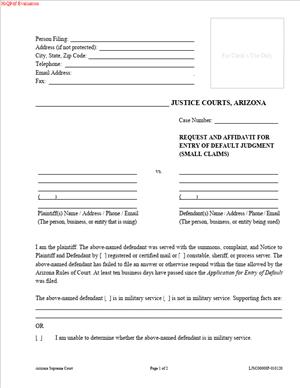
LJSC00008F – Request and Affidavit for Entry of Default Judgment (Small Claims)
Fill out nowJurisdiction: Country: United States | Province or State: Arizona
If the other side never responded to your small claims case, you may be ready to ask the court for a decision in your favor. That is where the LJSC00008F – Request and Affidavit for Entry of Default Judgment (Small Claims) comes in.
The LJSC00008F – Request and Affidavit for Entry of Default Judgment (Small Claims) is the document you file when the defendant has not filed an answer within the required time. It tells the court that the deadline has passed and asks the judge to enter a default judgment.
This form is not used at the start of your case. It comes later, after proper service and after the response period has expired. It is a follow‑up step in the small claims process.
If you are representing yourself, this form is often the final step before the court issues a judgment without a hearing. Understanding what it does and how to complete it helps you avoid delays or rejection.
What is LJSC00008F – Request and Affidavit for Entry of Default Judgment (Small Claims)?
Clear definition
LJSC00008F – Request and Affidavit for Entry of Default Judgment (Small Claims) is a court form used in Arizona small claims cases to ask the court to enter a judgment because the defendant did not respond on time.
It combines two parts. First, you make a request for default. Second, you sign an affidavit. An affidavit is a sworn statement confirming that what you are saying is true. In this form, you confirm that the defendant was properly served and failed to answer within the required period.
When filed correctly, the document asks the court to decide the case based on your claim and the lack of response from the other party.
Who typically uses this form?
Most often, the plaintiff uses this form. The plaintiff is the person who filed the original small claims complaint.
You might be an individual trying to recover unpaid rent, damage to property, an unpaid loan, or money owed under a contract. You may also be a small business owner collecting on an unpaid invoice.
In some situations, a business representative files the document on behalf of the company, depending on court rules about who may appear in small claims court.
Why might you need this form?
You need this form when the defendant does not file an answer within the time allowed after being served with the complaint.
Small claims court operates on deadlines. Once service is completed, the defendant has a specific number of days to respond. If that deadline passes without an answer, the case does not automatically end. You must ask the court to enter a default.
Without filing this document, the court may not issue a judgment. The case can remain open and inactive. Filing the request moves the case forward.
Typical real-life scenarios
- You sue a former tenant for unpaid rent and property damage. The tenant is properly served but never files an answer. After the response period passes, you file this form to request a default judgment for the amount claimed.
- You provided services to a client who never paid. You file a small claims case. The client receives the paperwork but ignores it. You then use this form to ask the court to award the unpaid amount.
- You loaned money to someone under a written agreement. They stop making payments. You file a small claims action. The borrower does not respond to the complaint. This document allows you to ask the court to enter judgment based on the unpaid balance.
- You seek reimbursement for vehicle damage after an accident. The other driver was served but did not answer. You file this request so the court can decide the case without the defendant’s participation.
When would you use LJSC00008F – Request and Affidavit for Entry of Default Judgment (Small Claims)?
You use this form only after three key events have occurred.
First, you filed a small claims complaint with the court. Second, the defendant was properly served according to court rules. Third, the deadline for filing an answer has passed, and no answer was received.
Timing matters. If you file the request too early, before the response period ends, the court may reject it. Courts rely on strict time frames.
This form is generally used by plaintiffs who want to finalize their case when the defendant does not participate. It may also apply when there are multiple defendants and one of them fails to respond, although procedures can vary.
You do not use this form if the defendant filed an answer, even if you disagree with what they said. In that situation, the case usually proceeds to a hearing.
You also do not use it if the service was not properly completed. The court must be satisfied that the defendant had legal notice of the case.
Legal characteristics of LJSC00008F – Request and Affidavit for Entry of Default Judgment (Small Claims)
This form functions as both a request and a sworn statement. The affidavit portion is important. When you sign it, you are declaring under oath that the information is true.
For the court to act on the form, several conditions typically must be met. Service must have been completed according to Arizona rules. The response period must have expired. The amount you are requesting must match what you claimed in your original complaint, unless the court allows changes.
Common problems that lead to rejection include incorrect service dates, missing proof of service, mathematical errors in the amount requested, or failure to sign the affidavit.
Accuracy is critical. The court reviews the document to confirm that procedural requirements were met. If the file does not clearly show proper service and expiration of the response period, the court may not enter default.
It is also important to understand what this form does not do. It does not collect the money for you. It does not enforce the judgment. It only asks the court to enter judgment based on the defendant’s failure to respond.
Small claims procedures can vary slightly by court location, but the general principle is consistent. A default judgment may be entered when a properly served defendant fails to answer within the allowed time.
Is it legally binding?
The form itself is not the final binding order. The binding effect comes from the judgment the court enters after reviewing and approving your request.
If the court grants the request and enters a default judgment, that judgment becomes a court order. A court judgment is legally enforceable.
However, the defendant may have limited options in some situations to ask the court to set aside a default judgment. This can happen if they show reasons such as a lack of proper service or other procedural issues. The specific standards and deadlines can vary.
Once entered and not set aside, a default judgment carries the same legal weight as a judgment issued after a hearing. It establishes the amount owed and can be used in later enforcement steps allowed by law.
How to fill out LJSC00008F – Request and Affidavit for Entry of Default Judgment (Small Claims)
Step 1 – Enter the court information
At the top of the form, fill in the name of the court exactly as it appears on your original complaint. Include the county and precinct if required. This ensures the document is filed in the correct case.
Step 2 – Fill in the case caption
Copy the case number from your complaint or other court documents. Then list the plaintiff and defendant names exactly as they appear in the case. Names must match the original filing to avoid confusion in the court record.
Step 3 – State that the defendant was served
Provide the date the defendant was served with the complaint. This date must match the proof of service already filed with the court. The court uses this date to calculate whether the response period has expired.
Step 4 – Confirm that no answer was filed
Indicate that the defendant did not file an answer within the required time. Make sure the deadline has clearly passed before completing this section. The form usually requires you to confirm this under oath.
Step 5 – Specify the amount requested
Enter the amount of money you are asking the court to award. This should match the amount stated in your original claim, unless adjustments are permitted. Include any court costs or allowable fees if the form provides space for them.
Step 6 – Review calculations and details
Carefully check all numbers and dates. Confirm that the service date, expiration of the response period, and total amount requested are accurate. Small errors can delay the process.
Step 7 – Complete the affidavit section
Read the affidavit language closely. By signing, you are swearing that the information is true. Make sure every statement is accurate to the best of your knowledge.
Step 8 – Sign and date the form
Sign your name where indicated and enter the date of signing. Use the same name format that appears in the case caption. Your signature confirms the sworn statements in the document.
Step 9 – File the form with the court
Submit the completed document to the same court where your small claims case is pending. After filing, the court reviews the request and determines whether to enter a default judgment based on the information in the case file.
Legal terms you might encounter in LJSC00008F – Request and Affidavit for Entry of Default Judgment (Small Claims)
- Default: A default happens when the defendant does not file an answer or appear within the required time. In this form, you are asking the court to recognize that failure. You confirm that the response deadline has passed and that no response was filed.
- Default Judgment: A default judgment is a court decision entered in your favor because the other side did not respond. In this document, you request that the judge award you the amount you claimed. Once signed, it becomes an enforceable court order.
- Affidavit: An affidavit is a written statement made under oath. In this form, you swear that the facts you state are true, such as service details and the amount owed. Your signature confirms you understand you are making statements under penalty of perjury.
- Proof of Service: Proof of service shows that the defendant was properly notified of the lawsuit. The court relies on this to ensure due process. When completing this form, you must confirm that a valid service occurred and that proof is already on file.
- Answer: An answer is the defendant’s written response to your claim. This form requires you to state that no answer was filed within the allowed time. If an answer exists, a default judgment is usually not available.
- Principal Amount: The principal amount is the original sum you claim the defendant owes. This is separate from court costs or interest. You must clearly list this figure so the court can calculate the total judgment.
- Court Costs: Court costs are filing fees and other approved expenses you paid to bring the case. You may request reimbursement for these amounts. Be precise and include only allowable costs.
- Interest: Interest is additional money that may accrue on the principal. Some forms ask you to state whether you are requesting interest and from what date it runs. Make sure your calculation matches what you originally claimed.
- Judgment Date: The judgment date is the date the court officially enters the default judgment. This date matters for enforcement and for calculating post-judgment interest. It is usually filled in by the court, not by you.
FAQs
How do I know if enough time has passed to file this form?
You need to check the date the defendant was served and count the response period listed in the court rules or on the summons. Look at the proof of service in your file and calculate the deadline carefully. If the deadline has not passed, the court will not enter default.
What if the defendant filed something, but I did not receive it?
Check the court docket or contact the clerk to confirm whether any answer or motion was filed. If something appears in the record, you generally cannot proceed with this document. Make sure the court file truly shows no response before submitting your request.
Do I need to attach proof of service again when I submit LJSC00008F – Request and Affidavit for Entry of Default Judgment (Small Claims)?
In most cases, the proof of service should already be filed in your case. Review your file to confirm it is there and properly completed. If it is missing or incomplete, the court may reject this form until service is properly documented.
What amount should I write in the judgment section?
Enter the exact principal amount you claimed, plus any approved court costs and allowable interest. Do not add new damages that were not in your original claim. Double-check your math so the total matches the breakdown you provide.
What happens after the judge signs this document?
Once signed and entered, it becomes a judgment in your favor. The court will record the judgment in the case file. You can then use available enforcement tools if the defendant does not pay voluntarily.
Will the defendant be notified that a default judgment was entered?
The court typically sends notice of the judgment to the parties listed in the case. Make sure the addresses on file are accurate and match your original claim. Incorrect contact information can delay communication and payment.
Can I change the amount after filing this form?
You generally cannot increase the amount beyond what you originally requested in your claim. If you discover a calculation error before the court signs it, you may need to correct and resubmit this form. Once entered, changes usually require additional court action.
What if the court rejects LJSC00008F – Request and Affidavit for Entry of Default Judgment (Small Claims)?
If the clerk or judge finds a problem, you may receive a notice explaining what is missing or incorrect. Review the reason carefully, correct the issue, and resubmit if allowed. Common issues include incomplete service information or incorrect totals.
Checklist: Before, During, and After LJSC00008F – Request and Affidavit for Entry of Default Judgment (Small Claims)
Before
- Confirm the defendant was properly served, and proof of service is filed.
- Calculate the response deadline and verify it has passed.
- Review the court docket to ensure no answer or motion was filed.
- Gather your original claim to confirm the amounts requested.
- Recalculate principal, costs, and any interest.
- Verify the defendant’s name is spelled exactly as in the complaint.
- Make sure your contact information is current in the court file.
During
- Enter the court name and case number exactly as shown in your case.
- List the parties’ names exactly as they appear on prior filings.
- State clearly that the defendant was served and did not respond.
- Break down the amounts requested into principal, costs, and interest.
- Double-check all dates for accuracy.
- Review every blank line to ensure nothing required is missing.
- Sign the affidavit section as required.
After
- Make at least two copies of the completed form.
- File the original with the court clerk using the accepted method.
- Request a filed-stamped copy for your records.
- Monitor the case docket for entry of the judgment.
- Keep the signed judgment in a secure file.
- Note the judgment date for enforcement timelines.
- Update your records to reflect the judgment amount.
Common mistakes to avoid with LJSC00008F – Request and Affidavit for Entry of Default Judgment (Small Claims)
- Mistake: Filing too early because you miscounted the response deadline, which happens when you overlook the service date; this can lead to rejection by the clerk, so do not forget to calculate the full response period before submitting.
- Mistake: Listing a different defendant name than in the original claim, often due to spelling shortcuts; this can delay entry of judgment, so do not forget to match the name exactly as it appears in the case caption.
- Mistake: Adding extra damages not included in the original complaint, usually because you remember additional losses later; this can cause the judge to deny or reduce the request, so do not forget to limit the amount to what was originally claimed.
- Mistake: Failing to confirm that proof of service is on file, which happens when you assume it was submitted; this can prevent default from being entered, so do not forget to verify the court has the completed proof.
- Mistake: Making math errors in the total judgment amount, often due to rushed calculations; this can result in correction requests or reduced awards, so do not forget to double-check all numbers.
- Mistake: Forgetting to sign the affidavit section, which happens when focusing only on the financial section; this can make the filing invalid, so do not forget to complete and sign every required signature line.
What to do after filling out LJSC00008F – Request and Affidavit for Entry of Default Judgment (Small Claims)
After you complete the form, pause and review it line by line. Small claims courts expect accuracy. Even minor errors can delay the entry of judgment.
- Step 1: Make at least two copies of the completed and signed form.
- Step 2: Confirm that proof of service and your original claim are already in the court file.
- Step 3: File the original form with the clerk using the court’s accepted filing method.
- Step 4: Ask the clerk how you will be notified once the judge reviews your request.
- Step 5: Keep a stamped copy or filing confirmation for your records.
- Step 6: Check the case status periodically to see if the judgment has been entered.
- Step 7: Once entered, obtain a certified copy of the judgment if you plan to enforce it.
- Step 8: Record the judgment date and total amount in your personal records.
- Step 9: Organize all case documents together, including the judgment and proof of service.
- Step 10: Prepare a simple payment record sheet in case the defendant makes partial payments.
When the judgment is entered, it becomes an official court order stating that the defendant owes you a specific amount. Keep the signed judgment in a safe place. You may need it for collection efforts, negotiations, or future court filings.
If the defendant contacts you after judgment, document all communication in writing. Track any payments carefully. If full payment is made, follow court procedures to acknowledge satisfaction of the judgment so the public record reflects that it has been resolved.
Staying organized after filing is just as important as completing the form correctly. Accurate records protect you and make enforcement smoother if you need to take additional steps.
Disclaimer: This guide is provided for informational purposes only and is not intended as legal advice. You should consult a legal professional.