SC-108A- Order on Request to Correct or Cancel Judgment (Small Claims)
Fill out nowJurisdiction: Country: United States | Province or State: California
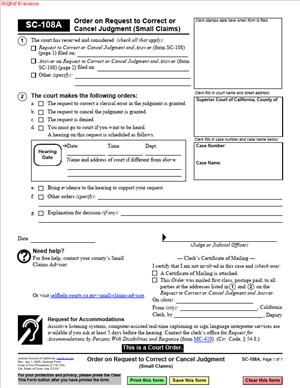
The SC-108A- Order on Request to Correct or Cancel Judgment (Small Claims) is a court document used after a small claims judgment has already been entered. It records the court’s decision on a request to fix, change, or cancel that judgment.
If you are reading this, you are likely preparing to complete or review this form as part of a small claims case. You may be trying to understand what the judge decided and how that decision affects the existing judgment.
This document matters because it can change the official court record. It can correct errors, clarify outcomes, or, in limited situations, cancel a judgment that was previously entered.
The form is not a request by itself. It is the court’s written order responding to a request that was already made. Understanding what this document does helps you know what the judgment currently says and what the court has officially approved.
Because this is a court order, accuracy matters. Every section reflects a decision that may affect payment obligations, enforcement, or the status of the case.
What is SC-108A- Order on Request to Correct or Cancel Judgment (Small Claims)?
Clear definition
SC-108A- Order on Request to Correct or Cancel Judgment (Small Claims) is a written court order used in California small claims cases. It documents the judge’s ruling on a request to correct a mistake in a judgment or to cancel that judgment entirely.
The form does not start the request. Instead, it shows how the court ruled after reviewing the request and any responses. Once signed and filed, it becomes part of the official case record.
This document typically states whether the judgment stays the same, is corrected in a specific way, or is canceled. It may also explain what part of the judgment is affected.
Who typically uses this form/document?
This form is typically used by the court. However, parties to the case often receive a copy and need to understand it.
Plaintiffs and defendants may both be affected. A party that asked for the correction or cancellation will review it to see whether the court agreed. The other party will review it to understand any changes to the judgment.
Court clerks also use this document to update records. Anyone relying on the judgment, such as for enforcement or payment tracking, may need to read it carefully.
Why you might need this form/document
You may need this document to confirm whether a judgment was corrected. Errors can include names, amounts, or clerical details.
You may also need it to know whether a judgment was canceled. Cancellation can change whether the judgment can be enforced.
If you are tracking deadlines, payments, or enforcement steps, this order tells you what judgment currently exists. It replaces or modifies earlier information in the case file.
Typical real-life scenarios
- A judgment lists the wrong party name due to a spelling error. A request is made to correct the record. The court issues this order to approve or deny that correction.
- A judgment shows an incorrect dollar amount because of a calculation mistake. After review, the court uses this form to state whether the amount is corrected.
- A defendant did not appear and later asked for the judgment to be canceled for a procedural reason. The court’s response is recorded on this order.
- A judgment was entered in error against the wrong case number. The court uses this order to clarify whether the judgment stands or is canceled.
When would you use SC-108A- Order on Request to Correct or Cancel Judgment (Small Claims)?
This form is used after a small claims judgment has already been entered. It applies when someone asks the court to change, correct, vacate, or otherwise affect that judgment. It is not used to start a small claims case or to request judgment for the first time.
The form usually comes into play after judgment entry, often before or during enforcement. For example, one party may ask the court to cancel a judgment, correct an error, pause enforcement, or clarify what the judgment requires. After reviewing the request, the court issues this order to record its decision.
Both plaintiffs and defendants may encounter this form. The party that made the request will review it to confirm whether the court granted, denied, or modified the requested relief. The other party will review it to understand whether the judgment remains the same, has been changed, or can still be enforced.
This document is especially important when there is uncertainty about the judgment or the next step in the case. It provides the court’s official ruling and helps clarify what the parties, court staff, and enforcement officers should rely on going forward.
In short, this form creates a clear written record of the court’s decision about an existing small claims judgment. It helps the parties understand whether the judgment is still in effect, whether enforcement can continue, and what must happen next.
Legal characteristics of SC-108A- Order on Request to Correct or Cancel Judgment (Small Claims)
This document is effective because it is signed by a judge and filed with the court. Once filed, it becomes part of the official case record.
Problems can arise when names, case numbers, or dates are inconsistent with other filings. Incomplete sections or missing signatures can also cause delays or confusion.
In California, small claims procedures are streamlined. This form reflects that simplified process, but it still carries legal weight once issued.
This document does not reopen the case for a new trial. It does not decide new facts. It only addresses whether an existing judgment is corrected or canceled.
Is it legally binding?
Yes, this order is legally binding once issued and entered by the court. It reflects the judge’s decision on the request.
Its binding effect comes from the court’s authority, not from the parties’ agreement. The changes stated in the order control over prior versions of the judgment.
The binding nature applies only to what the order addresses. Matters not mentioned in the order remain governed by the original judgment.
How to fill out SC-108A- Order on Request to Correct or Cancel Judgment (Small Claims)
Step 1 – Review the case caption
The top of the form lists the court name, address, and case number. This information ties the order to a specific small claims case. Check that it matches the existing judgment.
Step 2 – Identify the parties
The form lists the plaintiff and defendant names. These names should match the court record. The order applies only to the parties named in this section.
Step 3 – Understand the request being addressed
This section reflects whether the request was to correct the judgment, cancel it, or both. The order responds only to the request described here.
Step 4 – Read the court’s decision
The judge’s ruling is indicated by selected options or written text. This part shows whether the request was granted, denied, or granted in part.
Step 5 – Review any corrections made
If the judgment is corrected, the form describes what was changed. This may include amounts, dates, or other specific details.
Step 6 – Confirm whether the judgment is canceled
If the judgment is canceled, the order states that clearly. This changes the status of the prior judgment in the court record.
Step 7 – Check for additional instructions
Some orders include brief instructions or notes. These may relate to how the corrected judgment is entered or how the record is updated.
Step 8 – Note the date of the order
The date shows when the court made its decision. This date can matter for tracking the current status of the judgment.
Step 9 – Look for the judge’s signature
The judge’s signature makes the order official. An unsigned form does not reflect a final court decision.
Step 10 – Understand how this order affects the case
This final step is about reading the form as a whole. The SC-108A- Order on Request to Correct or Cancel Judgment (Small Claims) replaces or modifies parts of the earlier judgment exactly as stated in the order.
Legal terms you might encounter in SC-108A- Order on Request to Correct or Cancel Judgment (Small Claims)
- Judgment: This is the court’s final decision about who owes money and how much. In this document, the judgment is the specific ruling that the court may correct or cancel. You will see references to the original judgment date and amount.
- Correct: To correct a judgment means to fix a clerical or factual error without changing the core decision. In this form, corrections often involve names, amounts, or dates that were recorded incorrectly. The order will state exactly what was corrected.
- Cancel: To cancel a judgment means the original judgment is set aside and no longer valid. This document shows whether the court agreed to cancel it and under what circumstances. Cancellation changes the case’s outcome in the public record.
- Clerical Error: A clerical error is a mistake made in writing or recording information, not in deciding the case. This form often addresses spelling errors, transposed numbers, or missing details. The judge can correct these without re-hearing the case.
- Order: An order is a formal instruction issued by the court. This document is itself an order, meaning it states what the court has decided about the request. Once signed, it controls what happens next in the case file.
- Request: A request is a written request submitted to the court to fix or cancel the judgment. This order responds to that request. Reading it carefully tells you whether the court granted or denied what was asked.
- Effective Date: The effective date is when the court’s decision takes effect. In this form, it is usually the date the judge signs the order. This date matters for enforcement and record updates.
- Party: A party is any person or entity involved in the case, such as the plaintiff or defendant. The form lists the parties exactly as they appear in the case caption. Name accuracy here affects who the order applies to.
- Court File: The court file is the official record of everything submitted and decided in the case. This order becomes part of that file. Future actions rely on what the file shows after this order is entered.
FAQs
Is SC-108A- Order on Request to Correct or Cancel Judgment (Small Claims) something I fill out myself?
No. This document is issued by the court. You do not complete it like an application. You read it to understand what the judge decided about a request that was already submitted.
How do I know whether the judgment was corrected or canceled?
Look at the main decision section of this form. It will say whether the request was granted or denied and whether the judgment is corrected or canceled. Do not assume both happened unless it clearly states that.
What details should I check first when I receive this document?
Start with the case number, party names, and judgment date. Make sure they match your records exactly. If those basics are wrong, the order may not reflect your case correctly.
Does this document change the amount of money owed?
Only if the order specifically says so. Read the section describing the correction or cancellation. If a dollar amount is listed as corrected, that is the new amount in the court file.
Who signs this form, and why does that matter?
A judge signs this document. The signature shows the decision is official and enforceable. Without a judge’s signature and date, the order is not final.
When does the court’s decision take effect?
The decision usually takes effect on the date shown near the judge’s signature. Check that date carefully. That is the point when the court file reflects the change.
Do I need to attach this document to anything else?
You usually keep it with your case records. If you are communicating about the judgment later, this document is what shows the updated status. Make copies before sharing them.
Will this form change what appears in public records?
Yes, if the judgment is corrected or canceled. This document tells the court clerk what to update in the official record. The change should match exactly what is written in the order.
Checklist: Before, During, and After SC-108A- Order on Request to Correct or Cancel Judgment (Small Claims)
Before
- Gather your original judgment and any prior notices.
- Have your case number and party names handy.
- Know what error or issue the request was about.
- Prepare a place to store official court orders.
- Understand the difference between a correction and a cancellation.
- Set aside time to read the order carefully.
During
- Check the case caption for accuracy.
- Read the court’s decision line by line.
- Confirm whether the request was granted or denied.
- Look for specific corrected information.
- Note the effective date of the order.
- Verify the judge’s signature is present.
After
- Make at least two copies of the order.
- Update your personal case summary.
- Replace old judgment copies with the corrected ones.
- Monitor the court record for updates.
- Use this order when discussing the case going forward.
- Store the original in a safe, labeled file.
Common mistakes to avoid with SC-108A- Order on Request to Correct or Cancel Judgment (Small Claims)
- Mistake: Skimming the order because you expect good news, which happens when people assume the request was granted; the consequence is missing a denial or partial correction. Do not forget to read every decision line.
- Mistake: Ignoring name or number errors in the caption, which happens due to focusing only on the outcome; the consequence is future confusion about who the order applies to. Do not forget to check spelling and amounts.
- Mistake: Assuming a correction equals a cancellation, which happens from misunderstanding terms; the consequence is acting as if the judgment no longer exists; do not forget to confirm the exact wording.
- Mistake: Overlooking the effective date, which happens when people focus only on the signature; the consequence is using the order too early or too late. Do not forget to note the date.
- Mistake: Failing to keep copies, which happens due to relying on online access; the consequence is not having proof later. Do not forget to save and print copies.
- Mistake: Not updating your own records, which happens after relief or disappointment; the consequence is relying on outdated information; do not forget to replace old documents.
- Mistake: Sharing the order without context, which happens when explaining the case informally; the consequence is misunderstandings by others; do not forget to explain what was corrected or canceled.
- Mistake: Assuming the court fixed everything, which happens when only one issue was raised; the consequence is leaving other errors unaddressed; do not forget this order covers only the request made.
What to do after filling out SC-108A- Order on Request to Correct or Cancel Judgment (Small Claims)
Once you receive this order, your job is to understand it and integrate it into your case records. You are not submitting this document, but you are responsible for using it correctly. Treat it as the controlling version of what the court has decided about the judgment.
- Step 1: Read the entire order slowly, from top to bottom, without skipping any section.
- Step 2: Highlight or note exactly what the court corrected or whether the judgment was canceled.
- Step 3: Write down the effective date shown on the order.
- Step 4: Compare the order to your original judgment and identify what has changed.
- Step 5: Make at least two paper copies and one digital copy for your records.
- Step 6: Replace older judgment documents in your files with this updated order.
- Step 7: If you track the case in a spreadsheet or notebook, update it to reflect the order.
- Step 8: When communicating about the case, rely on the wording in this order, not memory.
- Step 9: Periodically check that the court file reflects what the order states.
- Step 10: Keep this order accessible in case questions come up later about the judgment’s status.
Disclaimer: This guide is provided for informational purposes only and is not intended as legal advice. You should consult a legal professional.