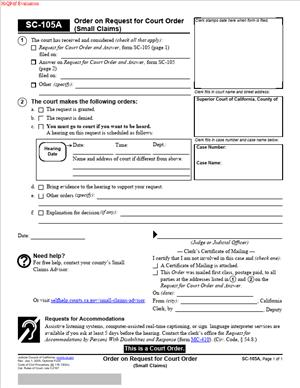
SC-105A – Order on Request for Court Order (Small Claims)
Fill out nowJurisdiction: Country: United States | Province or State: California
SC-105A – Order on Request for Court Order (Small Claims) is a court document used after someone asks the court for a specific action in a small claims case. You are usually reading this form because a judge has reviewed a request and issued an order.
This document matters because it shows what the court has decided. It can grant a request, deny it, or set conditions. People often rely on it to understand the next steps in their case.
You may encounter this form even if you did not file the original request. Courts send it to parties so everyone knows the outcome and any instructions.
If you are about to review or complete SC-105A – Order on Request for Court Order (Small Claims), understanding its purpose helps you read it carefully. Small details on this form can affect deadlines, appearances, or enforcement.
This document is not a general notice. It reflects a judge’s response to a specific request made in a small claims case.
What is SC-105A – Order on Request for Court Order (Small Claims)?
Clear definition
SC-105A – Order on Request for Court Order (Small Claims) is a written order issued by a small claims court judge. It responds to a formal request submitted in an existing small claims case.
The form records the judge’s decision. It may approve the request, deny it, or approve it with changes. The order becomes part of the court file.
This document is not the request itself. It is the court’s answer to that request, written in a standardized format.
Who typically uses this form/document?
Judges use this form to communicate decisions in small claims matters. Court clerks process and distribute it after the judge signs it.
Plaintiffs and defendants receive this document so they understand what the court has ordered. Sometimes, both sides review it closely to track obligations or deadlines.
People representing themselves often rely on this form to confirm whether their request was granted. Others receive it because the opposing party asked for court action.
Why you might need this form/document
You might need this form to confirm the outcome of a request you filed. It tells you whether the court agreed with what was asked.
You may also need it to understand limits placed on a request. A judge may allow part of a request and deny another part.
This document can also explain procedural steps. For example, it may set a hearing date or require additional information.
In some situations, you may need the order to show that the court has authorized or denied an action in your case.
Typical real-life scenarios
- A party asks the court to continue a hearing to a later date. The judge reviews the request and issues SC-105A showing whether the new date is approved.
- Someone requests permission to serve papers in a different way because standard service failed. The order explains whether that request is allowed.
- A defendant files a request related to military status or attendance at a hearing. The court uses this form to record its decision.
- After a judgment, a party requests a specific court order related to payment or procedure. The judge responds using this document.
When would you use SC-105A – Order on Request for Court Order (Small Claims)?
This form is used after a request has already been submitted in a small claims case. It is not used to start the case or to make the original claim. Instead, it records how the court responded to a request that was already placed before a judge.
You may receive this form when the court reviews written materials and makes a decision without holding a hearing, or before deciding whether a hearing is necessary. The timing depends on the type of request, the information submitted, and the stage of the case. In some situations, the judge may grant the request, deny it, or give directions about what must happen next.
Both plaintiffs and defendants may receive this form. The purpose of the document is the same regardless of which side submitted the request. What changes is the context. For example, a plaintiff may receive it after asking for a procedural order, while a defendant may receive it after asking for more time, a change in hearing arrangements, or another case-management step.
The form may arrive by mail, be provided through the court clerk, or be made available as part of the court file. It reflects the judge’s action at a specific moment in the case and may include important information such as deadlines, instructions, hearing details, or conditions that must be followed.
Parties should review the form carefully before taking their next step. It can clarify whether the request was approved, refused, or deferred, and it may explain what additional action is required. If the form sets a deadline or directs a party to serve documents, file materials, attend a hearing, or correct an issue, those instructions should be followed closely.
In short, this form helps parties understand the court’s response to a request and keeps the small claims case moving in an organized way. It gives both sides a written record of what the judge decided and what must happen next.
Legal characteristics of SC-105A – Order on Request for Court Order (Small Claims)
This document is effective when it is completed and signed by a judge. The judge’s signature signals that the court has acted on the request.
Problems can arise if the form is incomplete or unclear. Missing case information or unchecked boxes can create confusion about what was ordered.
Small claims procedures can vary by location, even within the same state. The structure of the order is standardized, but how it is used may differ slightly by court.
This form does not replace a judgment. It does not decide who wins the case unless the request itself involves a limited procedural ruling.
It also does not enforce itself. The order states what the court has decided, but further steps may be required for enforcement or compliance.
Is it legally binding?
Yes, this form reflects a court order once signed. The binding effect comes from the judge’s authority, not from the parties’ agreement.
The order applies to the specific request addressed. It does not automatically control other issues in the case.
Its effect depends on the content of the order. Some orders require action, while others simply deny a request and leave things unchanged.
How to fill out SC-105A – Order on Request for Court Order (Small Claims)
Step 1 – Case caption
The top of the form identifies the court, the parties, and the case number. This information links the order to the correct small claims case.
Accuracy matters because courts handle many cases at once. A correct caption ensures the order is filed and sent to the right people.
Step 2 – Identifying the request
This section refers to the specific request the judge reviewed. It may include the date the request was filed or the type of request made.
The description helps everyone understand what issue the court considered. It also limits the scope of the order to that request.
Step 3 – Court’s decision
Here, the judge indicates whether the request is granted, denied, or modified. The form may use checkboxes or short statements.
This part is the core of the document. Reading it carefully shows exactly what the court decided.
Step 4 – Conditions or limitations
If the request is granted in part, the judge may add conditions. These details explain how the order applies.
Conditions can include timing, required actions, or limits. They clarify expectations without restating the entire request.
Step 5 – Additional instructions
Some orders include instructions for future steps. This may involve attending a hearing or providing more information.
These instructions are tied to the specific request. They do not usually cover the entire case.
Step 6 – Judge’s signature and date
The judge signs and dates the form to make it official. Without this, the order has no effect.
The date can matter for timing. It often marks when the order takes effect or when deadlines begin.
Legal terms you might encounter in SC-105A – Order on Request for Court Order (Small Claims)
- Order: This is the court’s written decision. In this document, the order states what the judge approved, denied, or modified. It becomes part of the official case record once signed and filed.
- Request: A request is what a party asks the court to do. This form reflects the court’s response to that request, not the request itself. You should confirm the request description matches what was originally submitted.
- Party: A party is any person or entity involved in the case. The names listed here must match the case caption exactly. Errors can affect enforcement or later filings.
- Case Number: This is the court’s unique identifier for your small claims case. It ties this order to all other documents. A wrong number can cause the order to be misfiled.
- Judicial Officer: This refers to the judge or authorized officer who signs the order. Their signature gives the document legal effect. Unsigned orders are not effective.
- Granted: When a request is granted, the court agrees to it as stated. The order will say what relief was approved. You should read for any conditions attached.
- Denied: When a request is denied, the court refuses it. The order may or may not explain why. Denial means no change occurs based on that request.
- Modified: Modified means the court approved the request but changed some part of it. The modified terms control, not what you originally asked for. You must follow the order as written.
- Effective Date: This is the date the order takes effect. It may be the signing date or a later date stated in the order. Deadlines often run from this date.
FAQs
How do I know what the judge actually decided?
Read the section where the court marks the outcome. Look for words like granted, denied, or modified. Then read any added language carefully because conditions can limit what the decision allows.
Where do I check that the names are correct?
Compare the party names on this document to the case caption on earlier filings. Spelling, middle initials, and business suffixes should match exactly. Corrections usually require a separate request.
Does this form change my hearing date or deadline?
Only if the order explicitly says so. Look for a specific date or instruction that replaces a prior deadline. If nothing is stated, existing dates remain in effect.
Who signs this document, and why does it matter?
A judge or authorized judicial officer signs it. The signature shows the court approved the decision. Without it, the document has no effect in the case.
When does the order become effective?
Check the effective date listed near the signature. If no date is stated, it usually takes effect when signed and filed. Deadlines count from that point.
Do I need to attach anything to this form?
Usually, no attachments are added to the order itself. The order may reference earlier requests or filings already in the case. If attachments are required, the order will say so.
Will this order be visible in the public case record?
Yes, once filed, it becomes part of the case docket. Anyone allowed to view the file can see it. This is why accuracy matters.
Is this the same as SC-105A – Order on Request for Court Order (Small Claims)?
Yes. This document records the court’s ruling on a request in a small claims case. It does not replace the judgment unless it specifically says so.
How will I know the court accepted it?
Acceptance usually shows up as a clerk’s stamp or entry in the case file. In some courts, you receive a copy showing it was filed. Keep that copy with your records.
Can I use SC-105A – Order on Request for Court Order (Small Claims) more than once in the same case?
Yes. Each time the court rules on a qualifying request, a separate order may be issued. Each one stands on its own and should be kept in date order.
Checklist: Before, During, and After SC-105A – Order on Request for Court Order (Small Claims)
In small claims cases, orders like SC-105A are usually not appealable by themselves. Instead, any challenge to the ruling is typically addressed by filing a new, appropriate request or by raising the issue at the next hearing, if the rules allow. Understanding this helps set realistic expectations about your options.
Before
- Confirm your case number and court location.
- Review the original request that led to this order.
- Verify all party names match prior filings.
- Know what outcome you expected versus what might be ordered.
- Prepare a place to store certified and plain copies.
- Check whether you need the order for enforcement or proof.
During
- Read every checked box and handwritten note.
- Look for conditions or limits in the order text.
- Confirm the effective date and any deadlines.
- Make sure the judicial officer signed and dated it.
- Note whether the clerk filed or endorsed the order.
- Ask the clerk about copies if unclear.
After
- Make at least two copies for your records.
- Calendar any deadlines listed in the order.
- Follow any instructions exactly as written.
- Use the order when communicating with the other party.
- Keep the order with your case file.
- Update any notes or plans affected by the ruling.
Common mistakes to avoid with SC-105A – Order on Request for Court Order (Small Claims)
- Mistake: Skimming the order, which happens when you expect approval, leading to missed conditions, so do not forget to read every line.
- Mistake: Assuming a request was granted fully, which happens when “modified” is overlooked, causing noncompliance, so do not forget to follow only the written terms.
- Mistake: Ignoring the effective date, which happens when you focus on the signature date, leading to missed deadlines, so do not forget to calendar the correct date.
- Mistake: Not checking party names, which happens due to reused templates, causing enforcement problems, so do not forget to compare against earlier filings.
- Mistake: Filing nothing further when action is required, which happens when instructions are brief, causing delays, so do not forget to complete any follow-up steps.
- Mistake: Losing the signed copy, which happens without a filing system, causing proof issues, so do not forget to keep copies.
What to do after filling out SC-105A – Order on Request for Court Order (Small Claims)
Once the order is completed and signed, your job shifts to implementation and recordkeeping. This document controls what happens next in your case. Treat it as a roadmap and proof.
- Step 1: Review the entire order slowly and confirm you understand the result.
- Step 2: Check the effective date and write it down separately.
- Step 3: Make at least two copies, one for use and one for backup.
- Step 4: Confirm with the clerk that the order is filed in the case.
- Step 5: Place the original or a certified copy in your case folder.
- Step 6: Update any personal notes or timelines based on the order.
- Step 7: Share a copy with the other party if required or helpful.
- Step 8: Follow any instructions or limits stated in the order.
- Step 9: Use the order as proof if enforcement or compliance issues arise.
Staying organized after the order is issued saves time later. Clear records help if questions come up or if the court asks for confirmation.
Disclaimer: This guide is provided for informational purposes only and is not intended as legal advice. You should consult a legal professional.