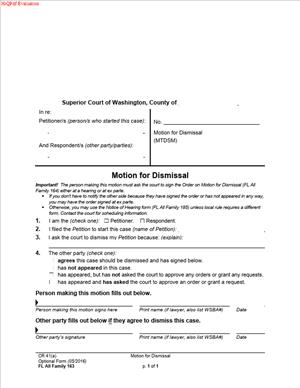
FL All Family 163 – Motion for Dismissal
Fill out nowJurisdiction: Country: United States | Province or State: Washington
If you are ending a family law case in Washington, the FL All Family 163 – Motion for Dismissal is the document used to ask the court to close it. It tells the Superior Court that you no longer want to move forward with the case.
This form is part of the Washington Superior Court family law forms. It is commonly used in cases involving divorce, legal separation, parenting plans, child support, or other family matters.
You use this motion when a case has already been filed, but you want the court to dismiss it. Filing the form does not automatically close your case. It asks a judge to review your request and issue an order.
Understanding how this form works can help you avoid delays or confusion. When you are about to fill it out, you need to know what dismissal means, how it affects your rights, and what information the court expects.
What is FL All Family 163 – Motion for Dismissal?
Clear definition
FL All Family 163 – Motion for Dismissal is a written request asking a Superior Court judge in Washington to dismiss, or end, a family law case. It is a formal court filing. Once approved by a judge, it results in the case being closed without a final decision on the issues.
A dismissal stops the legal process in that case. It removes the matter from the court’s active calendar. The court will not hold further hearings or issue final orders unless the case is reopened or refiled.
This document does not explain the full history of your case. Instead, it focuses on your request to end it. The judge reviews the motion and decides whether to grant the dismissal.
Who typically uses this form?
The person who started the case, often called the petitioner, commonly files this motion. For example, someone who filed for divorce may later decide not to continue and ask the court to dismiss the case.
In some situations, both parties agree that the case should be dismissed. In that case, the motion may reflect that agreement. If the other party has filed a response or their own claims, the process may be more complex.
Respondents may also be involved if they have filed counterclaims or separate requests for relief. When more than one claim is pending, the court will look at all open issues before deciding whether dismissal is appropriate.
Self-represented individuals frequently use this form. It is designed to be understandable without a lawyer, but it still requires careful attention to court rules and procedures.
Why might you need this form?
You may need this form if you filed a family law case and later changed your mind. Circumstances can shift after filing. You might reconcile with your spouse or reach a private agreement.
In some cases, the issue that led to the filing has been resolved outside of court. Instead of moving forward with hearings and final orders, you can request that the court dismiss the case.
You might also discover that the case was filed in the wrong county or that the court does not have jurisdiction. Rather than continuing in the wrong forum, a dismissal allows you to close the current case.
Another reason could be procedural. For example, you may realize that the paperwork needs correction or that you prefer to refile later with different claims.
Typical real-life scenarios
- A married couple separates, and one spouse files for divorce. After counseling, they decide to stay together. The spouse who filed the case submits a motion for dismissal, so the court closes the divorce action.
- A parent files a petition to modify a parenting plan. Before the hearing, both parents reached an informal agreement and decided not to pursue changes in court. The moving party asks the court to dismiss the modification case.
- Someone files for legal separation but later decides to file for divorce instead. They may request dismissal of the separation case before starting a new divorce case.
- A party files for child support but later learns that another court already has an active support order. To avoid conflicting cases, they move to dismiss the newly filed action.
- In each of these examples, the motion is not about deciding who is right. It is about ending the existing case so the court no longer needs to act on it.
When would you use FL All Family 163 – Motion for Dismissal?
You would use this form after a family law case has been officially filed with the Superior Court and assigned a case number. It is not used before filing. It applies only to cases that are already open.
Timing matters. In the early stages of a case, dismissal may be simpler, especially if the other party has not filed a response. Once the other party has participated, the court may review whether their rights are affected.
You might use the form before a scheduled hearing if you decide not to go forward. You might also use it after temporary orders have been entered but before a final order is issued.
If both parties agree that the case should end, the motion can reflect that shared position. If only one party wants dismissal, the judge may consider whether the other party objects.
In family law matters, there are often related issues such as child support or protection orders. If those issues are pending, the court will look at whether dismissing the case would leave any matters unresolved.
This form is specific to family law proceedings in the Washington Superior Court. It is not used for criminal cases or for general civil lawsuits outside the family law context.
Legal characteristics of FL All Family 163 – Motion for Dismissal
FL All Family 163 – Motion for Dismissal is a formal request to the court. It becomes effective only when a judge signs an order granting dismissal. Simply filing the motion does not end your case.
For the motion to be considered, it must include accurate case information. That typically means the correct court name, case number, and names of the parties as they appear in the original filing.
Service is often required. The other party usually must receive notice of your request. If proper notice is not given, the court may delay or deny the motion.
The court will look at whether there are pending claims from the other party. If a respondent filed a counter-petition or separate requests, dismissal of the entire case may require their consent or a court decision addressing those claims.
Common problems include incomplete information, failure to provide proof of service, or misunderstanding the difference between dismissing a case and modifying an order. A dismissal does not rewrite existing final orders. It ends the case going forward.
There can be differences depending on the stage of the case. Early dismissal may be handled more quickly. After significant court involvement, the judge may review the request more closely.
The motion does not erase past actions taken in the case. Temporary orders entered before dismissal may remain in effect unless the court’s dismissal order states otherwise. It also does not prevent someone from filing a new case later, unless the court specifies limits.
Is it legally binding?
The motion itself is not binding until the judge signs an order dismissing the case. Once the judge signs and the order is entered, the dismissal has legal effect.
A granted dismissal closes the case in the court’s records. The court will not continue to schedule hearings or issue final rulings in that matter. The parties are no longer actively litigating that specific case.
Whether the dismissal is “with prejudice” or “without prejudice” can affect future filings. A dismissal without prejudice generally allows a new case to be filed later. A dismissal with prejudice typically prevents the same claims from being filed again. The court’s order will state the type of dismissal.
The binding nature comes from the court order, not from the request alone. Until that order is entered, the case remains open and subject to court deadlines and appearances.
How to fill out FL All Family 163 – Motion for Dismissal
Step 1 – Complete the caption
At the top of the form, fill in the name of the Superior Court, the county, and the case number exactly as they appear on earlier documents. Enter the full names of the petitioner and respondent in the same format used in the original filing. Accuracy here ensures the motion is filed in the correct case.
Step 2 – Identify the party making the motion
Indicate who is asking for dismissal. This is usually the petitioner, but it can reflect both parties if there is an agreement. Use the same party designation that appears in the case, such as petitioner or respondent.
Step 3 – State what you are asking the court to dismiss
Clearly describe the case or specific claims you want dismissed. If you are asking to dismiss the entire case, make that clear. If only certain claims are being dismissed, identify them so the court understands the scope of your request.
Step 4 – Indicate whether the other party agrees
The form may provide space to note whether the other party agrees to the dismissal. If there is agreement, the court may process the request more smoothly. If there is no agreement, the court may review the request more carefully and may schedule a hearing.
Step 5 – Provide any required explanation
If the form asks for a reason, give a brief and clear explanation. Keep the statement factual. The court generally does not require a detailed personal history, but it may need enough information to understand why the case should end.
Step 6 – Review related orders and pending issues
Before signing, check whether there are temporary orders, scheduled hearings, or pending motions in the case. Make sure your request addresses whether you are asking to dismiss everything or only certain parts. This helps prevent confusion about what remains active.
Step 7 – Sign and date the form
Sign your name where indicated and print your name below your signature. Add the date of signing. Your signature confirms that the information in the motion is true to the best of your knowledge.
Step 8 – File the motion with the court clerk
Submit the completed form to the clerk of the Superior Court in the same county where the case is filed. The clerk will file-stamp the document and add it to the case record.
Step 9 – Arrange for service on the other party
Ensure the other party receives a copy of the filed motion in the manner required for your case. Keep proof that the service was completed. The court may require confirmation that proper notice was given before granting dismissal.
Step 10 – Submit or present a proposed order for dismissal
In many cases, you will also need a proposed order for the judge to sign. This order formally dismisses the case. Once the judge signs and the order is entered, the dismissal becomes effective and the case is closed.
Legal terms you might encounter in FL All Family 163 – Motion for Dismissal
- Petitioner: The person who started the case. On this form, you must clearly identify whether the petitioner is asking for dismissal or whether both parties agree. The name must match exactly what appears in the case caption.
- Respondent: The person who was served with the original petition. If you are the respondent filing this motion, you must indicate that in the caption and signature block. The court tracks who is making the request based on this role.
- Case Caption: The heading at the top of the form that lists the court name, county, parties, and case number. This section must be identical to other documents filed in your case. Even small errors in spelling or case number can delay processing.
- Case Number: The unique number assigned when the case was opened. You must enter this number correctly so the clerk can file your motion in the right case. Filing under the wrong number can cause serious confusion and delays.
- Without Prejudice: A type of dismissal that allows the case to be filed again in the future. If this option appears on your form, it means you are not permanently giving up the claim. It affects whether the same issues can be brought back to court later.
- With Prejudice: A dismissal that permanently ends the claims in the case. If the court grants dismissal with prejudice, you generally cannot refile the same claims. This is a final resolution of those issues.
- Pending Motions: Other requests filed in the case that have not yet been decided. When you ask for dismissal, you should consider whether any pending motions will automatically become moot. The court may need clarity about what should happen to them.
- Proposed Order: A separate document you prepare for the judge to sign if your motion is granted. The motion asks for dismissal, but the proposed order formally records the court’s decision. Without a signed order, the case may remain open.
- Service: The formal delivery of court documents to the other party. Even when asking to dismiss, you may still need to serve the motion unless the rules allow otherwise. Proof of service may need to be filed with the court.
- Clerk of Court: The court official who processes filed documents. The clerk reviews your submission for completeness and records it in the court system. Acceptance by the clerk does not mean the judge has granted your request.
FAQs
Do both parties have to agree before the court will dismiss the case?
Not always. In some situations, the person who filed the case can request dismissal without the other party’s signature, especially if no final orders have been entered. However, if the case has progressed or if there are existing rulings, the judge may require agreement or a hearing before approving the request. Check whether the signature section asks for the other party’s approval and complete it carefully.
What is the difference between dismissing “with prejudice” and “without prejudice” on this form?
When you select “with prejudice,” you are telling the court you want the claims permanently closed and not refiled. “Without prejudice” means you reserve the right to start the case again later. On FL All Family 163 – Motion for Dismissal, you must mark the correct option because it affects your future legal rights. Read the selection boxes closely before you finalize the document.
If temporary orders were entered, what happens to them after dismissal?
Temporary orders usually end when the case is dismissed, but the judge’s signed order controls. This is why your proposed order should clearly state what happens to existing temporary arrangements. If you are unsure, review prior orders and confirm whether they automatically terminate upon dismissal.
Do I need a hearing for the judge to sign the dismissal?
It depends on how the case stands. If both parties agree and sign, the judge may review the paperwork without a hearing. If there is disagreement or unresolved issues, the court may schedule a hearing. Make sure your motion clearly states whether the other party agrees and whether a hearing is requested.
What documents should I attach to FL All Family 163 – Motion for Dismissal?
You typically do not need extensive attachments, but you may need a proposed order for the judge to sign. If the other party agrees, you may include their signed joinder or written agreement. Always check that attachments are labeled and referenced clearly in the motion.
What happens to the public record once the case is dismissed?
The case file remains part of the court record, but its status changes to dismissed. The dismissal order becomes part of that record. Anyone reviewing the file will see that the case was filed and later closed.
Can I refile the same case later if circumstances change?
That depends on how the dismissal was entered. If it were without prejudice, you may be able to refile. If it was with prejudice, you usually cannot bring the same claims again. Review the selection you made on this document before submitting it.
How do I know the court accepted and processed the dismissal?
After filing, confirm that the clerk stamped or electronically accepted your documents. Then check that a judge signed the order dismissing the case. In FL All Family 163 – Motion for Dismissal, the motion itself is not enough; the signed order is what officially closes the case.
Checklist: Before, During, and After FL All Family 163 – Motion for Dismissal
Before
- Confirm the exact case name and number from prior court documents.
- Review all existing orders to understand what will be affected by dismissal.
- Decide whether you are requesting dismissal with or without prejudice.
- Check whether the other party agrees and whether their signature is required.
- Prepare a proposed order for the judge to sign.
- Verify whether any hearings are already scheduled.
- Make sure all names are spelled exactly as in the original petition.
During
- Complete the caption exactly as it appears in the case file.
- Clearly identify whether you are the petitioner or respondent.
- Mark the correct dismissal option without leaving boxes blank.
- Reference any related pending motions or temporary orders.
- Attach the proposed order behind the motion.
- Sign and date the form in the correct signature block.
- Include contact information as required on the form.
- Make copies of the entire packet before filing.
After
- File the motion and proposed order with the clerk.
- Serve the other party if required and file proof of service.
- Calendar any hearing date if the court schedules one.
- Monitor the case docket for a signed dismissal order.
- Obtain a conformed copy of the signed order for your records.
- Cancel any future hearings if the court confirms dismissal.
- Store both paper and digital copies in a safe place.
Common mistakes to avoid with FL All Family 163 – Motion for Dismissal
- Mistake: Choosing “with prejudice” without understanding it is permanent, often because the terms sound similar, which can prevent you from refiling later; do not forget to confirm which option matches your long-term intent.
- Mistake: Leaving the case number incomplete or incorrect due to copying from memory, which can result in filing delays or misfiled documents; do not forget to verify the number from an official court document.
- Mistake: Failing to prepare a proposed order because you assume the motion alone closes the case, which can leave the case technically open; do not forget that the judge must sign an order.
- Mistake: Not addressing existing temporary orders, often because you assume they automatically disappear, which can create confusion about enforceability; do not forget to review and reference prior orders.
- Mistake: Forgetting to serve the other party when required, usually due to thinking dismissal requires no notice, which can delay court action; do not forget to file proof of service if service is required.
- Mistake: Filing the motion but not checking whether the judge signed the order, which can leave you believing the case is closed when it is not; do not forget to confirm entry of the signed dismissal order.
- Mistake: Using names that differ from the original petition, often because of a recent name change, which can create record inconsistencies; do not forget to match the original case caption exactly.
What to do after filling out FL All Family 163 – Motion for Dismissal
Once you complete the form, focus on proper filing and follow-through. A motion does not close your case by itself. The court must process it and enter a signed order.
- Step 1: Review every page for accuracy, including the spelling of names, the case number, and the dismissal option selected.
- Step 2: Make at least two copies of the full packet, including the proposed order.
- Step 3: File the originals with the court clerk, either in person or through the court’s accepted filing method.
- Step 4: Pay any required filing fee, if applicable, or confirm that no fee is required for dismissal.
- Step 5: Serve the filed motion on the other party if the rules require service, and complete a proof of service form.
- Step 6: Check the court’s docket or contact the clerk to confirm the motion was accepted for filing.
- Step 7: Watch for notice of a hearing if the court decides one is necessary.
- Step 8: After the judge signs the dismissal order, obtain a stamped copy for your records.
- Step 9: Review the signed order carefully to confirm it reflects the type of dismissal you requested.
- Step 10: Cancel any scheduled court appearances if the signed order closes the case and the court confirms cancellation.
- Step 11: Update your personal records to show the case status as dismissed.
- Step 12: Store the signed order securely, both digitally and in paper form, in case you need proof of dismissal in the future.
Taking these final steps ensures your request results in an officially closed case. Always confirm that the judge’s signature appears on the dismissal order before considering the matter finished.
Disclaimer: This guide is provided for informational purposes only and is not intended as legal advice. You should consult a legal professional.