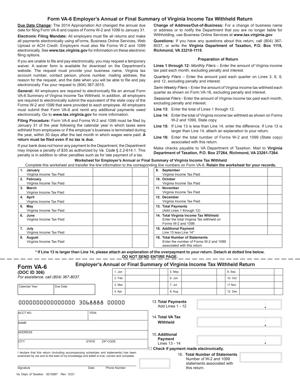
Form VA-6 Employer’s Annual or Final Summary of Virginia Income Tax Withheld Return
Fill out nowJurisdiction: Country: United States | Province or State: Virginia
The Form VA-6 Employer’s Annual or Final Summary of Virginia Income Tax Withheld Return is an annual reconciliation form used by employers to report Virginia income tax withheld from employees’ wages. If you withhold Virginia state income tax from payroll, this document brings all of that information together for the year.
You use this form to match what you withheld from employees with what you previously sent to the state during the year. It acts as a year-end summary. It confirms whether your payroll records align with your reported payments.
This form is typically filed after the end of the calendar year. It may also be filed when you close your business or stop having employees in Virginia. In that case, it becomes a final return rather than an annual one.
If you are filling it out, you are likely responsible for payroll or tax reporting. You may be a business owner, payroll manager, accountant, or another authorized representative. Understanding how the form works helps you avoid delays, corrections, or notices.
What is Form VA-6 Employer’s Annual or Final Summary of Virginia Income Tax Withheld Return?
Clear definition
Form VA-6 Employer’s Annual or Final Summary of Virginia Income Tax Withheld Return is a year-end reconciliation document for Virginia income tax withholding. It summarizes the total amount of state income tax you withheld from all employees during the year and compares it to the total amount you already reported and paid.
It is not a payroll report for each employee. Instead, it is a summary of your withholding activity as an employer. The figures you enter are usually based on your payroll records and the individual wage and tax statements you issued to employees.
The form generally includes totals for wages paid and Virginia income tax withheld. It may also require identifying information about your business and your Virginia tax account.
Who typically uses this form?
This form is used by employers who withhold Virginia income tax from employee wages. That includes corporations, limited liability companies, partnerships, sole proprietors, nonprofit organizations, and government entities with employees in Virginia.
You might also use this form if you are a small business owner who runs your own payroll. Even if you only have one employee, you may need to file it if you withheld Virginia income tax.
Payroll service providers or accountants often prepare and submit the form on behalf of employers. However, the legal responsibility for accurate reporting remains with the employer.
If you stop operating your business or no longer have employees subject to Virginia withholding, you may file this form as a final return to close out your account.
Why might you need this form?
You need this form to reconcile your payroll withholding records with what you reported to the state during the year. It helps ensure that the total tax withheld from employees matches the total tax payments credited to your account.
It also serves as confirmation that you issued wage and tax statements reflecting the correct amount of Virginia income tax withheld. In many cases, the totals on this form are expected to align with the totals from employee wage statements.
Filing this document can also be a required step before your withholding account is considered complete for the year. If you are closing your business, it may be part of the process to finalize your withholding obligations.
Typical real-life scenarios
- You operate a small retail store in Virginia with five employees. Throughout the year, you withhold Virginia income tax from each paycheck and submit those amounts periodically. After the year ends, you prepare the annual summary to report the total wages and total tax withheld for all employees combined.
- You run a consulting company that decides to shut down mid-year. After issuing final paychecks and withholding Virginia income tax, you prepare a final summary return. This lets the state know you will not continue withholding in the future.
- You recently switched payroll systems and want to confirm that all reported withholding amounts match your internal records. As you complete the annual summary, you compare totals from your payroll reports with what was previously filed.
- You manage payroll for a nonprofit organization with seasonal employees. Even though some workers were employed for only part of the year, you still reconcile all Virginia income tax withheld using the annual summary form.
When would you use Form VA-6 Employer’s Annual or Final Summary of Virginia Income Tax Withheld Return?
You typically use this form after the close of a calendar year. It is commonly prepared in the period following the end of December, once all payroll records for the year are finalized and employee wage statements have been issued.
You may also use it when your business stops having employees in Virginia. For example, if you sell your company, dissolve it, or relocate operations outside the state, you may file this form as a final return.
If you change your business structure and obtain a new tax account, you might need to file a final summary under the old account. The form can signal that no further withholding returns will be filed under that registration.
Payroll managers, bookkeepers, and business owners often complete this form as part of year-end tax reporting. It fits into the broader process of closing out payroll for the year and ensuring all withholding records are accurate.
Legal characteristics of Form VA-6 Employer’s Annual or Final Summary of Virginia Income Tax Withheld Return
This form functions as an official tax filing. When submitted, it reports specific financial information about wages paid and Virginia income tax withheld. Accuracy matters because the figures are tied to employee records and state tax accounts.
For the form to be effective, it generally must include complete and correct identifying information. That includes your Virginia withholding account number and business details. Totals must align with your payroll records and prior withholding submissions.
Common issues that can cause problems include mathematical errors, mismatched totals, incorrect account numbers, or missing required attachments. Inconsistencies between this form and employee wage statements may also trigger questions.
While many states require annual withholding reconciliation forms, details can vary by jurisdiction. Deadlines, formatting, and submission methods differ. This form applies specifically to Virginia withholding requirements.
This document does not replace employee wage statements. It does not report federal withholding. It also does not calculate income tax owed by employees. Its purpose is to summarize what you withheld and reported as an employer.
Is it legally binding?
Yes, in the sense that it is an official tax return submitted to a state tax authority. When you sign and submit it, you are affirming that the information is accurate to the best of your knowledge.
The figures you report can affect your withholding account balance. If the totals show that you underreported or underpaid during the year, you may receive notice of a balance due. If you overreported, your account may reflect a credit.
Because it is a tax filing, providing false or misleading information can carry consequences under general tax laws. The form becomes part of your official tax record once accepted.
At the same time, it does not create a contract between you and your employees. It is a reporting document, not an employment agreement or payroll authorization. Its binding nature relates to tax reporting obligations, not employment terms.
How to fill out Form VA-6 Employer’s Annual or Final Summary of Virginia Income Tax Withheld Return
Step 1 – Enter your business identification information
Begin by providing your legal business name and any trade name used for payroll reporting. Enter your Virginia withholding account number exactly as assigned. Include your mailing address and any other requested identifying details so the return is matched to the correct account.
Step 2 – Indicate whether the return is annual or final
Look for the section that asks whether you are filing an annual summary or a final return. If you are closing your business or ending Virginia withholding, mark the option that indicates a final filing. Provide any requested date related to the end of withholding activity.
Step 3 – Report total wages subject to Virginia withholding
Enter the total amount of wages paid during the year that were subject to Virginia income tax withholding. Use your payroll records and year-end summaries to calculate this figure. Make sure the amount reflects the full calendar year or the portion of the year you operated.
Step 4 – Report total Virginia income tax withheld
Enter the total amount of Virginia income tax you withheld from all employees during the reporting period. This number is typically the combined total from all employee wage statements for the year. Confirm that it matches your internal payroll summaries.
Step 5 – Reconcile with payments made during the year
Provide the total amount of withholding tax you previously reported and paid to the state during the year. Compare this figure with the total tax withheld. If the form includes a line for balance due or overpayment, complete it based on the difference between these totals.
Step 6 – Review for accuracy and consistency
Check all numbers carefully. Confirm that your totals match your payroll reports and employee wage statements. Verify that your account number and business name are correct. Ensure all required fields are complete.
Step 7 – Sign and date the form
If a signature is required, sign the form as the authorized person for the business. Print your name and title if requested. Enter the date of signing to show when the information was finalized.
Step 8 – Submit the form using the required method
Follow the instructions on the form for submission. This may involve electronic filing or mailing to a designated address. Ensure the submission is completed within the applicable timeframe for annual or final filings.
Legal terms you might encounter in Form VA-6 Employer’s Annual or Final Summary of Virginia Income Tax Withheld Return
- Withholding Account Number: This is the identification number assigned to your business for Virginia income tax withholding. You enter it on this form to ensure the Department of Taxation applies the annual totals to the correct employer account. If this number is wrong or missing, your payments may not match your account records.
- Employer Identification Number (EIN): This is the federal tax ID issued to your business. It appears near the top of the form and must match what you use on payroll reports and employee wage statements. A mismatch between your EIN and your withholding account number can delay processing.
- Taxable Wages: These are wages paid to employees that are subject to Virginia income tax withholding. On this form, you report the total taxable wages for the year, not individual employee amounts. The total should align with what you reported on employee wage and tax statements.
- Virginia Income Tax Withheld: This is the total amount of state income tax you deducted from employees’ pay during the year. You enter the full annual amount on this document. It must match the combined total of all withholding payments you submitted throughout the year.
- Reconciliation: Reconciliation means comparing two sets of numbers to confirm they match. On this form, you reconcile the total tax withheld with the total payments you have already made. If there is a difference, you must identify whether you owe additional tax or have overpaid.
- Final Return: A final return indicates that your business has stopped withholding Virginia income tax. You check the final box if you have closed your business, no longer have employees, or will no longer withhold in Virginia. Filing as final updates your account status.
- Reporting Period: This refers to the calendar year covered by the return. You must enter the correct year so the totals correspond to the right reporting cycle. Using the wrong year can cause your filing to post incorrectly.
- Overpayment: An overpayment occurs when the total payments you made exceed the total tax withheld. This form allows you to indicate how you want that overpayment handled. You may apply it to future liabilities or request a refund, depending on your situation.
- Balance Due: A balance due means the total tax withheld is greater than the payments you made. If this happens, you must submit the remaining amount with the return. Leaving a balance unpaid can result in penalties and interest.
- Authorized Signer: This is the person legally permitted to sign the return on behalf of the business. It may be the owner, an officer, or another authorized individual. The signature confirms that the information provided is accurate to the best of your knowledge.
FAQs
What if my totals on this form do not match the payments I made during the year?
Start by reviewing your payroll records and each payment confirmation for the year. Compare the total Virginia income tax withheld from employees’ wages with the total you actually sent in. If you underpaid, you must report the balance due and submit payment. If you overpaid, you must clearly indicate how you want the overpayment handled so your account reflects the correct balance.
How do I know if I should mark the return as final on Form VA-6 Employer’s Annual or Final Summary of Virginia Income Tax Withheld Return?
You mark it as final if you will no longer have employees subject to Virginia withholding or if your business has closed. Before checking that box, confirm that you have issued all employee wage statements and made all required withholding payments. Once processed as final, your withholding account may be closed, and future filings might not be expected.
What happens if I discover an error after I submit this document?
You should review whether the error affects wages, withholding, or your account information. If the totals were incorrect, you may need to file an amended return for the same reporting year. Keep copies of your original filing and the corrected version so you can show what changed and why.
Do I need to attach employee wage statements to this form?
You must follow the submission instructions for how employee wage information is reported. In many cases, wage statements are filed separately, either electronically or in a specific format. Before filing, confirm that the totals on this return match the combined totals from all employee wage statements for the same year.
Who is allowed to sign this return?
An authorized signer is typically the business owner, a corporate officer, or another person officially permitted to act for the business. Make sure the signer’s name and title are entered clearly. The signature confirms that the information on this document is accurate and complete.
What if my business name or address has changed since my last filing?
Enter your current legal business name and address as requested on the form. If the state’s records have not yet been updated, you may need to file a separate change form. Make sure your withholding account number and EIN remain consistent so your payments are applied correctly.
Will filing this return change my public business records?
This return mainly updates your tax account with the Department of Taxation. If you mark it as final, it may update the status of your withholding account. It does not automatically change corporate registration or licensing records, which are handled separately.
How do I confirm that my Form VA-6 Employer’s Annual or Final Summary of Virginia Income Tax Withheld Return was accepted?
After submission, look for a confirmation number, electronic acknowledgment, or processed status in your tax account system. If you filed by mail, allow time for processing and monitor your account for updates. Keep proof of submission so you can show when and how you filed if questions arise.
Checklist: Before, During, and After Form VA-6 Employer’s Annual or Final Summary of Virginia Income Tax Withheld Return
Before
- Gather total payroll records for the entire reporting year.
- Confirm your Virginia withholding account number and EIN.
- Collect records of all withholding payments made during the year.
- Verify totals from all employee wage statements.
- Check whether your business is still actively withholding.
- Review prior quarterly or monthly filings for consistency.
- Confirm the correct reporting year.
- Identify any unpaid balances or overpayments in your records.
During
- Enter your business name exactly as registered.
- Input your withholding account number carefully.
- Select the annual or final return status accurately.
- Report total taxable wages for the year.
- Report the total Virginia income tax withheld.
- Compare withheld totals with payments made.
- Calculate any balance due or overpayment.
- Indicate how to handle an overpayment if applicable.
- Review all entries for math errors.
- Sign and date the return with proper authority.
After
- Make a complete copy of the signed return.
- Save proof of payment if you owe a balance.
- Retain confirmation of electronic submission or mailing.
- Store payroll reports used to calculate totals.
- Keep employee wage statement summaries with your records.
- Monitor your tax account for posting confirmation.
- Address any notices or discrepancies promptly.
- Update internal records to show the return was filed.
- Calendar the next filing deadline if not final.
Common mistakes to avoid with Form VA-6 Employer’s Annual or Final Summary of Virginia Income Tax Withheld Return
- Mistake: Reporting totals from only one quarter because you rely on a recent report, which leads to underreporting the annual amount and possible penalties; do not forget to combine all periods for the full year.
- Mistake: Entering the wrong withholding account number due to copying from an old document, which can misapply your payments to another account; do not forget to verify the number against current state records.
- Mistake: Marking the return as final without actually ceasing payroll, which may close your account and trigger compliance issues; do not forget to confirm your business status before selecting final.
- Mistake: Failing to reconcile withheld tax with payments made, often because payroll and accounting records are not compared, resulting in unexpected balances due; do not forget to complete the reconciliation step.
- Mistake: Leaving the signature line blank because you assume electronic submission replaces it, which can cause rejection or delays; do not forget that an authorized signer must approve the return.
- Mistake: Ignoring small overpayments, thinking they will automatically roll forward, which may leave funds unallocated; do not forget to specify how the overpayment should be handled.
- Mistake: Using estimates instead of final payroll totals due to time pressure, which can require an amended filing later; do not forget to wait for complete year-end figures.
- Mistake: Forgetting to keep proof of filing, which creates problems if the state later questions whether you submitted the return; do not forget to save confirmations and copies.
What to do after filling out Form VA-6 Employer’s Annual or Final Summary of Virginia Income Tax Withheld Return
Once you complete the form, pause before submitting it. Review every number against your payroll summary for the year. Confirm that the total Virginia income tax withheld equals the sum of all payments you made. Small errors often happen during data entry, not calculation.
- Step 1: Make a full copy of the signed return for your records, including all worksheets you used.
- Step 2: If you owe a balance, arrange payment using the approved method and note the confirmation details.
- Step 3: Submit the return using the required filing method for your account type.
- Step 4: Save any electronic confirmation number or proof of mailing.
- Step 5: Update your internal payroll records to show that the annual reconciliation is complete.
- Step 6: Match the filed totals with your employee wage statement summary to ensure consistency.
- Step 7: Monitor your withholding account for posting confirmation or notices.
- Step 8: Respond quickly if you receive a discrepancy notice or a request for clarification.
- Step 9: If you marked the return as final, confirm that your withholding account status reflects closure.
- Step 10: Archive all supporting documents with your year-end tax records for future reference.
Keep these records organized by tax year. Store payroll summaries, payment confirmations, and a copy of the filed return together. If you are ever audited or asked to explain a discrepancy, you will have everything in one place.
Suppose you continue operating and withholding Virginia income tax, set reminders for upcoming filing deadlines. Annual reconciliation works best when your monthly or quarterly payments are accurate throughout the year. Strong recordkeeping now reduces stress next filing season.
Disclaimer: This guide is provided for informational purposes only and is not intended as legal advice. You should consult a legal professional.