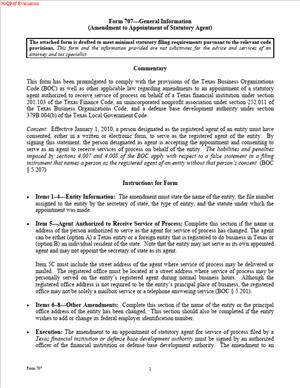
Form 707 – Amendment of Appointment of Statutory Agent
Fill out nowJurisdiction: United States | Texas
What is a Form 707 – Amendment of Appointment of Statutory Agent?
Form 707 is the filing you use to update your Texas Secretary of State record with a new statutory agent or a new agent address. In Texas, this role is often called a registered agent. The function is the same: this person or company receives legal papers and official state mail for your business. When your agent changes, you file an amendment so courts, agencies, and the public know where to deliver service of process and official notices.
You use this form to amend a prior appointment. That means your entity already exists in Texas, or you’re already registered to do business here, and you now need to change the agent details on file. The change might be a new agent, a new registered office address, or both. The filing does not change your principal office, your mailing address, or your tax contact. It only changes the official point of contact for legal notices and service of process.
Typical users include domestic Texas entities and foreign entities registered in Texas: corporations, professional corporations, nonprofits, limited liability companies, professional LLCs, limited partnerships, limited liability partnerships, business trusts, and other filing entities recognized by Texas. If you previously appointed an agent with your formation or registration filing, Form 707 is how you keep that appointment current.
You need this form whenever your current agent arrangement no longer matches reality. If your agent resigns, your agent vendor cancels, your internal agent employee leaves, or your registered office moves, your Texas record becomes inaccurate. Without a timely amendment, you risk missing lawsuits or state correspondence. You also risk compliance issues, including possible default, loss of good standing, or administrative action against your registration. The form is a simple but critical update that keeps your business reachable and in compliance.
Common scenarios include switching from an individual agent to a commercial agent service, consolidating multiple states under one agent provider, relocating the registered office within Texas, correcting a previously mis-typed address, or updating after a merger or rebrand when your agent’s name has changed. In each case, Form 707 gives you a clean, official on-record change, so third parties serve your company at the correct Texas address.
When Would You Use a Form 707 – Amendment of Appointment of Statutory Agent?
You use this form when you need to change who or where your business designates to receive legal documents in Texas. A typical situation is a vendor change. For example, you might have appointed an individual manager as agent when you formed, but you now want a commercial registered agent with 24/7 acceptance and forwarding. Form 707 lets you replace the individual with the service company. Another common case is an address update. If your registered office moves across town or you begin using your agent’s Texas office address instead of yours, the state needs that new location on record. Filing the amendment gives you immediate coverage at the correct address.
You also file after an agent’s resignation. If your agent resigns, you have a short window to appoint a new one. Form 707 is the tool you use to make that appointment effective. If you wait too long, you risk default service on the Secretary of State, which means a lawsuit could proceed without reaching you at your business location.
A rebrand can prompt an amendment, too. Suppose your agent company changes its legal name after a merger. If the new name creates a mismatch between your records and the current agent, you correct it with an amendment. For nonprofits or professional entities, the triggers are the same. If the registered office address changes for your medical practice’s PLLC or your bar association’s nonprofit corporation, you must amend the agent and address to match your current arrangements.
In multi-entity groups, you use Form 707 to standardize across the portfolio. If your holding company and subsidiaries each have different agent details, you may decide to centralize. You would file a separate amendment for each entity so each record shows the same agent and office. Law firms and corporate legal departments often file these in batches during year-end cleanups or post-transaction integration.
If you expanded to Texas as a foreign entity and used a temporary local contact at registration, you use Form 707 to switch to a permanent agent. If you changed your internal policy and no longer permit officers to serve as agents, you use Form 707 to implement the new policy. The unifying theme is simple: any material change to the agent’s identity or registered office address calls for an amendment.
Legal Characteristics of the Form 707 – Amendment of Appointment of Statutory Agent
Form 707 is a legally binding public filing. When the Texas Secretary of State accepts it, your amended agent appointment becomes part of your entity’s official record. Courts, plaintiffs, state agencies, and the public rely on that record to deliver service of process and official notices. That reliance is what gives the filing real legal effect. It determines how and where people can validly serve your business in Texas.
Enforceability is rooted in Texas law, requiring each filing entity and each registered foreign entity to maintain a registered agent and registered office in Texas. The registered office must be a physical street address in Texas where the agent can accept hand delivery. A P.O. Box does not satisfy the registered office requirement. Your agent may be an individual Texas resident or an organization authorized to do business in Texas. The agent must consent to the appointment. Consent can be written or electronic, and you must keep evidence of that consent in your company records. The state does not need the consent itself attached to the filing, but your filing generally includes a statement that the agent has consented.
If you fail to maintain a valid agent and office, or if you list an address where the agent is not available, you risk serious consequences. Service of process may be effected on the Secretary of State as your agent of last resort. Lawsuits can move forward even if you never actually receive the papers. Your entity can also face administrative penalties, including loss of good standing, termination, or revocation of registration. Timely filing of the amendment and keeping your agent arrangement accurate protects your due process rights and your standing.
The form also carries certification and penalty implications. When you sign, you certify that the information is accurate and that you have the authority to file. Submitting false information or signing without authority can expose you to civil or criminal penalties. You should ensure that the name of your entity matches the Secretary of State record, that the file number is correct, and that the new agent’s address is complete and deliverable. A clean, correct filing minimizes processing delays and ensures the new appointment takes effect as you intend.
Finally, Form 707 allows you to control effective timing. You can make the amendment effective on filing, or you can choose a delayed effective date. A short delay is sometimes useful during transitions, such as when your old provider is finishing a contract term and the new provider starts the next day. Use the effective date option to avoid gaps or overlaps.
How to Fill Out a Form 707 – Amendment of Appointment of Statutory Agent
Follow these steps to complete the amendment accurately and avoid rejections or delays.
1) Confirm your authority to file
Decide who will sign. For a corporation, this is usually an officer. For an LLC, a manager or managing member. For a limited partnership, a general partner. For a nonprofit, a director or officer. If you use a law firm or corporate service provider, confirm your engagement authorizes them to prepare and submit the filing, and make sure an authorized company representative will sign.
2) Gather your entity information
Pull your exact legal name as it appears on the Texas Secretary of State record. Do not shorten, abbreviate, or omit punctuation. Obtain your Texas Secretary of State file number. Identify your entity type (for example, corporation, LLC, nonprofit corporation, limited partnership) and, if you are foreign, your jurisdiction of formation. This basic information anchors your filing to the correct record.
3) Confirm what is changing
Decide whether you are changing the agent, the registered office address, or both. If the agent’s name is changing due to a rebrand, confirm whether the registered office address is also changing. If you are moving from an individual agent to an organization, make sure the organization is authorized to do business in Texas. If you are changing only the address, confirm that the agent will be available there during normal business hours.
4) Provide the new statutory (registered) agent information
Choose the type of agent. You can appoint either an individual Texas resident or an organization authorized in Texas. Enter the new agent’s full legal name. If appointing an organization, use its exact legal name. If appointing an individual, include first, middle (if any), and last name. Do not list your entity itself as its own agent. The agent must be a separate person or organization.
5) Provide the registered office address in Texas
List the full street address in Texas where the agent will accept service of process. Include building, suite, floor, and any internal mail stops necessary for delivery. Use a physical street address; do not use a P.O. Box. If the agent is a commercial registered agent service, enter the specific Texas office address they designate for your entity. Confirm the address accepts hand delivery during business hours.
6) Include the agent’s consent statement
Texas requires the agent’s consent to the appointment. Obtain written or electronic consent from the new agent and keep it with your company records. In the form, include the required statement that the person or organization named as the agent has consented to serve as your agent. Do not attach the consent document unless the form specifically asks you to. Maintain the consent internally for inspection or audit purposes.
7) Address the prior appointment, if needed
Form 707 amends your existing appointment. You do not need to include a resignation from the former agent, but you can align the effective date so there is no gap. If your prior agent has already resigned, move quickly. If the former agent will continue through a certain date, use a delayed effective date so the change takes effect the day after that term ends.
8) Select an effective date
You can choose “when filed” for immediate effect, or specify a delayed effective date. Use delayed effectiveness to coordinate transitions, avoid mid-day changes, or align with contract start dates. A short delay also helps if you are filing multiple amendments across a corporate group and want them to switch over at the same time.
9) Review legal requirements for the agent and office
Confirm the new agent meets Texas requirements: an individual must be a Texas resident, and an organization must be authorized to do business in Texas. Confirm the registered office is a Texas street address where the agent can accept service. Make sure the address is not a mail drop or virtual-only location without staff during business hours, as that can be treated as noncompliant.
10) Complete the execution (signature) block
Enter the date. Print the signer’s name and title. Sign in ink if paper filing, or follow the digital signature instructions if filing electronically. By signing, you certify authority and accuracy. Do not have the new agent sign unless the form specifically provides a line for agent acceptance. Your statement that the agent consented, combined with your internal record of the agent’s consent, satisfies the requirement.
11) Prepare any attachments only if the form requires them
Most amendments do not require attachments beyond the form itself. Avoid adding extra pages that are not requested. If you have a complex name with unusual punctuation or a very long address, ensure it fits cleanly within the form fields.
12) Pay the filing fee
A state filing fee applies. Confirm your payment method in advance. If filing on paper, prepare a check with the correct payee and amount. If filing electronically, have a card or account ready. If you are filing several amendments for related entities, plan payment for each filing.
13) Submit the filing
You can file electronically, by mail, or by hand delivery. Electronic filings are typically faster to process and give you quicker confirmation. If you mail, use a trackable method and include a cover page with your contact information in case the state needs clarification. Keep a copy of what you submitted, including the final signed form, your consent record, and proof of payment.
14) Monitor for confirmation and update your records
Watch for your acknowledgment. Once accepted, update your internal compliance calendar, registered agent roster, litigation holds, and any SOP instructions for your legal team. Notify outside counsel, claims handlers, and insurers of the new agent and address. If you have contracts that list your registered agent in notice sections, update those where practical.
15) Coordinate with the new agent
Confirm the new agent’s onboarding is complete. Verify forwarding instructions, fee billing, escalation paths, and emergency contact details. Test with a courtesy mailing to confirm delivery works as expected. Make sure your team recognizes the agent’s envelopes and emails so legal mail is not misrouted.
Practical tips help you avoid common pitfalls. Use the exact entity name and Texas file number to prevent mismatched records. Do not list a P.O. Box as the registered office address. Get the agent’s consent before filing, not after. If you are replacing an individual agent with a commercial provider, verify which Texas office address you should use; commercial agents often have specific street addresses for service. If you are standardizing across entities, prepare a consistent template and double-check that each filing shows the right entity type and file number. If timing matters, set a delayed effective date that coordinates with vendor start dates and avoids gaps.
Done well, your Form 707 filing is straightforward. You identify your entity, specify the new agent and Texas registered office, certify consent, set the effective date, sign, pay, and submit. After acceptance, your Texas record shows the right point of contact, your service of process route is clear, and your compliance posture is strong.
Legal Terms You Might Encounter
- Statutory agent. This is the person or company you designate to receive legal papers. For this form, you are changing that appointment. Texas often uses the term registered agent. The function is the same.
- Registered office. This is the street address where your agent accepts service. It must be in Texas. The address appears on this form. Update it if the location changes.
- Service of process. These are official legal notices, such as lawsuits. Your statutory agent must be able to receive them during business hours. This form ensures those papers reach the right party.
- Filing entity. This is the business or organization filing the form. It can be a corporation, LLC, partnership, nonprofit, or other entity. You must enter the exact legal name.
- SOS file number. This is the state’s unique ID for your entity. It helps the filing office locate your record quickly. Include it if you have it.
- Consent of agent. Your new agent must agree to serve. The form includes a consent representation or attachment. Do not file without your agent’s consent.
- Effective date. This is when the change takes effect. You can choose on filing, a specific date, or a delayed date if allowed. Plan for seamless coverage.
- Governing person or authorized officer. This is the person who signs for the entity. They must have authority under your governance documents. Use the correct title and name.
- Resignation of agent. An agent can resign. If that happens, you must appoint a new one. This form amends your appointment to avoid a coverage gap.
- Principal office. This is your main business office. It can be different from the registered office. This form focuses on the registered office and agent only.
FAQs
Do you need your new statutory agent’s consent before filing?
Yes. Get written consent. Your agent must agree to accept legal papers for your entity. Confirm the exact legal name and Texas street address. Keep a copy of the consent in your records.
Do you need to notify your prior agent?
Yes. Send notice once your filing is accepted. Confirm the effective date and time. Ask the prior agent to update their records and stop accepting for you on that date.
Do you need a Texas street address for the registered office?
Yes. Use a physical street address in Texas. Do not list only a P.O. Box. Your agent must be available at that location during normal business hours.
Can one filing cover multiple entities?
No. File a separate Form 707 for each entity. Each entity has a distinct record and agent appointment. Use the exact legal name and file number for each.
Can you choose a future effective date?
Often, yes. Many filings allow a delayed effective date. Use a date that prevents any lapse in agent coverage. Confirm your agent will begin on that date.
Who can sign Form 707?
An authorized officer, manager, or governing person should sign. The signer’s title must match your governance structure. Do not have the agent sign for the entity unless allowed.
What if your agent’s name changes because of a merger or rebrand?
File an amendment to reflect the new agent name. The state must have the correct agent name and the current Texas address. Do not assume databases update on their own.
Do you need to update other records after filing?
Yes. Update banks, insurers, lenders, and key counterparties. Revise any compliance logs and calendars. Align your website, contracts, and policies with the new agent information.
Checklist: Before, During, and After the Form 707 – Amendment of Appointment of Statutory Agent
Before signing:
- Legal name of your entity exactly as on record.
- State file number for faster processing.
- New statutory agent’s full legal name.
- Texas street address for the registered office.
- Written consent from the new agent.
- Governing person or officer authorized to sign.
- Desired effective date and time.
- Contact name, email, and phone for filing questions.
- Payment method for the filing fee.
- Internal policy on who receives legal notices after the agent.
During signing:
- Verify the entity name matches state records exactly.
- Confirm the registered office is a Texas street address.
- Confirm the agent’s name spelling and any suffixes.
- Check that the effective date selection is correct.
- Review the consent statement or attachment requirement.
- Ensure the signer’s title is accurate and current.
- Double-check all fields for completeness and legibility.
- Confirm fee authorization matches the selected filing method.
After signing:
- File the form with the state filing office using your chosen channel.
- Keep proof of submission and any confirmation page.
- Track status until you receive acceptance.
- Save the stamped copy or acknowledgement with your records.
- Notify the prior agent of the change and the effective date.
- Inform internal teams who handle legal mail.
- Update your registered office in internal databases.
- Update stakeholders who rely on your agent details.
- Calendar the next annual compliance review.
- Store the agent’s consent with the board or manager minutes.
Common Mistakes to Avoid Form 707 – Amendment of Appointment of Statutory Agent
- Using a P.O. Box as the registered office. The state requires a Texas street address. Don’t forget this. A P.O. Box can trigger rejection and delay service readiness.
- Misspelling the agent’s legal name. Small errors cause processing delays. Confirm the exact name and suffixes. Rejections slow time-sensitive changes.
- Letting coverage lapse between agents. You need continuous agent coverage. Overlap dates if needed. A gap can lead to missed legal notices.
- Having an unauthorized person sign. The state may reject the filing. Confirm authority under your governance documents. Use the correct title.
- Forgetting to notify key parties after acceptance. Banks, insurers, and counterparties need current details. Don’t forget to share the new agent and office address. Outdated records can misroute legal mail.
What to Do After Filling Out the Form 707 – Amendment of Appointment of Statutory Agent
- Submit the form for processing. Use your chosen filing method. Pay the fee. Keep a copy of the completed form and payment receipt.
- Track the filing status. Monitor until you receive acceptance. If the office requests corrections, respond quickly. Fix minor errors before they cause delays.
- Confirm the effective date. Make sure the agent begins service on time. Review any delayed effective date you selected. Align internal processes with that date.
- Notify your prior agent. Provide the acceptance notice and effective date. Confirm they stop accepting you after the change.
- Update your compliance records. Add the new agent and registered office to your corporate records. Store the agent’s written consent with minutes or resolutions.
- Inform internal teams. Tell legal, finance, and operations about the change. Explain where legal mail will arrive. Share the agent’s contact details if needed.
- Notify external stakeholders. Update banks, insurers, lenders, and key clients. Revise standing instructions and notice addresses. Replace outdated details in contracts and forms.
- Update public and customer-facing content. Check your website, policies, and standard documents. Make sure the registered office and agent references are current.
- Set reminders. A calendar is an annual review of registered agent details. Add a reminder before renewals or service agreements expire. Keep the contact data current.
- Keep all records. Save the accepted filing, consent, and any correspondence. Maintain them in your corporate record book. Ensure easy access during audits or disputes.
Disclaimer: This guide is provided for informational purposes only and is not intended as legal advice. You should consult a legal professional.