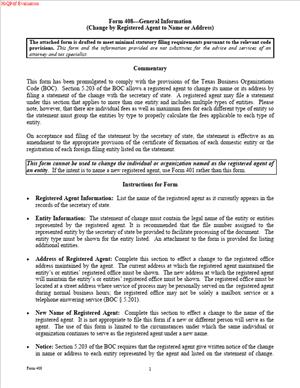
Form 408 – Statement of Change by Registered Agent to Name or Address
Fill out nowJurisdiction: Country: United States | Province/State: Texas
What is a Form 408 – Statement of Change by Registered Agent to Name or Address?
Form 408 is a filing you use to update the Texas Secretary of State when a registered agent’s name or street address changes. It is designed for the registered agent to file, not the business entity. With this form, the agent updates the public record for one or many entities they represent in Texas. Once filed, the state updates each affected entity’s registered agent name and/or registered office address.
This form exists because Texas requires every domestic and foreign filing entity to maintain a registered agent and a registered office in Texas. The registered agent accepts legal notices and service of process for the entity. The registered office must be a physical street address in Texas where the agent can be reached during normal business hours. When the agent’s name or business location changes, the state must know. Form 408 handles that change at the state level in one filing.
Who typically uses this form?
Registered agents do. That includes individuals who serve as registered agents and businesses that act as registered agents. If you are a law firm, corporate service provider, or accounting firm serving as the agent for multiple clients, you likely use this form when you relocate or rebrand. If you are an in-house counsel or operations manager at a company that serves as its own registered agent, you use this form when your company’s name changes or your registered office moves.
Why would you need this form?
You file it to keep the Secretary of State’s records accurate without asking each client entity to file its own change. If your company changed its legal name, this form lets you push that new name to your clients’ registrations. If you moved offices, this form updates the registered office for each client to your new Texas street address. You can file one statement and attach a list of all impacted entities. That saves time and reduces the risk of missed notices.
Typical usage scenarios include a registered agent company changing its name after a merger, a firm that moves across town and needs to change the registered office for hundreds of clients, or an individual agent who updated their legal name and wants every client record to reflect it. You can also use this form if you discover that the registered office on file is incorrect and you need to correct it. The form focuses on the agent’s information. It does not change the client’s name, management, or principal office. It only updates the registered agent name and/or the registered office address on file for each listed entity.
If you are a business owner and want to switch to a different registered agent, this is not your form. In that case, the entity must file its own change of agent/office document. Form 408 is filed by the existing agent and covers the agent’s own name or office change for the entities they already represent.
When Would You Use a Form 408 – Statement of Change by Registered Agent to Name or Address?
You use Form 408 whenever the registered agent of record changes its legal name or moves its Texas registered office. Think about moments in your operations that shift your contact details. A lease ends, and you relocate. You buy another firm and rebrand. You correct a suite number because the building renumbered floors. Those are triggers to file Form 408.
If you are a professional registered agent serving many clients, one filing lets you update all your clients at once. You list each represented entity by legal name and Texas file number. The change takes effect for each listed entity when the Secretary of State accepts the filing, unless you choose a delayed effective date. This approach avoids sending hundreds of separate forms, checks, or submissions.
If you are an individual who serves as a registered agent for one or a few businesses, you also use this form. For example, if you are the founder and designated agent for your LLC and you move your office, use this form to update the registered office address. If you changed your legal name, this form updates your agent name for each entity you represent.
Law firms and corporate secretaries use this form when the firm’s name changes or the office location changes. A common pattern is a firm combining with another firm and adopting a new name. The firm files Form 408 to change the registered agent name for all clients and to update the registered office to the new address. Another common pattern is a firm leaving a shared workspace for a dedicated suite that meets the “physical address” requirement. The firm updates the registered office for each client using this form.
Avoid using Form 408 to appoint a brand-new agent. If your business plans to change from Agent A to Agent B, your business needs to file the entity’s change of agent form. Form 408 does not replace the current agent with a different agent. It only updates the current agent’s name and/or registered office address.
Legal Characteristics of the Form 408 – Statement of Change by Registered Agent to Name or Address
Form 408 is a statutory filing with the Texas Secretary of State. It is legally binding because Texas law authorizes the registered agent to change the agent’s name or registered office by delivering a signed statement to the state. The Secretary of State updates the public record for each listed entity once the filing is accepted. From that point, service of process and official notices are directed to the new registered agent’s name or registered office address on record.
Enforceability rests on several elements. First, the filing is made by the registered agent of record. The agent signs the form, which certifies the accuracy of the information and the agent’s authority to make the change. If the agent is a business, an authorized officer or manager signs for the agent. Second, the form identifies each affected entity by exact legal name and Texas file number. That ensures the change applies to the correct records. Third, the form includes the old and new information, so the Secretary of State can confirm the continuity. Fourth, the agent agrees to notify each represented entity of the change, which protects the entity’s right to know where legal papers will be delivered.
The filing becomes effective when the Secretary of State files it, unless you pick a delayed effective date. Many Texas filings allow a delayed effective date up to a short period after submission. You can use that feature to coordinate your office move or your rebrand rollout. Once effective, the change is the address and name of record for legal notice. Courts and state agencies will rely on it. If you do not file when your address changes, your clients risk missed service and default judgments. That is why timely filing matters.
General legal considerations are straightforward. The registered office must be a physical street address in Texas. A post office box alone does not meet the requirement. You can include a suite number. The registered agent must be available at the registered office during normal business hours. The registered agent can be an individual Texas resident or a domestic or foreign organization authorized to do business in Texas. If the registered agent is an organization, it acts through its officers or authorized employees.
The agent must maintain written consent to serve as the registered agent for each entity. Your signature on this form confirms you consent to the continued appointment after your name or address change. You must also notify each represented entity of the change. Best practice is to send a brief notice to the entity’s last known contact. Keep proof of delivery for your records.
A false statement in a filed document can carry civil or criminal penalties. Sign only after you confirm the accuracy of the names, file numbers, and addresses. If you list an entity you do not represent, you risk misdirecting that entity’s legal service. If you forget an entity, that entity’s record will remain outdated. Take the time to build a complete list before you file.
How to Fill Out a Form 408 – Statement of Change by Registered Agent to Name or Address
Follow these steps to complete and file Form 408 accurately and efficiently.
1) Confirm you should be the filer
Make sure you are the registered agent of record for each entity you plan to include. Check your internal client roster. If you are not the agent of record for an entity, do not list it. This form is filed by the registered agent, not by the entity.
2) Gather the required information
Collect the exact legal name and Texas file number for each represented entity. Use the name as it appears on the state’s records. Gather your current agent name on file and your new agent name, if your name changed. Gather your current registered office address on file and your new Texas street address. Include suite numbers where applicable. Confirm the new address is a physical location in Texas and staffed during business hours.
3) Decide what you are changing
Identify whether you are changing the agent’s name, the registered office address, or both. If you are changing only the address, your agent name must remain the same as on file. If you are changing only the name, your registered office address may remain the same. If both changed, you will report both.
4) Complete the registered agent identification
Enter the registered agent’s current legal name exactly as shown on the state’s records. If you are an individual, enter your full legal name. If you are an entity, enter the full legal name of the entity, including entity suffix. If your legal name changed, enter the new legal name in the space provided for the new agent name.
5) Complete the registered office information
Enter the registered office street address currently on file. Then enter the new street address, if changing. Use a physical Texas address. Do not list a P.O. Box as the sole address. Include suite, floor, and building identifiers. Proofread the city, state, and ZIP code. If only your suite number changed, still file this form to update it. Minor address errors can derail service.
6) List the represented entities
List each entity for which you serve as registered agent and for which the change applies. For each entity, include the exact legal name and its Texas file number. If the form provides only a few lines, attach an additional schedule to list all entities. Label attachments clearly. Use a spreadsheet export or roster to reduce typos. If an entity has been terminated or withdrawn, do not list it. This step determines which records will be updated.
7) Include the statement of notice to entities
Form 408 includes a certification that you will notify each represented entity of the change. You must send that notice promptly. Prepare a short notice that states your new agent name and/or new registered office address and the effective date. Send it to your client’s designated contact. Email plus mail is a safe approach. Keep copies.
8) Choose the effectiveness of filing
Most Texas forms allow you to select when the filing becomes effective. You may choose effectiveness on filing or on a future date. If you pick a future date, it must be within the allowed time window. This option helps you coordinate a move or a rebrand. Pick a date that aligns with your actual occupancy of the new registered office. Do not pick a date before you can receive service at the new address.
9) Sign the form
The registered agent must sign. If the agent is an individual, that individual signs. If the agent is an entity, an authorized person signs on behalf of the entity. Include the signer’s printed name and title. Date the form. By signing, you certify the accuracy of the information and your authority to file. Review the signature block instructions and follow them exactly.
10) Prepare attachments and schedules
If you listed more entities than the form allows, attach an addendum. Use consistent formatting. Include columns for legal name and Texas file number. Number the pages and reference the attachment in the form. If your change is a name change due to a merger or conversion, retain your internal evidence. You do not need to attach your merger document unless the form requests it, but keep it in your files.
11) File with the Texas Secretary of State
Submit the form to the Secretary of State for filing. You can typically file by mail, in person, or electronically. Include any required fees. If filing on paper, use black ink and legible print. If filing electronically, verify your entries before submission. If you need the change to appear quickly, use a method that provides confirmation of receipt and filing.
12) Obtain and keep confirmation
After filing, obtain the stamped or confirmed copy. Save it to your records. If you filed for many entities, keep the entity list you used to prepare the filing. Cross-check a sample of entities in the public record to confirm the updates posted correctly. If you find a discrepancy, contact the filing office to resolve it.
13) Notify your clients
Send the notice to each represented entity. Include the effective date, your new name and/or address, and instructions for their own internal records. Invite clients to update any third-party systems that use the registered office address. This step fulfills your legal duty to notify and reduces confusion.
14) Update your service protocols
Update intake procedures for service of process at the new address. Train reception and mailroom staff. Update signage and mail forwarding. Confirm that the new office is staffed during normal business hours. If you have multiple Texas locations, confirm which address is your registered office for each entity. Keep the registered office address consistent on all filings.
15) Avoid common mistakes
Do not use a P.O. Box as your only address. Do not list entities you do not represent. Do not miss suite numbers or building identifiers. Do not forget the Texas file number for each entity. Do not sign without authority. Do not select an effective date you cannot support operationally. If your move date changes, adjust your filing or pick effectiveness on filing and wait to file until you are ready.
16) Plan for future changes
Create a checklist for future moves or name changes. Maintain a current roster with each client’s exact legal name and file number. Keep consent records for each client. Set reminders to review your registered office details annually. Good records make the next update easy.
Real-world example: Your firm moves from 123 Main Street, Suite 300, Austin, TX, to 500 Congress Avenue, Suite 1200, Austin, TX. You represent 240 Texas entities. You prepare Form 408 with your current agent name, old address, and new address. You attach a schedule listing all 240 entities with their names and file numbers. You select an effective date that matches your first staffed day at the new office. You sign as the agent’s authorized officer and file. You then send a notice to each client. When the filing posts, each listed entity’s registered office now shows the Congress Avenue address. Courts and agencies serve your clients at that address.
Another example: Your registered agent entity’s legal name changed from “Lone Star Registered Agent LLC” to “Lone Star Compliance LLC.” Your office address did not change. You complete Form 408 to update the agent name only. You list your client entities and file. After filing, the agent’s name on each client’s record matches your new legal name. You notify your clients and update your letterhead. Service continues at the same address without interruption.
That is all you need to complete Form 408 with confidence. If you confirm you are the agent of record, gather accurate client data, and follow the steps above, the change will post cleanly and keep your clients protected.
Legal Terms You Might Encounter
- Registered agent means the individual or company you appoint to receive legal papers. On this form, the registered agent is the filer making the change. If you are the registered agent, you complete and sign it.
- Registered office means the physical street address in Texas where the agent accepts service. It must be a real location, open during business hours. Form 408 updates that address when it changes.
- Service of process means lawsuits, subpoenas, or official notices delivered to your agent. This form ensures those documents go to the correct address and agent name.
- Represented entity means each Texas or registered foreign business that the agent represents. You must list every represented entity affected by the change on the form or in an attachment.
- Secretary of State file number is the unique number for each represented entity on record. You include this number for each entity to avoid misapplied changes or rejection.
- Statement of change is the legal filing that updates the agent’s name or registered office address. Form 408 is a statement filed by the agent rather than by the entity.
- Written notice refers to the agent’s duty to notify each represented entity of the change. The agent certifies on the form that it sent proper notice to every entity.
- Effective date indicates when the change takes effect on the state’s records. You can request a future effective date if the form allows it, or it becomes effective on filing.
- Authorized signer is the person who has the authority to sign for the agent. For an individual agent, it is the agent. For an organization acting as an agent, it is an officer or authorized manager.
- Attachment or schedule is a separate list you add when you have many entities. It should include each entity’s exact legal name and file number for accurate updates.
FAQs
Do you use this form if you are the business owner, not the agent?
No. This form is for the registered agent to file the change. If you are the entity and you want to change your agent or office, you use the entity‑filed change form. Ask your agent which filing applies before you proceed.
Do you need each entity’s consent before you file?
You do not need formal consent on this form. But you must notify each represented entity in writing. The certification on the form confirms that you sent those notices. Keep proof that you sent them.
Do you have to list all entities your agency represents?
List every entity affected by the name or address change. If you miss one, that entity’s record will not update. Use an attachment if needed. Include exact legal names and file numbers.
Do you need a physical address for the registered office?
Yes. Use a Texas street address that is staffed during normal business hours. A P.O. Box alone will cause rejection. If mail is unreliable, you can add a mailing address in addition to the street address, if space allows.
Do you need to file separate forms for domestic and foreign entities?
You can list both on one filing. The key is accuracy. Include each entity’s state file number and exact legal name. Use a clear attachment for long lists.
Do you sign as the agent or as the entity?
The agent signs. If the agent is an organization, an authorized officer or manager signs for it. Use your legal name and title. Do not let a represented entity sign this form.
Do you need to update tax or licensing agencies separately?
Yes. This filing updates the state’s business registry. It does not update tax, licensing, or bank records. Send change notices to those agencies and vendors as needed after filing.
Do you need to file a resignation instead of this form?
No, not for a simple name or address change. Use a resignation filing only if you intend to step down as an agent. If you resign, each entity must appoint a new agent.
Checklist: Before, During, and After the Form 408 – Statement of Change by Registered Agent to Name or Address
Before signing
- Gather the agent’s exact legal name, including any entity suffix.
- Confirm the new registered office street address is in Texas.
- Verify the address can receive hand delivery during business hours.
- Compile a complete list of represented entities affected by the change.
- For each entity, confirm the exact legal name and state file number.
- Prepare a clean attachment if you have many entities.
- Draft and send written notices to each represented entity about the change.
- Keep dated proof of those notices (email, certified mail, or delivery log).
- Identify the authorized signer for the agent and confirm their title.
- Check whether you need a future effective date to align operations.
- Align internal systems for service handling at the new address.
During signing
- Enter the agent’s current legal name exactly as on state records.
- If the agent’s name changed, enter the new legal name exactly.
- Enter the new registered office street address with suite or floor.
- Do not use a P.O. Box as the registered office.
- Add a mailing address only if the form allows and it differs.
- List each entity by exact legal name and state file number.
- Reference and attach the schedule if the list exceeds the form.
- Check the certification that you notified all represented entities.
- Choose and confirm the effective date, if provided by the form.
- Review every line for typos, missing suite numbers, or wrong ZIP codes.
- Sign as the agent or authorized officer, and print the name and title.
- Date the form and prepare payment as required.
- Make a clear, legible copy for your records before you file.
After signing
- File the form with the state filing office promptly.
- Use a filing method that gives you a dated receipt.
- Track the filing status and note the effective date.
- When accepted, save the stamped or acknowledged copy.
- Confirm the change appears on each entity’s public record.
- If an entity is missing, file a supplemental statement right away.
- Forward a courtesy notice to all represented entities confirming acceptance.
- Update your registered agent procedures for document intake.
- Test mail and courier delivery at the new office.
- Notify law firms you work with about the new service address.
- Update address info with courts where you commonly receive filings.
- Update your own company records, insurance, banks, and vendors.
- Keep proof of notices, the filing receipt, and the accepted form in records.
Common Mistakes to Avoid
Leaving entities off the list
- Consequence: Those entities will not be updated. Service may go to the old address. You risk missing deadlines and default exposure. Don’t forget to include every entity you represent.
Using a P.O. Box instead of a physical address
- Consequence: The filing may be rejected. Even if accepted in error, hand delivery could fail. Use a Texas street address that is staffed during business hours.
Mismatched names or file numbers
- Consequence: The state may post the change to the wrong record or reject the filing. Cross‑check legal names and state file numbers before you sign.
Skipping written notices to represented entities
- Consequence: You may violate your duties and face disputes or complaints. The certification requires notice. Send and keep proof for each entity.
Letting the wrong person sign
- Consequence: The filing can be rejected or challenged. The agent must sign. If the agent is an entity, an authorized officer or manager must sign.
Assuming other agencies update automatically
- Consequence: Tax mail, licensing notices, and bank correspondence can go to the wrong place. Send separate updates to all non‑registry parties after acceptance.
What to Do After Filling Out the Form
- File the form with the state as soon as you sign it. Use a method that provides a timestamp and confirmation. Keep a copy of what you submitted, including attachments.
- Monitor acceptance. Note the effective date on the acknowledgment. Verify that each listed entity shows the new agent name or office on the state’s record. Search by file number for accuracy.
- If an entity is missing from the update, act fast. File a supplemental statement to add that entity. Use the same naming conventions and file number format as the original listing.
- Send a confirmation notice to each represented entity. Include the new registered office address and, if applicable, the agent’s new legal name. Provide the effective date and any new contact details for service intake.
- Harden your intake process at the new address. Train reception and mailroom staff. Set clear procedures for logging and routing the service of process. Put backup coverage in place during peak periods.
- Update related records outside the registry. Notify courts you interact with. Update law firm instructions and standing protective orders that name the agent. Confirm insurers, banks, and vendors have the correct address.
- If you find an error in the filing, correct it. You can submit a corrective filing or a new statement, depending on the issue. Keep the error, the correction, and all acknowledgments together in your compliance files.
- Keep a retention packet. Include the form, acceptance, mailing proofs, entity notices, and your internal change memo. Store it where your compliance team can find it quickly.
- Plan for future changes. Maintain a master list of all represented entities with their file numbers. Keep it current so the next change is fast and accurate. Schedule periodic audits to catch new appointments you need to include.
- If the name change resulted from a broader reorganization, sync names everywhere. Align your registered agent agreements, marketing materials, insurance, and bank records. This prevents confusion when third parties check your information.
- Finally, document any service incidents during the transition. If a delivery went to the old address, log what happened and how you resolved it. Use those lessons to refine your procedures.
Disclaimer: This guide is provided for informational purposes only and is not intended as legal advice. You should consult a legal professional.