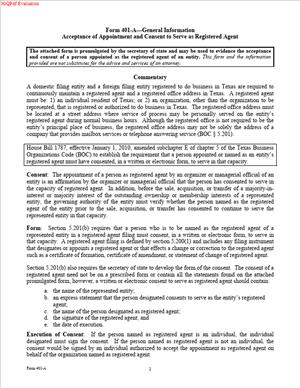
Form 401-A—General Information Acceptance of Appointment and Consent to Serve as Registered Agent
Fill out nowJurisdiction: Country: The United States | Province/State: Texas
What is a Form 401-A—General Information Acceptance of Appointment and Consent to Serve as Registered Agent?
Form 401-A is a short consent form used in Texas. It lets a proposed registered agent accept the appointment and agree to serve. The form confirms that the agent understands the role and responsibilities. It also confirms that the agent has the right address and will be available for service of process.
You use this form when you need written proof that an agent agrees to serve. Texas law requires a registered agent’s consent. The consent can be written or electronic. Form 401-A provides a clear, standard way to document that consent.
You see this form when forming or registering a business in Texas. You also see it when you change your registered agent or registered office. In all cases, the agent must agree to the appointment. Having a signed 401-A removes doubt and reduces filing risks.
Who typically uses this form? Business owners, managers, and organizers use it. Attorneys and filing services use it. So do professional registered agent companies and law firms that serve as agent. Nonprofit incorporators use it. So do foreign entities that register to do business in Texas.
Why would you need this form? Because you must have your agent’s consent. If your agent does not sign the formation or change document, you should keep a signed consent. Form 401-A is the standard way to capture that consent in writing. It helps avoid rejection of your filing. It also helps avoid disputes about whether the agent accepted the role.
Typical usage scenarios are simple. You are forming a Texas LLC and you list a person as registered agent. That person signs a 401-A to accept the appointment. You are changing the registered agent for your corporation. The new agent signs a 401-A confirming consent and the Texas office address. You are a foreign company registering in Texas. Your chosen agent signs a 401-A so you can complete your application to register. You are a law firm taking on agent duties for a client. You have your firm’s authorized signer complete a 401-A to document consent.
In each case, the form confirms three key points. The agent consents to serve. The agent has a Texas street address for the registered office. The agent understands they must be available at that address during business hours. With those points confirmed, you can proceed with your filing with confidence.
When Would You Use a Form 401-A—General Information Acceptance of Appointment and Consent to Serve as Registered Agent?
You use Form 401-A when you appoint a new agent for a Texas entity. That can be at formation, at registration, or when you change the agent later. If the agent signs the main filing, you may not need a separate 401-A. If the agent does not sign the main filing, you should have a signed consent. The 401-A fills that gap.
Consider a new Texas LLC. You list your friend as registered agent. The formation certificate lists their name and a Texas street address. Your friend should sign a 401-A to show they agree to serve at that address. You keep that consent in your records.
Consider a corporation that wants to change its agent. The old agent resigned, or you want a new provider. You file the change document naming the new agent and office. The new agent should sign a 401-A to confirm consent. You keep the consent in case the state asks for proof.
Consider a foreign entity that wants to do business in Texas. You must appoint a Texas registered agent and registered office. Your chosen agent should sign a 401-A. You use that consent to satisfy the consent requirement.
Consider a merger that changes the registered agent. The surviving entity must have a valid agent and office in Texas. If the agent did not sign the merger filing, the 401-A documents consent.
Consider a nonprofit run by volunteer directors. The treasurer agrees to be the agent. They sign a 401-A confirming the Texas office address and duty to accept service.
Consider a law firm that becomes agent for multiple client entities. The firm has a process to collect 401-A forms. Each entity gets a signed consent from the firm’s authorized signer. The firm keeps copies. So do the clients.
These examples cover common users. You may be a business owner, general counsel, paralegal, or office manager. You could be an organizer of a new LLC or a director of a nonprofit. You might be a foreign company’s legal manager. You might be a third-party registered agent company. In each case, the form helps you confirm and prove the agent’s consent.
Legal Characteristics of the Form 401-A—General Information Acceptance of Appointment and Consent to Serve as Registered Agent
Form 401-A is not the appointment itself. The appointment occurs in the entity’s filing or change document. But the form is legally significant. It is a written consent by the agent to accept the appointment. Texas law requires the agent’s consent to serve. The consent can be written or electronic. The 401-A provides the written consent record.
Is it legally binding? Yes. The agent’s signature confirms acceptance of duties. Those duties include accepting legal papers for the entity. They include maintaining a Texas registered office at a street address. They include being available during normal business hours. The form also confirms that the agent knows they can resign. It confirms that the entity can change the agent. These acknowledgments match core statutory terms.
What ensures enforceability? Several features do. The agent signs the form. The signature shows clear assent. The form identifies the entity by exact legal name. It identifies the agent by name. It states the Texas registered office street address. It includes the date. It includes the capacity of the signer if the agent is an organization. These elements meet basic contract and consent standards. They also meet state recordkeeping expectations.
The form also promotes accurate public records. Your formation or change filing lists the agent and the registered office. If the 401-A confirms the same details, you reduce mismatch risk. If the state questions your filing, you can show the consent. That reduces the chance of rejection. It reduces the chance of disputes over whether service of process was valid. A signed consent strengthens the case that service delivered to the agent is effective.
General legal considerations apply. The registered office must be a Texas street address. A P.O. Box alone does not work. A private mailbox is not enough. A virtual address without staff on-site is risky. The agent must be a Texas resident or a Texas organization. Or an organization authorized to do business in Texas. The agent must keep normal weekday business hours at the registered office.
The person who signs for an organizational agent must have authority. That could be a manager, officer, partner, or authorized employee. If an unauthorized person signs, the consent may be defective. Confirm authority before you rely on the consent.
Your entity should keep the signed consent with its records. Keep it with your formation, registration, or change filings. The state may not require you to file the 401-A. But the state can ask for proof of consent. Having a signed 401-A makes that easy.
False statements on the form can cause problems. The state can take administrative action for false records. A court can question the effectiveness of service of process. An agent may refuse service if they did not actually consent. Avoid those risks by using a valid 401-A and getting a proper signature.
The registered agent role involves public contact. The registered office will be on public record. Choose an address that can handle legal mail and official notices. Make sure the agent has reliable intake processes. The 401-A does not replace those processes. It confirms that the agent understands and accepts them.
How to Fill Out a Form 401-A—General Information Acceptance of Appointment and Consent to Serve as Registered Agent
Before you start, align the details. Confirm the exact legal name of the entity. Confirm the Texas registered office street address. Confirm the agent’s name and capacity. Make sure your formation or change filing matches this form.
Step 1: Identify the entity exactly.
Write the exact legal name of the entity. Use the full name as it will appear in the state’s records. Include commas, LLC, Inc., LP, or other designators as required. If the entity already exists, have the file number handy. Use the name that appears in the latest state records.
Step 2: State the entity type and home jurisdiction if needed.
If the form has a space for entity type, fill it in. Note whether it is an LLC, corporation, LP, or nonprofit. If the entity is foreign, list the home jurisdiction. Keep it consistent with the registration filing.
Step 3: List the registered agent’s name.
If the agent is an individual, use the full legal name. Do not use a nickname. If the agent is an organization, use the full legal name of the company. Match the name that appears in Texas records if the organization is registered in Texas.
Step 4: Provide the registered office address.
This must be a Texas street address. Include suite or unit numbers. Do not use a P.O. Box as the sole address. Make sure the address is staffed during business hours. Confirm that deliveries and process servers can access the location.
Step 5: Confirm agent eligibility.
If the agent is an individual, they must be a Texas resident. If the agent is an organization, it must be a Texas entity or authorized to do business in Texas. Do not list the entity itself as its own agent unless allowed and practical. Many entities use a third-party agent to avoid lapses.
Step 6: Read the acceptance and consent language.
The form includes standard acceptance terms. It states that the agent accepts the appointment. It states that the agent consents to serve at the registered office. It states that the agent understands the duties. Those duties include accepting service of process and official mail.
Step 7: Align the form with your filing.
The agent name and registered office must match your formation or change filing. If they do not match, the state may question the filing. Compare the details line by line. Fix any mismatch before signing.
Step 8: Sign the form.
If the agent is an individual, they sign and date. If the agent is an organization, an authorized person signs and dates. Print the signer’s name and title. Use a title that reflects actual authority. Examples include Manager, Member, President, Partner, or Authorized Representative.
Step 9: Add contact details if the form requests them.
Some versions include a contact name, phone, or email. Provide reliable contact methods. The state or your filing service may need to reach the signer. Use a business email that is monitored.
Step 10: Handle multiple entities correctly.
If one agent accepts for several entities, prepare separate forms. One form per entity avoids confusion. It also avoids rejection due to mixed information. If you must use an attachment, list each entity with exact names. But separate forms are often cleaner.
Step 11: Manage dating and effective timing.
Date the consent close to your filing date. Do not predate or postdate the form by long periods. If your filing will occur weeks later, re-check that nothing changed. If the address or agent changed, get a new signature.
Step 12: Keep records. Keep the original signed 401-A with the company records.
Keep a digital copy for quick access. If your agent is a service company, they also keep a copy. Recordkeeping makes later transitions easier. It also helps if the state asks for proof of consent.
Step 13: Decide whether to submit the form.
Often, you will not file the 401-A with the state. The consent can be kept with your records. Your formation or change filing may include a statement that the agent consented. In some cases, you may attach the signed 401-A to avoid questions. Follow your filing strategy and the current instructions. If the agent did not sign the main filing, keep the signed 401-A as backup.
Step 14: Confirm the registered office standard.
Make sure the office will be open during normal business hours. Make sure someone is present to accept service. Post clear signage for the office. Train staff on intake of legal documents. The 401-A assumes you will meet these operational standards.
Step 15: Review for common errors.
Check spelling of names. Check the entity suffix. Check the address format and suite number. Check the county if the form asks for it. Check that the signer’s title is accurate. Check that the date is complete. Correct any errors before you rely on the consent.
Step 16: Handle updates.
If the agent later changes their name or the office moves, you must file a change. The 401-A does not substitute for a change filing. If you appoint a new agent, get a new signed 401-A. Keep your records consistent across all filings.
Practical example: You form “Clear Creek Builders, LLC.” You want your CFO, a Texas resident, to be the registered agent. You list their name and a Houston street address in the formation. Your CFO signs a 401-A accepting the appointment. You keep the original with your LLC records. If the state asks for proof of consent, you have it ready.
Another example: You run a Delaware corporation registering in Texas. You hire a professional agent in Austin. They give you a signed 401-A with their address and consent. You attach it to your registration package or keep it on file. Your filing sails through because the agent consent is clear.
Another example: Your nonprofit switches to a new law firm as agent. The firm’s operations director signs a 401-A. The firm’s office address is listed as the registered office. You submit your change filing listing the same address. You keep the 401-A with your minute book. The public record stays accurate.
Final tips help avoid delays. Confirm that the registered office is not a mail drop. Confirm that the agent can receive hand delivery. Confirm that the address is in Texas. Make sure your main filing and the 401-A match. Make sure the signature is original or meets accepted electronic standards. Keep the consent current and accessible.
If you follow these steps, you reduce filing risk. You also protect your entity from service problems. A clean 401-A shows that your agent is ready and accountable. That is the goal of the consent requirement. It gives the public a reliable way to reach your entity. It gives you a clear record that your agent accepted the job.
Legal Terms You Might Encounter
Registered agent means the person or company you appoint to receive legal papers for your entity. This includes lawsuits, official notices, and state reminders. On this form, the registered agent confirms they accept that role. The agent’s consent is central. Without their acceptance, the appointment is not complete.
Registered office is the physical street address in Texas where the registered agent receives documents. It must be a real, deliverable location. Do not use a mailbox or a virtual “drop.” On this form, you identify the registered office that the agent will staff during normal business hours.
Service of process refers to delivery of legal papers, like a lawsuit or subpoena. Your registered agent is the official recipient for these documents. By signing this form, the agent agrees to accept service of process at the registered office. That promise is what protects you from missed legal notices.
Acceptance of appointment is the agent’s formal “yes” to the role. It states the agent understands and accepts the duties. This form is the document where that acceptance is captured in writing. The signature proves the agent’s consent and helps avoid disputes about whether they agreed.
Consent to serve is closely related to acceptance. It is the agent’s permission for the state to list them as your registered agent. The consent confirms the agent is aware of the appointment and agrees to serve. On this form, consent prevents an unwanted appointment from appearing on the public record.
Governing person is the individual who controls or manages the entity, such as a manager, member, director, or officer. While the governing person does not usually sign this particular form, they are often the one who coordinates it. They also ensure the agent listed is the current and correct choice.
Authorized signatory is the person allowed to sign on behalf of the agent, if the agent is a company. For an individual agent, the individual signs. For a company agent, an authorized person signs the consent. On this form, the capacity of the signer should be clear and correct to avoid rejection.
Domestic entity means an entity formed in Texas. Foreign entity means an entity formed elsewhere that registers to do business in Texas. Either type must maintain a Texas registered agent and office. On this form, the consent language works for both domestic and foreign entities that need a Texas agent.
Effective date is when the appointment becomes active on the public record. You can often align the effective date with your formation, registration, or change filing. This form captures consent and can accompany the main filing so the appointment and consent take effect together.
Resignation and change refer to later updates to your registered agent or office. A registered agent can resign, or you can change agents or the office address. If that happens, you will need a new consent from the new agent. This same concept of written consent underpins each change you make.
FAQs
Do you have to file this form with the state?
Usually, yes—file it with the related filing that appoints or changes the registered agent. If your main filing already includes the agent’s signed consent, a separate form may not be needed. If the consent is not in that filing, include this form so the record shows clear acceptance.
Do you need the registered agent’s signature on this form?
Yes. The registered agent must sign to confirm acceptance and consent. If the agent is a company, an authorized person of that company signs. Make sure the name, title, and date are clear. An unsigned form will delay your filing and can cause rejection.
Do you need a physical street address for the registered office?
Yes. Use a real Texas street address where the agent can receive documents in person during business hours. Do not list a P.O. box. If you use a non-deliverable or out-of-state address, the filing can be rejected. It can also lead to missed legal notices.
Do you have to use the same registered agent for every entity you own?
No. You can appoint different agents for different entities, or you can use the same agent for all. If you use one agent for multiple entities, ensure each entity has a separate consent. Keep each consent with the matching filing, so the record stays clean.
Do you need to pay a fee for this form?
The fee is tied to the related filing, such as formation, registration, or change of agent. The consent form itself does not drive a separate fee in many scenarios. Budget for the main filing. Include this consent to complete the record. Check your filing method for any processing charges.
Do you need notarization for this form?
No, notarization is not typically required. What you do need is a complete and accurate signature from the registered agent or their authorized signatory. Make sure names match and the date is present. A simple, clean signature is sufficient.
Do you need to update the state if the agent or address changes later?
Yes. You must keep a current registered agent and office on record. If either changes, file the required change document and obtain new consent from the new agent. Make the update promptly to avoid missed mail and penalties. Don’t let gaps occur between resignations and new appointments.
Do you have to appoint a person, or can a company serve as registered agent?
You may appoint either an individual Texas resident or a company authorized to do business in Texas. Your entity itself cannot serve as its own registered agent. When a company is the agent, ensure an authorized person signs the consent on the company’s behalf.
Checklist: Before, During, and After the Form 401-A—General Information Acceptance of Appointment and Consent to Serve as Registered Agent
Before signing:
- Confirm your entity’s exact legal name. Match spacing, punctuation, and capitalization.
- Locate your state file number, if already assigned.
- Identify the registered agent: individual or company. Confirm their authority and availability.
- Confirm the registered office street address in Texas. Verify deliverability during business hours.
- Decide on effective date alignment with your main filing.
- Gather the agent’s signatory details: name, title, and contact info for questions.
- Confirm whether the consent will be filed with formation, registration, or a change filing.
- Prepare a clean copy for the agent to review and sign.
- Set a target filing date and build in review time.
During signing:
- Verify the entity name appears exactly as it will on the main filing.
- Confirm the registered office is a physical Texas street address, not a P.O. box.
- If the agent is a company, ensure the signer lists their title and authority.
- Check that the acceptance and consent language is complete and unaltered.
- Confirm the date of signature. Avoid undated or future-dated signatures.
- If pairing with a change filing, ensure the prior agent info in that filing is correct.
- Review for blanks or cross-outs. Reprint if the form looks messy or unclear.
- Align the effective date with your main filing strategy.
- Get a final confirmation from the agent that they can receive documents at the listed office.
After signing:
- File the consent with the related state filing as required.
- Keep a copy of the signed consent in your company records.
- Send a copy to the registered agent for their records.
- If changing agents, notify the prior agent of the effective date change.
- Calendar the expected processing window. Watch for acceptance or rejection notices.
- After acceptance, verify your public record shows the correct agent and office.
- Train your internal team on how legal mail will flow from the agent to you.
- Set a reminder to re-confirm agent contact details annually.
- Document a backup plan if the agent changes or resigns.
Common Mistakes to Avoid
Using a non-physical address. Don’t list a P.O. box or a mailbox service as the registered office. Your filing can be rejected, and you risk missing legal papers. Use a real Texas street address that is staffed during business hours.
Forgetting the agent’s signature. Don’t submit an unsigned consent. Filings without a proper signature can stall or fail. Get the agent’s signature, name, title (if any), and date, and confirm their consent matches your main filing.
Mismatching the entity name or file number. Don’t rely on a shortened or brand name. Use the exact legal name and the correct file number. A mismatch can cause misapplied filings and delays in updating your public record.
Appointing an unavailable agent. Don’t choose an agent who cannot staff the registered office or respond quickly. Missed service can lead to default judgments and penalties. Confirm availability and a clear forwarding plan before they sign.
Filing the consent without the related update. Don’t assume the consent alone changes your agent on record. You still need the formation, registration, or change filing. Pair the consent correctly or your record will not update.
What to Do After Filling Out the Form
File the consent with the right submission. If you are forming or registering an entity, attach the signed consent to that packet if needed. If you are changing the registered agent or office, attach the consent to that change filing. If your main filing already includes a signed agent consent, keep this form in your records instead.
Track acceptance. After you file, watch for confirmation from the state. Acceptance means the agent and office are now the public record for your entity. If you receive a rejection, review the reason, correct it, and resubmit. Common fixes include address corrections, signature updates, or entity name alignment.
Notify your registered agent. Send them the timestamped copy or confirmation. Confirm how they will forward documents to you. Clarify timing, method (scan, email, courier), and who in your organization receives urgent notices. Set expectations for same-day alerts on lawsuits and government notices.
Update your internal records. Store the signed consent in your minute book or digital compliance folder. Update your compliance calendar with renewal and annual review checkpoints. Note the registered office address in vendor forms that require an official address.
Coordinate with a change in agent. If you replaced a prior agent, settle any final invoices. Confirm the end date of their service. Verify there is no gap between the prior agent’s end and the new agent’s start. Ensure mail forwarding is in place during any brief overlap.
Plan for amendments. If the registered office moves or you change agents later, you must file a change and obtain new consent. Start early to avoid a gap. Keep the new signed consent with your records and file it with the related update, if required.
Respond to service of process. If your agent forwards a lawsuit, act immediately. Note the deadlines in the paperwork. Route the documents to the right decision-makers and advisers the same day. Establish a clear internal protocol for triage and response.
Maintain ongoing compliance. Reconfirm your agent’s contact details each year. If the registered office becomes undeliverable, update the record at once. A working agent and office are essential for good standing and for avoiding missed legal notices.
Distribute final records. Share the accepted filings and consent with your finance, legal, and operations leads. Ensure each team knows the registered office address and the agent’s forwarding process. This prevents delays when time-sensitive documents arrive.
Monitor for agent resignation. If your agent resigns, appoint a new agent quickly and gather a new consent. File the change promptly to keep your record current. Delay can lead to penalties or default service sent to your principal office instead.
Close the loop with stakeholders. Let your tax preparer, bank, and key partners know the official agent address if they track it in their files. While most will not mail to the registered office, consistent records reduce confusion and misrouted notices.
Disclaimer: This guide is provided for informational purposes only and is not intended as legal advice. You should consult a legal professional.