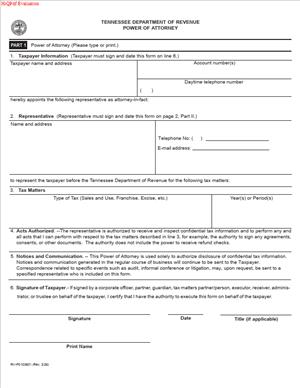
RV-F0103801 – Power of Attorney
Fill out nowJurisdiction: Country: United States | Province or State: Tennessee
The RV-F0103801 – Power of Attorney is a form used in Tennessee to let someone act on your behalf in tax matters with the Tennessee Department of Revenue. It allows you to name a trusted person to communicate with the department, receive information, and handle specific issues for you.
If you are dealing with a tax question, audit, payment issue, or dispute, this form gives another person legal authority to step in for you. That person is often a tax professional, attorney, accountant, or sometimes a family member or business partner.
You might consider this document if you cannot manage your tax matters personally, if you prefer professional representation, or if you want someone else to handle communications with the state. It is especially useful when deadlines are tight or the issues are complex.
This form focuses only on tax matters handled by the Tennessee Department of Revenue. It does not grant broad authority over your finances, property, or medical decisions. Its scope is limited to what you describe in the document.
Understanding how this form works helps you avoid delays and confusion. Before you sign and submit it, you need to know exactly what authority you are giving and how it will be used.
What is RV-F0103801 – Power of Attorney?
Clear definition
RV-F0103801 – Power of Attorney is a written authorization that allows you, as the taxpayer, to appoint a representative to act for you in dealings with the Tennessee Department of Revenue. In this context, you are commonly called the “principal,” and the person you appoint is your “representative” or “agent.”
The form creates a limited power of attorney. It applies only to state tax matters you list in the document. It allows your representative to receive confidential tax information and, depending on the authority you grant, to discuss, negotiate, and resolve tax issues with the department.
This is not a general power of attorney covering all personal or business decisions. It is specific to tax administration and communication with the Tennessee Department of Revenue.
Who typically uses this form?
Individual taxpayers often use this form when they are facing an audit, responding to a notice, or setting up a payment arrangement. If you feel unsure about handling a tax matter alone, appointing a representative can make the process more manageable.
Business owners also use this form. Corporations, partnerships, and limited liability companies may authorize an officer, employee, accountant, or attorney to represent the business in tax matters.
Tax professionals frequently ask clients to complete this form so they can speak directly with the department. Without a valid power of attorney on file, the department may refuse to discuss confidential details with anyone other than the taxpayer.
Why might you need this form?
You may need this form if you receive a letter from the Tennessee Department of Revenue requesting information or proposing changes to your tax account. A representative can respond on your behalf and gather the necessary records.
If you are under audit, your representative can attend meetings, submit documents, and communicate with auditors. This can reduce stress and help ensure that responses are complete and timely.
You might also use this form when setting up payment plans, resolving penalties, or disputing assessments. The authority you grant allows your representative to speak for you within the limits you define.
If you are unavailable due to travel, illness, or business obligations, this form allows someone else to manage the issue while you are away.
Typical real-life scenarios
- You operate a small retail business in Tennessee and receive a notice about a sales tax discrepancy. You hire a tax professional to review your records and communicate with the department. To allow direct communication, you complete and sign the power of attorney form.
- You are an individual taxpayer who moved out of state but still has an open issue with Tennessee income tax. Because you cannot attend meetings in person, you appoint a representative located in Tennessee to handle the matter.
- Your company is selected for a routine audit. You prefer that your in-house accountant manage the audit process. By filing this document, you authorize that person to speak with auditors and provide records.
- You are dealing with multiple tax periods and several types of taxes, such as sales and use tax and franchise and excise tax. You want one representative to coordinate all communications with the department to ensure consistency and organization.
When would you use RV-F0103801 – Power of Attorney?
You would use this form any time you want someone else to communicate with the Tennessee Department of Revenue about your tax matters. This includes receiving notices, responding to questions, attending conferences, and discussing account details.
It is commonly used during audits, assessments, refund claims, and appeals. In these situations, detailed conversations often occur between the taxpayer and the department. A properly filed power of attorney allows your representative to participate fully in those discussions.
If you are setting up a payment agreement or requesting penalty relief, you may also use this form. Your representative can discuss your financial situation and proposed terms directly with the department, as long as that authority is included in the document.
Business entities use this form when a specific officer or employee will handle tax issues. Even if someone works for the company, the department may require written authorization before sharing confidential information.
You may also use this form when you want copies of correspondence sent to your representative. This helps ensure that important notices are not missed and that deadlines are tracked carefully.
The form is typically filed before or at the beginning of a tax matter. However, it can also be submitted at any stage if you decide later that you want representation.
Legal characteristics of RV-F0103801 – Power of Attorney
This document creates a formal legal relationship between you and your representative for specific tax purposes. It authorizes the Tennessee Department of Revenue to disclose your confidential tax information to the named representative.
For the form to be effective, it generally must be completed accurately and signed by the proper person. If you are an individual, you sign for yourself. If you are signing on behalf of a business entity, you must have the authority to bind that entity, such as being an officer or authorized member.
The form usually requires clear identification of the taxpayer. This can include your full legal name, mailing address, and identifying numbers such as a Social Security number or federal employer identification number. Incomplete or incorrect information can delay processing.
You must also clearly identify the representative. This often includes the representative’s name, address, and contact information. If the representative is a professional, additional identifying information may be required.
The scope of authority is defined by what you include in the form. You typically specify the types of tax involved and the tax periods covered. If you leave these sections vague or blank, the department may limit or reject the authorization.
A common reason for problems is failing to sign and date the form. Another issue arises when the person signing on behalf of a business lacks documented authority. In those cases, the department may not recognize the power of attorney.
Laws and procedures can vary by state. This form is designed specifically for use with the Tennessee Department of Revenue. It does not automatically apply to federal tax matters or to other states.
This document does not transfer ownership of property. It does not authorize the representative to make medical decisions or handle unrelated financial matters. Its effect is limited to the tax matters and authority described within it.
Is it legally binding?
When properly completed and signed, this form is generally legally binding between you and your representative for the purposes described. It signals to the Tennessee Department of Revenue that it may rely on the named representative’s authority.
The binding nature depends on accurate completion and valid signatures. If required information is missing or if the signature is not valid, the department may treat the form as ineffective.
Once accepted, the department may communicate directly with your representative within the scope of authority you granted. Actions taken by your representative under that authority are typically treated as actions taken on your behalf.
The power of attorney remains effective until it is revoked, replaced, or limited by its own terms. You may be able to revoke it by submitting a written notice, depending on the department’s procedures.
How to fill out RV-F0103801 – Power of Attorney
Step 1 – Identify the taxpayer
Enter the full legal name of the taxpayer. If you are an individual, use your name as it appears on your tax records. If you are a business entity, use the exact registered business name. Provide the required identification numbers and current mailing address to ensure the department can match the form to the correct account.
Step 2 – Provide contact information
Include complete contact details for the taxpayer. This may include phone numbers and other identifying information requested on the form. Accurate contact details help prevent delays if the department needs clarification.
Step 3 – Name your representative
Enter the full name of the person you are appointing as your representative. Provide the representative’s mailing address and any additional identifying information required. Make sure the spelling and details are correct, as the department will rely on this information to confirm authority.
Step 4 – Define the tax matters covered
Specify the type or types of tax involved. This may include categories such as sales and use tax, franchise and excise tax, or other state-administered taxes. Be clear and precise so there is no confusion about the scope of representation.
Step 5 – List the tax periods
Identify the tax periods covered by the authorization. This may involve listing specific years, quarters, or date ranges. If the form allows, ensure the periods are clearly stated so the department understands the time frame of the representative’s authority.
Step 6 – Describe the authority granted
Review the section describing what your representative is allowed to do. Some forms outline standard powers, such as receiving confidential information, discussing issues, and negotiating resolutions. Read this section carefully so you understand the authority you are granting.
If the form allows you to limit authority, clearly state any restrictions. For example, you may choose to allow access to information but not authority to sign certain documents. Any limitations should be written clearly and specifically.
Step 7 – Review for accuracy and completeness
Before signing, read the entire document from start to finish. Confirm that names, identification numbers, tax types, and periods are correct. Check that no required fields are left blank. Errors at this stage can result in rejection or delays.
Step 8 – Sign and date the form
Sign the form in the space provided. If you are signing as an individual, use your usual legal signature. If you are signing for a business, indicate your title or role within the organization. Enter the date of signing to establish when the authorization begins.
Step 9 – Submit the completed form
Follow the submission instructions provided with the form. This may involve mailing, faxing, or electronically submitting the document to the Tennessee Department of Revenue. Ensure that the department receives a complete and legible copy so your representative’s authority can be recognized without delay.
Legal terms you might encounter in RV-F0103801 – Power of Attorney
- Principal: The principal is the taxpayer who grants authority to someone else. On this form, that is you or your business. Your name must match the name on file with the Tennessee Department of Revenue, including any middle initials, suffixes, or business designations.
- Representative: The representative is the person you authorize to act on your behalf. This may be an attorney, accountant, enrolled agent, or another trusted individual. You must provide accurate identifying and contact details so the Department can communicate directly with them.
- Tax Matter: A tax matter refers to the specific type of tax involved, such as sales tax, franchise and excise tax, business tax, or individual income-related issues. This form requires you to clearly identify which tax types your representative can handle. If you leave this section too broad or blank, the authority may be limited.
- Tax Period: The tax period defines the years or reporting periods covered by the authorization. It can include specific calendar years, fiscal years, or date ranges. If you do not list a period, the Department may reject the form or restrict access.
- Authorization: Authorization is the legal permission you grant to your representative. This document, it outlines what actions the representative can take, such as accessing records, discussing accounts, filing documents, or negotiating payment arrangements.
- Revocation: Revocation means canceling a previously granted power of attorney. Some forms allow you to automatically revoke earlier authorizations by checking a box. If you do not indicate revocation clearly, prior representatives may still have access.
- Declaration of Representative: This section confirms that your representative accepts the appointment and is authorized to represent you. The representative may need to sign and state their professional status. Without this declaration, the authorization may not be valid.
- Signature: The signature section confirms that you knowingly grant authority. If you are signing for a business, you must have proper authority, such as being an owner, officer, or authorized manager. An incorrect signer can invalidate the form.
- Electronic Filing or Submission: Some agencies allow submission by mail, fax, or online upload. The method you choose affects processing time. You must follow the accepted submission methods for the form to be recognized.
FAQs
Do I need to list every tax type separately on RV-F0103801 – Power of Attorney?
Yes. You should list each specific tax type the representative is allowed to handle. If you only write a general phrase like “all taxes,” the Department may require clarification or limit access. Be precise so your representative can speak to the agency about exactly what you intend.
What happens if I forget to list the tax period?
If you leave out the tax period, the agency may reject this form or process it only for limited periods. The tax period tells the Department which years or filings your representative can access. Always double-check that the date range matches the issue you are trying to resolve.
Can I appoint more than one representative?
Yes, you can usually name more than one representative. Make sure you clearly print each person’s name and contact information. If the form allows you to specify whether they can act independently or must act together, read that section carefully before signing.
Does my representative have to sign the document?
In most cases, yes. The declaration section confirms that the representative accepts the role and meets eligibility requirements. If that section is unsigned, the Department may not recognize the authorization.
How do I know if the Department has accepted RV-F0103801 – Power of Attorney?
You typically will not receive automatic confirmation unless you request it. Your representative may confirm acceptance by contacting the Department and verifying access. If access is denied, review the submitted copy to check for missing signatures, unclear tax periods, or name mismatches.
Can I revoke a previous power of attorney using this document?
Often, yes, but only if you indicate that you intend to revoke earlier authorizations. Some versions include a revocation checkbox or require you to attach a written statement. If you do not clearly revoke prior forms, earlier representatives may still have authority on record.
What if the business name on this form is slightly different from what the state has on file?
The names must match the state’s records. Even small differences like missing “LLC” or using an old trade name can delay processing. Confirm the exact legal name registered with the Department before submitting the form.
Will this form give my representative access to all my tax records automatically?
Only for the tax types and periods you list. The Department limits access based on what you enter in the tax matter and period sections. If you want broader access, you must clearly state that on the document.
Checklist: Before, During, and After RV-F0103801 – Power of Attorney
Before
- Confirm the exact legal name of the taxpayer as registered with the Tennessee Department of Revenue.
- Verify your taxpayer identification number or account number.
- Decide which tax types need representation.
- Identify the correct tax periods involved.
- Choose a qualified and trusted representative.
- Confirm the representative’s contact details and eligibility.
- Review whether you need to revoke any prior authorizations.
- Gather any supporting documents that explain the tax issue.
During
- Print or type names clearly and legibly.
- Enter the taxpayer identification number exactly as registered.
- List each tax type separately.
- Specify accurate start and end dates for tax periods.
- Clearly define the authority granted.
- Complete any revocation section if applicable.
- Ensure both you and your representative sign where required.
- Double-check dates next to each signature.
After
- Make a complete copy for your records.
- Provide a copy to your representative.
- Submit the form using an accepted method.
- Note the date of submission.
- Follow up to confirm processing if needed.
- Store the form with your tax records.
- Update internal compliance files for your business.
- Revoke outdated authorizations if circumstances change.
Common mistakes to avoid with RV-F0103801 – Power of Attorney
- Mistake: Leaving the tax period blank because you assume it covers all years, which happens when people rush, leading to rejection or limited access, so do not forget to clearly list each year or date range.
- Mistake: Using a trade name instead of the registered legal name, which happens when businesses operate under a DBA, causing processing delays, so do not forget to match the state’s official records exactly.
- Mistake: Forgetting the representative’s signature, which happens when you focus only on your own signature, resulting in an incomplete authorization. Do not forget to complete the declaration section fully.
- Mistake: Granting overly broad authority without understanding it, which happens when you check every box automatically, potentially allowing more access than intended, so do not forget to read and limit authority where appropriate.
- Mistake: Failing to revoke an old representative, which happens when you assume the new form replaces the old one, allowing prior access to continue, so do not forget to indicate revocation clearly.
- Mistake: Submitting the form to the wrong address or by an unapproved method, which happens when instructions are skipped, delaying recognition, so do not forget to verify the correct submission process.
- Mistake: Signing without proper authority for a business entity, which happens when an employee signs casually, making the form invalid, so do not forget to ensure the signer has legal authority.
- Mistake: Providing incomplete contact information for the representative, which happens when phone or email fields are overlooked, causing communication problems, do not forget to complete every required contact field.
What to do after filling out RV-F0103801 – Power of Attorney
Once you complete the form, pause before sending it. Review every section carefully. Small errors can delay recognition and prevent your representative from helping you quickly.
- Step 1: Make at least two copies of the signed form. Keep one for your personal or business records and give one to your representative.
- Step 2: Confirm the correct submission method accepted by the Tennessee Department of Revenue, such as mail, fax, or electronic upload if available.
- Step 3: Submit the form using the approved method and keep proof of submission, such as a confirmation page or mailing receipt.
- Step 4: Record the date you submitted the form in your calendar or compliance log.
- Step 5: Inform your representative that the form has been sent so they can follow up if necessary.
- Step 6: Allow reasonable processing time before attempting to use the authorization.
- Step 7: Have your representative contact the Department to confirm that they are recognized on your account.
- Step 8: If the authorization is not on file, compare your copy against the original instructions to identify missing details.
- Step 9: Store the finalized and accepted version with your tax records for the covered years.
- Step 10: Review your power of attorney status annually and update it if your representative changes or your tax matters expand.
Keeping your records organized protects you. When you know exactly who has authority and for what time period, you reduce confusion and protect sensitive tax information. A properly completed and confirmed power of attorney makes communication with the Department more efficient and ensures your representative can act without unnecessary delay.
Disclaimer: This guide is provided for informational purposes only and is not intended as legal advice. You should consult a legal professional.