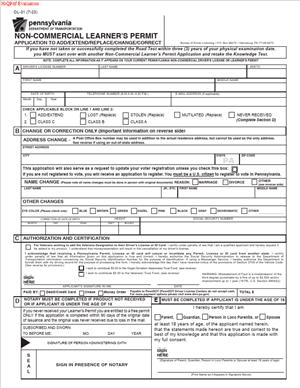
DL-31 – Non-Commercial Learner’s Permit Application to Add or Extend or Replace or Change or Correct
Fill out nowJurisdiction: Country: United States | Province or State: Pennsylvania
The DL-31 – Non-Commercial Learner’s Permit Application to Add or Extend or Replace or Change or Correct is a Pennsylvania form used to update or manage your non-commercial learner’s permit. You use it when something about your permit needs to change or be reissued.
If you are learning to drive and hold a learner’s permit, this document helps keep your driving record accurate. It allows you to request specific updates without starting the permit process over.
This form matters because your learner’s permit must reflect your correct identity, status, and driving privileges. Errors or expired permits can delay testing or licensing.
Understanding how this application works saves time. It also reduces the chance your submission will be rejected for avoidable mistakes.
What is DL-31 – Non-Commercial Learner’s Permit Application to Add or Extend or Replace or Change or Correct?
Clear definition
DL-31 – Non-Commercial Learner’s Permit Application to Add or Extend or Replace or Change or Correct is an official state form used to modify an existing non-commercial learner’s permit in Pennsylvania. It is not an application for a brand-new permit. Instead, it updates or reissues one you already have.
The form covers several different actions. You can use it to add driving privileges, extend the validity of a permit, replace a lost or damaged permit, change personal information, or correct errors.
It is designed for non-commercial driving privileges. This means it applies to standard passenger vehicle permits, not commercial driver’s licenses.
When processed, the form updates your driving record and may result in a new physical permit being issued to you.
Who typically uses this form?
Most people who use this form are learner drivers. They already hold a valid or recently expired non-commercial learner’s permit.
Teen drivers often use it if their permit expires before they complete testing requirements. Adults who are first-time drivers may also use it in similar situations.
You might also use the form if your name changes after marriage or another legal event. Anyone whose permit contains incorrect information can use this document to request a correction.
Parents or guardians may be involved when the permit holder is under 18. However, the permit holder remains the primary applicant.
Why might you need this form?
You may need this form if your learner’s permit has expired and you want to continue the learning process. Extending the permit allows you to keep practicing legally.
You might need it if your permit was lost, stolen, or damaged. A replacement ensures you have valid proof of your driving status.
Changes in personal information also create a need for this filing. For example, if your legal name or address changes, your permit should match your current identification records.
Errors on the original permit, such as a misspelled name or incorrect date of birth, can also require correction through this form.
Typical real-life scenarios
- You pass the knowledge test and receive a learner’s permit. A year later, you have not yet taken your road test and the permit expires. You use this form to request an extension so you can continue preparing.
- You move to a new home within Pennsylvania. Your mailing address changes, and you want your permit to show the correct address. This document allows you to request that update.
- You legally change your last name after marriage. Your identification documents now reflect your new name, but your learner’s permit does not. You use this application to align your permit with your current legal name.
- Your wallet is stolen, and your learner’s permit was inside. You need a replacement to continue practicing and to present identification if required. This form starts that replacement process.
- You notice a typo in your middle name on your permit. Even small errors can cause problems during testing or identification checks. Submitting this form helps correct the record.
When would you use DL-31 – Non-Commercial Learner’s Permit Application to Add or Extend or Replace or Change or Correct?
You use this form after you already have a non-commercial learner’s permit. It is not part of the first-time permit application process.
One common situation is nearing the expiration date printed on your permit. If you have not completed the required steps toward a driver’s license, an extension request through this document keeps your learning period active.
Another situation involves lost or damaged permits. If the physical document is no longer usable, you request a replacement rather than applying again from the beginning.
Changes to your legal identity are another reason. If your name changes due to marriage, divorce, or court order, your learner’s permit should match your current legal documents. This form supports that update.
You may also use it when adding certain driving privileges within the non-commercial category. In some cases, additional classifications or corrections are processed through the same document.
Clerical errors are another trigger. If information was entered incorrectly during the original application, you use this filing to correct the state’s records.
The form may also be relevant if you did not complete a required step within a set time frame and your permit status needs to be restored or extended. The exact outcome depends on your individual circumstances and the state’s internal review.
Legal characteristics of DL-31 – Non-Commercial Learner’s Permit Application to Add or Extend or Replace or Change or Correct
This document is an official government application. Its effectiveness depends on accurate completion, proper identification, and any required fees.
For the form to be processed, it typically must be complete. Missing signatures, incomplete sections, or inconsistent information can lead to delays or rejection.
Your identity details must match supporting records. Differences between your application and other state records may cause processing issues until clarified.
The form becomes effective when the state reviews and approves it. Simply filling it out does not automatically change your permit status. Approval generally results in an updated record and, if applicable, a new permit document.
Common problems include incorrect personal data, unpaid fees, or submitting the wrong type of request. For example, requesting a replacement when the permit has long expired may require additional steps.
High-level differences can exist depending on age or permit status. For instance, minors may have additional requirements compared to adults. The form itself covers multiple request types, but the review process can vary based on your situation.
This document does not grant a full driver’s license. It does not replace required testing or mandatory waiting periods. It also does not automatically remove restrictions that apply to learner drivers unless the state specifically updates your status.
Is it legally binding?
The form is a formal request to a government agency. When you sign it, you confirm that the information you provide is true and accurate.
Your signature generally serves as a certification. Providing false information can carry consequences under state law.
However, the document itself is not a contract between you and another private party. It does not create mutual obligations like a typical agreement would.
Its legal effect comes from administrative approval. Once processed, it updates your official driving record. That updated record governs your learner driving privileges moving forward.
How to fill out DL-31 – Non-Commercial Learner’s Permit Application to Add or Extend or Replace or Change or Correct
Step 1 – Review the form and identify your purpose
Start by reading the entire form carefully. Identify whether you are adding privileges, extending an existing permit, requesting a replacement, changing information, or correcting an error. Selecting the correct purpose helps ensure the rest of your answers align with your request.
Step 2 – Provide your current personal information
Enter your full legal name as it appears on official identification. Include your date of birth, current address, and any other identifying details requested. Make sure the information matches existing records to avoid processing delays.
Step 3 – Indicate the type of request
Mark or select the section that matches your reason for filing. This may include extension, replacement, name change, address change, or correction. Be precise, since different requests may be handled differently.
Step 4 – Supply previous permit details
Provide your learner’s permit number if requested. Include any relevant details about the current or expired permit. Accurate permit information helps the agency locate your record quickly.
Step 5 – Complete change or correction information
If you are changing or correcting details, clearly state the updated information. For example, enter your new legal name exactly as shown on your supporting documents. Ensure spelling and dates are accurate.
Step 6 – Answer required eligibility questions
Some versions of the form include questions about your driving status or eligibility. Read each question carefully and answer truthfully. These responses can affect how your request is processed.
Step 7 – Review fee requirements
Check whether a fee applies to your request. Replacement permits or extensions often involve a payment. Prepare the correct amount in the accepted form before submission.
Step 8 – Sign and date the application
Sign the form where indicated. Your signature confirms that all information is accurate to the best of your knowledge. Enter the current date to complete the certification section.
Step 9 – Submit the completed form
Submit the form according to the provided instructions. This may involve mailing it or delivering it in person. Ensure all required documents and payment, if any, are included at the time of submission.
Legal terms you might encounter in DL-31 – Non-Commercial Learner’s Permit Application to Add or Extend or Replace or Change or Correct
- Applicant: The applicant is you—the person requesting the change, extension, replacement, or correction to a non-commercial learner’s permit. Your full legal name must match your current identification records. Any mismatch can delay processing or require extra documentation.
- Non-Commercial Learner’s Permit: This is a temporary authorization that allows you to practice driving a non-commercial vehicle under certain restrictions. It is not a full driver’s license. The form deals only with this type of permit, not commercial driving credentials.
- Extension: An extension allows you to continue using your learner’s permit beyond its original expiration date. You may need this if you have not completed required testing within the permit’s validity period. The extension does not remove testing requirements.
- Replacement: A replacement is issued when your permit is lost, stolen, damaged, or destroyed. It provides a duplicate of your existing permit. The replacement keeps the same permit class and status unless you request another change.
- Correction: A correction fixes inaccurate information on your permit. This may include spelling errors in your name, incorrect date of birth, or wrong address. You usually need proof to support any correction.
- Change of Information: This refers to updating details such as your name or address. A legal name change typically requires official documentation. Address changes must reflect your current residence to keep records accurate.
- Permit Class: The class indicates the type of vehicle you are learning to operate. Non-commercial classes differ based on vehicle type. Selecting the wrong class can affect your testing eligibility.
- Certification: Certification is your signed statement confirming that the information you provided is true and complete. By signing, you accept responsibility for accuracy. False information can lead to penalties or denial of your request.
- Fee: A fee is the required payment to process your request. The amount depends on whether you are extending, replacing, or correcting the permit. Your application may not be processed without the correct payment.
- Eligibility Requirements: These are conditions you must meet to qualify for a learner’s permit or extension. They may include age requirements, testing status, and compliance with driving rules. If you do not meet these requirements, your request can be denied.
FAQs
Do I need to complete the entire DL-31 – Non-Commercial Learner’s Permit Application to Add or Extend or Replace or Change or Correct if I am only changing my address?
Yes. Even if you are making a simple change, you must complete all required sections so the agency can verify your identity and match your request to your existing record. Pay close attention to personal identification details and your permit number. Leaving sections blank can slow down processing.
What documents should I attach if I changed my legal name?
You should attach an official document that shows your previous name and your new legal name, such as a court order or similar legal record. The name on this document must match the name you enter on this form. If the spelling or order of names does not match exactly, your request may be rejected until clarified.
Can I request both a replacement and a correction at the same time?
Yes, you can request more than one action if the form allows you to select multiple options. Make sure you clearly check or mark each applicable box. Provide supporting documents for each change so the processing office does not treat it as incomplete.
What happens if my permit has already expired?
If your permit is expired, you may need to request an extension rather than just a replacement. Check the expiration date carefully before selecting your request type. If you choose the wrong option, your application may be returned, or you may have to submit a new request with the correct fee.
How do I make sure my signature is valid?
You must sign your name exactly as it appears in your official identification records. Do not use nicknames. If you are required to have a parent or guardian signature due to age, make sure that person signs in the correct section; missing required signatures can result in rejection.
Will updating my address change other driving records automatically?
Updating your address on this document updates the permit record associated with it. However, you should confirm whether other credentials linked to your driving history also need updating. Check that your new address is written clearly and completely, including apartment numbers.
How do I know if my fee amount is correct?
Review the fee section carefully and match your request type—extension, replacement, or correction—to the listed amount. If you combine requests, verify whether separate fees apply. Submitting the wrong amount can delay acceptance of your application.
How will I know if my request has been approved?
After you submit DL-31 – Non-Commercial Learner’s Permit Application to Add or Extend or Replace or Change or Correct, you should receive confirmation or a new permit if approved. Processing times vary. If information is missing or incorrect, you may receive a notice asking for clarification or additional documents.
Checklist: Before, During, and After DL-31 – Non-Commercial Learner’s Permit Application to Add or Extend or Replace or Change or Correct
Before
- Confirm the exact reason for your request (extend, replace, change, or correct).
- Check the expiration date on your current learner’s permit.
- Gather your current permit and any identification documents.
- Collect legal documents supporting name or status changes.
- Verify your current residential address details.
- Review fee amounts for your specific request.
- Make sure you have a valid payment method ready.
- Read all instructions carefully before writing anything.
During
- Print clearly using black or blue ink if completing by hand.
- Enter your full legal name exactly as shown on official records.
- Provide your permit number and date of birth accurately.
- Select the correct request type box.
- Double-check every number you enter, including dates.
- Attach required supporting documents securely.
- Calculate and confirm the correct fee amount.
- Sign and date the certification section.
- Ensure any required parent or guardian signature is included.
After
- Make a complete copy of the signed form for your records.
- Keep copies of all supporting documents submitted.
- Submit the form using the approved submission method.
- Record the date you submitted the application.
- Monitor your mail or communication for updates.
- Respond promptly to any request for additional information.
- Store your new permit safely once received.
- Update your personal records with any corrected information.
Common mistakes to avoid with DL-31 – Non-Commercial Learner’s Permit Application to Add or Extend or Replace or Change or Correct
- Mistake: Selecting the wrong request type because you did not check your permit’s expiration date, which can lead to rejection or extra fees; do not forget to confirm whether you need an extension or a replacement before marking a box.
- Mistake: Writing a nickname or shortened name instead of your full legal name, which happens out of habit and can cause identity mismatches; do not forget to match your name exactly to your official documents.
- Mistake: Forgetting to attach proof of a legal name change, often because you assume the agency already has it, which can delay processing; do not forget to include a clear copy of the supporting document.
- Mistake: Submitting the wrong fee amount due to misreading the fee schedule, which can result in the form being returned; do not forget to double-check the amount tied to your specific request.
- Mistake: Leaving required sections blank because they seem unrelated to your request, which can make the application incomplete; do not forget to review every section and fill in all mandatory fields.
- Mistake: Missing a required signature, especially a parent or guardian signature when applicable, which is common when rushing; do not forget to confirm all necessary signatures are present before submission.
- Mistake: Entering an outdated or incorrect address because you copied it from old records, which may prevent you from receiving your updated permit; do not forget to verify your current residence details carefully.
- Mistake: Failing to keep copies of the completed form and attachments, which can create problems if the application is lost; do not forget to make and store copies before sending everything in.
What to do after filling out DL-31 – Non-Commercial Learner’s Permit Application to Add or Extend or Replace or Change or Correct
Once you finish the form, pause before sending it. Review every entry slowly. Check names, dates, and numbers against your identification and your current learner’s permit. Small errors can delay processing.
Make sure all required documents are attached. If you are including copies, confirm they are clear and readable. Faded or cut-off copies can lead to follow-up requests.
- Step 1: Make a full copy of the signed application for your records.
- Step 2: Make copies of all supporting documents and your payment confirmation, if applicable.
- Step 3: Confirm the correct submission method, such as mailing or delivering to the appropriate processing location.
- Step 4: Verify the mailing address or submission details are accurate and complete.
- Step 5: Submit the application and note the date you sent or delivered it.
- Step 6: Keep proof of mailing or delivery, if available.
- Step 7: Monitor your mail and any official correspondence for confirmation or requests for additional information.
- Step 8: Respond promptly if you are contacted about missing information.
- Step 9: Once you receive your updated or replacement permit, review it immediately for accuracy.
- Step 10: Store your new permit in a secure place and discard any invalid or damaged versions appropriately.
After approval, update your personal records. If your name or address changed, make sure other important documents reflect the same information. Consistency across records helps prevent future delays.
Stay aware of your new expiration date if you requested an extension. Mark it on your calendar. Planning ahead can save you from repeating the process under time pressure.
Disclaimer: This guide is provided for informational purposes only and is not intended as legal advice. You should consult a legal professional.