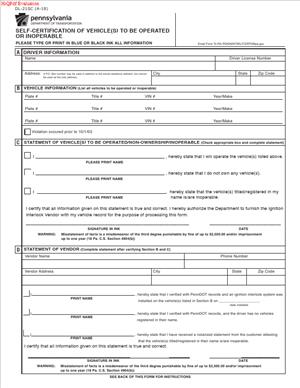
DL-21SC- Self-Certification of Vehicle(s) to Be Operated or Inoperable
Fill out nowJurisdiction: Country: United States | Province or State: Pennsylvania
The DL-21SC- Self-Certification of Vehicle(s) to Be Operated or Inoperable is a Pennsylvania form used to declare the status of one or more vehicles you own or control. It lets you formally state whether specific vehicles will be operated on public roads or will remain inoperable.
You may encounter this form when dealing with vehicle registration, insurance requirements, or compliance matters. It is commonly used to clarify the status of vehicles that are not currently being driven.
If you are about to complete the DL-21SC- Self-Certification of Vehicle(s) to Be Operated or Inoperable, you likely need to confirm important details about your vehicle’s use. The information you provide can affect registration records and insurance expectations.
This document matters because it creates a written record of your certification. Once signed and submitted, it becomes part of your official vehicle file with the state.
What is DL-21SC- Self-Certification of Vehicle(s) to Be Operated or Inoperable?
Clear definition
The DL-21SC- Self-Certification of Vehicle(s) to Be Operated or Inoperable is a written statement you complete to certify whether certain vehicles will be operated on Pennsylvania highways or are inoperable. It is a self-certification, meaning you are personally attesting that the information is true.
The form typically asks for identifying details about each vehicle. This often includes the vehicle identification number, registration information, and ownership details. You then indicate whether each vehicle will be operated or is currently inoperable.
By signing the document, you confirm that your statements are accurate to the best of your knowledge. The form becomes part of the administrative record tied to your vehicle registration.
Who typically uses this form?
Vehicle owners are the most common users. This includes individuals who own passenger cars, trucks, motorcycles, or other registered vehicles in Pennsylvania.
Businesses may also use the form if they maintain fleets and need to clarify which vehicles are actively operated. In these cases, an authorized representative often completes and signs the document.
You might also see this form used when insurance coverage has lapsed or when there are questions about whether a vehicle is being driven. In those situations, the state may require clarification through a written certification.
Why might you need this form?
You may need this form if your vehicle is not being driven but remains registered. The state may require confirmation that the vehicle will not be operated during a certain period.
It can also be used when resolving issues related to insurance reporting. If there is a gap in insurance coverage, authorities may ask you to certify that the vehicle was not operated during that time.
Another reason is to prevent penalties connected to uninsured operation. By declaring a vehicle inoperable, you are formally stating that it is not being used on public roads.
In some situations, the form helps update records when a vehicle is stored, under repair, or otherwise out of service for an extended period.
Typical real-life scenarios
- You own a car that is currently not running due to mechanical problems. The registration is still active, but the vehicle is sitting in your driveway. You may use this form to certify that the car is inoperable and not being driven.
- You have a seasonal vehicle, such as a convertible or motorcycle, that you only use during certain months. During the off-season, you may need to confirm that it will not be operated.
- You recently experienced a lapse in insurance coverage. To address administrative concerns, you may be asked to confirm that the vehicle was not operated during the uninsured period.
- You manage several vehicles for a small business. One truck is out of service and parked at your facility. The form can help document that it is not currently in operation.
- You are storing a vehicle long-term while deciding whether to sell or repair it. By completing the form, you clarify its status for state records.
When would you use DL-21SC- Self-Certification of Vehicle(s) to Be Operated or Inoperable?
You would use this form when there is a need to formally state whether a vehicle will be driven on public roads. This often arises during administrative reviews tied to registration or insurance.
The form may be used after receiving a notice that your insurance coverage was canceled or not reported. In that context, you may need to confirm that the vehicle was not operated during the time in question.
It can also be relevant when you plan to keep a vehicle off the road for a period of time. Rather than canceling registration entirely, you may certify that the vehicle will remain inoperable.
Vehicle owners, co-owners, and authorized representatives are the typical parties completing the document. The key factor is that the person signing must have authority and accurate knowledge of the vehicle’s status.
If you are responding to a written request or notice, the timing of your submission can be important. Delays may affect how your certification is processed or whether additional action is required.
Legal characteristics of DL-21SC- Self-Certification of Vehicle(s) to Be Operated or Inoperable
This form functions as a sworn or certified statement. Its effectiveness depends on accurate completion, proper identification of the vehicle, and a valid signature.
To be accepted, the information must match official records. Errors in the vehicle identification number, registration plate number, or owner name can lead to delays or rejection.
Incomplete sections are a common problem. If required fields are left blank or unclear, the submission may not be processed.
In Pennsylvania, vehicle and insurance rules are governed by state law. While other states may use similar certifications, requirements and consequences can differ. The details of how the certification affects registration status depend on Pennsylvania’s administrative framework.
It is important to understand what this document does not do. It does not automatically cancel registration, transfer ownership, or provide insurance coverage. It also does not serve as a repair certification or inspection record.
The form records your statement about operation status. It does not replace other required filings related to title, registration renewal, or insurance documentation.
Is it legally binding?
Yes, in the sense that you are making a formal certification to a state agency. When you sign the form, you are attesting that the information is true and correct.
Because it is a certification, providing false information can carry consequences. The document may include language stating that false statements are subject to penalties under applicable law.
Its binding nature comes from your signature and the submission to a government authority. Once accepted, it becomes part of your official record.
However, the form does not create a contract between you and another private party. Its effect is administrative rather than contractual. It binds you to the truthfulness of your statement, not to a negotiated agreement.
How to fill out DL-21SC- Self-Certification of Vehicle(s) to Be Operated or Inoperable
Step 1 – Review the entire form
Start by reading the full document from top to bottom. Identify each section that requires information. Make sure you understand whether you are certifying a vehicle as to be operated or inoperable. This helps prevent mistakes later.
Step 2 – Enter owner information
Provide your full legal name as it appears on the vehicle registration records. Include your current address and any other identifying details requested. The information must match official records to avoid processing delays.
Step 3 – Identify the vehicle or vehicles
List each vehicle covered by the certification. Carefully enter the vehicle identification number and registration plate number. Double-check each digit, since even a small error can cause the submission to be rejected.
Step 4 – Indicate operational status
For each vehicle, mark or state whether it will be operated or is inoperable. Follow the wording on the form exactly. Do not leave this section blank. Your selection determines how the state records the vehicle’s status.
Step 5 – Review insurance-related statements
Read any statements related to insurance coverage or operation during specific periods. Confirm that your certification accurately reflects the vehicle’s actual use. If the form references a particular date range, ensure your statement aligns with those dates.
Step 6 – Read the certification language
Before signing, review the certification clause carefully. This section typically explains that you are declaring the information to be true and correct. Make sure you understand that your signature confirms the accuracy of all entries.
Step 7 – Sign and date the form
Sign your name in the designated area. Use the same name format as listed earlier in the form. Enter the date of signing. If you are signing as an authorized representative, ensure your role is clearly indicated where required.
Step 8 – Prepare the form for submission
Check that all sections are complete and legible. Confirm that no required fields are missing. Once you are satisfied that the information is accurate and complete, the document is ready for submission according to the instructions provided with the form.
Legal terms you might encounter in DL-21SC- Self-Certification of Vehicle(s) to Be Operated or Inoperable
- Self-Certification: This means you are making a formal statement about your vehicle’s status without submitting additional proof at the same time. You are declaring the information is true based on your knowledge. The agency relies on your statement when updating its records.
- Operated Vehicle: This refers to a vehicle that is currently being driven or is intended to be driven on public roads. If you mark a vehicle as operated, you are confirming it is active and subject to insurance and registration rules. Your selection affects how the vehicle is treated in official records.
- Inoperable Vehicle: An inoperable vehicle is not being driven and is not road-ready. It may be stored, undergoing repairs, or otherwise unable to operate. By marking it inoperable, you are stating it is not in use on public highways.
- Vehicle Identification Number (VIN): The VIN is the unique 17-character code assigned to your vehicle. You must enter it exactly as it appears on your registration or title. Even one incorrect character can cause processing delays or rejection.
- Registration Record: This is the official state record showing who owns the vehicle and its current status. When you submit this form, the information you provide may update that record. Accuracy is critical because this record is used for enforcement and insurance verification.
- Owner of Record: This is the person whose name appears on the vehicle’s title or registration. Only the owner of record or an authorized representative should complete and sign the form. If the name on the form does not match the registration, it may not be accepted.
- Certification Statement: This is the section near the signature line where you affirm the truth of your statements. It often includes language about penalties for false information. Read it carefully before signing.
- Effective Date: This is the date when the vehicle’s status changed or when your certification applies. If the form asks for a date, provide the specific day the vehicle became operated or inoperable. This date can affect insurance and compliance tracking.
- Authorized Signature: This is the legally recognized signature of the owner or approved representative. A typed name is not always sufficient unless the instructions allow it. Your signature confirms you accept responsibility for the information provided.
FAQs
What date should I enter as the effective date?
Enter the exact date the vehicle’s status changed. If it became inoperable, use the day it stopped being driven. If it returned to use, use the day it was first operated again. Do not guess. Check repair receipts, storage records, or insurance documents to confirm the correct date.
Do I need to attach proof that my vehicle is inoperable?
In most cases, this document works as your sworn statement, and no extra proof is required at the time you file it. However, you should keep repair invoices, photos, or storage agreements in your records. If the agency questions your certification later, you may need to support what you stated on the DL-21SC- Self-Certification of Vehicle(S) to Be Operated or Inoperable.
Who is allowed to sign this form?
The owner listed on the registration should sign. If there are co-owners, check whether both must sign based on how the names appear on the registration record. If someone signs on behalf of the owner, that person must have proper authority and ensure their name matches any supporting authorization documents.
What happens after I submit this form?
The agency reviews your submission and updates the vehicle’s registration record if everything is complete. If information is missing, unclear, or inconsistent with existing records, processing may pause. You may receive a notice asking for corrections or clarification before the update is finalized.
Can I list more than one vehicle on the same form?
If the form includes space for multiple vehicles, you may list each one with its correct VIN and status. Make sure each entry is complete and legible. If there is not enough space, you may need a separate DL-21SC- Self-Certification of Vehicle(s) to Be Operated or Inoperable for each additional vehicle.
What if the name on my insurance does not exactly match the registration?
The name on this document should match the registration record. Small differences, such as missing middle initials, can sometimes cause delays. Before filing, compare the name on your registration card and enter it exactly as shown to avoid rejection.
Will this form change who owns the vehicle?
No. This form does not transfer ownership and does not update the title. It only reports whether the vehicle is being operated or is inoperable. Ownership changes require a separate title process.
Can I correct a mistake after I submit it?
Yes, but you must act quickly. If you notice an error in the VIN, date, or vehicle status, contact the agency or follow its correction process. You may need to submit a new form with accurate information so the registration record reflects the correct status.
Checklist: Before, During, and After DL-21SC- Self-Certification of Vehicle(s) to Be Operated or Inoperable
Before
- Confirm the vehicle’s current operational status.
- Locate the correct VIN from your title or registration card.
- Verify the owner name exactly as it appears on the registration.
- Check the date the vehicle became operated or inoperable.
- Review your insurance status for consistency.
- Gather any supporting records for your personal files.
- Read the full form to understand each required field.
During
- Print clearly in black or blue ink if completing by hand.
- Enter the VIN carefully, character by character.
- Fill in all requested owner information.
- Mark the correct operational status without leaving it blank.
- Double-check dates for accuracy.
- Read the certification statement word for word.
- Sign using your legal name as shown on the registration.
- Date your signature accurately.
After
- Make a complete copy of the signed form for your records.
- Confirm the correct submission address or method.
- Submit the form using a trackable method if available.
- Note the date you mailed or delivered it.
- Watch for confirmation or follow-up notices.
- Keep related insurance and repair records together.
- Update your personal vehicle file with the change.
- Respond promptly if you receive a correction request.
Common mistakes to avoid with DL-21SC- Self-Certification of Vehicle(s) to Be Operated or Inoperable
- Mistake: Entering the wrong VIN because you copied it from memory instead of the registration, which happens often, can lead to rejection or misapplied status changes, so do not forget to verify every character directly from the official document.
- Mistake: Using a nickname or shortened version of your name because it feels familiar, which can cause processing delays due to name mismatches, so do not forget to match the registration exactly.
- Mistake: Guessing the effective date because you do not remember it precisely, which may create conflicts with insurance records, so do not forget to confirm the date with documentation.
- Mistake: Leaving sections blank because you think they do not apply, which can result in the form being returned incomplete, so do not forget to review every field before signing.
- Mistake: Forgetting to sign and date the certification statement, which makes the submission invalid, so do not forget to complete the signature section fully.
- Mistake: Assuming submission automatically cancels insurance obligations, which can lead to coverage gaps or penalties, so do not forget to review your insurance responsibilities separately.
- Mistake: Failing to keep a copy of what you submitted because you trust the process, which makes it harder to prove what you certified later, so do not forget to store a full copy in your records.
- Mistake: Submitting multiple vehicles without clearly separating their information, which can confuse processing staff and delay updates, so do not forget to list each vehicle clearly and completely.
What to do after filling out DL-21SC- Self-Certification of Vehicle(s) to Be Operated or Inoperable
Once you complete the form, pause before sending it. Review every line. Small errors create big delays. Make sure your handwriting is legible and your numbers are clear.
- Step 1: Make a clear copy or scan of the signed form for your records.
- Step 2: Confirm the correct submission method, whether by mail or in person, based on the current instructions.
- Step 3: Place the form in an envelope with any required accompanying materials, if applicable.
- Step 4: Use a mailing method that provides tracking if you want proof of delivery.
- Step 5: Record the date you sent or delivered the form in your personal records.
- Step 6: Monitor your mail for confirmation or any follow-up notice.
- Step 7: Check your vehicle registration record once processing time has passed to ensure the status was updated.
- Step 8: Keep all related documents, including insurance confirmations and repair invoices, together in a single file.
- Step 9: Update your personal vehicle log to reflect the status change and the effective date you reported.
- Step 10: If you receive a request for clarification, respond promptly and include a copy of your original submission.
Stay organized. This document becomes part of your vehicle’s official record. If questions arise later, your copy and notes will help you show exactly what you reported and when.
Disclaimer: This guide is provided for informational purposes only and is not intended as legal advice. You should consult a legal professional.