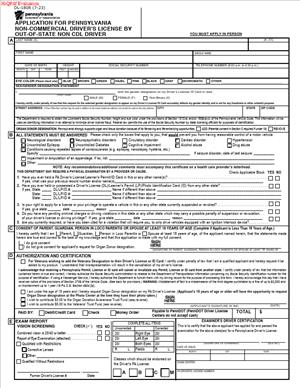
DL-180R – Application For Pennsylvania Non-Commercial Driver’s License by Out-Of-State Non CDL Driver
Fill out nowJurisdiction: Country: United States | Province or State: Pennsylvania
If you recently moved to Pennsylvania and already have a valid driver’s license from another state, you may need to complete the DL-180R – Application For Pennsylvania Non-Commercial Driver’s License by Out-Of-State Non CDL Driver. This form is part of the process for transferring your driving privileges into Pennsylvania.
The document is used when you are not applying for a commercial driver’s license. It focuses on standard, non-commercial driving privileges, such as operating a personal car, SUV, or light truck.
Filling out this form correctly matters because it connects your out-of-state driving record to your new Pennsylvania license. Errors or missing information can delay your license issuance.
If you are about to complete this form, you likely want to know what information is required, how it fits into the overall licensing process, and what to watch for before signing.
What is DL-180R – Application For Pennsylvania Non-Commercial Driver’s License by Out-Of-State Non CDL Driver?
Clear definition
DL-180R – Application For Pennsylvania Non-Commercial Driver’s License by Out-Of-State Non CDL Driver is an official state application used by individuals who currently hold a valid non-commercial driver’s license from another U.S. state and want to obtain a Pennsylvania non-commercial driver’s license.
It is a licensing application, not a contract. By completing it, you provide personal identification details, driving history information, and certifications about your eligibility to drive.
The form is generally submitted as part of an in-person licensing transaction. It works together with identity documents, proof of residency, and your current out-of-state license.
Who typically uses this form?
You would typically use this form if you recently became a Pennsylvania resident and have a valid non-commercial license issued by another state.
It is also used by people who are relocating for work, school, or family reasons and need a Pennsylvania license for daily driving, identification, or vehicle registration purposes.
Military families, college graduates who remain in the state, and employees transferred to Pennsylvania often encounter this form during their move.
Drivers upgrading from an out-of-state standard license to a comparable Pennsylvania non-commercial license also complete this application.
Why might you need this form?
Most states require new residents to obtain a local driver’s license after establishing residency. This form starts that transition in Pennsylvania.
You may need a Pennsylvania license to register a vehicle, update insurance, or meet employer identification requirements. A local license also reflects your current address.
The form allows the state to verify your driving status, check for suspensions or revocations, and confirm that you qualify for a non-commercial license in Pennsylvania.
It also serves as your written certification that the information you provide is accurate and complete.
Typical real-life scenarios
- You move from Ohio to Pennsylvania for a new job. You rent an apartment and update your mailing address. To continue driving legally with a local license, you complete this application as part of transferring your credentials.
- You graduate from a university in another state and accept a position in Pennsylvania. After signing a lease and establishing residency, you begin the process of converting your existing non-commercial license.
- You relocate to Pennsylvania to be closer to family. Even though your current license is still valid, you need a Pennsylvania license that reflects your new address and residency.
- You are a remote worker who moved across state lines but kept your previous license. After registering your vehicle in Pennsylvania, you apply for a Pennsylvania non-commercial driver’s license using this form.
When would you use DL-180R – Application For Pennsylvania Non-Commercial Driver’s License by Out-Of-State Non CDL Driver?
You would use DL-180R – Application For Pennsylvania Non-Commercial Driver’s License by Out-Of-State Non CDL Driver when you are changing your state of licensure from another U.S. jurisdiction to Pennsylvania, and you hold a non-commercial license.
This form is generally part of a broader licensing transaction. It is not typically mailed in by itself without supporting documents. Instead, it accompanies identity verification and other required paperwork.
You might complete it shortly after establishing residency. Residency is commonly tied to where you live, work, or maintain your primary home.
It is used by everyday drivers. This includes employees commuting to work, parents transporting children, retirees, and students who remain in Pennsylvania after finishing school.
The form is not used for commercial driver’s licenses. If you operate heavy vehicles for business purposes, a different application process generally applies.
You also would not use this form simply to renew an existing Pennsylvania license. It is specific to out-of-state non-commercial drivers applying for a Pennsylvania credential.
Legal characteristics of DL-180R – Application For Pennsylvania Non-Commercial Driver’s License by Out-Of-State Non CDL Driver
This form is an official government document. Its validity depends on accurate completion, proper identification, and submission through the correct process.
To be effective, the information you provide must match your supporting documents. Differences in name spelling, date of birth, or address can create delays or require clarification.
Common issues that lead to processing problems include incomplete sections, unanswered eligibility questions, unsigned certifications, or inconsistent information about your current license status.
The form typically requires you to disclose whether your driving privileges are suspended, revoked, or restricted in any state. Failing to disclose accurate information can affect the outcome of your application.
Pennsylvania, like other states, may check national driver databases to confirm your driving record. If another state reports an active suspension, that may need to be resolved before a Pennsylvania license can be issued.
This document does not automatically grant you a license. It is part of the application process. Final approval depends on eligibility review and completion of any required testing or verification.
It also does not serve as temporary driving authorization by itself. Driving privileges are generally tied to the status of your existing license and the outcome of your Pennsylvania application.
Is it legally binding?
The form itself is not a contract between you and another private party. However, it contains certifications and declarations made under penalty of law.
When you sign the application, you are affirming that the statements you provided are true and correct. That certification has legal significance.
Providing false information on a government licensing application can lead to denial, suspension, or other consequences. The binding effect comes from your sworn statements, not from a negotiated agreement.
Once the application is accepted and a Pennsylvania license is issued, your driving privileges are governed by Pennsylvania law. At that point, you are subject to the rules and regulations that apply to licensed drivers in the state.
How to fill out DL-180R – Application For Pennsylvania Non-Commercial Driver’s License by Out-Of-State Non CDL Driver
Step 1 – Review the form before writing anything
Start by reading the entire application from top to bottom. This gives you a clear picture of what information is required.
Look for sections that ask about identification, residency, and your current out-of-state license. Make sure you have your existing license and personal details available before you begin.
Step 2 – Enter your full legal name and personal details
Provide your full legal name exactly as it appears on your identity documents. Include your middle name if requested.
Fill in your date of birth, gender if required, and any other identifying details. Double-check spelling and numbers to avoid mismatches.
If you have had a name change, ensure the name on the form aligns with the documentation you plan to present.
Step 3 – Provide your current residential address
Enter your Pennsylvania residential address. This is typically the address where you live, not a temporary mailing address.
If the form asks for a mailing address that differs from your residence, complete that section carefully. Make sure the addresses are accurate and formatted clearly.
Your address connects your license to your Pennsylvania residency, so accuracy is important.
Step 4 – List your out-of-state driver’s license information
Provide details about your current non-commercial driver’s license. This often includes the issuing state, license number, and expiration date.
Copy the information directly from your license to reduce errors. Even a small number mistake can delay processing.
If your license has restrictions, ensure the information is accurately reflected if the form requests it.
Step 5 – Answer eligibility and driving history questions
The form may include questions about suspensions, revocations, medical conditions, or other factors affecting your ability to drive.
Read each question carefully before answering. Respond fully and truthfully.
If a question does not apply to you, follow the form’s instructions on how to indicate that. Leaving a required question blank can cause delays.
Step 6 – Review any certification statements
Near the end of the form, you will typically find a certification section. This section confirms that the information you provided is true and complete.
Read this part slowly. Make sure you understand what you are affirming by signing.
Check that all earlier sections are complete before moving to the signature line.
Step 7 – Sign and date the application
Sign your name exactly as instructed. Use your legal signature.
Enter the date of signing in the format requested. Do not predate or postdate the form.
Your signature finalizes the application portion of the licensing process and confirms your statements are accurate.
Legal terms you might encounter in DL-180R – Application For Pennsylvania Non-Commercial Driver’s License by Out-Of-State Non CDL Driver
- Non-Commercial Driver’s License (Class C): This is the standard driver’s license for operating personal vehicles, such as cars and light trucks. On this form, you are applying for a non-commercial class, not a commercial driver’s license (CDL). The class determines what type of vehicles you may legally drive.
- Out-of-State License: This refers to your current driver’s license issued by another state. You must provide details about this license, including the issuing state and license number. The information helps verify your driving history and eligibility.
- Surrender of License: When you apply for a Pennsylvania license, you may be required to give up your out-of-state license. This prevents you from holding two valid licenses at the same time. The form includes acknowledgments related to this requirement.
- Proof of Identity: You must confirm your legal name and identity using acceptable documents. The name you enter on the form must match your identity documents. Any mismatch can delay processing.
- Proof of Residency: This shows that you live in Pennsylvania. You may need to provide documents that list your current residential address. The address on the form becomes part of your official driving record.
- Medical Qualification: Even for non-commercial licenses, you must answer questions about medical conditions that could affect your ability to drive safely. The form may include self-certification statements about your physical or mental fitness to operate a vehicle.
- Organ Donor Designation: You may have the option to register as an organ donor. If you select this option, it will appear on your driver’s license record. Your choice becomes part of your official identification.
- Veteran Designation: Eligible applicants may request a veteran status marking on their license. You must provide supporting documentation if you select this option. The designation will appear on the face of your license.
- Real ID Compliance: You may choose between a standard license and one that meets federal identification standards. If you apply for a compliant card, you must provide additional documentation. Your selection affects how you can use the license for federal identification purposes.
- Certification Statement: At the end of the form, you must sign a statement confirming that the information you provided is true and correct. By signing, you acknowledge that false statements can lead to penalties, suspension, or denial of your application.
FAQs
Do I need to take a written or road test when I submit this form?
In many cases, if your out-of-state license is valid and in good standing, you may not need to take additional tests. However, this depends on your driving record and the status of your current license. Review the eligibility section carefully and be prepared in case further testing is required.
What happens to my current out-of-state license after I apply?
You are generally required to surrender your out-of-state license when applying for a Pennsylvania license. This prevents you from holding two active licenses at the same time. Make sure you understand this before submitting the DL-180R – Application For Pennsylvania Non-Commercial Driver’s License by Out-Of-State Non CDL Driver, especially if you still need your current license for identification.
What if my name on my out-of-state license is different from my current legal name?
The name on this form must match your current legal name as shown on your identity documents. If your name has changed due to marriage, divorce, or court order, you must bring supporting documents. Any inconsistency can delay acceptance of your application.
Can I use a P.O. Box as my address?
This document asks for your residential address. A P.O. Box alone is usually not enough because the license must reflect where you physically live. If you also receive mail at a different address, follow the instructions for mailing address fields.
What if my out-of-state license is expired?
If your license is expired, your eligibility may be affected. You may be required to complete additional steps, such as testing. Check the expiration date before completing this form and be prepared to provide full driving history details if requested.
Do I need to disclose traffic violations or suspensions?
You must answer all driving history and eligibility questions truthfully. The agency will verify your record through national databases. Omitting or misrepresenting information on the DL-180R – Application For Pennsylvania Non-Commercial Driver’s License by Out-Of-State Non CDL Driver can result in denial or suspension.
Can I apply for a Real ID at the same time?
Yes, you may choose a federally compliant option if you provide the required documents. This means bringing additional proof of identity and residency. Indicate your choice clearly on this form so your card is issued correctly.
How will I know if my application has been accepted?
You will typically receive confirmation at the service location if you apply in person. Your new license or a temporary credential may be issued after processing. If there is a problem with your DL-180R – Application For Pennsylvania Non-Commercial Driver’s License by Out-Of-State Non CDL Driver, you will be informed about what needs correction.
Checklist: Before, During, and After DL-180R – Application For Pennsylvania Non-Commercial Driver’s License by Out-Of-State Non CDL Driver
Before
- Confirm your out-of-state license is valid and not suspended.
- Gather proof of identity documents showing your full legal name.
- Collect proof of Pennsylvania residency with your current address.
- Review your driving history for recent violations or suspensions.
- Decide whether you want a Real ID-compliant card.
- Determine whether you want organ donor or veteran designations.
- Check for any name differences between your documents.
- Bring any legal name change documents if applicable.
During
- Print clearly in black or blue ink if completing by hand.
- Enter your full legal name exactly as it appears on your identity documents.
- Provide your complete residential address without abbreviations that cause confusion.
- Accurately list your out-of-state license number and issuing state.
- Answer all eligibility and medical questions honestly.
- Double-check each field for missing information.
- Review the certification statement before signing.
- Sign and date the form in the correct location.
After
- Make a copy or take a photo of the completed form for your records.
- Submit the form as instructed at the appropriate service location.
- Surrender your out-of-state license if required.
- Pay any applicable fees and keep your receipt.
- Keep any temporary license issued to you.
- Monitor your mail for your permanent license card.
- Verify that your name and address are correct on the new license.
- Update your vehicle registration or insurance records if needed.
Common mistakes to avoid with DL-180R – Application For Pennsylvania Non-Commercial Driver’s License by Out-Of-State Non CDL Driver
- Mistake: Entering a nickname or shortened name because it is commonly used, which happens out of habit, leading to processing delays or rejection, so do not forget to use your full legal name exactly as shown on your identity documents.
- Mistake: Listing a mailing address instead of your physical residence because you receive mail elsewhere, which can cause compliance issues or additional document requests, so do not forget to provide your true residential address where required.
- Mistake: Guessing your out-of-state license number from memory, which often results in errors and verification problems, so do not forget to copy the number directly from your current license.
- Mistake: Skipping medical or eligibility questions because they seem minor, which can lead to accusations of providing false information, so do not forget to answer every question fully and truthfully.
- Mistake: Forgetting to sign the certification statement because you focused only on the information fields, which makes the application invalid, so do not forget to sign and date in the designated area.
- Mistake: Failing to bring supporting documents for name changes, which happens when you assume your current license is enough, leading to delays, so do not forget to bring official proof of any legal name change.
- Mistake: Not reviewing the completed form for small errors, which commonly occurs when you are in a hurry, causing rejection or correction requests, so do not forget to carefully proofread before submission.
- Mistake: Assuming you can keep both licenses, which can result in complications or cancellation of one license, so do not forget that you may be required to surrender your out-of-state credential.
What to do after filling out DL-180R – Application For Pennsylvania Non-Commercial Driver’s License by Out-Of-State Non CDL Driver
Once you complete the form, pause before submitting it. A careful review now can save you time later. Make sure every field is legible and complete.
- Step 1: Review the entire form line by line and confirm your name, date of birth, license number, and address are accurate.
- Step 2: Attach or gather all required supporting documents, including proof of identity and residency.
- Step 3: Make a clear copy or take a photo of the signed form for your personal records.
- Step 4: Bring the completed form and your documents to the appropriate driver licensing service location.
- Step 5: Present your out-of-state license and be prepared to surrender it if required.
- Step 6: Pay any required fees and keep the receipt as proof of your application.
- Step 7: Receive and review any temporary license or interim document issued to you.
- Step 8: Wait for your permanent license card to arrive by mail if it is not issued on the spot.
- Step 9: Check the new license carefully once you receive it to confirm that all information is correct.
- Step 10: Update your employer, insurance provider, and vehicle registration records if your license number or state of issuance has changed.
Keep your copy of the completed form and any receipts in a safe place. If there is a delay or question about your application, these records will help you respond quickly. Staying organized ensures your transition to a Pennsylvania driver’s license goes smoothly.
Disclaimer: This guide is provided for informational purposes only and is not intended as legal advice. You should consult a legal professional.