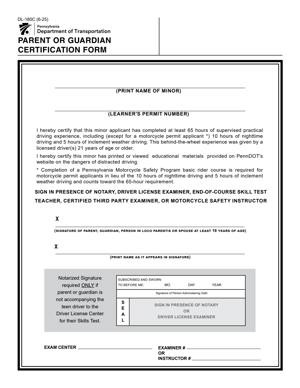
DL-180C – Parent or Guardian Certification Form
Fill out nowJurisdiction: Country: United States | Province or State: Pennsylvania
If you are helping a teen apply for a driver’s permit in Pennsylvania, you may be asked to complete the DL-180C – Parent or Guardian Certification Form. This document confirms that a parent, legal guardian, or spouse with custody gives permission for a minor to apply for driving privileges.
The DL-180C – Parent or Guardian Certification Form is not filled out by the teen. It is completed and signed by the adult who has legal responsibility for the minor. Your signature shows that you are aware of and approve the application.
This form matters because minors cannot independently apply for a learner’s permit in Pennsylvania. State rules require parental or guardian consent before driving privileges are issued.
If you are about to fill it out, you need to understand what you are certifying, what information is required, and how your signature affects the application process. A mistake or missing detail can delay the permit.
What is DL-180C – Parent or Guardian Certification Form?
Clear definition
The DL-180C – Parent or Guardian Certification Form is a consent document used in Pennsylvania for minors applying for a learner’s permit. It confirms that a parent, legal guardian, or qualifying spouse authorizes the minor to apply for driving privileges.
By signing the form, you are certifying your relationship to the minor and acknowledging your responsibility in connection with the application. The document becomes part of the teen’s driver record during the permit process.
It is typically submitted along with the minor’s learner’s permit application and other required documents. Without it, the application may not be processed.
Who typically uses this form?
This form is used by parents of minors who are seeking a learner’s permit. In many cases, one parent signs, though family circumstances may vary.
Legal guardians also use this form when they have been granted authority over the minor by a court. If the minor is married, a spouse who has custody rights may be permitted to sign, depending on the situation.
The minor does not complete this certification. Your role is to provide consent and confirm legal responsibility.
Why might you need this form?
You need this form when a person under 18 wants to apply for a learner’s permit in Pennsylvania. State rules require documented adult consent for minors.
The form provides written proof that the adult understands and approves the application. It creates a clear record that the minor is not applying without supervision or knowledge of a responsible adult.
Without this signed certification, the permit application is generally incomplete. The teen may be turned away until proper consent is provided.
Typical real-life scenarios
- Your 16-year-old is ready to start driving and has completed any required preparation for a learner’s permit. As a parent, you complete the certification to allow the application to move forward.
- You are a court-appointed guardian for a minor who lives with you. The teen wants to begin driver training, and you sign the document to confirm your legal authority and consent.
- A teen’s parents are divorced, and one parent has primary custody. That parent completes the certification to show that they have the authority to approve the permit application.
- A minor who is legally married seeks a learner’s permit. The spouse with recognized custody or responsibility may complete the certification if allowed under the circumstances.
- In each of these examples, the form serves the same purpose: to confirm that a legally responsible adult is aware of and approves the minor’s application.
When would you use DL-180C – Parent or Guardian Certification Form?
You would use the DL-180C – Parent or Guardian Certification Form at the time a minor applies for a learner’s permit in Pennsylvania. It is typically part of the initial application package.
This form is used before any driving privileges are granted. It is not a renewal document and is not used for adults. Its purpose is tied specifically to minors seeking their first permit.
You may also encounter this form if a previous application was incomplete or rejected due to missing parental consent. In that case, you would complete it so the minor can reapply.
In blended or nontraditional family situations, the form becomes especially important. It clarifies who is providing consent and whether that person has the authority to do so.
If custody arrangements have changed, the correct adult must complete the certification before the permit can be issued. The form helps the licensing authority confirm that the right person is authorizing the application.
Legal characteristics of DL-180C – Parent or Guardian Certification Form
This form is an official certification tied to a government licensing process. It requires accurate information about the minor and the signing adult.
For the form to be effective, it must be fully completed and signed by an eligible parent, guardian, or qualifying spouse. The signature typically confirms that the information provided is true and correct.
Incomplete fields, incorrect personal details, or an ineligible signer are common reasons for delays or rejection. If the adult’s relationship to the minor is unclear, additional documentation may be requested.
The form does not replace other required documents. Proof of identity, age, and residency may still be necessary as part of the permit application process.
High-level differences can arise depending on family structure. For example, when there are custody orders, the person signing may need to have legal authority under those arrangements. The form itself does not override court orders or custody agreements.
This document does not grant driving privileges by itself. It does not serve as a permit or license. It only provides consent for the minor to apply.
Is it legally binding?
Yes, the certification carries legal significance. When you sign it, you are making a formal statement that you are the parent, guardian, or otherwise authorized person and that you consent to the minor’s application.
Because it is submitted to a state agency, false statements may carry consequences. The certification relies on your truthful representation of your relationship and authority.
At the same time, the form is limited in scope. It does not create a private contract between you and the minor. It does not change custody rights, and it does not establish financial terms beyond what state law may already provide in connection with a minor driver.
Its binding effect is tied to the licensing process. It authorizes the application to proceed and documents your consent within that process.
How to fill out DL-180C – Parent or Guardian Certification Form
Step 1 – Review the form and confirm eligibility to sign
Start by reading the entire form carefully. Confirm that you are legally eligible to sign as the parent, legal guardian, or qualifying spouse of the minor. Make sure your relationship to the minor is clear and accurate.
Check that the minor is under 18 and applying for a learner’s permit. If the applicant is already 18, this certification is generally not required.
Step 2 – Enter the minor’s personal information
Fill in the minor’s full legal name exactly as it appears on other application documents. Include any required identifying details, such as date of birth or address, if requested on the form.
Accuracy is important. The information on this certification should match the information on the learner’s permit application and supporting documents. Even small differences in spelling can cause processing delays.
Step 3 – Provide your information as the parent or guardian
Enter your full legal name and any other requested details. This may include your address, contact information, or identification details.
Make sure your name is written clearly and matches any identification you may need to present. If you are a legal guardian, be prepared to show documentation establishing your authority if requested.
Step 4 – Confirm your relationship and consent
Indicate your relationship to the minor in the space provided. This may involve selecting or writing “parent,” “legal guardian,” or another qualifying status.
Read the certification statement carefully before signing. It usually confirms that you consent to the minor’s application and that the information provided is true.
Take a moment to ensure you understand what you are certifying. Your signature is a formal acknowledgment tied to the licensing process.
Step 5 – Sign and date the form properly
Sign your name in the designated area. Use your normal legal signature. Enter the date of signing clearly.
In some cases, the form may require your signature to be witnessed or notarized. If that applies, wait to sign until you are in front of the appropriate official.
Double-check that every required field is completed before submission. An unsigned or undated form will not be accepted and can delay the minor’s permit application.
Legal terms you might encounter in DL-180C – Parent or Guardian Certification Form
- Minor Applicant: This is the person under 18 who is applying for a learner’s permit. On this document, the minor’s full legal name, date of birth, and identifying details must match their other application paperwork. If the name does not match exactly, processing can be delayed.
- Parent or Legal Guardian: This refers to the adult who has legal authority over the minor. The form requires this person to certify consent. If you are not a biological parent, you may need to confirm your legal status as a guardian before signing.
- Certification: A certification is a formal statement that the information you provide is true. When you sign, you are confirming that you have authority to consent and that the details about the minor are accurate. This is more than a casual approval; it is a legal affirmation.
- Consent: Consent means you agree to allow the minor to apply for driving privileges. On this form, your consent is required before the state will issue a learner’s permit to someone under 18.
- Signature: Your signature is your legal acknowledgment of the statements on the form. It must be written exactly as required. Some versions of the form may require signing in the presence of an authorized official.
- Notarization: Notarization is the process where a notary public verifies your identity and witnesses your signature. If the form requires notarization, you must sign it in front of the notary, not before.
- Identification Number: This may refer to a driver’s license number or other official ID number. You may need to provide your own identification details so the state can confirm your identity.
- False Statement: A false statement is any incorrect or misleading information. Providing false information on this document can result in penalties, including possible suspension of the minor’s driving privilege.
- Withdrawal of Consent: This is the act of revoking your approval after the permit has been issued. Depending on the rules in place, a parent or guardian who signed may have the ability to withdraw consent, which can affect the minor’s driving status.
FAQs
Do both parents have to sign the DL-180C – Parent or Guardian Certification Form?
In most situations, only one parent or legal guardian with proper authority needs to sign this form. The key issue is whether the signer has legal custody or guardianship rights. If custody arrangements are complex, you should confirm that the signing adult has the authority to give consent. If the wrong person signs, the application may be rejected.
What if the minor’s name is spelled differently on other documents?
The name on this document must match the minor’s official identification and other application paperwork exactly. Even small differences, such as a missing middle name or suffix, can cause delays. Check the birth certificate and school or identification records before completing the form to ensure consistency.
Do I need to sign this form in front of someone?
Some versions require your signature to be witnessed or notarized. If notarization is required, you must wait and sign in front of the notary. Signing it beforehand can invalidate the document. Always review the signature instructions printed on the form before you complete that section.
What happens if I change my mind after signing?
If you decide to withdraw your consent, you generally must notify the appropriate authority in writing. This form records your original approval, but it does not automatically explain how to revoke it. You will need to follow the separate process for withdrawing consent, and until that is done, the minor’s driving privileges may remain active.
Can a legal guardian sign instead of a parent?
Yes, if you are a court-appointed legal guardian, you can typically sign this form. You may need to provide documentation showing your guardianship status. Without proof of legal authority, your signature may not be accepted.
What identification should I bring when submitting this document?
You should bring government-issued photo identification that confirms your identity matches the information listed on the form. The issuing office may check your ID to verify that you are the person who signed. If notarization is involved, the notary will also require valid identification.
Is the DL-180C – Parent or Guardian Certification Form kept on public record?
This form becomes part of the minor’s driver licensing file. It is not generally published for public viewing, but it is maintained as part of official records. It documents that proper consent was given at the time of application.
What if we make a mistake after signing?
If you notice an error after signing, do not attempt to cross out and rewrite information unless instructions clearly allow it. In many cases, you will need to complete a new copy of the form. Submitting a corrected but unclear version can delay processing or lead to rejection.
Checklist: Before, During, and After DL-180C – Parent or Guardian Certification Form
Before
- Confirm the minor meets the age requirements for a learner’s permit.
- Verify that you have legal authority to sign as parent or guardian.
- Gather your government-issued photo identification.
- Review the minor’s legal name and date of birth for accuracy.
- Check whether notarization is required.
- Read all instructions printed on the form carefully.
- Have any guardianship documents available if applicable.
During
- Print clearly in black or blue ink if completing by hand.
- Enter the minor’s full legal name exactly as shown on official records.
- Provide your full legal name without abbreviations.
- Double-check dates for accuracy, including birth date and signing date.
- Review every completed field before signing.
- Sign only in the designated signature area.
- Ensure a notary witnesses your signature if required.
After
- Make a copy of the completed and signed form for your records.
- Attach the form to the minor’s learner’s permit application.
- Submit it through the proper channel, such as in person if required.
- Confirm that the application packet is complete.
- Keep proof of submission if available.
- Monitor the application status if tracking is provided.
- Store your copy in a safe place with other driving records.
Common mistakes to avoid with DL-180C – Parent or Guardian Certification Form
- Mistake: Signing the form without legal authority, which happens when a relative assumes they can sign; this can cause rejection of the application and delays, so do not forget to confirm your custodial or guardianship rights first.
- Mistake: Misspelling the minor’s legal name because you rely on memory; this leads to processing errors or mismatched records, so do not forget to copy the name exactly from an official document.
- Mistake: Signing before meeting a notary when notarization is required; this invalidates the notarization and forces you to complete a new form, so do not forget to wait and sign in the notary’s presence.
- Mistake: Leaving required fields blank because they seem optional; incomplete forms are often rejected, so do not forget to review every section carefully before submission.
- Mistake: Using nicknames or shortened names for the parent or guardian; this creates identity verification problems, so do not forget to use your full legal name as shown on your ID.
- Mistake: Failing to keep a copy of the signed document; this makes it difficult to prove consent later, so do not forget to make and store a clear copy for your records.
- Mistake: Providing outdated or incorrect identification information; this can delay verification, so do not forget to check that your ID is current and matches what you write on the form.
- Mistake: Assuming consent cannot be withdrawn; misunderstanding your ongoing responsibility can affect the minor’s driving status, so do not forget to learn the separate steps required if you later choose to revoke consent.
What to do after filling out DL-180C – Parent or Guardian Certification Form
Once you complete and sign the form, your role is not quite finished. You need to make sure it is properly submitted and recorded as part of the minor’s learner’s permit application.
Start by reviewing the entire document one more time. Look for missing signatures, incorrect dates, or blank fields. Small errors can slow down processing.
- Step 1: Make at least one clear photocopy or scanned copy of the signed form for your personal records.
- Step 2: Attach the original signed form to the minor’s learner’s permit application packet.
- Step 3: Confirm whether submission must be done in person or can be mailed, and follow the required method.
- Step 4: Bring your identification if you are submitting the paperwork in person, in case verification is required.
- Step 5: If notarization was required, double-check that the notary seal and signature are present and legible.
- Step 6: Ask for confirmation that the paperwork has been received and accepted for processing.
- Step 7: Keep any receipt, confirmation slip, or transaction record provided at submission.
- Step 8: Monitor mail or official communication for updates about the learner’s permit status.
- Step 9: File your copy of the form with other important documents related to the minor’s driving privileges.
- Step 10: Stay aware of your continuing responsibilities, including supervision requirements and the option to withdraw consent if circumstances change.
After submission, the form becomes part of the minor’s official licensing record. You do not need to refile it unless instructed. However, you remain the consenting adult tied to that permit until the minor reaches adulthood or the legal relationship changes.
Keep your contact information current with the appropriate authority if required. If you move or change your name, make sure your records are accurate so you can be reached about any issues related to the minor’s driving status.
Being organized now can prevent confusion later. A simple folder with copies of the permit application, this certification, and any related notices will make it easier to respond quickly if questions arise.
Disclaimer: This guide is provided for informational purposes only and is not intended as legal advice. You should consult a legal professional.