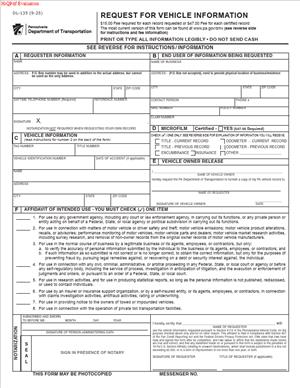
DL-135 – Request for Vehicle Information
Fill out nowJurisdiction: Country: United States | Province or State: Pennsylvania
If you are looking for details about a vehicle registered in Pennsylvania, the DL-135 – Request for Vehicle Information is the form used to ask for those records. It is a written request submitted to the state agency that maintains vehicle registration information.
You might be completing this form because you need ownership details, title history, or registration data connected to a specific vehicle. The document allows you to formally ask for that information instead of relying on informal sources.
This form matters because vehicle records are not released automatically. Access is limited and controlled. A properly completed request increases the chances that your submission will be processed without delay.
Before you begin filling it out, it helps to understand what the form does, who uses it, and what kind of information it can provide. That context makes the completion process clearer and more efficient.
What is DL-135 – Request for Vehicle Information?
Clear definition
DL-135 – Request for Vehicle Information is a state-issued document used to request official motor vehicle record information for a specific vehicle. It is a formal written submission asking the state to release details from its vehicle registration database.
The form generally requires you to identify the vehicle clearly. This often includes the vehicle identification number, plate number, or title number. The more precise the information, the easier it is for the agency to locate the correct record.
The document also requires you to identify yourself and explain your reason for requesting the information. Vehicle records are protected, so the form is designed to confirm that your request fits within allowed purposes.
This is not a casual inquiry. It is an official filing that becomes part of the administrative record once submitted.
Who typically uses this form?
Private individuals sometimes use this form when they are involved in a dispute, transaction, or investigation involving a vehicle. For example, someone may need confirmation of current or prior ownership.
Attorneys and legal professionals may submit the form as part of preparing for a civil case. They might seek title history, lien information, or other official registration details connected to a claim.
Insurance representatives may use the form when investigating a claim involving a vehicle. Accurate registration data can clarify who owned the vehicle at a specific time.
Businesses involved in towing, storage, or recovery of vehicles may also use this document. In those situations, official records can help determine the responsible owner.
Why might you need this form?
You may need this form if you cannot obtain reliable vehicle information from the person involved. Official records provide a more dependable source than verbal statements or informal paperwork.
In some cases, you might need documentation for court proceedings. Certified vehicle information can support a claim about ownership, transfers, or liens.
You may also need confirmation before completing a transaction. For example, verifying title status can help clarify whether there are outstanding interests in the vehicle.
Another reason could involve compliance. Certain professional or business activities require documented proof that you made a formal request for vehicle information.
Typical real-life scenarios
- You were involved in a minor accident, and the other driver provided limited information. You want to confirm the vehicle’s registration details through official records.
- You purchased a vehicle and later discovered inconsistencies in the title paperwork. Requesting vehicle information helps you understand the title history and prior ownership.
- A vehicle has been abandoned on your property. You need to identify the registered owner before taking further steps.
- You are preparing for a civil lawsuit related to vehicle ownership. Official registration information may support your position in the case.
- An insurance claim is being reviewed, and there is a question about who owned the vehicle on the date of loss. Official records can clarify that timeline.
When would you use DL-135 – Request for Vehicle Information?
You would typically use DL-135 – Request for Vehicle Information when you need official vehicle record data maintained by the state and cannot obtain it directly from the owner or seller.
This often happens in disputes. If two parties disagree about who owned a vehicle at a certain time, a formal records request may provide clarity.
You might also use it during due diligence before completing a vehicle-related transaction. While buyers often rely on title documents provided by sellers, some situations call for verification through official channels.
Businesses that manage vehicles as part of their operations may use the form when conducting internal reviews or responding to incidents. For example, confirming the status of a vehicle before resale or disposal.
Legal professionals may file this request during pre-trial preparation. The information can help establish a timeline of ownership or confirm registration status.
In some situations, you may need the information to comply with procedural requirements in another process, such as notifying an owner or confirming lienholder details.
The form is generally used when accuracy and official documentation matter. It is not intended for curiosity or casual background checks.
Legal characteristics of DL-135 – Request for Vehicle Information
DL-135 – Request for Vehicle Information is an administrative request form. Its effectiveness depends on accurate completion, a qualifying purpose, and compliance with submission requirements.
For the request to be processed, the vehicle must be clearly identified. Incomplete or incorrect identification details can delay processing or lead to rejection.
Your identity and stated reason for requesting the information are also important. Vehicle records are protected by privacy rules. Requests that do not meet permitted uses may be denied.
Payment of the required fee, if applicable, is commonly a condition of processing. Missing or incorrect payment details can result in the form being returned.
Across different states, rules about vehicle record access may vary. Some jurisdictions limit release more strictly than others. In Pennsylvania, the request process is structured and purpose-based.
This form does not transfer ownership. It does not create a lien. It does not update registration records. It is only a request for information already on file.
Submitting the form does not guarantee approval. The agency reviews each request to determine whether it meets the required standards for release.
Is it legally binding?
DL-135 – Request for Vehicle Information is not a contract between you and another private party. It does not create mutual obligations like an agreement would.
However, when you sign the form, you are generally certifying that the information you provide is accurate and that your stated purpose is valid. That certification can carry legal significance.
Providing false information on an official request form may have consequences. The form relies on truthful and complete disclosure.
The document becomes legally effective as an administrative filing once submitted and accepted for processing. Its legal effect is limited to requesting and, if approved, receiving vehicle record information.
It does not decide disputes. It does not establish ownership by itself. It simply provides access to existing records that may then be used in other legal or business contexts.
How to fill out DL-135 – Request for Vehicle Information
Step 1 – Identify the vehicle clearly
Begin by entering the vehicle’s identifying information exactly as requested. This typically includes the vehicle identification number and may also include the registration plate number or title number. Accuracy is critical. Double-check every character before moving on.
Step 2 – Provide your personal or business information
Enter your full legal name and current address. If you are submitting the request on behalf of a business, provide the business name and any required identifying details. Make sure the contact information is complete so the agency can respond to your submission.
Step 3 – State your reason for the request
Indicate the purpose for which you are requesting the vehicle information. Read the listed categories carefully and select the one that matches your situation. If a written explanation is required, describe your purpose clearly and directly.
Step 4 – Choose the type of record requested
Some versions of the form allow you to specify the type of information you need, such as current ownership, title history, or lien details. Mark the appropriate option so your request is processed correctly.
Step 5 – Review certification statements
Read the certification section in full. This section confirms that the information you provided is true and that your request meets allowed purposes. Take a moment to ensure everything you entered is accurate before signing.
Step 6 – Sign and date the form
Sign your name in the designated space. Enter the current date. If the form requires a handwritten signature, ensure it is clear and matches the name provided earlier in the document.
Step 7 – Prepare payment if required
Check whether a fee is required for the requested information. If so, complete the payment section as instructed on the form. Confirm that the payment details are accurate and included with your submission.
Step 8 – Make a copy for your records
Before submitting, create a complete copy of the filled-out form and any attachments. Keeping a copy helps you track what was requested and when the submission was made.
Step 9 – Submit the completed form
Send or deliver the completed document according to the submission instructions provided with the form. Ensure all required sections, signatures, and payment details are included so the request can be processed without unnecessary delay.
Legal terms you might encounter in DL-135 – Request for Vehicle Information
- Driver Privacy Protection Act (DPPA): This is a federal law that restricts access to personal information in motor vehicle records. On this form, you may need to certify that your request fits one of the permitted uses under the DPPA. Your reason for requesting the information must match one of those legally allowed categories.
- Permitted Use: A permitted use is the legally approved reason for accessing vehicle or owner information. The form typically lists several categories, such as use in litigation, insurance claims, or business verification. You must select the option that accurately reflects why you are requesting the record.
- Motor Vehicle Record (MVR): An MVR is the official record maintained by the state for a vehicle or driver. In this context, it usually refers to ownership, title history, registration status, or lien information tied to a specific vehicle.
- Certified Record: A certified record is an official copy that includes a certification statement from the agency. This type of record is often required for court proceedings or formal disputes because it carries evidentiary weight.
- Non-Certified Record: A non-certified record provides the requested information but does not include official certification language. It may be suitable for internal review, research, or preliminary investigation.
- Lienholder: A lienholder is a lender or creditor that has a legal interest in the vehicle until a debt is paid. If a vehicle has an active lien, that information may appear in the record you request.
- Vehicle Identification Number (VIN): The VIN is a unique 17-character code assigned to each vehicle. The form requires the Vehicle Identification Number to ensure the correct vehicle record is retrieved. Even one incorrect character can result in rejection or retrieval of the wrong record.
- Requester Certification: This is your signed statement confirming that the information you provided is true and that your request complies with applicable laws. By signing, you accept responsibility for the accuracy of your statements.
- Authorized Representative: An authorized representative is someone legally permitted to request information on behalf of another person or business. If you act in this capacity, you may need to indicate your title or relationship.
- Record Fee: This is the payment required to process the request. The fee varies depending on the type of record requested. Payment must usually accompany the form, or the request will not be processed.
FAQs
What happens if I enter the wrong Vehicle Identification Number on this form?
If you enter an incorrect VIN, the agency may reject your request or provide information for the wrong vehicle. Review all 17 characters carefully before submitting. Double-check numbers that look similar, such as “0” and “O” or “1” and “I.” An incorrect VIN can delay your request and require you to pay another fee.
How do I know if my reason qualifies as a permitted use?
Read the list of permitted uses carefully and compare them to your actual purpose. Your selection must accurately describe why you need the information. If your situation involves litigation, insurance, lien enforcement, or business verification, make sure your explanation matches the selected category. Do not choose a category just because it seems close; your certification confirms the truth of your selection.
Do I need a certified copy of the record?
You need a certified copy if you plan to present the record in court or in a formal legal dispute. A certified record includes official authentication from the agency. If you only need the information for personal review or informal use, a non-certified copy may be sufficient.
What identification information must match exactly?
Your name and address should match your official identification or business records. If you are requesting records as a company representative, ensure the business name is written exactly as it appears in official filings. Inconsistent information can cause delays or require clarification before processing.
Can I request information for more than one vehicle at a time?
This document is typically completed for one vehicle per submission. If you need information for multiple vehicles, you may need to complete separate forms and pay separate fees. Confirm that each request clearly identifies a single Vehicle Identification Number and includes the required payment.
What changes in the public record after I submit DL-135 – Request for Vehicle Information?
Submitting this form does not change the vehicle’s title, registration, or ownership. It only allows you to obtain existing information. The public record remains the same unless a separate filing is made to update ownership, lien status, or registration details.
What if I am requesting information on behalf of someone else?
If you act as an authorized representative, you must clearly indicate your role. Provide your own contact information and identify the person or business you represent. Ensure you have authority to request the information and that your explanation of purpose aligns with permitted use requirements.
How will I know if my request was accepted?
Once processed, you will receive the requested record or a notice explaining any issues. If information is missing, incomplete, or inconsistent, the agency may return the request unprocessed. Keep copies of everything you submit so you can quickly correct and resubmit if needed.
Checklist: Before, During, and After DL-135 – Request for Vehicle Information
Before
- Confirm the full 17-character VIN directly from the vehicle or official documents.
- Decide whether you need a certified or non-certified record.
- Review the list of permitted uses and identify the one that matches your purpose.
- Gather your personal or business identification details.
- Verify spelling of names and accuracy of mailing address.
- Confirm you have proper authority if requesting on behalf of another person or company.
- Check the current fee amount and acceptable payment method.
- Set aside time to complete the form without rushing.
During
- Write clearly and legibly if completing by hand.
- Enter the Vehicle Identification Number carefully and double-check each character.
- Complete every required field; do not leave mandatory sections blank.
- Select the correct permitted use category.
- Provide a detailed but accurate explanation if the form requires it.
- Choose the correct type of record requested.
- Review the certification language before signing.
- Sign and date the form exactly as your name appears.
- Attach the correct payment.
After
- Make a full copy of the completed form and payment record.
- Store your copy in a secure file for future reference.
- Submit the form using the approved delivery method.
- Track delivery if you use a mail service with tracking.
- Note the date of submission.
- Monitor your mail or contact method for a response.
- Respond promptly if the agency requests clarification.
- File the received record in an organized system.
- Update any internal case files or documentation with the new information.
Common mistakes to avoid with DL-135 – Request for Vehicle Information
- Mistake: Entering an incorrect Vehicle Identification Number because of rushed copying, which can lead to rejection or receiving the wrong record, and not forgetting to verify all 17 characters directly from an official source.
- Mistake: Selecting the wrong permitted use because it seems similar to your purpose, which can result in denial of the request, and not forgetting to match your exact reason to the listed category.
- Mistake: Forgetting to sign the certification section, which happens when you focus only on the data fields, leading to automatic rejection, and not forgetting that an unsigned form is incomplete.
- Mistake: Sending the wrong fee amount due to outdated information, which delays processing, and not forgetting to confirm the current fee before submission.
- Mistake: Failing to indicate representative capacity when acting for a business, which creates confusion about authority, and not forgetting to clearly state your title or relationship.
- Mistake: Leaving required fields blank because they seem optional, which can cause processing delays, and not forgetting to review the entire form line by line before submitting.
- Mistake: Using inconsistent name or address information compared to official records, which may trigger verification issues, and not forgetting to match your identification details exactly.
- Mistake: Not keeping a copy of the submitted form, which leaves you without proof of what was requested, and not forgetting to store a complete duplicate for your records.
What to do after filling out DL-135 – Request for Vehicle Information
Once you complete the form, your focus shifts to proper submission and follow-up. Small administrative steps now can prevent delays later.
- Step 1: Review the entire form again for accuracy and completeness.
Read each section slowly. Confirm the Vehicle Identification Number, your contact information, your selected permitted use, and your signature.
- Step 2: Confirm payment details.
Make sure the payment matches the requested record type. Ensure the payment method meets the agency’s requirements and is correctly filled out.
- Step 3: Make complete copies.
Copy the signed form and proof of payment. If you are submitting supporting documentation, copy that as well. Keep everything together in one file.
- Step 4: Prepare your submission package.
Place the form and payment together. Ensure nothing is missing. If mailing, use a secure envelope and write the correct address clearly.
- Step 5: Choose a reliable delivery method.
If mailing, consider a method that provides delivery confirmation. This gives you proof that the request was received.
- Step 6: Record the submission date.
Write down the date you sent or delivered the request. This helps you track processing time and follow up if needed.
- Step 7: Monitor for correspondence.
Watch your mail or other designated contact channel for the requested record or any notice of deficiency. Respond promptly if additional information is requested.
- Step 8: Review the received record carefully.
Check that the VIN matches your request and that the information provided aligns with your expectations. If something appears incorrect, note the discrepancy immediately.
- Step 9: File the record securely.
Store the document in a secure location. If it relates to litigation, insurance, or a business matter, add it to the appropriate case or transaction file.
- Step 10: Update your internal records.
If the information affects a pending claim, court case, lien action, or internal business decision, update your notes and documentation accordingly.
Taking these steps ensures that your request is not only submitted properly but also integrated into your broader legal or administrative process in a clear and organized way.
Disclaimer: This guide is provided for informational purposes only and is not intended as legal advice. You should consult a legal professional.