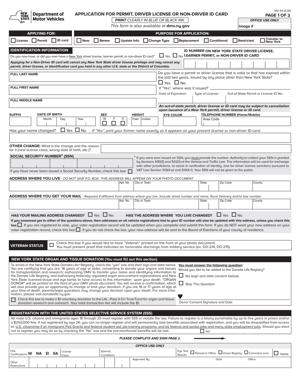
MV-44- Application for Permit, Driver License or Non-Driver ID Card
Fill out nowJurisdiction: Country: United States | Province or State: New York
The MV-44- Application for Permit, Driver License or Non-Driver ID Card is the main form you use in New York to apply for a learner permit, driver license, or non-driver identification card. It is the starting point for getting legal driving privileges or an official state-issued ID.
You complete this form when you are applying for the first time, changing your license class, renewing in certain situations, or updating personal information tied to your driving record. It gathers your identity details, residency information, and licensing history.
This document matters because it connects directly to your driving privileges and your legal identity within the state’s motor vehicle system. Errors or missing information can delay your application or prevent issuance of your permit or license.
If you are about to fill it out, you need to understand what the form is asking for, how your answers are used, and what common mistakes lead to problems. This guide walks you through the purpose, structure, and completion of the form in practical terms.
What is MV-44- Application for Permit, Driver License or Non-Driver ID Card?
Clear definition
The MV-44- Application for Permit, Driver License or Non-Driver ID Card is an official state motor vehicle form used to request a learner permit, driver license, or non-driver identification card in New York. It collects personal, identification, and eligibility information.
The form serves as your formal request for driving privileges or state-issued identification. By signing it, you confirm that the information you provide is true and complete.
It also allows the licensing authority to determine whether you meet age, identity, residency, and legal presence requirements. The information you provide is entered into your motor vehicle record.
Who typically uses this form?
You use this form if you are applying for your first learner permit. New drivers, including teenagers and adults who have never held a license, commonly complete it.
You also use it if you are converting a learner permit to a driver license after meeting testing requirements. In some situations, you complete it when upgrading to a different class of license, such as a commercial or motorcycle class.
People who need a non-driver ID card use this form as well. This applies to individuals who do not drive but need official photo identification issued by the state.
Existing license holders may complete the form to update certain personal details, replace a lost or damaged credential, or change the type of document they hold.
Why might you need this form?
You need this form any time you are asking the state to issue or reissue a driving-related credential. It acts as your official request and statement of eligibility.
Without this form, the licensing agency does not have the necessary information to evaluate your identity, residency, and qualifications. It is the gateway to scheduling tests and receiving your physical credential.
If your name has changed, you may need to file this form to reflect that change on your permit or license. If your previous credential expired or was lost, this form may also be required to obtain a new one.
It is also used when you choose between different document types, such as a standard document or other available formats. Your selection affects the type of identification issued.
Typical real-life scenarios
- You are a high school student preparing to apply for your first learner permit. You gather your identity documents and complete the MV-44- Application for Permit, Driver License or Non-Driver ID Card to begin the testing process.
- You recently moved to New York from another state and need to apply for a New York driver license. As part of transferring your driving privileges, you complete this form to request a new license.
- You do not drive but need a government-issued photo ID for banking, travel within the country, or other identification purposes. You complete the same form to apply for a non-driver ID card.
- Your driver license was lost or damaged. You fill out the form to request a replacement credential that reflects your current information.
- You have changed your legal name due to marriage or another legal reason. You complete the form to update your license or ID so it matches your other identity records.
When would you use MV-44- Application for Permit, Driver License or Non-Driver ID Card?
You use this form at the beginning of the licensing process. If you are applying for a learner permit, the form is part of your initial submission before taking a written knowledge test.
You also use it after passing required tests, when you are ready to move from a permit to a full driver license. In that case, the form helps update your status and issue the appropriate credential.
If you are changing the class of your license, such as adding a motorcycle privilege, you may use this form as part of that request. The form signals that you are seeking a different type of authorization.
When replacing a lost, stolen, or destroyed permit or license, this form is commonly used to request a duplicate. It confirms your identity and current address.
If your personal information has changed, such as your name or other identifying details, you may complete the form to update your motor vehicle record and obtain a corrected credential.
For non-drivers, you use the form when applying for an ID card for the first time or replacing an existing one. It functions as the standard application document for both drivers and non-drivers.
Legal characteristics of MV-44- Application for Permit, Driver License or Non-Driver ID Card
This form is an official government application. Its legal effect comes from your signature and the truthfulness of the information you provide. By signing, you are certifying that your statements are accurate.
The form typically requires personal details such as your full legal name, date of birth, address, and other identifying information. It may also ask questions about your driving history and medical conditions that affect driving.
For the form to be effective, it must be completed fully and signed where required. Incomplete answers, missing signatures, or inconsistent information can result in rejection or delay.
Providing false information can lead to denial of your application and may affect your driving record. The certification section is not a formality. It confirms that your statements are made under penalty of law.
The form itself does not grant you driving privileges. It is an application. Your permit or license is issued only after eligibility is confirmed and any required tests or reviews are completed.
Requirements and document standards can vary by state. In New York, specific identity and residency proofs are required in addition to the completed form. The form works together with those supporting documents.
Common problems include mismatched names between the form and identity documents, incorrect license class selection, and failure to answer required questions. Reviewing your answers before submission helps avoid these issues.
Is it legally binding?
The MV-44- Application for Permit, Driver License or Non-Driver ID Card is legally significant because you sign a certification that your information is true. That certification creates a legal obligation to provide accurate information.
It is not a contract between you and another person. Instead, it is a formal declaration to a government agency. Its binding effect relates to the truth of your statements and your eligibility for the credential requested.
Once accepted, the information becomes part of your official motor vehicle record. That record can be used for enforcement of traffic laws and administrative actions related to your driving privileges.
If information on the form is incorrect, the consequences can include denial, suspension, or other administrative actions, depending on the situation. The form therefore carries legal weight, even though it is an application rather than an agreement.
How to fill out MV-44- Application for Permit, Driver License or Non-Driver ID Card
Step 1 – Select the type of document you are applying for
At the beginning of the form, you indicate what you are requesting. This may include a learner permit, driver license, or non-driver ID card. Read each option carefully and select the one that matches your situation. Choosing the correct category ensures your application is processed under the right standards.
Step 2 – Provide your full legal name and personal details
Enter your full legal name exactly as it appears on your identity documents. Include your date of birth, gender if requested, and other identifying details. Make sure spelling and numbers match your supporting documents. Even small differences can delay processing.
Step 3 – Enter your residential and mailing address
Provide your current residential address. This is where you live, not a temporary or mailing-only address unless the form allows it. If you receive mail at a different address, enter that in the designated mailing address section. Accuracy here affects where your credential and official notices are sent.
Step 4 – Answer identification and eligibility questions
The form may include questions about your Social Security number or other identifying numbers. Fill in the requested information carefully. If you are asked about previous licenses, list them as accurately as possible, including out-of-state credentials.
Step 5 – Respond to medical and driving history questions
You may be asked about medical conditions that affect your ability to drive safely. Read each question closely and answer truthfully. These responses help determine whether additional review or restrictions are necessary.
You may also be asked about prior suspensions or revocations. Provide complete and honest answers based on your history.
Step 6 – Choose document type or additional options if available
If the form provides options for different types of credentials, select the one you are applying for. This may involve choosing between standard and other available document formats. Your selection affects the documentation you must present and the type of card issued.
Step 7 – Review all information for accuracy
Before signing, read through every section of the form. Confirm that names, dates, and numbers are correct. Check that you answered all required questions. Correcting mistakes before submission reduces delays.
Step 8 – Sign and date the certification
Sign your name in the certification section exactly as required. Enter the date of signing. By signing, you confirm that all information is true and complete. An unsigned form is generally not accepted.
Step 9 – Submit the form with required supporting documents
Submit the completed MV-44- Application for Permit, Driver License or Non-Driver ID Card along with the required identity and residency documents. Ensure that all materials are presented together so your application can be processed without unnecessary delay.
Legal terms you might encounter in MV-44- Application for Permit, Driver License or Non-Driver ID Card
- Learner Permit: A learner permit is a limited authorization that allows you to practice driving under supervision. On this form, you select this option if you are applying for your first driving credential. It usually requires passing a written knowledge test and a vision screening before it is issued.
- Driver License Class: This refers to the type of vehicle you are legally allowed to operate. The form may ask you to choose a class, such as one for standard passenger vehicles or commercial vehicles. Your selection affects testing requirements and driving privileges.
- Non-Driver ID Card: A non-driver identification card is a state-issued photo ID for people who do not drive. When you choose this option on the form, you are requesting identification only, not driving privileges. It is often used for banking, travel within the country, or verifying age.
- Renewal: Renewal means you are extending the validity of an existing permit, license, or ID card. On this document, you indicate that you already hold a credential and want to continue it. You must confirm your current information and eligibility before it can be renewed.
- Replacement: A replacement is requested if your current credential is lost, stolen, or damaged. The form allows you to state this reason so a new card can be issued with the same number and details. You may need to confirm that the original is no longer in your possession.
- Endorsement: An endorsement is an added authorization that allows you to operate specific types of vehicles, such as motorcycles. If you select an endorsement, you are confirming that you meet additional testing or training requirements. The endorsement will appear on your final credential.
- Restriction: A restriction limits how or when you may drive. For example, you might be required to wear corrective lenses or drive only during certain hours. If a restriction applies, it becomes part of your official driving record.
- Certification: Certification is the section where you confirm that all information provided is true and complete. By signing, you acknowledge that false statements can lead to penalties or denial. This signature makes the document legally enforceable.
- Organ Donor Designation: This is your choice to register as an organ and tissue donor. If you select this option, your status will be recorded and printed on your card. It is a voluntary decision made directly on the application.
- Proof of Identity: Proof of identity refers to the supporting documents you must present to confirm who you are. The form requires you to provide identifying details that must match those documents exactly. Inconsistent information can delay processing.
FAQs
What information must match exactly between this form and my identity documents?
Your full legal name, date of birth, and current residential address must match the documents you present. If your birth certificate, passport, or other identification shows a different name spelling or order, the information on this document must reflect that exact version. If you have legally changed your name, you need documentation that connects your old name to your new one so the record can be updated correctly.
Do I need to complete every section of the MV-44- Application for Permit, Driver License or Non-Driver ID Card?
You must complete all sections that apply to the type of credential you are requesting. Some areas only apply to first-time applicants, while others are specific to renewals or replacements. If a question does not apply to your situation, follow the instructions on the form for skipping or marking it appropriately rather than leaving it blank.
When does my new permit, license, or ID become effective?
Your new credential generally becomes effective once it is issued and recorded by the agency. The date of issue will appear on the card or on your temporary document. Until you receive confirmation or a temporary authorization, you should not assume your status has changed.
Who is allowed to sign this document?
You must sign it yourself if you are legally able to do so. If the applicant is under a certain age or otherwise required to have consent, a parent or guardian may also need to sign. The signature confirms that the information provided is accurate and that you understand the responsibilities tied to the credential.
What happens if I check the wrong box for renewal, replacement, or new application?
Selecting the wrong box can delay processing because the agency reviews your request based on that selection. If you notice the error before submission, correct it clearly. If it has already been submitted, you may need to clarify your intent in person so your record reflects the correct action.
Do I need to attach documents to this form?
Yes, you must present required proof of identity, age, and residency when submitting this form. The document itself does not replace supporting identification. The agency will review your paperwork to confirm that the details you entered are accurate before accepting your application.
Will the information I provide update my official driving record?
Yes. The details you enter, including your address, endorsements, and donor designation, are recorded in your official file once approved. That means any change you request becomes part of the public and administrative record tied to your credential.
Can I correct mistakes after submitting the MV-44- Application for Permit, Driver License or Non-Driver ID Card?
If you realize there is an error, contact the issuing office as soon as possible. Minor corrections may be handled before the card is produced, but significant errors might require submitting a new form. Acting quickly helps prevent incorrect information from being printed on your credential or stored in your record.
Checklist: Before, During, and After MV-44- Application for Permit, Driver License or Non-Driver ID Card
Before
- Confirm which credential you are applying for: permit, license, renewal, replacement, or non-driver ID.
- Gather proof of identity, date of birth, and residency documents.
- Verify that your legal name appears the same on all documents.
- Check whether you need a vision test or written test.
- Review eligibility requirements for endorsements or upgrades.
- Confirm your current address and mailing address.
- Bring payment for required fees.
- If applicable, obtain parental or guardian consent.
During
- Read each section carefully before marking any boxes.
- Print your full legal name clearly and legibly.
- Double-check your date of birth and identification number entries.
- Select the correct application type.
- Answer medical and driving history questions honestly.
- Confirm any endorsements or restrictions you are requesting.
- Review organ donor selection before finalizing.
- Sign and date the certification section.
After
- Obtain a receipt or confirmation of submission.
- Keep copies of all supporting documents.
- Store any temporary permit or interim document safely.
- Monitor mail for your official card.
- Review your issued credential for accuracy immediately.
- Report any errors as soon as you notice them.
- Update your address with other relevant institutions if it has changed.
- Retain payment proof for your records.
Common mistakes to avoid with MV-44- Application for Permit, Driver License or Non-Driver ID Card
- Mistake: Entering a nickname instead of your full legal name, which happens because people use informal names daily, leading to record mismatches and delays—do not forget to match your name exactly to your identity documents.
- Mistake: Choosing the wrong application type, often due to confusion between renewal and replacement, which can result in processing errors or additional fees—do not forget to verify your current credential status before checking a box.
- Mistake: Leaving required questions blank because they seem irrelevant, which can cause rejection of your submission—do not forget to follow instructions for every field and mark items properly.
- Mistake: Providing an outdated address, often because you recently moved, which may lead to your card being mailed to the wrong location—do not forget to enter your current residential and mailing address accurately.
- Mistake: Forgetting to sign the certification section, which happens when you focus only on the information fields, resulting in an incomplete application—do not forget that your signature is mandatory.
- Mistake: Bringing insufficient proof of identity, often due to misunderstanding document requirements, which can stop your application from being processed—do not forget to confirm document requirements in advance.
- Mistake: Failing to review medical disclosure answers carefully, which may unintentionally provide incorrect information and affect eligibility—do not forget to read each health-related question thoroughly before responding.
- Mistake: Not checking the final printed credential for errors, which can leave incorrect data on your official record—do not forget to inspect the card immediately after receiving it.
What to do after filling out MV-44- Application for Permit, Driver License or Non-Driver ID Card
Once you have completed the form, pause and review everything line by line. Look for spelling errors, incorrect numbers, and unchecked boxes. Small mistakes can create delays or require a new submission.
- Step 1: Make a clear copy or take a photo of the completed form for your personal records.
- Step 2: Organize your supporting documents in the order they may be requested.
- Step 3: Confirm the office location and hours where you will submit the form.
- Step 4: Bring acceptable payment for all required fees.
- Step 5: Submit the form in person if required and present your identification documents.
- Step 6: Complete any required testing, such as vision or written exams, if you are applying for a permit or new license.
- Step 7: Receive and review any temporary document issued to you.
- Step 8: Keep your receipt or confirmation notice in a safe place.
- Step 9: Monitor your mail for the arrival of your official permit, license, or ID card.
- Step 10: When your card arrives, check your name, address, class, endorsements, and restrictions for accuracy.
- Step 11: If any detail is incorrect, contact the issuing office promptly to request correction.
- Step 12: Store your new credential securely and update your records with employers, schools, or other institutions if your status has changed.
Taking these steps protects you from future complications. Careful follow-through ensures your driving or identification status is properly recorded and recognized.
Disclaimer: This guide is provided for informational purposes only and is not intended as legal advice. You should consult a legal professional.