DOH-4156 – Influenza or Pneumococcal Immunization Consent Form
Fill out nowJurisdiction: Country: United States | Province or State: New York
The DOH-4156 – Influenza or Pneumococcal Immunization Consent Form is a health consent document used in New York to authorize a flu or pneumococcal vaccination. You complete it before receiving the vaccine. It confirms that you understand the benefits and possible risks and that you agree to be vaccinated.
This form is commonly used in pharmacies, clinics, hospitals, long-term care facilities, and community vaccination sites. It creates a written record of your permission. It also documents important health information that providers rely on before administering a vaccine.
If you are about to sign this form, you are likely preparing to receive a flu shot or a pneumococcal vaccine. The form helps ensure that the provider reviews your medical history and screens for any precautions. It also protects both you and the provider by documenting informed consent.
Taking a few minutes to understand what you are signing can prevent delays. It can also help you answer questions accurately. That matters because vaccine decisions depend on your health background and current condition.
What is DOH-4156 – Influenza or Pneumococcal Immunization Consent Form?
Clear definition
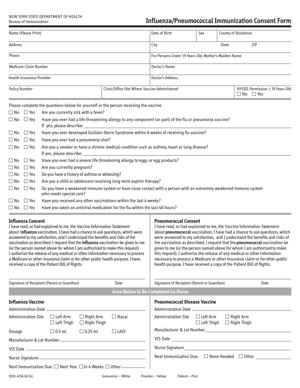
The DOH-4156 – Influenza or Pneumococcal Immunization Consent Form is an official New York State Department of Health document used to obtain written consent before administering influenza or pneumococcal vaccines. It serves two main purposes. First, it collects health screening information. Second, it confirms that you agree to receive the immunization after reviewing key information.
The document typically includes sections for personal details, medical history questions, insurance information, and a consent statement. By signing, you confirm that the information you provided is accurate to the best of your knowledge.
It is not just a sign-in sheet. It is a formal consent agreement that becomes part of your vaccination record. Providers rely on it to confirm that required disclosures were made and that you agreed voluntarily.
Who typically uses this form?
Adults receiving a flu or pneumococcal vaccine in New York often complete this form. In many settings, parents or legal guardians fill it out for children receiving a flu vaccine. The pneumococcal vaccine is more common for older adults and people with certain medical conditions.
Pharmacists, nurses, and other authorized healthcare professionals use the completed form to determine whether vaccination is appropriate. Public health clinics use it during seasonal vaccination campaigns. Employers or schools hosting vaccination events may also require participants to complete it on site.
Long-term care residents may have the form completed with assistance from staff. In those cases, the resident or a legally authorized representative signs the consent section.
Why might you need this form?
You need this form any time a provider requires written consent before administering an influenza or pneumococcal vaccine in New York. Written consent is a standard part of immunization practice. It shows that you received information about the vaccine and had the opportunity to ask questions.
The form also screens for conditions that could affect vaccine safety. For example, it may ask about allergies, past reactions to vaccines, current illness, or specific medical conditions. Your answers help the provider decide whether to proceed, delay, or take precautions.
Insurance and billing details may also be collected on the document. This allows the provider to submit claims when applicable. In some cases, it helps determine eligibility for public vaccine programs.
Typical real-life scenarios
- You visit a pharmacy in the fall for a seasonal flu shot. Before the pharmacist prepares the vaccine, you are handed the consent form. You complete it while waiting, answer screening questions, and sign at the bottom.
- You attend a community health fair offering free flu vaccinations. Staff members ask you to complete the form at a registration table. A nurse reviews your answers before calling you in for vaccination.
- You are over 65 and your primary care provider recommends a pneumococcal vaccine. At your appointment, you complete the form as part of your intake paperwork. The nurse reviews it with you before administering the shot.
- Your child’s school hosts a flu vaccination clinic. You receive the form in advance, fill it out at home, and sign as the parent or legal guardian. The completed document is returned to the school nurse or clinic staff on vaccination day.
When would you use DOH-4156 – Influenza or Pneumococcal Immunization Consent Form?
You use this form immediately before receiving an influenza vaccine, commonly known as a flu shot, or a pneumococcal vaccine in New York. It is part of the standard intake process at many vaccination sites.
Seasonal flu vaccination campaigns often begin in late summer or early fall. During this period, pharmacies and clinics administer large numbers of vaccines daily. The form helps streamline screening while maintaining proper documentation.
You may also use it during a routine medical appointment. If your provider determines that you are due for a pneumococcal vaccine based on age or medical condition, you will likely complete the document that same day.
Employers sometimes host workplace vaccination clinics. In those settings, employees complete the form on site before receiving the shot. Similarly, colleges, senior centers, and community organizations may use it during organized immunization events.
Healthcare providers use the completed form as part of your medical record. It supports safe administration and accurate reporting. If you return for another vaccination in the future, you may be asked to complete a new form reflecting your current health status.
Legal characteristics of DOH-4156 – Influenza or Pneumococcal Immunization Consent Form
This form functions as a written record of informed consent. In healthcare, informed consent generally means that you received relevant information about a procedure, understood the key points, and agreed voluntarily.
For the form to be effective, it must be completed accurately and signed by the appropriate person. That may be you, or it may be a parent or legally authorized representative. The signature confirms that consent was given.
Common problems arise when information is incomplete or unclear. Missing signatures, unanswered screening questions, or inconsistent health details can delay vaccination. Providers may pause the process until the form is clarified.
Accuracy matters. If you omit known allergies or past vaccine reactions, the provider may not have the full picture needed for safe administration. While the form is not a medical test, it relies on your truthful responses.
Requirements for consent can vary by state. In New York, written consent is commonly used for vaccinations administered in pharmacies and many other settings. Other states may allow different documentation practices, but the underlying principle of informed consent is consistent.
The form does not guarantee that you will receive the vaccine. If your answers indicate a possible risk, the provider may decide not to proceed or may refer you to another setting. The document supports decision-making; it does not override clinical judgment.
It also does not replace a broader medical evaluation. It focuses on screening related to the specific vaccine. Ongoing medical advice or treatment plans are handled separately.
Is it legally binding?
Yes, in the sense that it documents your voluntary agreement to receive a specific vaccination. When you sign, you confirm that you were informed and that you consent to the procedure described.
Your signature can serve as evidence that consent was obtained. In healthcare settings, documentation of consent is an important legal and professional standard. The form becomes part of your medical or pharmacy record.
However, it does not bind you to future vaccinations. Each immunization typically requires its own consent. You also retain the ability to ask questions before the vaccine is administered.
If the form is signed by a parent or authorized representative, it reflects that person’s authority to consent on behalf of the patient. If that authority is unclear or disputed, providers may delay vaccination until proper authorization is confirmed.
How to fill out DOH-4156 – Influenza or Pneumococcal Immunization Consent Form
Step 1 – Review the title and vaccine type
Start by confirming that the document is the correct form for the vaccine you are receiving. Check whether it specifies influenza, pneumococcal, or both. Make sure it matches what the provider discussed with you.
Step 2 – Enter patient identification information
Fill in the patient’s full legal name, date of birth, address, and contact details as requested. Write clearly. This information links the consent to the correct medical record.
If you are completing the form for someone else, such as a child or dependent adult, enter their information in the patient section, not your own.
Step 3 – Provide demographic details if requested
Some versions of the form ask for gender, race, ethnicity, or similar details. These fields are often used for public health reporting. Answer them as instructed on the document.
If a question is optional, the form usually states that clearly. Follow the instructions provided on the page.
Step 4 – Complete insurance or payment information
Enter insurance details if the form includes a billing section. This may include the name of the insurance plan, identification numbers, or group numbers. Accurate entries help avoid billing issues later.
If you are participating in a public program or paying out of pocket, indicate that where appropriate.
Step 5 – Answer the health screening questions carefully
Read each medical screening question fully before answering. These questions often address allergies, past reactions to vaccines, current illness, pregnancy status, and certain chronic conditions.
Answer truthfully based on your current health status. If you are unsure about a condition or past reaction, inform the provider. They may ask follow-up questions before proceeding.
Step 6 – Review vaccine information acknowledgment
The form typically includes a statement confirming that you received information about the vaccine’s benefits and possible side effects. Read this section before signing.
This acknowledgment confirms that you had the opportunity to review key facts and ask questions. If anything is unclear, raise it before moving on.
Step 7 – Sign and date the consent section
Sign your name in the designated signature line. Enter the date of signing. If you are a parent or legally authorized representative, indicate your relationship to the patient where requested.
Your signature confirms that the information you provided is accurate and that you consent to the vaccination described in the form.
Step 8 – Allow provider review and completion
After you sign, return the form to the healthcare provider. They will review your answers and may complete additional sections, such as vaccine lot number or administration details.
At this point, the provider determines whether to proceed with the vaccination. Once approved, the vaccine is administered and the completed form is retained as part of the official record.
Legal terms you might encounter in DOH-4156 – Influenza or Pneumococcal Immunization Consent Form
- Informed Consent: This means you agree to receive the vaccine after understanding its benefits and risks. On this form, you confirm that you received information about the vaccine and had a chance to ask questions. Your signature shows that your consent is voluntary.
- Vaccine Information Statement (VIS): This is a document that explains the vaccine’s purpose, risks, and possible side effects. The form usually asks you to confirm that you received or reviewed this statement. The date of the VIS may be recorded to show which version you saw.
- Contraindication: A contraindication is a medical reason not to receive a vaccine. The health screening questions on the form help identify these. If you answer “yes” to certain questions, the provider may delay or decline vaccination.
- Precaution: A precaution is a condition that might increase the risk of a reaction or affect how well the vaccine works. Unlike a contraindication, it does not always prevent vaccination. The provider uses your answers to decide whether it is safe to proceed.
- Adverse Reaction: This refers to an unwanted side effect after vaccination. The form may ask about past reactions to flu or pneumococcal vaccines. Your answers help the provider assess risk before administering another dose.
- Immunization Record: This is the official record showing you received a vaccine. Information from this form is used to update that record. It typically includes the vaccine type, date given, and provider details.
- Lot Number: The lot number identifies the specific batch of vaccine used. The healthcare provider completes this section. It is important for tracking and safety monitoring.
- Administration Site: This indicates where on your body the vaccine is given, such as the left arm. The provider records this after the shot. It becomes part of your medical record.
- Authorized Representative: If the patient cannot legally consent, a parent, guardian, or other authorized person signs. The form may ask you to state your relationship to the patient. This confirms you have authority to consent.
- Insurance Information: This section captures details needed for billing. You may need to provide your policy number or confirm eligibility. Accurate information helps prevent billing delays or rejected claims.
FAQs
What information do I need to have ready before starting this form?
You should have your full legal name, date of birth, address, and contact details ready. Bring your insurance card if you plan to use coverage. If you are signing for someone else, confirm your legal authority and relationship. Review your medical history so you can answer screening questions accurately.
What if I do not know my complete vaccination history?
Do your best to answer truthfully based on what you remember or can verify. Check your personal immunization record or contact prior providers if possible. If you are unsure, tell the provider before signing. The DOH-4156 – Influenza or Pneumococcal Immunization Consent Form relies on accurate health information to assess safety.
Can someone else sign this document for the patient?
Yes, but only if that person has legal authority to consent. This is often a parent or legal guardian for a minor. The signer must print their name and relationship clearly. The signature confirms they are authorized to act for the patient.
What does my signature legally confirm?
Your signature confirms that you received vaccine information, had an opportunity to ask questions, and agree to receive the vaccine. It also confirms that the answers you provided are accurate to the best of your knowledge. Once signed, this document becomes part of your medical record.
What happens if I answer “yes” to a health screening question?
A “yes” answer does not automatically prevent vaccination. It alerts the provider to review your response more closely. The provider may ask follow-up questions or decide to delay vaccination. Do not leave the form incomplete because you are unsure; explain your situation clearly.
Do I need to attach any additional documents?
Usually, no attachments are required. However, you may need to show identification or an insurance card for verification. In some cases, proof of guardianship or authorization may be requested if you are signing for someone else.
Is the DOH-4156 – Influenza or Pneumococcal Immunization Consent Form filed with a government office?
It is generally kept by the healthcare provider as part of your medical file. The information may also be entered into an immunization registry. You do not typically file it yourself with a state office.
Can I get a copy after I sign?
Yes. You can request a copy for your records. Keeping a copy helps you track the date of vaccination and the type of vaccine received. It also provides proof of immunization if required for work, school, or travel.
Checklist: Before, During, and After DOH-4156 – Influenza or Pneumococcal Immunization Consent Form
Before
- Review your medical history, especially allergies and past vaccine reactions.
- Locate your identification and insurance card.
- Confirm the patient’s full legal name and date of birth.
- Verify whether you are the patient or an authorized representative.
- Read the vaccine information provided to you.
- Prepare questions about risks or side effects.
- Check if you need proof of guardianship if signing for a minor.
During
- Print all names clearly and legibly.
- Double-check spelling of the patient’s name.
- Answer every health screening question honestly.
- Do not skip questions, even if they seem repetitive.
- Confirm the vaccine type (influenza or pneumococcal).
- Review the acknowledgment statements before signing.
- Sign and date in the correct section.
- Ensure the provider completes their portion after administration.
After
- Request a copy of the completed form.
- Verify the vaccine type and date on your copy.
- Confirm your immunization record has been updated.
- Store the copy with other medical documents.
- Monitor for side effects and follow any instructions given.
- Contact the provider if you notice unexpected reactions.
- Keep the record accessible for employment or school needs.
Common mistakes to avoid with DOH-4156 – Influenza or Pneumococcal Immunization Consent Form
- Mistake: Leaving health screening questions blank because you are unsure, which happens when people rush; this can delay vaccination or require follow-up, so do not forget to answer every question fully.
- Mistake: Using a nickname instead of your legal name, which often occurs out of habit; this may cause record mismatches, so do not forget to match your ID exactly.
- Mistake: Forgetting to sign and date the consent section, which happens when focusing only on medical questions; without your signature the form is incomplete, so do not forget the final review.
- Mistake: Providing outdated insurance information because you rely on memory; this can lead to billing problems, so do not forget to check your current card.
- Mistake: Failing to disclose a prior adverse reaction due to embarrassment or uncertainty; this can increase health risks, so do not forget that full disclosure protects you.
- Mistake: Not confirming your authority when signing for someone else, which can invalidate consent; do not forget to clearly state your relationship and legal role.
- Mistake: Skimming the vaccine information statement, which happens when you feel rushed; this may leave you unaware of side effects, so do not forget to review it carefully.
- Mistake: Walking away without a copy, which often occurs during busy clinic visits; this leaves you without proof of vaccination, so do not forget to request one.
What to do after filling out DOH-4156 – Influenza or Pneumococcal Immunization Consent Form
Once you complete and sign the form, your role is not quite finished. You should make sure the vaccination process and recordkeeping are handled correctly.
- Step 1: Confirm that the provider has reviewed your answers before administering the vaccine.
- Step 2: Verify that the vaccine type matches what you agreed to receive.
- Step 3: Observe the provider completing their section, including date and vaccine details.
- Step 4: Request a copy of the completed form for your personal records.
- Step 5: Check that your name, date of birth, and vaccine information are accurate on your copy.
- Step 6: Ask whether your information will be entered into the state immunization registry.
- Step 7: Store your copy in a safe place with other medical and insurance records.
- Step 8: Mark the vaccination date on your personal health calendar.
- Step 9: Monitor your health for any side effects over the next few days.
- Step 10: Report any unexpected or severe reactions to your provider promptly.
You should also update any personal health logs you keep. If your employer, school, or program requires proof of vaccination, provide a copy as instructed. Keep the original copy secure. This form supports your official immunization record, so treat it as an important medical document.
Disclaimer: This guide is provided for informational purposes only and is not intended as legal advice. You should consult a legal professional.