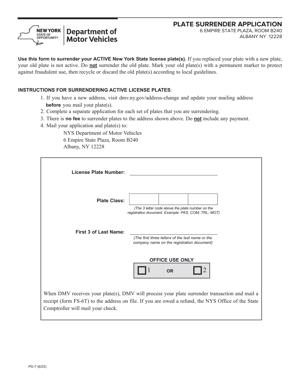
PD-7 – Plate Surrender Application
Fill out nowJurisdiction: Country: United States | Province or State: New York
The PD-7 – Plate Surrender Application is a form used in New York when you need to officially return your vehicle license plates. It records that your plates are being surrendered to the motor vehicle agency.
You complete this form when you no longer need the plates linked to a vehicle. This often happens after selling a car, ending a lease, or taking a vehicle off the road.
This document matters because license plates are tied to your vehicle registration. Until they are properly surrendered and recorded, the registration may remain active in your name.
If plates are not surrendered correctly, you may continue to receive notices or face registration issues later. Filing the form helps create a clear record that you returned the plates.
Understanding how this form works makes the process smoother. When you know what information is required, you can avoid delays or rejected submissions.
What is PD-7 – Plate Surrender Application?
Clear definition
The PD-7 – Plate Surrender Application is a written request used to document the return of vehicle license plates to the New York motor vehicle authority. It confirms that you are surrendering plates associated with a specific vehicle registration.
The form connects the plate number, the vehicle, and the registered owner. Once processed, it updates the official record to show that the plates are no longer active.
This form is administrative in nature. It does not transfer ownership of a vehicle. It simply addresses the status of the plates and related registration.
Who typically uses this form?
Most often, the registered owner of a vehicle uses this form. This is the person whose name appears on the vehicle registration.
You might complete it yourself if you sold your vehicle and removed the plates. You may also use it if you are terminating registration because the vehicle is no longer in use.
In some cases, a person acting on behalf of the owner may handle the submission. That can include a family member, estate representative, or authorized agent, depending on the situation.
Businesses that own fleet vehicles may also use this form. When a company retires a vehicle from service, it may need to surrender the plates tied to that registration.
Why might you need this form?
You may need this form when you want to officially end a vehicle registration. Surrendering the plates is often part of closing out that registration.
It can also be required when canceling insurance tied to the vehicle. Registration and insurance records are often connected, so plate surrender helps complete the administrative process.
If a vehicle is destroyed, dismantled, or permanently removed from service, returning the plates updates the record. This prevents the registration from appearing active.
You might also need it if you are replacing certain plate types. In some situations, surrendering old plates is part of receiving new ones.
Typical real-life scenarios
- You sell your car to a private buyer. Before handing over the vehicle, you remove the plates because plates generally stay with the owner. After the sale, you complete the surrender process so the plates are no longer linked to you.
- Your leased vehicle is returned at the end of the lease. The leasing company takes possession of the car, but you are responsible for handling the plates. You submit the form to confirm they have been returned.
- Your vehicle is totaled in an accident. The insurance process resolves the vehicle’s value, but the registration must still be addressed. Surrendering the plates closes that part of the record.
- You move out of state and register your vehicle elsewhere. As part of transitioning your registration, you return your New York plates. The form documents that change.
- A vehicle has been sitting unused for a long time. You decide not to keep it registered. You remove the plates and complete the surrender so the registration is no longer active.
When would you use PD-7 – Plate Surrender Application?
You use the PD-7 – Plate Surrender Application when you are ending the active use of specific license plates. The key moment is when the plates are no longer attached to a vehicle that is registered in your name.
This often happens right after a sale. Once you remove the plates from the vehicle, you need a formal way to record that they have been returned.
You may also use the form when canceling a vehicle’s registration voluntarily. If you are storing a vehicle long-term and do not plan to keep it registered, surrendering the plates is typically part of that process.
Another common situation involves insurance changes. If insurance coverage ends on a registered vehicle, the registration may need to be addressed as well. Plate surrender helps align the registration record with the insurance status.
For estates, the form may be used after the death of a vehicle owner. When the vehicle is sold or otherwise transferred, the plates must be handled separately from the title.
Commercial vehicle owners may use this form when removing a vehicle from a fleet. Once the business decides a vehicle is no longer in service, the plates are returned, and the registration record is updated.
In each case, the form is used at the point when the plates are physically being returned or have already been removed and are ready to be surrendered.
Legal characteristics of PD-7 – Plate Surrender Application
The PD-7 – Plate Surrender Application is an administrative filing. Its legal effect comes from being properly completed and accepted by the appropriate motor vehicle authority.
For the form to be effective, it must accurately identify the plates and the registered owner. The plate number, vehicle details, and owner information must match official records.
Errors in plate numbers or personal information commonly cause delays. If the information does not align with the registration database, the surrender may not be processed correctly.
Signatures are important. The registered owner, or authorized person, must sign the form where required. An unsigned form is often treated as incomplete.
Legibility also matters. If handwriting is unclear, the processing office may not be able to verify the details. That can result in rejection or requests for clarification.
The form does not transfer vehicle ownership. It does not replace a title transfer document. It also does not by itself cancel insurance or settle financial obligations related to the vehicle.
In general, vehicle registration processes vary by state. The underlying concept of surrendering plates is common, but the specific steps and requirements may differ. The PD-7 – Plate Surrender Application applies within New York’s registration system.
Once processed, the form updates the registration record to show that the plates are no longer active. This creates an official record tied to your name and the plate number.
Is it legally binding?
Yes, in the sense that it becomes part of an official government record once accepted. When you sign and submit the form, you are certifying that the information you provided is accurate.
The act of surrendering plates through this form has legal consequences for registration status. It signals that the registration connected to those plates is being ended or adjusted.
However, the form is not a contract between private parties. It does not create rights or obligations between a buyer and seller. Its binding effect relates to the administrative record maintained by the motor vehicle authority.
If the form contains false information, that can create legal problems because you are making statements in an official filing. Accuracy is essential.
Its effectiveness depends on proper submission and acceptance. A partially completed or incorrectly signed form may not produce the intended update in the registration system.
How to fill out PD-7 – Plate Surrender Application
Step 1 – Review the form and gather your documents
Start by reading the entire form before writing anything. This helps you understand what information is required.
Gather your vehicle registration, plate number information, and personal identification details. Having these documents nearby reduces the chance of mistakes.
Make sure you have the correct plate numbers exactly as they appear on the physical plates and registration.
Step 2 – Enter the plate information
Locate the section that asks for the license plate number. Carefully print the number, including any letters and numbers in the correct order.
If the form asks for plate type, indicate the category shown on your registration. This may distinguish between standard and specialty plates.
Double-check every character. A single incorrect letter or number can prevent proper processing.
Step 3 – Provide vehicle details
Fill in the vehicle identification details requested on the form. This may include the vehicle identification number, year, make, or model.
Use your registration card to ensure the information matches official records. Do not rely on memory for long identification numbers.
If multiple plates are connected to the same vehicle, confirm that the information reflects the correct registration.
Step 4 – Enter the registered owner’s information
Write the full legal name of the registered owner exactly as it appears on the registration.
Provide the current address where requested. This should match the owner’s record to avoid confusion.
If the vehicle was registered to more than one person, ensure the names are listed as required by the form instructions.
Step 5 – Indicate the reason for surrender
Some versions of the form ask why the plates are being surrendered. Choose or write the reason that best reflects your situation.
Common reasons include sale of the vehicle, transfer, destruction, or cancellation of registration.
Be clear and consistent with any related documents you have completed, such as a title transfer.
Step 6 – Review insurance and registration status sections
If the form includes questions about insurance or registration status, answer them carefully.
Provide information that matches your current situation. Inconsistent answers can delay processing.
Read each question fully before responding so you understand what is being asked.
Step 7 – Sign and date the form
Locate the signature section. The registered owner, or authorized representative, must sign where indicated.
Use your usual legal signature. Do not leave this section blank.
Write the date of signing clearly. The date helps establish when the surrender request was made.
Step 8 – Make a copy for your records
Before submitting the form, make a complete copy for your personal records.
Keep the copy with any related documents, such as proof of sale or prior registration.
Having your own record can help resolve questions later about when the plates were surrendered.
Step 9 – Submit the form with the plates
Follow the submission instructions provided with the form. This may involve returning the physical plates along with the completed document.
Ensure that the plates you are surrendering match the plate numbers listed on the form.
Once submitted and processed, the record should reflect that the plates are no longer active under your name.
Legal terms you might encounter in PD-7 – Plate Surrender Application
- Registrant: The person or business listed as the official owner of the vehicle registration. On this form, the registrant is the party legally responsible for the plates and must be the one who signs or authorizes the surrender. The name you enter must match the registration record.
- Registration: The official record that connects a vehicle to a plate number and an owner. When you surrender plates, you are ending or changing the status of that registration. The form updates that record in the motor vehicle database.
- Plate Number: The combination of letters and numbers printed on your physical license plates. You must enter this exactly as it appears. Even one incorrect character can delay processing.
- Vehicle Identification Number (VIN): A unique 17-character code assigned to your vehicle. This number confirms which vehicle was tied to the surrendered plates. You must copy it carefully from your registration document or vehicle title.
- Effective Date: The date you want the surrender to take effect or the date you actually turned in the plates. This date matters for insurance and registration status. It should reflect when the plates stopped being used.
- Insurance Certification: A section where you confirm the insurance status connected to the registration. You may need to indicate whether coverage has ended or remains active. The information you provide can affect compliance records.
- Authorized Representative: A person signing on behalf of the registrant, such as for a company-owned vehicle. This person must have legal authority to act for the business. The signature confirms that authority.
- Surrender Receipt: A document issued after you turn in your plates. It proves that the plates were returned and the registration was closed or updated. You should keep this with your vehicle records.
- Suspension: A penalty that can occur if registration or insurance rules are not followed. Plate surrender can prevent or resolve certain types of suspensions. The form helps document compliance.
- Certification Statement: The declaration near the signature line where you confirm the information is true. By signing, you accept responsibility for accuracy. False information can lead to penalties.
FAQs
Do I need to complete every section of this document?
You should complete all sections that apply to your situation. If a section does not apply, leave it blank only if the instructions allow it. Do not guess at unknown details. Make sure required fields like plate number, VIN, registrant name, and signature are filled in clearly before submitting.
What date should I enter as the effective date?
Enter the date the plates stopped being used on a vehicle or the date you are physically surrendering them, depending on what the form requests. Check the line label carefully. The date you provide becomes part of the official record, so it must match your actual timeline.
Can someone else sign this form for me?
Only the registered owner or an authorized representative can sign. If a business owns the vehicle, the person signing must have authority to act for that business. Make sure the signer prints their name and indicates their title if required so the record shows proper authority.
What happens to the registration record after I submit PD-7 – Plate Surrender Application?
Once processed, the registration linked to those plates is updated to show that the plates were surrendered. The effective date you listed becomes part of the record. This can change the public status of the registration from active to surrendered or closed.
Do I need to return both plates?
If two plates were issued, you are generally expected to return both. If one plate is missing, you may need to indicate that on the form. Be clear and accurate so the record reflects exactly what was returned.
What if the name on the registration does not exactly match my current name?
You must enter the name exactly as it appears on the registration record. If your name has changed, that is handled separately from this document. Do not alter the name on this form to match new identification unless the registration record has already been updated.
How will I know the surrender was accepted?
You should receive a surrender receipt or confirmation when the plates are processed. Check that the plate number and date are correct on the receipt. Keep this proof in case you need to show that the plates were returned.
Do I need to attach any other documents when submitting the PD-7 – Plate Surrender Application?
You typically submit the physical plates along with this form. In some situations, you may need to show identification or provide supporting details about insurance status. Review the instructions on the document to confirm whether additional information is required.
Checklist: Before, During, and After PD-7 – Plate Surrender Application
Before
- Confirm the correct plate number and vehicle identification number.
- Locate your current registration document.
- Verify the exact name of the registrant as shown on the record.
- Determine the correct effective date for surrender.
- Check the insurance status tied to the registration.
- Ensure you have both physical plates, if two were issued.
- Confirm who is authorized to sign the form.
- Review the form instructions for required fields.
During
- Write the plate number exactly as shown on the plates.
- Enter the VIN carefully, double-checking each character.
- Print the registrant’s name clearly and legibly.
- Complete all required insurance and status sections.
- Indicate the reason for surrender if the form asks for it.
- Review the effective date before finalizing.
- Sign in the correct place using your legal signature.
- Add your title if signing for a business.
After
- Make a copy of the completed form for your records.
- Obtain and keep the surrender receipt.
- Verify that the plate number on the receipt matches your plates.
- Store the receipt with your vehicle or insurance records.
- Confirm that the registration status has been updated.
- Notify your insurance provider if needed.
- Update internal fleet records if the vehicle is business-owned.
- Keep all documents in a safe place for future reference.
Common mistakes to avoid with PD-7 – Plate Surrender Application
- Mistake: Entering the wrong plate number because you copy it from memory instead of the physical plate, which can delay processing or leave the wrong registration active, so do not forget to double-check every character directly from the plate.
- Mistake: Using a nickname or updated name instead of the exact registered name, which happens after a personal name change and can cause record mismatches, so do not forget to match the registration record exactly.
- Mistake: Forgetting to sign the form, often because you focus on the plate details and overlook the certification section, which makes the submission incomplete, so do not forget to review the signature line before submitting.
- Mistake: Listing the wrong effective date because you guess or confuse it with the sale date, which can create issues with insurance compliance, so do not forget to confirm the exact date the plates stopped being used.
- Mistake: Submitting the form without returning both plates when two were issued, which can leave the record flagged as incomplete, so do not forget to check that you are returning all issued plates.
- Mistake: Failing to keep a copy or receipt because you assume the transaction is automatically recorded, which leaves you without proof if questions arise later, so do not forget to store your confirmation safely.
- Mistake: Allowing someone without proper authority to sign for a business vehicle, which can invalidate the submission, so do not forget to ensure the signer has documented authority.
- Mistake: Leaving required insurance sections blank because you are unsure what to enter, which can trigger follow-up notices, so do not forget to review and complete every required certification line.
What to do after filling out PD-7 – Plate Surrender Application
Once you complete the form, your next steps matter just as much as filling it out correctly. You are closing out an official registration record. You want proof that it was done properly and on time.
Start by reviewing everything one more time. Look at the plate number, VIN, name, and effective date. Confirm that the signature is in place. Small errors can lead to delays or notices later.
- Step 1: Make a clear copy of the signed form for your personal records.
- Step 2: Package the physical plates together so they are ready to be surrendered.
- Step 3: Submit the form and plates through the accepted submission method.
- Step 4: Request or obtain a surrender receipt at the time of submission.
- Step 5: Review the receipt to confirm the plate number and effective date are correct.
- Step 6: Store the receipt with your registration and insurance documents.
- Step 7: Check your vehicle record after processing to confirm the status shows surrendered.
- Step 8: Inform your insurance provider that the plates have been surrendered if coverage is being changed or ended.
- Step 9: Update any internal records if the vehicle was part of a business fleet.
- Step 10: Keep all related paperwork for future reference in case questions arise.
If you later receive any notice about registration or insurance status, compare it to your surrender receipt. Your documentation is your proof. Staying organized now prevents problems later.
Disclaimer: This guide is provided for informational purposes only and is not intended as legal advice. You should consult a legal professional.