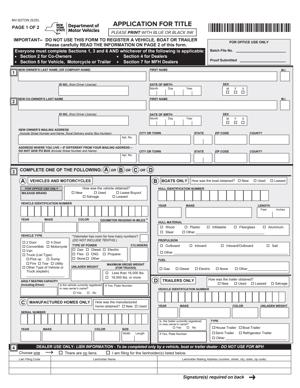
MV-82TON – Application for Title
Fill out nowJurisdiction: Country: United States | Province or State: New York
The MV-82TON – Application for Title is the document used in New York when you need to apply for a vehicle title without registering the vehicle at the same time. It connects you, as the owner, to the official ownership record maintained by the state.
If you are about to fill out this form, you are likely dealing with a vehicle purchase, transfer, or ownership change. You may already have the vehicle in your possession. Now you need the title issued correctly in your name.
This form matters because the title is the legal proof of ownership. Without it, you cannot easily sell the vehicle, transfer it, or use it as collateral. Errors on the application can delay processing and create problems later.
Understanding how the document works before you start filling it out can save time. It also helps you avoid common mistakes that lead to rejected submissions or follow-up requests for corrections.
What is MV-82TON – Application for Title?
Clear definition
The MV-82TON – Application for Title is a New York motor vehicle form used to request a title certificate for a vehicle. It is specifically designed for situations where you want a title issued but are not applying for registration at the same time.
A vehicle title is the official state record showing who owns the vehicle. It includes key details such as the vehicle identification number (VIN), make, model, year, and the owner’s name and address.
This form gathers the information needed to create or update that record. It also documents how you acquired the vehicle, such as through a purchase, gift, inheritance, or transfer.
Unlike registration forms, this document focuses on ownership. It does not, by itself, allow you to drive the vehicle legally on public roads.
Who typically uses this form?
Private buyers often use this form after purchasing a vehicle but before registering it. For example, you might buy a vehicle that you plan to store, restore, or resell later.
Dealers may also use title-only applications in certain transactions, especially when the vehicle is being transferred but not immediately registered for use.
Estate representatives sometimes complete this form when transferring ownership after someone has passed away. In that situation, the form becomes part of the broader process of updating official records.
Businesses may use it when moving vehicles between corporate entities or holding inventory that is not currently registered.
In all these cases, the common factor is the need to update ownership records without requesting plates or registration at the same time.
Why might you need this form?
You may need this form because the previous title was signed over to you, and you must now apply for a new one in your name.
You might also need it if the vehicle was never titled in New York and now must be entered into the state’s title system.
In some cases, you may have lost the previous title before it was properly transferred. The application becomes part of the process to correct the ownership record.
If you are separating ownership between co-owners or changing how names appear on the title, this form can also be required to reflect the updated information.
The form ensures that the state’s records match the actual ownership of the vehicle. That alignment is important for sales, financing, and resolving disputes.
Typical real-life scenarios
- You purchase a used car from a private seller. The seller signs over the existing title to you. You do not plan to drive the car immediately, but you want the title issued in your name. You complete this form to record the transfer.
- You inherit a vehicle from a family member. The estate paperwork allows you to take ownership, but the state records still show the deceased person as the owner. You use this application to update the title.
- You are restoring a classic vehicle. It will not be driven for some time, but you want clear ownership in your name while restoration is underway. A title-only application fits that situation.
- You operate a small business and transfer a vehicle from your personal name to the business entity. The physical vehicle does not change location, but the ownership record must change.
- You purchase a vehicle at auction. The vehicle is not ready for the road. You apply for a title first, then handle registration later when the vehicle is roadworthy.
- Each of these examples involves a change or confirmation of ownership without immediate registration.
When would you use MV-82TON – Application for Title?
You would use MV-82TON – Application for Title when you need to establish or update ownership of a vehicle in New York and are not applying for registration at the same time.
This often happens after buying a vehicle that will not be driven right away. If you are storing it, transporting it out of state, or repairing it before use, a title-only filing may be appropriate.
You might also use the form when transferring ownership between individuals, such as between family members. The vehicle may already be off the road, but the legal owner needs to change.
Another situation involves correcting ownership details. For example, if a name was recorded incorrectly or an ownership structure changes from one individual to two co-owners, the title record must reflect that change.
In estate matters, an executor or administrator may use the form to move the title from the deceased owner’s name to an heir or beneficiary. The vehicle may not be registered during this transition.
Businesses sometimes use it when restructuring ownership. A vehicle can move from one company to another within the same corporate group. The application updates the official record to match the new owner.
You would not use this form to register a vehicle for road use. If you need plates, registration, or inspection-related documentation, a different process applies.
Legal characteristics of MV-82TON – Application for Title
The MV-82TON – Application for Title becomes effective when it is properly completed, signed, and accepted by the state agency responsible for motor vehicle records. Acceptance results in the issuance of a title certificate in the applicant’s name.
For the application to be processed, the information must match supporting documents. These typically include the existing title, proof of ownership transfer, and identification. If details do not match, the submission may be delayed or rejected.
Common problems include incomplete fields, incorrect VIN numbers, mismatched names, missing signatures, or unclear ownership history. Even a small error in the VIN can cause processing issues because that number uniquely identifies the vehicle.
Another frequent issue is inconsistency between the transfer information on the existing title and the details written on the application. If the seller’s signature or date does not align with the application, the agency may require clarification.
The form also requires you to disclose how you obtained the vehicle. Inaccurate or vague descriptions can create questions about the legitimacy of the transfer.
High-level procedural differences may exist depending on the type of vehicle. For example, requirements may vary for trailers, motorcycles, or vehicles brought in from another state. The supporting documents often differ in those situations.
It is important to understand what this form does not do. It does not grant permission to operate the vehicle on public roads. It does not replace registration. It does not serve as proof of insurance. Its primary function is to establish legal ownership in the state record.
Is it legally binding?
Yes, the information you provide on the form is legally significant. When you sign it, you are certifying that the details are true and correct to the best of your knowledge.
The title issued as a result of an accepted application becomes the official proof of ownership. That document can be used in future sales, transfers, or financial transactions involving the vehicle.
Because the form requires your signature, false statements can have consequences. The accuracy of the information directly affects the validity of the title issued.
The document is binding in the sense that it updates the official ownership record. Once processed, the title reflects the names and ownership structure you provided. Changing that record later generally requires another formal filing.
However, the form itself does not create a sales contract between buyer and seller. It records the result of a transfer. The underlying transaction may involve separate agreements or documents not included in this application.
How to fill out MV-82TON – Application for Title
Step 1 – Identify the vehicle
Begin by entering the full vehicle identification number exactly as it appears on the vehicle and prior title. Double-check each character. Then provide the year, make, body type, and other identifying details requested. Accuracy here is critical because this information ties the application to a specific vehicle record.
Step 2 – Provide current ownership information
Enter the name and address of the person or entity applying for the title. If there are co-owners, include both names exactly as you want them to appear on the new title. Pay attention to how names are spelled and whether middle initials are used, since the title will reflect this information precisely.
Step 3 – Indicate how ownership was obtained
Complete the section that explains how you acquired the vehicle. This may involve a purchase, gift, inheritance, or other transfer. Include the date of transfer and the name of the previous owner as requested. Make sure these details match the existing title or supporting documents.
Step 4 – Record lien information if applicable
If there is a loan or security interest attached to the vehicle, provide the lender’s name and address in the space provided. This ensures the title reflects any lienholder. If there is no lien, complete the section according to the form’s instructions so it is clear that no security interest exists.
Step 5 – Review tax and fee sections
The form may include areas related to taxes or fees connected to the transfer. Enter the required information carefully and confirm that the amounts correspond with the transaction details. Incomplete or inconsistent entries in this section can slow down processing.
Step 6 – Read the certification statement
Before signing, read the certification language near the signature line. This section confirms that the information provided is accurate. Take a moment to review all entries on the form so you are confident that the details are correct.
Step 7 – Sign and date the form
Sign your name exactly as it appears in the ownership section. Add the date of signing in the format requested. If there are co-owners, ensure each required signature is included. Unsigned forms are typically not processed.
Step 8 – Attach supporting documents
Gather the existing title, proof of identity, and any additional ownership documents required for your situation. Confirm that all documents are complete and legible. Missing paperwork is a common reason for delays.
Step 9 – Prepare for submission
Make a final review of the entire application. Check the Vehicle Identification Number, names, dates, and signatures one more time. Ensure all required sections are filled in and that supporting documents are included. Once everything is complete, the form is ready for submission through the appropriate filing method.
Legal terms you might encounter in MV-82TON – Application for Title
- Vehicle Identification Number (VIN): The VIN is the unique 17-character code assigned to your vehicle. On this document, you must enter it exactly as it appears on the vehicle and supporting paperwork. A single incorrect character can delay processing or cause the title to be issued for the wrong vehicle.
- Lienholder: A lienholder is a lender or party that has a legal claim against the vehicle because money is owed. If you financed the vehicle, you must list the lienholder’s full legal name and address. This ensures the title reflects the lender’s interest until the loan is paid off.
- Title Certificate: The title certificate is the official record of vehicle ownership. This document requests the issuance of a new title certificate in your name or with updated information. What you write on the form becomes part of the public ownership record.
- Transfer of Ownership: This refers to the legal change from one owner to another. The form captures how ownership was obtained, such as by sale, gift, inheritance, or court order. The reason for transfer affects what supporting documents you must attach.
- Odometer Disclosure: This is the statement of the vehicle’s mileage at the time of transfer. You must record the current reading accurately and indicate whether it reflects actual mileage. Inaccurate reporting can lead to legal penalties and title branding.
- Sales Tax Information: This section records the purchase price or fair market value of the vehicle. It is used to calculate taxes owed at the time of title issuance. If you claim an exemption, you must indicate the basis and provide proof.
- Primary Owner and Co-Owner: These are the individuals or entities listed as owners on the title. The form asks how multiple owners will be connected, such as “and” or “or,” which affects whether both signatures are required for future transfers.
- Power of Attorney: This is a legal authorization allowing someone to sign on behalf of an owner. If someone else signs this document for you, a valid power of attorney must be attached. The name on the form must match the authority granted in that document.
- Proof of Identity: You must provide identification details that confirm who you are. The information entered on the form must match your identification documents exactly. Any mismatch can cause rejection or require correction.
FAQs
What information must match exactly between this form and my supporting documents?
Your name, address, and the vehicle identification number must match exactly across this document and all attachments. If your name appears differently on your identification than on the prior title, you may need proof of the name change. Even small spelling differences can delay processing.
When does the ownership change become official?
Ownership is not final just because you signed the paperwork. The change becomes part of the official record once the application is accepted and processed. Until then, errors or missing items can prevent the transfer from being completed.
What if I made a mistake while filling it out?
Minor errors may require you to complete a new form rather than crossing out information. Corrections that look altered or unclear can cause rejection. It is often faster to start over than to submit a form with visible changes.
Do both owners have to sign if there are two names listed?
It depends on how the names are connected on the title. If the owners are listed with “and,” both usually must sign to approve the transaction. If listed with “or,” one signature may be enough, but you must follow what is shown on the existing title.
How do I show that I paid off my loan?
You must provide proof that the lien was satisfied, such as a lien release document. Simply stating that the loan is paid is not enough. The lienholder’s release must match the vehicle and be properly completed to clear the record.
Can someone else submit the MV-82TON – Application for Title for me?
Yes, but they must have proper authorization if they are signing on your behalf. If they are only delivering the paperwork and not signing it, the signatures on the form must already be completed correctly. Make sure all identification and supporting documents are included before it is submitted.
What happens if the mileage reading is wrong?
If the odometer disclosure is incorrect, the title may reflect inaccurate mileage. That can affect the vehicle’s value and future transfers. You may need to complete additional paperwork to correct the record.
How do I know my MV-82TON – Application for Title was accepted?
You will receive confirmation through official processing, typically in the form of a receipt and later a title certificate. If something is missing, you may be notified to provide corrections. Keep your proof of submission until you receive the updated title.
Checklist: Before, During, and After MV-82TON – Application for Title
Before
- Gather the current title certificate.
- Confirm the vehicle identification number on the vehicle matches your documents.
- Collect proof of identity with your correct legal name.
- Obtain lien release documents if the loan is paid.
- Verify the purchase price and payment details.
- Prepare proof of sales tax payment or exemption if applicable.
- Confirm how ownership will be listed if there is a co-owner.
During
- Print clearly in black or blue ink.
- Enter the full Vehicle Identification Number without skipping characters.
- Write your legal name exactly as shown on your identification.
- Indicate the correct ownership connector if there are two owners.
- Record the odometer reading carefully.
- Complete every required section; do not leave blanks unless instructed.
- Review the tax section for accuracy.
- Read the certification statement before signing.
- Sign and date the form in the correct spaces.
After
- Make a complete copy of the signed form for your records.
- Copy all supporting documents before submission.
- Submit the application with required fees.
- Keep your receipt or proof of submission.
- Track the expected processing time.
- Store the new title certificate in a secure place once received.
- Update your insurance and registration records if ownership changed.
Common mistakes to avoid with MV-82TON – Application for Title
- Mistake: Entering the wrong Vehicle Identification Number because you copied it from memory instead of the vehicle, which leads to processing delays or rejection; do not forget to double-check every character directly from the source.
- Mistake: Using a nickname or shortened name because that is what you normally go by, which causes mismatches with identification and prior titles; do not forget to use your full legal name exactly as shown on your ID.
- Mistake: Forgetting to list a lienholder because you assume the loan is almost paid off, which results in an incomplete title record; do not forget to include lender details until you have an official lien release.
- Mistake: Leaving required sections blank because you think they do not apply, which can cause rejection or requests for clarification; do not forget to review each section and confirm whether it truly does not apply.
- Mistake: Crossing out errors and writing over them, which makes the form hard to read and may invalidate it; do not forget that starting a fresh form is often safer.
- Mistake: Recording the wrong mileage due to misreading the odometer, which can affect the vehicle’s value and create legal issues; do not forget to check the odometer carefully before writing the number.
- Mistake: Failing to attach supporting documents such as proof of payment or lien release, which stops processing until documents are provided; do not forget to assemble all attachments before submission.
- Mistake: Not keeping copies of what you submitted, which leaves you without proof if something is lost or questioned; do not forget to make and store complete copies.
What to do after filling out MV-82TON – Application for Title
Once you complete the form, pause before submitting it. Review every entry slowly. Confirm that names, numbers, and dates match your supporting documents. Small inconsistencies are a common reason for delays.
Make a full copy of the signed document. Include copies of the title, lien release, identification, and any tax paperwork. Keep these copies in a dedicated folder. If questions arise later, you will have a clear record of what you submitted.
- Step 1: Review the entire form line by line for accuracy and completeness.
- Step 2: Assemble all required supporting documents in the order listed on the application instructions.
- Step 3: Calculate the required fees and confirm your payment method is acceptable.
- Step 4: Submit the application through the approved filing method, whether in person or by mail, as allowed.
- Step 5: Obtain a receipt or proof that your paperwork was received.
- Step 6: Monitor the status of your submission and respond promptly if additional information is requested.
- Step 7: Receive and review the new title certificate when it arrives to confirm all details are correct.
- Step 8: Store the original title in a secure location, such as a safe or locked file.
- Step 9: Update your personal records to reflect the new ownership details.
- Step 10: Notify your insurance provider if the ownership structure or lien status has changed.
After you receive the updated title, check it carefully. Confirm the spelling of names, the Vehicle Identification Number, and any lien information. If something is wrong, address it immediately rather than waiting until you sell or refinance the vehicle.
Keep the title in a safe place. Do not store it in the vehicle. The title is proof of ownership. Losing it creates extra steps and additional paperwork.
Finally, update any internal records you maintain for financial or tax purposes. If you track vehicle assets for business use, make sure your accounting reflects the new ownership status. Staying organized now will save time and stress later.
Disclaimer: This guide is provided for informational purposes only and is not intended as legal advice. You should consult a legal professional.