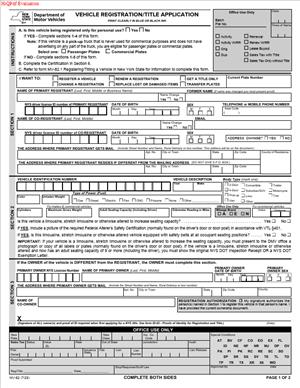
MV-82 – Vehicle Registration or Title Application
Fill out nowJurisdiction: Country: United States | Province or State: New York
If you plan to register a vehicle or apply for a title in New York, you will likely encounter the MV-82 – Vehicle Registration or Title Application. This form is the standard document used to request vehicle registration, a certificate of title, or both.
The MV-82 – Vehicle Registration or Title Application is used by individuals and businesses who need official recognition from the state that a vehicle is properly registered and, when applicable, that ownership is documented through a title. It is a key step in making a vehicle legally recognized for use on public roads.
You may be filling out this form after buying a car, receiving a vehicle as a gift, moving to New York with an out-of-state vehicle, or replacing lost registration documents. The form gathers detailed information about you and the vehicle.
Understanding what this document asks for can help you avoid delays. Small mistakes, missing information, or incomplete signatures often lead to rejected submissions. When you know what each section means, you can complete the filing with more confidence.
This guide walks you through what the form is, when it is used, and how to fill it out clearly and accurately.
What is MV-82 – Vehicle Registration or Title Application?
Clear definition
The MV-82 – Vehicle Registration or Title Application is a state-issued form used to request vehicle registration, a certificate of title, or both in New York. It collects identifying information about the vehicle and the person or entity applying.
Registration allows a vehicle to be legally operated on public roads. A title establishes legal ownership of the vehicle. In many cases, you apply for both at the same time using this single document.
The form includes sections for vehicle details, owner information, insurance certification, and transaction type. It may also require signatures confirming that the information provided is accurate.
Who typically uses this form?
Individuals commonly use this form after purchasing a new or used vehicle. This includes private sales, dealership purchases, and transfers between family members.
People who move to New York from another state often use this form to register their out-of-state vehicle locally. In these cases, the vehicle may already have a title from another jurisdiction.
Businesses also use this form when registering vehicles owned by a company. This can include fleets, service vehicles, or commercial units.
Leasing companies, lienholders, and co-owners may be involved in the process if there is shared ownership or financing attached to the vehicle.
Why might you need this form?
You may need this form to place a newly acquired vehicle into your name and obtain license plates. Without proper registration, a vehicle cannot legally be driven on public roads.
You might also need it to apply for a title if ownership has changed. A title is the official document that shows who owns the vehicle.
If your registration or title was lost, damaged, or needs to be updated due to a name change, this form may also be part of the process.
In some cases, changes to the vehicle itself, such as corrections to vehicle information, may require a new application.
Typical real-life scenarios
- You buy a used car from a private seller. The seller signs over the existing title to you. To complete the transfer, you fill out this form to apply for registration and a new title in your name.
- You receive a vehicle as a gift from a family member. Even though no money changes hands, the ownership still needs to be formally transferred. The form documents the change and requests new registration.
- You move to New York with a car already registered in another state. To legally operate it in New York, you apply for registration here. The form captures your new address and the vehicle’s details.
- You run a small business and purchase a van for deliveries. The vehicle is owned by the company, not you personally. You complete the form using the business’s legal name and ownership information.
- You replace a vehicle after an accident. Once you obtain a new vehicle, you use the form to register it and obtain the necessary documents for road use.
When would you use MV-82 – Vehicle Registration or Title Application?
You use this form whenever you need to request vehicle registration, a certificate of title, or both within New York. The timing often follows a change in ownership or residency.
If you have just purchased a vehicle, the application is part of completing the transfer process. Until registration is issued, the vehicle is not fully recognized under your name for road use.
When relocating from another state, you may use this form after establishing residency in New York. It connects your personal information with the vehicle’s identification details under New York records.
If you are adding or removing an owner, such as after marriage, divorce, or inheritance, the form may be required to update official records.
Businesses use the form when placing vehicles into company ownership. This can apply whether the vehicle is newly purchased or transferred from an individual owner to a business entity.
You may also use the form when making corrections to prior records. For example, if there was an error in a vehicle identification number or owner’s name, a new submission may be needed.
Legal characteristics of MV-82 – Vehicle Registration or Title Application
This form functions as an official request to a government agency. It becomes effective when properly completed, signed, and accepted by the relevant authority.
For the document to be valid, it generally must include accurate identifying information. This includes the vehicle identification number, make, model, year, and owner details. Required signatures must be present.
Common reasons for rejection include missing signatures, incomplete insurance certification, mismatched ownership information, or unreadable entries. Inconsistent data between the form and supporting documents can also cause delays.
The form often requires proof of identity and proof of insurance. While the form itself collects information, it does not replace the need for supporting documentation.
Requirements may vary depending on the type of vehicle, such as passenger vehicles, commercial vehicles, or trailers. Certain transactions, like transfers involving deceased owners, may involve additional paperwork.
It is important to understand what the form does not do. It does not by itself transfer ownership without proper supporting documents, such as an endorsed title. It also does not guarantee approval simply because it is submitted.
Is it legally binding?
The MV-82 – Vehicle Registration or Title Application is legally significant because it is a sworn statement to a government agency. When you sign it, you confirm that the information provided is true to the best of your knowledge.
Providing false or misleading information can carry legal consequences. The signature indicates that you understand the accuracy requirement.
However, the form itself is not a contract between private parties. It does not replace a bill of sale or financing agreement. Instead, it serves as an official request for state action.
Once processed and approved, the result of the application, such as issuance of a registration or title, carries legal effect. The form is the mechanism that triggers that process.
How to fill out MV-82 – Vehicle Registration or Title Application
Step 1 – Identify the type of transaction
Begin by indicating what you are applying for. The form typically asks whether you are requesting registration, a title, or both. It may also include options for renewals, replacements, or corrections.
Select the option that matches your situation. This sets the context for the rest of the form and determines what additional information is required.
Step 2 – Provide owner information
Enter your full legal name exactly as it appears on your identification. If there are co-owners, include each person’s name as instructed on the form.
Provide your current residential address. This is generally where official correspondence will be sent. If a mailing address is different, include that where requested.
If the vehicle is owned by a business, use the legal business name. Include any required identification numbers if the form asks for them.
Step 3 – Describe the vehicle
Locate the vehicle identification number and enter it carefully. This number is critical and must match the title and other documents exactly.
Provide the vehicle’s year, make, model, body type, and color. Accuracy is important because these details link your application to a specific vehicle.
If the vehicle was previously registered in another state, include prior registration information where requested.
Step 4 – Record lien information if applicable
If there is a loan on the vehicle, you may need to provide the name and address of the lienholder. This identifies the financial institution or entity with a security interest.
Ensure the lien information matches the financing documents. Errors here can delay title processing.
If there is no lien, indicate that clearly if the form provides a space for it.
Step 5 – Complete insurance certification
The form typically requires confirmation that the vehicle is insured. Provide the insurance details requested, such as policy information.
Insurance information must be current and consistent with the vehicle described. Incomplete or expired coverage details may result in rejection.
This section confirms that the vehicle meets insurance requirements for registration.
Step 6 – Answer usage and classification questions
Indicate how the vehicle will be used. For example, it may ask whether the vehicle is for personal or commercial use.
Select the classification that best matches the vehicle’s primary purpose. This can affect registration type and fees.
If the vehicle has special status, such as being modified or custom-built, provide the requested information.
Step 7 – Review odometer and damage disclosures if required
Some transactions require an odometer reading. Enter the current mileage exactly as shown on the vehicle’s odometer.
If the form asks about damage or prior condition, answer truthfully based on available information.
These disclosures help maintain accurate vehicle records.
Step 8 – Sign and date the application
Read the certification statement near the signature line. By signing, you confirm that the information provided is true and complete.
All required owners must sign where indicated. If a business is applying, an authorized representative typically signs on behalf of the company.
Date the form clearly. An undated form may not be processed.
Step 9 – Attach required supporting documents
Gather the documents that support your application, such as the existing title, proof of identity, and insurance documentation.
Ensure that names and vehicle details match across all documents. Differences in spelling or numbers can cause delays.
Keep copies of everything for your records before submission.
Step 10 – Submit the completed form
Submit the completed form and supporting documents through the appropriate channel for processing. Make sure all pages are included and legible.
Once submitted, the application will be reviewed. If approved, registration documents and, when applicable, a title will be issued reflecting the information you provided.
Taking time to review each section before submission can help reduce the chance of processing delays and ensure your vehicle records are updated accurately.
Legal terms you might encounter in MV-82 – Vehicle Registration or Title Application
- Registrant: The registrant is the person or entity listed as responsible for the vehicle’s registration. This may or may not be the legal owner. On this form, you must clearly identify the registrant because that name will appear on the registration record and associated documents.
- Owner: The owner is the person or entity that holds legal title to the vehicle. If the vehicle is financed, the lender may hold the title until the loan is paid off. You must list the owner exactly as it appears on the proof of ownership documents.
- Lienholder: A lienholder is a lender or creditor with a financial interest in the vehicle. If you financed the vehicle, the lienholder’s name and address must be included so the title reflects their legal interest. Missing or incorrect lien details can delay title issuance.
- Certificate of Title: This is the official document that proves ownership of the vehicle. When you use this form to apply for a title, you are asking the state to issue or update this record. The title will reflect the owner’s name, vehicle details, and any liens.
- Registration Class: Registration class refers to how the vehicle is categorized for registration purposes. It can depend on vehicle type, weight, and how you plan to use it. The class affects fees and what plates you receive.
- Odometer Disclosure: This is a statement of the vehicle’s mileage at the time of transfer. Federal and state laws require accurate reporting in many ownership changes. You must enter the mileage exactly as shown on the vehicle’s odometer, without guessing or rounding.
- Proof of Insurance: This confirms that the vehicle meets the state’s minimum insurance requirements. You cannot complete registration without valid insurance information. The insurance details you provide must match the vehicle identification number (VIN).
- Vehicle Identification Number (VIN): The VIN is a unique 17-character code assigned to the vehicle. It identifies the exact vehicle being registered or titled. You must enter it carefully, as even one incorrect character can cause rejection or processing delays.
- Transfer of Ownership: This refers to the legal change of ownership from one party to another. The form records this change and updates official records. You must ensure that the seller’s information and signatures align with the title or bill of sale.
- Gross Vehicle Weight Rating (GVWR): GVWR is the maximum operating weight of the vehicle as determined by the manufacturer. This figure may affect registration classification and fees. You typically find it on the vehicle label inside the driver’s door.
FAQs
What is the difference between registration and title on this document?
Registration allows you to legally operate the vehicle on public roads. A title proves who owns the vehicle. On this form, you may apply for one or both, depending on your situation, and you must check the correct transaction type so the record reflects what you are requesting.
Do the owner and registrant have to be the same person?
No. The owner is the legal titleholder, while the registrant is responsible for maintaining registration. If they differ, you must list both clearly and ensure the names match the supporting documents you submit.
What documents do I need to attach when submitting MV-82 – Vehicle Registration or Title Application?
You typically need proof of ownership, proof of identity, and proof of insurance. If there is a lien, you must include lien information. If you are transferring ownership, you must provide documents that show the chain of ownership so the state can update the record accurately.
How do I make sure the name on this form matches official records?
Use the exact spelling and format shown on your government-issued identification or title document. Do not use nicknames or abbreviations unless they appear on your official records. Even small differences can cause processing delays or require correction.
What happens if I make a mistake after I submit this document?
If the application has errors, it may be rejected or returned for correction. In some cases, you may need to submit a corrected application or additional documentation. Review all entries before submission to avoid extra time and fees.
When does the registration become effective?
Registration generally becomes effective once the application is processed and approved. You should confirm that you receive registration documents or plates before assuming you can legally operate the vehicle. The effective date will be reflected in the official registration record.
Do I need all owners to sign this form?
If there are multiple owners listed on the title, the signature requirements depend on how ownership is structured. If the title shows joint ownership, all required parties must sign to authorize changes. Check that every necessary signature is present before submission.
What information from the MV-82 – Vehicle Registration or Title Application becomes part of the public record?
Owner name, vehicle description, VIN, lien information, and registration class typically become part of official motor vehicle records. You should ensure all details are accurate because they may be accessible to authorized parties and used in future transactions.
Checklist: Before, During, and After MV-82 – Vehicle Registration or Title Application
Before
- Confirm whether you are applying for registration, title, or both.
- Gather proof of ownership documents.
- Obtain valid proof of insurance tied to the correct VIN.
- Locate your government-issued identification.
- Verify the vehicle’s VIN directly from the vehicle.
- Check if there is a lien and collect lienholder details.
- Review the current title for correct owner names.
- Confirm the vehicle’s mileage for accurate odometer disclosure.
During
- Select the correct transaction type at the top of the form.
- Enter owner and registrant names exactly as shown on official documents.
- Carefully write the full 17-character VIN without skipping characters.
- Provide complete lienholder name and mailing address if applicable.
- Fill in insurance information exactly as shown on your insurance card.
- Disclose the current odometer reading without alteration.
- Double-check vehicle year, make, and body type entries.
- Sign and date the form where required.
After
- Make a complete copy of the signed form for your records.
- Attach all required supporting documents.
- Confirm that payment information is included if required.
- Submit the form through the appropriate filing method.
- Keep any receipt or confirmation you receive.
- Monitor for receipt of registration documents or title.
- Verify that the issued documents reflect accurate information.
- Store your registration and title in a safe place.
Common mistakes to avoid with MV-82 – Vehicle Registration or Title Application
- Mistake: Entering the wrong VIN because you copied it from memory instead of the vehicle, which can lead to rejection or mismatched records, so do not forget to verify all 17 characters directly from the vehicle.
- Mistake: Using a nickname or shortened name, which often happens out of habit and causes record mismatches, so do not forget to match your name exactly to your identification or title document.
- Mistake: Forgetting to list a lienholder when the vehicle is financed, which can delay title issuance and create legal complications, so do not forget to include full lender details if money is owed.
- Mistake: Leaving required signature fields blank because you overlooked them, which results in processing delays or rejection, so do not forget to review every signature line carefully.
- Mistake: Providing outdated insurance information, which happens when a policy was recently changed and can prevent registration approval, so do not forget to confirm your policy is active and matches the VIN.
- Mistake: Misreporting the odometer reading due to estimation or transcription errors, which can create legal issues, so do not forget to record the exact mileage shown on the dashboard.
- Mistake: Selecting the wrong registration class because you did not verify vehicle weight or use, which can affect fees and legality, so do not forget to confirm the correct classification details before submitting.
What to do after filling out MV-82 – Vehicle Registration or Title Application
Once you complete the form, pause before submitting it. A careful final review can prevent weeks of delay. Read every field slowly. Compare names, numbers, and dates against your supporting documents.
- Step 1: Make a full copy of the completed and signed form for your records.
- Step 2: Make copies of all supporting documents you plan to submit.
- Step 3: Confirm that your proof of insurance is active and matches the vehicle information.
- Step 4: Verify that all required signatures are present.
- Step 5: Confirm that payment details are complete if payment is required.
- Step 6: Assemble the form and documents in a logical order.
- Step 7: Submit the application through the approved method.
- Step 8: Obtain and keep proof of submission or a receipt.
- Step 9: Track the status of your application if tracking is available.
- Step 10: Review all issued documents for accuracy once you receive them.
After submission, monitor your mail or official notifications for confirmation. If additional information is requested, respond promptly and provide exactly what is asked. Delays often occur when responses are incomplete.
When you receive your registration documents, plates, or title, review them carefully. Check spelling of names, VIN, vehicle description, and lien information. If you notice any error, address it immediately to avoid complications in future transactions.
Store your certificate of title in a secure place. Keep your registration document in the vehicle as required. Maintain organized records of your transaction, including copies of the submitted form and receipts.
Finally, update your personal records. If you sold a vehicle and transferred ownership, remove it from your insurance policy once appropriate. If you registered a new vehicle, confirm your insurance policy reflects the updated vehicle details. Keeping all records consistent helps prevent disputes and administrative issues later.
Disclaimer: This guide is provided for informational purposes only and is not intended as legal advice. You should consult a legal professional.