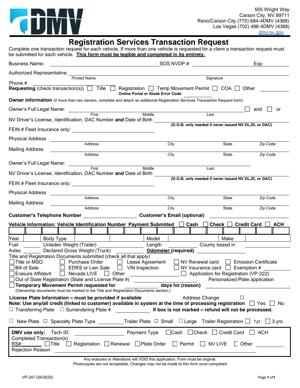
VP-247 – Registration Services Transaction Request
Fill out nowJurisdiction: Country: United States | Province or State: Nevada
The VP-247 – Registration Services Transaction Request is a Nevada Department of Motor Vehicles form used to request specific vehicle registration services. If you are preparing to complete this form, you are likely trying to process a registration-related change or transaction without visiting a DMV office in person.
This document helps you communicate exactly what service you are requesting. It acts as a written instruction sheet that goes along with your supporting documents and payment. When filled out clearly, it reduces confusion and speeds up processing.
You may encounter this form if you are renewing, transferring, updating, or correcting vehicle registration details. It is commonly used when handling matters by mail or through a registration service.
Before you begin filling it out, it helps to understand what information it collects and how it fits into the larger registration process. Small mistakes can delay your submission, so clarity and completeness matter.
What is VP-247 – Registration Services Transaction Request?
Clear definition
The VP-247 – Registration Services Transaction Request is a written request form used to process vehicle registration transactions in Nevada. It tells the DMV what action you want taken on a specific vehicle record.
The form typically includes sections for vehicle information, owner details, and the type of transaction requested. It may also include space for signatures and contact information.
In practical terms, it is not the registration itself. It is the request that triggers a change, update, or issuance related to a vehicle’s registration record.
Who typically uses this form?
Individual vehicle owners often use this form when they need to complete a registration-related task by mail. This can include people who have recently purchased a vehicle, moved to a new address, or need replacement documents.
Businesses that manage fleets also use this form. For example, a company with multiple vehicles may submit registration changes for one or more units.
Registration services and authorized agents may prepare and submit this document on behalf of clients. In those cases, the service provider fills out the form using the information given by the vehicle owner.
Family members handling matters for someone else, such as an elderly parent, may also use this form if they are authorized to act on that person’s behalf.
Why might you need this form?
You may need this form when you are not completing a standard in-person transaction at a DMV office. It helps formalize your request and ensures the correct service is performed.
If your registration documents were lost, stolen, or damaged, this form may be part of the process to request replacements.
You might also use it to update personal information tied to your vehicle record, such as a change of address or correction of a name.
In some cases, the form supports specialty transactions that are not handled through basic online renewal systems.
Typical real-life scenarios
- You purchased a used vehicle from a private seller. You have the title and bill of sale, but you are mailing your paperwork instead of visiting an office. This form tells the DMV you are requesting a registration in your name.
- You recently moved within Nevada and need your registration record updated to reflect your new address. Instead of standing in line, you prepare a mailing that includes this request form and any required documentation.
- Your registration certificate was misplaced. You need a duplicate to keep in your vehicle. The form communicates that you are requesting a replacement document, not a new registration.
- You are removing a vehicle from operation and want to complete a related registration change. The form helps identify the vehicle and the action you are requesting.
- A business is updating multiple vehicles after a corporate name change. Each vehicle’s registration record must reflect the new legal name, and this document is used to request that update.
When would you use VP-247 – Registration Services Transaction Request?
You would use this form when a registration-related transaction cannot be completed through a simple online system or when you prefer to handle the matter by mail.
It is commonly used during ownership transfers when additional documentation must be reviewed. If you are submitting title documents, proof of insurance, or other required paperwork, this form ties everything together.
Vehicle owners use it when requesting duplicate registration certificates or decals. It clarifies that you are not registering a new vehicle, but replacing existing credentials.
If you are correcting an error on your registration record, such as a misspelled name or incorrect vehicle information, this form may be used to request that correction.
Registration service providers may rely on it when submitting multiple transactions in bulk. In those cases, accuracy is especially important because each request affects an official state record.
You might also use it if you are handling a transaction for someone else and need to clearly identify both the vehicle owner and the person submitting the request.
In general, you use this form any time you need a clear written record of the specific registration service you are asking the Nevada DMV to perform.
Legal characteristics of VP-247 – Registration Services Transaction Request
This form functions as an official request to a state agency. It becomes part of the vehicle’s administrative record once processed.
For the request to be effective, the information must be complete and consistent with the supporting documents you submit. Names, vehicle identification numbers, and plate numbers must match official records.
Signatures are usually required. An unsigned form may be rejected or returned because it does not confirm who is making the request.
Common causes of delay include missing fees, incomplete vehicle identification numbers, or unclear transaction selections. Even small discrepancies can require follow-up review.
The form itself does not transfer ownership unless accompanied by proper title documentation. It does not replace a bill of sale or a title certificate.
Nevada may have specific formatting or documentation standards that differ from other states. For example, proof of insurance requirements and emissions compliance rules can affect whether a registration request is approved.
This document does not serve as temporary registration unless explicitly authorized through a separate process. Submitting it does not automatically grant driving privileges.
Is it legally binding?
The form is legally significant because it communicates your official request to a state agency and may require your signature under penalty of providing false information.
When you sign, you are generally confirming that the information provided is accurate. False statements on state forms can carry legal consequences.
However, the form itself is not a contract between private parties. It does not create a new legal agreement like a sales contract would.
Its legal effect depends on proper completion and acceptance by the DMV. Once processed, the requested change becomes part of the official registration record.
If required documents or fees are missing, the request may not be processed. In that case, no legal change occurs until the issue is resolved and the submission is accepted.
How to fill out VP-247 – Registration Services Transaction Request
Step 1 – Review the entire form before writing
Read through the full document from start to finish. This gives you a clear picture of what information is required and what documents must accompany your submission.
Take note of any sections that apply to your specific transaction. Some portions may not be relevant to your situation.
Step 2 – Identify the type of transaction
Locate the section where you indicate the service you are requesting. Mark or write the specific transaction clearly, such as duplicate registration, transfer, correction, or update.
Be precise. If multiple options appear similar, select the one that matches your intended outcome. This guides the processing staff.
Step 3 – Enter the vehicle information
Provide the vehicle identification number exactly as it appears on your title or registration. Double-check each character.
Include the license plate number if requested. Also provide the year, make, and model of the vehicle.
Any mismatch between this section and your supporting documents can delay processing.
Step 4 – Provide owner information
Enter the full legal name of the registered owner as it appears on official records. If there are multiple owners, list each one as required.
Include the current mailing address. If you are updating the address, ensure the new information is clearly indicated.
Provide contact details such as a phone number or email if the form requests them. This allows the agency to reach you if clarification is needed.
Step 5 – Complete any additional required sections
Some transactions require extra details, such as lienholder information, insurance confirmation, or odometer disclosures.
Fill in every field that applies to your request. If a section does not apply, follow the form’s instructions for leaving it blank or marking it as not applicable.
Avoid writing outside designated areas unless the form provides space for additional explanations.
Step 6 – Review supporting documents
Gather all documents required for your specific transaction. This may include a signed title, proof of insurance, identification copies, or payment.
Compare the information on those documents to what you entered on the form. Make corrections before signing if anything does not match.
Ensure copies are clear and legible if you are submitting photocopies.
Step 7 – Calculate and include payment
Determine the correct fee associated with your requested service. Confirm that the amount matches the transaction selected.
Prepare payment in the accepted form indicated on the instructions that accompany the form.
Place the payment securely with your documents to prevent separation during mailing.
Step 8 – Sign and date the form
Sign your name in the designated signature area. If multiple owners are required to sign, ensure each person signs where indicated.
Write the date of signing. This confirms when the request was made.
Review your signature to make sure it is complete and matches your printed name.
Step 9 – Make a complete copy for your records
Before sending the submission, create a full copy of the completed form and all attachments.
Keep this copy in your records. It provides proof of what you submitted and can help resolve any future questions.
Store it in a safe place until you receive confirmation or updated registration documents.
Step 10 – Submit the form as instructed
Place the completed VP-247 – Registration Services Transaction Request, supporting documents, and payment together in one package.
Address the envelope exactly as directed in the instructions provided with the form.
After mailing or delivering it through the appropriate channel, monitor your mail for confirmation, updated documents, or any follow-up communication related to your request.
Legal terms you might encounter in VP-247 – Registration Services Transaction Request
- Registered Owner: The registered owner is the person or legal entity listed in the DMV records as the owner of the vehicle. This is the name that appears on the current registration. When you complete this document, the registered owner’s name must match the DMV record exactly, including middle initials or business designations.
- Lienholder: A lienholder is a bank, credit union, or other lender that has a financial interest in the vehicle. If there is a loan on the vehicle, the lienholder may be listed on the title and in DMV records. Certain registration transactions may require you to confirm whether a lienholder exists.
- Vehicle Identification Number (VIN): The VIN is a unique 17-character code assigned to your vehicle. This document requires the VIN to identify the correct vehicle record. A single incorrect character can cause delays or rejection.
- Registration Renewal: Registration renewal refers to extending the validity of your current vehicle registration. If you are using this form for a renewal-related service, you must ensure the vehicle is eligible and that all required information is current.
- Registration Reinstatement: Reinstatement applies when a registration has been suspended or expired beyond the normal renewal period. You may need to request reinstatement and pay additional fees. The form may require you to indicate the reason for reinstatement.
- Duplicate Registration: A duplicate registration is a replacement for a lost, stolen, or damaged registration card. If you are requesting a duplicate, you typically confirm that the original is no longer in your possession.
- Change of Address: A change of address updates the address associated with your vehicle registration. This ensures you receive future notices and documents. The address you provide must be complete and accurate, including apartment or unit numbers if applicable.
- Authorized Representative: An authorized representative is someone permitted to act on behalf of the registered owner. This could be a family member, employee, or agent. If someone else signs or submits the document for you, proper authorization may be required.
- Transaction Fee: A transaction fee is the amount you must pay for the requested service. Fees vary depending on the type of registration action. Submitting incorrect payment can delay processing.
FAQs
What information do I need before starting this form?
You need your vehicle’s VIN, current registration details, and the exact name of the registered owner as it appears in DMV records. If you are changing an address or requesting a duplicate, confirm the correct updated information before writing anything. Have payment ready and confirm the amount due for your specific transaction.
How do I know which transaction type to select on VP-247 – Registration Services Transaction Request?
Read the list of available transaction options carefully and match it to what you actually need done. For example, replacing a lost registration is different from updating an address or reinstating a suspended registration. If you select the wrong option, the DMV may process the wrong action or reject your request.
What happens if the name I enter does not exactly match DMV records?
If the name does not match exactly, your request may be delayed or denied. This includes missing middle initials, using nicknames, or leaving out business identifiers like “LLC” or “Inc.” Check your current registration card and copy the name exactly as shown.
Can someone else submit this document for me?
Yes, but that person may need to show they are authorized to act for you. If the form requires a signature from the registered owner, make sure it is signed correctly. If an authorized representative signs, ensure any required authorization details are included and accurate.
Do I need to include supporting documents with this form?
It depends on the transaction you select. For example, some changes may require proof of identity or documentation supporting the request. Review the instructions for your specific transaction and confirm you have attached everything required before submission.
How do I calculate the correct payment amount?
Check the current fee schedule for the type of registration service you are requesting. Fees may differ based on the transaction type. Confirm the total before submitting this form to avoid rejection or delays due to underpayment or overpayment.
Will my registration change immediately after I submit this document?
Processing time depends on how you submit it and the type of transaction. Your registration record is updated only after the request is reviewed and accepted. Keep proof of submission in case you need to show that you made the request.
What should I do if my request on the VP-247 – Registration Services Transaction Request is rejected?
Carefully read any notice explaining why it was rejected. Common reasons include incomplete information, signature issues, or incorrect fees. Correct the specific problem identified, then resubmit this document with accurate and complete information.
Checklist: Before, During, and After VP-247 – Registration Services Transaction Request
Before
- Confirm the exact transaction you need (duplicate, change of address, reinstatement, etc.).
- Locate your current registration card and verify the registered owner’s name.
- Write down the full 17-character VIN directly from the vehicle or official documents.
- Confirm whether a lienholder is listed on your vehicle record.
- Check the current fee amount for your selected transaction.
- Gather any required supporting documents.
- Ensure you have an acceptable form of payment ready.
- Decide whether you or an authorized representative will sign and submit.
During
- Print clearly using black or blue ink if completing by hand.
- Select only the transaction type that applies to your situation.
- Enter the VIN carefully and double-check each character.
- Write the registered owner’s name exactly as shown on DMV records.
- Provide a complete and accurate mailing address.
- Complete all required fields; do not leave mandatory sections blank.
- Review any declarations or statements before signing.
- Sign and date the form in the correct location.
After
- Make a full copy of the completed form and attachments.
- Keep your payment receipt or proof of transaction.
- Submit the form using the correct method (in person, by mail, or other approved channel).
- Track delivery if mailing the form.
- Monitor your mail for updated registration documents.
- Check that your registration record reflects the requested change.
- Store the new registration card safely in your vehicle.
- Update your personal records with the new registration details.
Common mistakes to avoid with VP-247 – Registration Services Transaction Request
- Mistake: Entering the wrong VIN because you copied it from memory instead of the vehicle or official document, which leads to rejection or processing the wrong vehicle; always verify all 17 characters directly from a reliable source.
- Mistake: Selecting the wrong transaction type because you rushed through the options, which can cause delays or incorrect updates; do not forget to read each option carefully before marking your choice.
- Mistake: Using a nickname or incomplete business name because it seems easier, which may not match DMV records and can result in denial; never forget to copy the name exactly as it appears on the current registration.
- Mistake: Forgetting to sign and date the form because you focused on the vehicle details, which makes the request invalid; always check the signature line before submission.
- Mistake: Sending incorrect payment because you relied on outdated fee information, which can delay processing; do not forget to confirm the current fee for your specific transaction.
- Mistake: Leaving required fields blank because you assumed they were optional, which can cause the DMV to return the form; make sure you review every section and complete all mandatory parts.
What to do after filling out VP-247 – Registration Services Transaction Request
Once you complete the form, pause before submitting it. A careful review now can save you weeks of delay later. Compare every entry to your current registration and supporting documents.
- Step 1: Read the entire completed form from top to bottom without skipping sections.
- Step 2: Verify the VIN character by character against your vehicle or official paperwork.
- Step 3: Confirm the registered owner’s name matches exactly, including punctuation and business identifiers.
- Step 4: Check that you selected the correct transaction type and did not mark multiple conflicting options.
- Step 5: Confirm all required attachments are included, if your transaction calls for supporting documents.
- Step 6: Make a clear copy or scan of the signed form and all attachments for your records.
- Step 7: Prepare the correct payment amount in the accepted format.
- Step 8: Submit the form using the approved method and keep proof of submission.
- Step 9: If mailing, consider using a trackable delivery method and keep the tracking number.
- Step 10: Watch for confirmation, updated registration documents, or any notice requesting additional information.
After submission, organize your records. Keep your copy of the form, payment receipt, and any confirmation notice together in a dedicated vehicle file. If your address changed, update your insurance policy and any internal records to match the new registration details. When you receive updated registration documents, review them immediately for accuracy. If something is incorrect, act quickly to correct it before the issue grows more complicated.
Disclaimer: This guide is provided for informational purposes only and is not intended as legal advice. You should consult a legal professional.