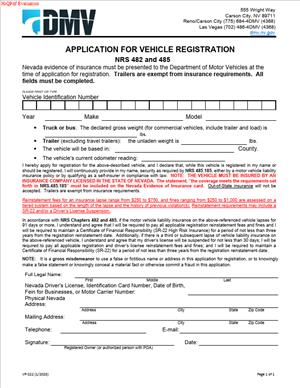
VP-222 – Application for Vehicle Registration NRS 482 and 485
Fill out nowJurisdiction: Country: United States | Province or State: Nevada
The VP-222 – Application for Vehicle Registration NRS 482 and 485 is the document used to apply for or update a vehicle registration in Nevada. If you are buying, transferring, or changing information about a vehicle, this is the form that starts the official process.
When you register a vehicle, you connect that vehicle to you as the legal owner or registrant. This filing places the vehicle in the state’s registration system and allows you to receive license plates and registration documents.
If you are filling out this form, you are likely preparing to visit or submit paperwork to the Nevada Department of Motor Vehicles. The form gathers details about you, the vehicle, and the type of registration you are requesting.
Understanding what the form asks for can save you time and avoid delays. Small errors can lead to rejected submissions or the need to resubmit documents. Knowing what each section means helps you complete the application with confidence.
This guide walks you through what the VP-222 – Application for Vehicle Registration NRS 482 and 485 does, when you use it, and how to fill it out step by step.
What is VP-222 – Application for Vehicle Registration NRS 482 and 485?
Clear definition
The VP-222 – Application for Vehicle Registration NRS 482 and 485 is an official Nevada vehicle registration application. It is used to apply for a new registration, renew certain registration details, or update ownership and vehicle information in state records.
The form collects identifying information about the vehicle, such as the vehicle identification number (VIN), year, make, and model. It also records the owner’s name, address, and other required details.
The reference to NRS 482 and 485 connects the form to Nevada statutes that govern vehicle registration and insurance requirements. By completing the document, you are providing information that supports compliance with those laws.
Who typically uses this form?
Vehicle owners use this form when they need to register a passenger car, truck, motorcycle, or other motor vehicle in Nevada. Both individuals and businesses may complete it.
You might use this form after purchasing a vehicle from a private seller. Dealerships often handle registration paperwork, but in some situations, you may need to complete and submit it yourself.
People moving to Nevada from another state may also use this form to transfer an out-of-state registration. In that case, it supports placing the vehicle into Nevada’s system.
Lenders or lienholders are not the primary users, but their information may appear on the form if there is a financed vehicle. The registered owner remains responsible for completing and signing the application.
Why might you need this form?
You need this form whenever you are establishing or updating the official registration of a vehicle in Nevada. Registration is separate from title, but the two often move together during a sale or transfer.
If you buy a used vehicle in a private sale, you typically complete registration paperwork soon after the title is transferred. The form allows the state to issue plates or assign existing plates to the vehicle.
You may also need the document when correcting information. For example, if your name changes or you discover an error in the vehicle description, the filing can update state records.
Businesses that add vehicles to their fleet use the same application. The form records the legal entity’s name and the person authorized to act on its behalf.
Typical real-life scenarios
- You purchase a used car from a neighbor. The seller signs over the title. You then complete the registration application to place the vehicle in your name and receive Nevada plates.
- You relocate to Nevada for work. Your vehicle is currently registered in another state. You submit a registration application so the vehicle is properly registered under Nevada law.
- You inherit a vehicle from a family member. After the title transfer is completed, you file the registration form to make sure the vehicle is registered in your name.
- You operate a small delivery business and buy a new van. You complete the registration application listing your business as the owner, ensuring the vehicle is legally registered for use on public roads.
- You correct a misspelled name on your existing registration. The form supports updating that information so your registration matches your identification documents.
When would you use VP-222 – Application for Vehicle Registration NRS 482 and 485?
You use this form at the point when a vehicle needs to be officially registered or re-registered in Nevada. This usually follows a change in ownership, a move into the state, or the addition of a vehicle to your records.
Timing often matters. Registration is generally required before operating the vehicle legally on public roads, except for limited short-term situations. The form is part of the process that allows you to obtain valid plates and a registration certificate.
If you are transferring plates from one vehicle to another, this application may also be involved. It helps connect the new vehicle details with your existing registration credentials.
In some cases, you use this form alongside other documents. For example, you may submit it together with a signed title, proof of insurance, and identification. The registration application does not replace those documents but works with them.
Businesses, trusts, or other entities use the same form when registering vehicles in the entity’s name. An authorized representative completes and signs it on behalf of the organization.
Legal characteristics of VP-222 – Application for Vehicle Registration NRS 482 and 485
This form functions as a formal request to the state to register a vehicle. It becomes effective when properly completed, signed, and accepted by the appropriate office.
Accuracy is critical. Incomplete fields, incorrect VINs, or mismatched owner names commonly cause delays or rejection. Even a single-digit error in the Vehicle Identification Number can require correction before the registration is processed.
The form relies on truthful statements. Providing false information can create serious legal consequences because the document is part of an official government record.
Nevada law requires vehicles to meet certain conditions before registration is granted. These may include insurance coverage and, in some cases, emissions compliance. The application itself does not prove compliance, but it works together with required documentation.
This document does not transfer ownership by itself. Title transfer is handled through separate paperwork. The registration application reflects and records ownership but does not create it.
Different states use different forms and procedures. A registration document from another state does not automatically satisfy Nevada requirements. When moving from another jurisdiction, you typically complete Nevada’s version of the application to align with state rules.
Clerical errors, missing signatures, or unsigned certifications are common reasons applications are returned. Reviewing each section before submission reduces the risk of processing delays.
Is it legally binding?
Yes, in the sense that you are making formal statements to a government agency. When you sign the application, you confirm that the information provided is accurate to the best of your knowledge.
Your signature connects you to the vehicle as the registrant. Once the application is accepted, the registration issued in your name carries legal responsibilities, such as maintaining required insurance and keeping your address current.
However, the form itself is not a contract between private parties. It does not replace a bill of sale or purchase agreement. Its legal effect centers on creating or updating a public registration record.
If the application is denied or incomplete, it does not create a valid registration. The legal effect arises only after approval and issuance of registration credentials.
How to fill out VP-222 – Application for Vehicle Registration NRS 482 and 485
Step 1 – Review the entire form before writing anything
Read through all sections of the application. Notice what information is required about the vehicle, the owner, and any lienholder. This helps you gather documents in advance and avoid stopping midway.
Step 2 – Enter the vehicle information exactly as shown on the title
Provide the VIN, year, make, model, and body type exactly as they appear on the title or manufacturer documents. Copy the Vehicle Identification Number carefully, character by character. Even a small mistake can delay processing.
Step 3 – Provide owner or business information
Fill in your full legal name as it appears on your identification. If a business owns the vehicle, enter the complete legal entity name. Include your current physical address and any required mailing address details.
Step 4 – Add co-owner details if applicable
If there is more than one registered owner, list each person as requested on the form. Use full legal names. The order and format may affect how ownership is recorded in state records.
Step 5 – Include lienholder information if the vehicle is financed
If you borrowed money to purchase the vehicle, enter the lienholder’s name and address as required. This ensures the registration record reflects any secured interest in the vehicle.
Step 6 – Indicate the type of registration or transaction
Select or mark the section that matches your situation, such as new registration, transfer, or other applicable category. Make sure your selection aligns with the supporting documents you plan to submit.
Step 7 – Review insurance and compliance sections
Complete any portions that relate to insurance or statutory compliance. Confirm that the information you provide matches your current insurance records and other documentation.
Step 8 – Sign and date the application
Sign your name exactly as entered in the owner section if the vehicle is owned by a business; an authorized representative signs and includes their title if required. Add the date of signing in the space provided.
Step 9 – Double-check all entries before submission
Read through the entire application once more. Verify the Vehicle Identification Number, spelling of names, and addresses. Confirm that all required sections are completed and that no signature lines are left blank.
Legal terms you might encounter in VP-222 – Application for Vehicle Registration NRS 482 and 485
- Registered Owner: The registered owner is the person or business whose name appears on the registration record. This is the party legally responsible for the vehicle’s operation and compliance with registration and insurance requirements. On this form, you must enter the name exactly as it appears on the title or ownership document.
- Legal Owner: The legal owner is usually a lender or lienholder that holds a security interest in the vehicle. If you financed the vehicle, the lender’s name and address must be listed. This ensures the registration record reflects who has a financial claim on the vehicle.
- Lienholder: A lienholder is the creditor that financed your vehicle purchase. The lien gives the creditor rights in the vehicle until the loan is paid off. You must provide accurate lienholder details so the title and registration records are properly linked.
- Vehicle Identification Number (VIN): The VIN is a unique 17-character code assigned to your vehicle. It identifies the make, model, year, and manufacturing details. You must copy it exactly as shown on the title or vehicle itself, since even one incorrect character can delay processing.
- Odometer Reading: The odometer reading shows the vehicle’s mileage at the time of application. You may need to certify that the mileage is accurate to the best of your knowledge. Providing false mileage information can create legal and financial issues later.
- Gross Vehicle Weight Rating (GVWR): GVWR refers to the maximum weight a vehicle is rated to carry, including passengers and cargo. For certain vehicles, this number affects registration classification and fees. You must enter the correct weight category if the form asks for it.
- Proof of Insurance: Proof of insurance confirms that the vehicle meets minimum coverage requirements. Registration cannot typically be completed without valid insurance information. The form may require you to certify that coverage is active.
- Residence Address: This is the physical location where you live or where the vehicle is primarily kept. It may be different from your mailing address. Accurate address information ensures that registration documents and renewal notices reach you.
- Registration Period: The registration period is the time frame during which your vehicle is legally registered. It usually runs for a fixed term. Your application starts or renews that period once approved.
- Certification Statement: This is the section where you confirm that all information provided is true and correct. By signing, you accept legal responsibility for the accuracy of the application. Read this section carefully before you sign.
FAQs
What effective date does this form use for my registration?
The effective date usually ties to when your application is processed and approved, not the date you sign it. When completing this form, check whether you are applying for a new registration, renewal, or transfer. The transaction type you select affects when your registration period begins and ends.
Do I need to sign if the vehicle is owned by a business?
Yes. This document must be signed by an authorized representative of the business. That person should print their name and title clearly so the agency can confirm signing authority. Make sure the business name on the form matches exactly with the ownership records.
What attachments are typically required with VP-222 – Application for Vehicle Registration NRS 482 and 485?
You may need to include supporting documents such as proof of ownership, proof of insurance, and identification. If there is a lienholder, include accurate lien information as shown on your financing paperwork. Missing attachments are one of the most common reasons this form is delayed or rejected.
What happens if the name on my title does not exactly match the name I write on this form?
The agency compares the name you enter with the name on the title and other ownership documents. Even small differences, like missing middle initials or suffixes, can trigger questions. Always copy the name exactly as it appears on your title to avoid processing problems.
How do I know if my application has been accepted?
After submission, you should receive confirmation through official documentation, such as a registration card or updated record. If there is an issue, you may be contacted to correct or clarify information. Keep copies of everything so you can quickly respond if needed.
What changes in the public record once VP-222 – Application for Vehicle Registration NRS 482 and 485 is processed?
Once approved, the registration record updates to show the current registered owner, address, vehicle details, and any lienholder information. These details become part of the official motor vehicle record. Accuracy matters because law enforcement and other agencies rely on that record.
Can I correct an error after I submit this document?
If you discover a mistake, act quickly. Contact the processing office and ask what correction steps are required. Some errors may require a new application or written clarification, especially if they involve ownership or Vehicle Identification Number details.
Do all owners have to sign this form?
If the vehicle is jointly owned, all listed owners may need to sign depending on how ownership is structured. Review the ownership format shown on the title. If multiple signatures are required and one is missing, the application may not be processed.
Checklist: Before, During, and After VP-222 – Application for Vehicle Registration NRS 482 and 485
Before
- Confirm you have the correct and most current version of the form.
- Gather your vehicle title or ownership document.
- Locate your vehicle’s Vehicle Identification Number and verify it matches your paperwork.
- Have current proof of insurance available.
- Confirm the correct legal name and address of all owners.
- Collect lienholder or financing details if applicable.
- Check your odometer reading and record it accurately.
- Review any prior registration documents for consistency.
During
- Write legibly in dark ink if completing by hand.
- Enter the VIN exactly as shown, without guessing or abbreviating.
- Copy owner names precisely as they appear on the title.
- Provide complete residence and mailing addresses.
- Fill in lienholder information in full, including address.
- Select the correct transaction type for your situation.
- Review the certification statement carefully before signing.
- Ensure all required signatures are included.
- Double-check every field for blanks or incomplete answers.
After
- Make a full copy of the completed application for your records.
- Attach all required supporting documents before submission.
- Submit the form using the accepted method.
- Keep proof of submission, such as a receipt or confirmation.
- Monitor for confirmation or updated registration documents.
- Store your new registration card in your vehicle as required.
- Update your personal records with the new registration period.
- Calendar your next renewal date to avoid lapses.
Common mistakes to avoid with VP-222 – Application for Vehicle Registration NRS 482 and 485
- Mistake: Entering the VIN incorrectly because you copied it from memory instead of the vehicle or title, which can cause rejection or delays, so do not forget to verify each of the 17 characters carefully.
- Mistake: Using a nickname or shortened business name because it feels easier, which creates mismatches with ownership records and processing issues, so do not forget to match the title exactly.
- Mistake: Leaving the lienholder section blank when the vehicle is financed because you assume it is optional, which can result in incomplete records, so do not forget to include full lender details.
- Mistake: Skipping the insurance certification because you think coverage is already on file, which may prevent registration approval, so do not forget to confirm and provide accurate insurance information.
- Mistake: Missing a required co-owner signature because one person completed the form alone, which can invalidate the application, so do not forget to review ownership structure before signing.
- Mistake: Submitting the form without required attachments because you plan to send them later, which can stall processing, so do not forget to include all supporting documents at the same time.
- Mistake: Writing illegibly or using unclear corrections because you rushed, which can lead to data entry errors, so do not forget to print clearly and neatly.
- Mistake: Forgetting to make a copy before submission because you assume you will not need it, which leaves you without proof if questions arise, so do not forget to keep a complete copy.
What to do after filling out VP-222 – Application for Vehicle Registration NRS 482 and 485
Once you complete the application, pause before you submit it. A careful final review saves time and stress later. Make sure every required field is filled in and that your answers match your supporting documents.
- Step 1: Make a complete copy of the signed form and all attachments for your records.
- Step 2: Organize your supporting documents in the order requested, including proof of ownership and insurance.
- Step 3: Confirm the accepted submission method and prepare the application accordingly.
- Step 4: Submit the application and obtain proof of submission, such as a stamped copy or receipt.
- Step 5: Track the status if a tracking or reference number is provided.
- Step 6: Watch your mail or official communications for confirmation or requests for corrections.
- Step 7: Review your new registration card or confirmation documents for accuracy as soon as you receive them.
- Step 8: Place the registration card in your vehicle and store extra copies in a safe place.
- Step 9: Update any internal records, such as fleet logs or personal files, with the new registration period.
- Step 10: Mark your calendar with the next renewal date to prevent a lapse in registration.
Staying organized after submission helps you respond quickly if any issues arise. Keep everything related to your vehicle registration together in one file. That way, if you sell the vehicle, refinance it, or renew again, you already have the documents you need.
Disclaimer: This guide is provided for informational purposes only and is not intended as legal advice. You should consult a legal professional.