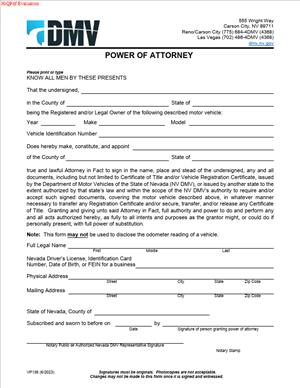
VP 136 – Power of Attorney
Fill out nowJurisdiction: Country: United States | Province or State: Nevada
The VP 136 – Power of Attorney is a form used in Nevada to authorize another person to act on your behalf in specific motor vehicle matters. It is issued by the Nevada Department of Motor Vehicles and is commonly used during vehicle transactions.
If you are buying, selling, registering, or transferring a vehicle and cannot appear in person, this document allows someone else to handle the process for you. It creates a limited authority tied to DMV-related tasks.
This form matters because many vehicle transactions require a signature from the legal owner. When you are unavailable, the VP 136 – Power of Attorney allows a trusted person to sign certain documents in your place.
You may be dealing with time pressure, distance, or scheduling issues. Understanding how this document works helps you complete your vehicle transaction without unnecessary delays.
What is VP 136 – Power of Attorney?
Clear definition
VP 136 – Power of Attorney is a Nevada DMV form that lets you appoint another person, called an attorney-in-fact or agent, to act for you in specific motor vehicle matters. It is not a general power of attorney for all financial or personal affairs.
The authority granted through this form is typically limited to tasks related to a particular vehicle. That may include signing a title, completing an odometer disclosure, or submitting registration paperwork.
This document focuses on vehicle-related transactions handled through the Nevada DMV. It does not automatically extend beyond the scope described in the form.
Who typically uses this form?
Vehicle owners often use this form when they cannot attend a DMV office in person. This includes individuals who are out of state, deployed, hospitalized, or otherwise unavailable.
Car dealerships and lienholders may also use this form when managing title transfers or processing documents on behalf of a vehicle owner.
Family members sometimes use it when helping an elderly relative handle vehicle paperwork. Business owners may use it when authorizing an employee to manage company vehicle transactions.
In each case, the person granting authority remains the legal owner, while the agent is permitted to complete specific actions on their behalf.
Why might you need this form?
You may need this form if you are selling a vehicle but cannot meet the buyer to sign the title. An agent can sign for you within the limits described in the document.
You might also need it if you are buying a vehicle and want someone else to complete the registration process. This can save time when work or travel prevents you from going to the DMV.
If there is a correction required on a title, such as updating ownership information, an authorized agent can handle the paperwork. The form provides proof to the DMV that the person signing has permission.
The form is also useful in situations involving multiple owners. If one owner cannot be present, they may grant authority to another person to sign on their behalf.
Typical real-life scenarios
- You move out of Nevada but still own a vehicle registered there. To sell the vehicle, you authorize a relative in Nevada to complete the title transfer. The relative signs DMV documents as your agent.
- You purchase a car from a private seller but are working long hours. You authorize your spouse to register the vehicle and obtain license plates. The spouse uses the form to show the DMV they can act for you.
- A dealership processes a trade-in vehicle. The owner signs a power of attorney so the dealership can correct title issues and finalize paperwork without requiring the owner to return for additional signatures.
- An elderly vehicle owner is unable to travel due to health concerns. A trusted adult child uses the power of attorney to handle registration renewal and title updates.
- A business with several company vehicles authorizes a staff member to manage titling and registration. The employee uses the document when submitting paperwork for each listed vehicle.
When would you use VP 136 – Power of Attorney?
You would use this form when a vehicle-related transaction requires your signature but you cannot provide it in person. The document allows someone else to step into that role for limited purposes.
Common situations include selling a car, transferring ownership after a purchase, registering a newly acquired vehicle, or correcting errors on a title. The agent may also complete odometer disclosures if permitted by the form.
In many cases, the DMV requires original signatures. If you are not available to sign at the time documents are submitted, this form provides a lawful way for another person to sign on your behalf.
The roles involved typically include the principal, who is the vehicle owner granting authority, and the agent, who is the person receiving authority. The agent’s powers are limited to what is described in the form.
This document is often used for a specific vehicle identified by year, make, model, and vehicle identification number. It is not usually a broad authorization for all current and future vehicles unless the form clearly states that.
You might also use it when time-sensitive filings are required. For example, certain title transfers must be completed within a set period after a sale. An agent can help meet those deadlines.
Legal characteristics of VP 136 – Power of Attorney
VP 136 – Power of Attorney is a written authorization. For it to be effective, it generally must be completed accurately, signed by the vehicle owner, and meet any signature requirements stated on the form.
The form typically identifies the principal and the agent by name. It also identifies the vehicle involved. Clear identification helps prevent confusion or rejection during submission.
If required information is missing, the DMV may decline to process the transaction. Common issues include incomplete vehicle details, mismatched names, or missing signatures.
Some states require notarization for certain powers of attorney. Requirements can vary by jurisdiction. In Nevada, the specific instructions on the form determine whether notarization is necessary for the DMV to accept it.
This document grants limited authority. It does not transfer ownership of the vehicle by itself. Ownership changes only when the title is properly signed and processed according to DMV procedures.
The form also does not give the agent control over unrelated financial accounts, property, or medical decisions. Its scope is tied to motor vehicle matters described in the document.
If the principal revokes the power of attorney before it is used, the agent’s authority typically ends. Authority may also end if the principal dies, depending on the terms and applicable law.
Errors on the form can delay processing. For example, if the vehicle identification number does not match DMV records, the transaction may be put on hold. Accuracy is essential to avoid additional visits or paperwork.
Is it legally binding?
When properly completed and signed, this form is generally legally binding for the limited purposes it describes. It creates a recognized agency relationship between you and the person you appoint.
The binding effect depends on compliance with the form’s requirements. If the document is incomplete or altered, it may not be accepted for processing.
The agent is expected to act within the authority granted. If the agent exceeds that authority, the action may not be valid, and disputes can arise.
The DMV relies on the document as proof that the agent has permission to sign. Once accepted, the signatures made by the agent within the allowed scope are treated as if you signed them yourself.
How to fill out VP 136 – Power of Attorney
Step 1 – Identify the vehicle owner
Enter your full legal name as it appears on the vehicle title. Include any middle name or initial if it appears in DMV records. Make sure the name matches the existing ownership documents.
Provide your current address if the form requests it. Use a complete mailing address, including city, state, and ZIP code.
Step 2 – Identify the agent
Write the full legal name of the person you are appointing as your agent. This should be someone you trust to handle vehicle paperwork accurately.
If the form asks for the agent’s address or identifying details, complete those fields clearly. The information should be legible and consistent.
Step 3 – Describe the vehicle
Enter the year, make, and model of the vehicle. Provide the complete vehicle identification number without omissions.
Double-check the Vehicle Identification Number against the title or registration. A single incorrect character can cause processing delays.
Step 4 – Specify the authority granted
Review the section that describes what the agent is allowed to do. This may include signing the title, completing odometer disclosures, or submitting registration forms.
Read each authorization carefully before signing. The authority given is limited to what is written in this section.
Step 5 – Review for accuracy
Go over every field before signing. Confirm that names, Vehicle Identification Number, and other details match existing documents.
Look for blank spaces that may need completion. Incomplete forms are commonly rejected.
Step 6 – Sign and date the form
Sign your name exactly as it appears on the vehicle title. Add the date of signing in the space provided.
If the form requires notarization, sign in the presence of a notary and complete the notary section as instructed on the document.
Step 7 – Provide the form to the agent
Give the completed original form to the person you appointed. The agent will present it when signing documents or submitting paperwork to the Nevada DMV.
Keep a copy for your records. This helps you track what authority was granted and when the document was signed.
Legal terms you might encounter in VP 136 – Power of Attorney
- Principal: This is you, the person who owns the vehicle and is giving authority to someone else. Your legal name must appear exactly as it appears on the vehicle title or registration record. If your name does not match the official record, the document may be rejected.
- Agent: The agent is the person you authorize to act on your behalf. This individual can sign documents and complete vehicle transactions for you within the limits you grant. Their full legal name should be clearly printed to avoid confusion at the time of processing.
- Attorney-in-Fact: This is another term for agent. It does not mean the person is a lawyer. It simply means they have been granted authority to act for you under this document.
- Authority Granted: This section explains what the agent is allowed to do. It may include signing a title, applying for registration, or completing transfer paperwork. The wording controls the scope of power, so it must accurately reflect what you intend.
- Vehicle Identification Number (VIN): The VIN is the unique 17-character number assigned to your vehicle. This number must match the Vehicle Identification Number shown on the title and on the vehicle itself. An incorrect VIN is one of the most common reasons forms are rejected.
- Odometer Disclosure: In many vehicle transactions, mileage must be recorded at the time of transfer. If your agent is authorized to complete a sale, they may also be required to certify the odometer reading. Accuracy here is critical because mileage statements carry legal consequences.
- Notarization: Some power of attorney forms require a notary public to witness your signature. The notary verifies your identity and confirms that you signed voluntarily. If notarization is required and missing, the document may not be accepted.
- Signature of Principal: This is your official signature authorizing the power granted. It should match the signature used on other vehicle records. A mismatched signature can delay or invalidate processing.
- Revocation: Revocation is the act of canceling the authority you previously granted. You may revoke a power of attorney at any time unless it has already been used to complete a transaction. Proper notice helps prevent unintended use.
- Effective Date: This is the date the authority begins. If no future date is listed, authority typically begins when you sign. The effective date matters if there is a delay between signing and submitting the paperwork.
FAQs
Does the agent’s name have to match their identification exactly?
Yes. The name you write for the agent should match their government-issued identification. If there is a mismatch, the office processing the transaction may question the authority and delay acceptance. Always confirm spelling, middle initials, and suffixes before signing this document.
When does the authority under VP 136 – Power of Attorney begin?
Authority generally begins on the date you sign, unless you specify a later effective date. Check the date line carefully. If the form is signed but undated, processing staff may not know when the authority started, which can lead to rejection or additional verification steps.
Do I need to include the full VIN or can I shorten it?
You must include the complete 17-character VIN exactly as it appears on the title or registration. Do not shorten or approximate it. Even one incorrect character can cause the transaction to be stopped because the vehicle cannot be positively identified in the record system.
Can the agent sell my vehicle using this form?
Only if the authority granted clearly allows it. Review the section describing what the agent may do. If it includes signing title transfer documents, then the agent can complete the sale paperwork. If the language is limited, they may not have authority to finalize a transfer.
What happens if I make a mistake while filling it out?
If you make a small error, do not use correction fluid or scribble over it. That can raise concerns about alterations. It is usually better to start over with a clean copy. Clear, legible information reduces the chance that the document will be rejected.
Do I need to attach anything to this form when submitting it?
That depends on the transaction being completed. If the agent is transferring ownership, they may need the original title and supporting documents. This document authorizes action, but it does not replace required title or registration paperwork.
Will this document change the public ownership record by itself?
No. Signing VP 136 – Power of Attorney does not automatically update vehicle ownership records. It only authorizes someone to act for you. The record changes when the underlying transaction, such as a title transfer, is properly completed and processed.
Can I cancel the VP 136 – Power of Attorney after signing it?
Yes, you can revoke the authority if the transaction has not yet been completed. You should notify the agent in writing and, if possible, retrieve or destroy unused copies. Clear communication helps prevent the agent from unknowingly acting under authority you no longer intend to grant.
Checklist: Before, During, and After VP 136 – Power of Attorney
Before
- Confirm the exact legal name listed on your vehicle title.
- Locate the full 17-character VIN from the title or vehicle.
- Decide precisely what authority you want to grant.
- Verify the agent’s full legal name and identification details.
- Check whether notarization will be required.
- Gather related documents such as the title or registration.
- Review any deadlines related to your vehicle transaction.
During
- Print clearly and use dark ink.
- Enter your name exactly as shown on the title.
- Write the agent’s name exactly as shown on their ID.
- Carefully copy the full Vehicle Identification Number without skipping characters.
- Review the authority language to ensure it matches your intent.
- Double-check all dates for accuracy.
- Sign only after confirming every field is complete.
- Complete notarization if required.
After
- Make at least one copy for your records.
- Provide the original to your agent if they will file it.
- Store your copy with your vehicle documents.
- Inform the agent of any limits on their authority.
- Track when and how the document will be used.
- Confirm that the related vehicle transaction is completed.
- Keep proof of submission or processing confirmation.
- Revoke the authority in writing if your plans change.
Common mistakes to avoid with VP 136 – Power of Attorney
- Mistake: Writing a nickname instead of your full legal name, which happens out of habit, can cause rejection because records must match exactly, so do not forget to copy your name directly from the title.
- Mistake: Entering an incorrect Vehicle Identification Number due to a transcription error can stop the transaction since the vehicle cannot be identified, so do not forget to double-check all 17 characters carefully.
- Mistake: Granting broader authority than intended because you did not read the authority section closely can allow actions you did not plan for, so do not forget to confirm the exact powers being given.
- Mistake: Forgetting to sign and date the form, which often happens when rushing, makes the document invalid, so do not forget to complete the signature and date lines.
- Mistake: Failing to complete notarization when required can result in immediate rejection at submission, so do not forget to verify whether a notary is necessary.
- Mistake: Making handwritten corrections or using correction fluid can create suspicion of alteration and delay processing, so do not forget to start over with a clean copy if you make an error.
- Mistake: Giving the form to the agent without keeping a copy can leave you without proof of what authority was granted, so do not forget to retain a complete copy for your records.
- Mistake: Assuming the power of attorney changes ownership by itself can lead to missed deadlines for title transfer, so do not forget that a separate transaction must be completed to update the record.
What to do after filling out VP 136 – Power of Attorney
Once you complete the document, your focus shifts to proper use and recordkeeping. This form only works if it is delivered and used correctly in connection with the underlying vehicle transaction.
- Step 1: Review the completed form one final time for spelling, VIN accuracy, and signatures.
- Step 2: Make clear, legible copies for your personal records.
- Step 3: If notarization is required and not yet completed, arrange for notarization before giving the document to your agent.
- Step 4: Provide the original signed document to your agent so they can complete the authorized transaction.
- Step 5: Give your agent any supporting documents they will need, such as the vehicle title or registration paperwork.
- Step 6: Confirm with your agent when and where they will submit the paperwork.
- Step 7: Ask your agent to notify you once the transaction has been processed and accepted.
- Step 8: Keep any confirmation receipts, copies of updated titles, or registration documents you receive.
- Step 9: Store your copy of the power of attorney with your vehicle records in a secure place.
- Step 10: If circumstances change, prepare a written revocation and inform the agent promptly to prevent unintended use.
Taking these steps protects you. You stay informed about what actions are taken in your name. You also maintain a clear paper trail if questions arise later. Organized records and clear communication with your agent reduce the risk of delays, misunderstandings, or unauthorized actions.
Disclaimer: This guide is provided for informational purposes only and is not intended as legal advice. You should consult a legal professional.