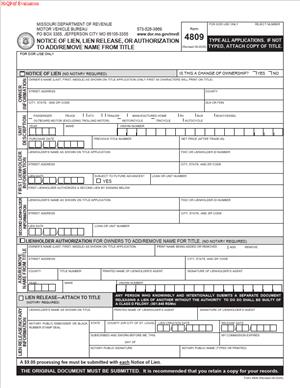
Form 4809 – Notice of Lien, Lien Release, or Authorization to Add or Remove Name from Title
Fill out nowJurisdiction: Country: United States | Province or State: Missouri
Form 4809 – Notice of Lien, Lien Release, or Authorization to Add or Remove Name from Title is used in Missouri to update ownership or lien information on a vehicle title. It is a multi-purpose form. It allows you to notify the state about a lien, release a lien, or change the names listed on a title.
You may encounter this form when buying, selling, refinancing, or transferring a vehicle. It connects the legal ownership record to the current financial or ownership situation. If the title does not match reality, problems can follow.
This document is often used by vehicle owners, lenders, and lienholders. It can also be used when someone needs to add or remove a co-owner from a title. That might happen after a marriage, divorce, loan payoff, or family transfer.
Accuracy matters. A small mistake in names, vehicle details, or signatures can delay processing. Understanding what each section means helps you complete the filing correctly the first time.
What is Form 4809 – Notice of Lien, Lien Release, or Authorization to Add or Remove Name from Title?
Clear definition
Form 4809 – Notice of Lien, Lien Release, or Authorization to Add or Remove Name from Title is an official Missouri Department of Revenue document. It updates the state’s motor vehicle title records.
The form serves three main purposes. First, it can notify the state that a lien exists on a vehicle. Second, it can confirm that a lien has been satisfied and should be released. Third, it can authorize adding or removing a person’s name from the vehicle title.
It is not a contract by itself. It is a formal notice and authorization that supports changes to an existing title record.
Who typically uses this form?
Vehicle owners use this form when they want to change who is listed on the title. For example, an owner may want to add a spouse or remove a former co-owner.
Lenders and lienholders use it to record a lien. A lien gives the lender a legal interest in the vehicle as security for a loan. When the loan is paid off, the lienholder may use the same form to release that interest.
Dealers and title services may also handle this document during vehicle transactions. Even if someone else prepares it, you remain responsible for reviewing the information before signing.
Why might you need this form?
You may need this form when a vehicle loan is paid off. The lien must be officially released so the title no longer shows a secured interest.
You might also need it if you refinance a vehicle. In that case, one lien is removed, and another may be added.
Another common reason is a change in ownership structure. If you want to add a family member as a co-owner, or remove someone after a divorce or settlement, this form helps update the title record.
Without filing the proper notice, the state record will not reflect the change. That can delay future sales or transfers.
Typical real-life scenarios
- You finance a vehicle through a bank. The bank records a lien to protect its interest. The lien is listed on the title. Once the loan is fully paid, the bank releases the lien using the appropriate section of the form.
- You and your spouse buy a car together. Later, you decide to have only one name on the title. The authorization section of the form allows for a change if all required parties sign.
- After a divorce, one person keeps the vehicle. The other person’s name must be removed from the title. The form provides a way to authorize that removal so the title reflects sole ownership.
- A parent helps a child buy a vehicle by co-signing and being listed on the title. After the loan is paid, the parent may want to be removed from the title. The form allows that change if all conditions are met.
- You refinance your vehicle with a different lender. The original lien is released, and the new lender records its lien. Both actions can involve different sections of this document.
When would you use Form 4809 – Notice of Lien, Lien Release, or Authorization to Add or Remove Name from Title?
You use this form when there is a change to the legal or financial status of a vehicle that must be reflected on the Missouri title record.
If you take out a loan using your vehicle as collateral, the lender typically records a lien. This protects the lender’s interest until the debt is paid. The notice portion of the form supports that recording.
When the loan is satisfied, the lien must be formally released. Until the release is processed, the title continues to show the lien. That can prevent or delay a sale or transfer.
You may also use this form when changing the names listed as owners. Ownership changes do not automatically update the state record. A signed authorization is usually required.
In some cases, both an owner and a lienholder must sign. For example, if a lien exists and you are trying to remove a co-owner, the lienholder may need to acknowledge the change. The exact signature requirements depend on the situation shown on the current title.
Timing can matter. Many vehicle-related filings are connected to deadlines for registration, titling, or transfer. Submitting the form promptly helps avoid complications with future transactions.
Legal characteristics of Form 4809 – Notice of Lien, Lien Release, or Authorization to Add or Remove Name from Title
This form becomes effective when it is properly completed, signed by the required parties, and accepted for processing. The information must match the existing title record and vehicle identification details.
Common reasons for rejection include mismatched names, incorrect vehicle identification numbers, missing signatures, or incomplete sections. If any required field is left blank, processing may stop until the issue is corrected.
Signatures are central to the form’s validity. Owners must sign to authorize changes to their ownership interest. Lienholders must sign to confirm that a lien is being released. If a business is involved, an authorized representative generally signs on its behalf.
The form itself does not transfer possession of a vehicle. It updates the legal record tied to the title. Physical control of the vehicle and the legal title record are related but separate matters.
High-level differences can exist depending on how the current title is structured. For example, if multiple owners are listed with specific ownership wording, that wording can affect who must sign. Similarly, if a lien is active, additional authorization may be required before ownership changes are processed.
The form does not resolve disputes between parties. If there is disagreement about ownership or loan status, the state record will usually not be changed until proper documentation is provided.
Is it legally binding?
The form is legally significant once properly signed and processed. When an owner signs to add or remove a name, that signature authorizes a change to the official title record. When a lienholder signs a release, that signature confirms the secured interest has been satisfied.
The binding effect depends on accurate information and valid signatures. If someone signs without authority or provides false details, the change can be challenged.
It is important to understand that the form reflects existing rights rather than creating them from scratch. For example, paying off a loan satisfies the debt. The lien release section confirms that satisfaction, so the public record is updated.
Once accepted and recorded, the updated title reflects the new ownership or lien status. Future buyers, lenders, and agencies rely on that record.
How to fill out Form 4809 – Notice of Lien, Lien Release, or Authorization to Add or Remove Name from Title
Step 1 – Identify the purpose of the form
Begin by determining which section applies to your situation. The form contains separate areas for lien notice, lien release, and authorization to add or remove a name. Complete only the portion that matches your specific transaction.
Step 2 – Enter vehicle information
Provide the full vehicle description as shown on the current title. This usually includes the vehicle identification number, year, make, and model. Double-check the VIN for accuracy, as a single incorrect character can delay processing.
Step 3 – Provide owner information
List the name or names exactly as they appear on the current title. If you are adding or removing a person, ensure that both the existing and new ownership details are clearly written. Use full legal names rather than nicknames.
Step 4 – Complete lien details if applicable
If you are recording a lien, enter the lienholder’s complete legal name and address. If you are releasing a lien, confirm that the lienholder information matches the existing record before completing the release section.
Step 5 – Review signature requirements
Determine who must sign based on the current title and the action requested. All listed owners may need to sign to authorize a name change. A lienholder must sign to release a lien. If a business is involved, the signer should include their title or capacity.
Step 6 – Sign and date the form
Each required party should sign in the appropriate space and include the date of signing. Make sure signatures are consistent with the names printed on the form. Avoid signing in the wrong section.
Step 7 – Verify completeness before submission
Read through the entire form once more. Confirm that all relevant sections are filled in, no required fields are blank, and all necessary signatures are present. Ensuring accuracy at this stage helps reduce delays in processing.
Legal terms you might encounter in Form 4809 – Notice of Lien, Lien Release, or Authorization to Add or Remove Name from Title
- Lien: A lien is a legal claim against a vehicle as security for a debt. On this form, a lien usually appears when a lender finances the vehicle and wants its interest recorded on the title. The lien stays attached to the vehicle record until it is officially released.
- Lienholder: The lienholder is the person or entity that holds the lien. This is often a bank or credit union, but it can also be an individual who loaned money for the vehicle. The lienholder’s name and address must be entered exactly as they want it to appear on the title record.
- Lien Release: A lien release confirms that the debt secured by the vehicle has been paid in full. In this document, the lienholder completes the release section to remove its claim from the title. Without a proper release, the lien remains part of the official record.
- Certificate of Title: The certificate of title is the legal document that shows who owns the vehicle and whether any liens exist. This form updates the information connected to that title, such as adding or removing a lien or changing ownership names. The title reflects what is recorded through this filing.
- Owner of Record: The owner of record is the person currently listed on the title. If you are adding or removing a name, the owner of record must be clearly identified. Only the correct owner can authorize certain changes to the title.
- Joint Ownership: Joint ownership means more than one person is listed as owner on the title. The form may be used to add a joint owner or remove one. The way names are joined on the title can affect who must sign and how future transfers work.
- Authorization: Authorization is written permission to make a change to the title. When adding or removing a name, the existing owner must authorize the update. This is done by signing in the appropriate section of the document.
- Vehicle Identification Number (VIN): The VIN is a unique 17-character number assigned to a specific vehicle. It must match the number on the current title and the vehicle itself. An incorrect VIN can delay or invalidate the processing of the request.
- Effective Date: The effective date is the date when the lien, release, or name change takes legal effect in the official record. This may be the date of signature or the date the document is processed, depending on how it is completed. You should review the form carefully to understand which date applies.
- Signature Certification: Signature certification confirms that the person signing has the authority to do so. For a lien release, the lienholder’s authorized representative must sign. For a name change, the owner must sign as shown on the existing title.
FAQs
Do I need the current title in front of me to complete this form?
Yes. You should have the current certificate of title so you can copy the vehicle identification number, owner names, and lien details exactly as they appear. Even small differences in spelling, punctuation, or name order can cause processing delays. Always match the information on the title character for character.
Who is allowed to sign the lien release section?
The lienholder or an authorized representative of the lienholder must sign that section. The name of the person signing should match the business records of the lienholder, and their title or authority may need to be indicated. If someone signs without proper authority, the release may be rejected, and the lien will remain on the record.
How do I correctly add a name to an existing title?
You must enter the full legal name of the new owner exactly as it should appear on the updated title. The current owner of record must authorize the addition by signing in the designated area. Make sure you clearly indicate whether ownership is changing to joint ownership and confirm that all required signatures are present before submitting Form 4809 – Notice of Lien, Lien Release, or Authorization to Add or Remove Name from Title.
What happens to the public record after I submit this document?
Once accepted and processed, the official title record is updated to reflect the lien notice, lien release, or name change. The updated information replaces the previous entry in the state’s vehicle title system. If the form is incomplete or contains errors, the record will not change until corrections are made and accepted.
Can I remove a name from the title without that person’s signature?
In most cases, the person whose name is currently on the title must authorize its removal by signing the document. If their signature is missing, the request may be denied. You should review the signature lines carefully and confirm that all listed owners have signed where required.
Do I need to enter the date the loan was paid off?
If you are completing the lien release portion, you should enter the date the debt was satisfied if the form requests it. This helps establish the timeline of the release and supports accurate recordkeeping. Make sure the date matches the lienholder’s records and the signature date provided.
What if the name on the title is slightly different from my current legal name?
You must enter the name exactly as it appears on the current title when identifying the owner of record. If your legal name has changed, you may need to provide additional documentation and complete the name change section accurately. Review each name field carefully to avoid mismatches that could delay processing of this form.
How do I know if my Form 4809 – Notice of Lien, Lien Release, or Authorization to Add or Remove Name from Title was accepted?
After submission, you should receive confirmation through the issuing authority’s normal processing method, which may include a receipt, updated title, or formal notice. Check that the new title reflects the lien release or name change you requested. If you do not receive confirmation within a reasonable time, follow up to verify that the document was processed.
Checklist: Before, During, and After Form 4809 – Notice of Lien, Lien Release, or Authorization to Add or Remove Name from Title
Before
- Gather the current certificate of title.
- Confirm the full legal names of all owners and lienholders.
- Verify the complete and correct VIN.
- Determine whether you are adding a lien, releasing a lien, or changing ownership names.
- Confirm who must sign based on the type of change.
- Collect any supporting documents, such as proof of loan payoff.
- Review the form instructions carefully.
- Check that you have accurate mailing addresses for all parties.
During
- Enter the VIN exactly as it appears on the title.
- Write all names clearly and in full legal format.
- Complete only the sections that apply to your request.
- Double-check lienholder information for accuracy.
- Ensure required dates are filled in and consistent.
- Confirm that all required signatures are included.
- Review the document for blank required fields.
- Make a copy of the completed form before submission.
After
- Submit the form using the accepted filing method.
- Retain a copy of the completed and signed document.
- Keep proof of submission, such as a receipt.
- Monitor for confirmation or an updated title.
- Review the updated title to confirm changes.
- Store the new title in a safe place.
- Update your personal records to reflect the change.
- Follow up promptly if you receive a notice of deficiency.
Common mistakes to avoid with Form 4809 – Notice of Lien, Lien Release, or Authorization to Add or Remove Name from Title
- Mistake: Entering an incorrect VIN because you copied it from memory instead of the title, which can cause rejection and delay, so always verify the number directly from the official document.
- Mistake: Forgetting to obtain the lienholder’s authorized signature for a release, which happens when borrowers assume that payoff alone is enough, leading to the lien remaining on record, so do not forget the signed release section.
- Mistake: Misspelling an owner’s name or using nicknames, which often occurs when rushing, resulting in processing issues or mismatched records, so always use the exact legal name shown on the title.
- Mistake: Leaving required date fields blank because they seem optional, which can result in incomplete processing, so check every date line and confirm it is properly filled in.
- Mistake: Submitting the form without reviewing all applicable sections, which happens when multiple changes are involved, causing partial updates, so carefully confirm that every relevant section is complete.
- Mistake: Failing to keep a copy of the signed document, which makes it difficult to resolve disputes or prove submission later, so always retain a clear copy for your records.
- Mistake: Assuming one owner can remove another without consent, which may lead to rejection, so confirm that all required owners have signed before submission.
- Mistake: Overlooking mailing address accuracy for lienholders, which can delay notifications and title issuance, so verify address details carefully.
What to do after filling out Form 4809 – Notice of Lien, Lien Release, or Authorization to Add or Remove Name from Title
Once you complete the document, pause and review it line by line. Check the VIN, names, dates, and signatures. Make sure the section you completed matches your intended change. Small errors can slow down the update process.
Next, prepare your submission package. If additional documents are required, such as proof of lien satisfaction or identification documents, attach them in an organized way. Keep everything neat and readable.
- Step 1: Make at least one clear copy of the signed form for your records.
- Step 2: Confirm the accepted submission method and prepare the form accordingly.
- Step 3: Submit the original signed document through the proper channel.
- Step 4: Obtain proof that you submitted the form, such as a receipt or stamped copy.
- Step 5: Track the processing timeframe so you know when to expect confirmation.
- Step 6: Review any correspondence you receive related to your filing.
- Step 7: When you receive the updated title or notice, compare it carefully to your request.
- Step 8: Verify that the lien has been added or released, or that the ownership names appear correctly.
- Step 9: Store the updated title in a secure place, such as a safe or locked file.
- Step 10: Update your personal records to reflect the change in lien status or ownership.
If you notice an error in the updated record, act quickly. Compare your copy of the submitted form to the updated title. Identify where the discrepancy occurred. Prompt follow-up helps prevent larger complications later, especially if you plan to sell, refinance, or transfer the vehicle.
Keeping organized records protects you. Maintain copies of the completed form, any payoff letters, and the updated title together. Clear documentation makes future transactions smoother and helps you demonstrate the current legal status of your vehicle.
Disclaimer: This guide is provided for informational purposes only and is not intended as legal advice. You should consult a legal professional.