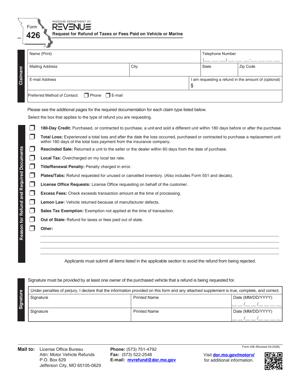
Form 426 – Request for Refund of Taxes or Fees Paid on Vehicle or Marine
Fill out nowJurisdiction: Country: United States | Province or State: Missouri
If you paid taxes or fees on a vehicle or boat and later learned you may have overpaid, Form 426 – Request for Refund of Taxes or Fees Paid on Vehicle or Marine is the document used to ask for that money back in Missouri. It gives you a formal way to explain what happened and request a refund from the state.
You might be here because you recently titled a car, registered a truck, or paid sales tax on a boat. After reviewing your paperwork, you realized the amount paid does not match what you believe was owed. This form is designed for that situation.
Form 426 – Request for Refund of Taxes or Fees Paid on Vehicle or Marine is not for general complaints. It is specifically for requesting a refund of certain vehicle or marine-related taxes or fees that were already paid.
Understanding how this form works helps you avoid delays. Small errors, missing documents, or unclear explanations often slow down refund requests. Knowing what information is required before you start makes the process smoother.
What is Form 426 – Request for Refund of Taxes or Fees Paid on Vehicle or Marine?
Clear definition
Form 426 – Request for Refund of Taxes or Fees Paid on Vehicle or Marine is a written request submitted to the Missouri Department of Revenue. It asks the department to review a payment you made for a vehicle or boat and determine whether a refund is due.
The form captures basic identifying information, details about the vehicle or marine vessel, the type of tax or fee paid, the amount paid, and the reason you believe a refund is owed. It creates an official record of your request.
This document does not automatically generate a refund. It starts a review process. The department examines your explanation and any attached proof before deciding whether to issue payment.
Who typically uses this form?
Most commonly, individuals use this form after registering or titling a vehicle. For example, you may have purchased a car and later discovered that sales tax was calculated on an incorrect purchase price.
Business owners also use the form. A company that titles fleet vehicles may realize that a registration fee was charged incorrectly or that tax was paid twice for the same vehicle.
Boat owners may use it after paying sales tax or registration fees on a watercraft. If the vessel qualifies for a specific exemption or if the tax base was miscalculated, this form allows you to formally request correction.
Dealers or lienholders sometimes assist with the process, but the request is generally filed by the person or entity that actually paid the tax or fee.
Why might you need this form?
You may need this form if you overpaid sales tax when purchasing a vehicle or boat. Overpayment can happen if the purchase price was entered incorrectly or if a trade-in was not properly credited.
You might also use it if you paid a registration or titling fee in error. For example, you may have paid for a registration period you did not use, or paid twice due to a clerical mistake.
Another reason is a cancelled transaction. If a sale falls through after taxes or fees were paid, you may need to request a refund for the amount already submitted.
In some cases, a vehicle or boat qualifies for an exemption that was not applied at the time of payment. The form provides space to explain the exemption and request a refund based on it.
Typical real-life scenarios
- You buy a used car from a private seller. When you title it, the sales tax is calculated based on a higher amount than the actual purchase price listed on the bill of sale. After noticing the difference, you seek a refund of the excess tax paid.
- You trade in your old vehicle when purchasing a new one. The trade-in value was not deducted from the taxable amount, and you paid sales tax on the full purchase price. You later discover that the trade-in should have reduced the taxable value.
- You register a boat and later learn that it qualifies for a specific category with a lower fee. The higher fee was charged during registration. You submit a refund request for the difference.
- You accidentally submit two payments for the same title transaction. Both payments are processed. You use the form to document the duplicate payment and request that one amount be returned.
- You begin titling a vehicle but cancel the transaction before completing registration. Despite the cancellation, certain fees were processed. You request a refund for the portion that was not required.
When would you use Form 426 – Request for Refund of Taxes or Fees Paid on Vehicle or Marine?
You would use this form after you have already paid a tax or fee related to a vehicle or marine vessel in Missouri and believe the amount was incorrect. The key factor is that the payment has already been made.
This form is not used before payment. If you are still in the process of registering or titling and notice an issue, that situation is usually handled at the office where the transaction is taking place. The refund form is for after-the-fact corrections.
Timing can matter. Refund requests are commonly subject to time limits. If a long period has passed since payment, the department may review whether the request falls within the allowed timeframe.
Individuals, businesses, and sometimes estates use this form. For example, an executor handling a deceased person’s vehicle affairs may discover taxes were overpaid and file the request as part of closing out the estate.
You may also use the form when a transaction changes after payment. If a sale is rescinded or a vehicle is returned to a seller, the original tax payment may no longer reflect the final outcome.
Legal characteristics of Form 426 – Request for Refund of Taxes or Fees Paid on Vehicle or Marine
This form functions as a formal claim for a refund. It puts your request into writing and requires you to provide identifying details and a clear explanation.
For the request to be considered, it generally must be complete and accurate. Missing vehicle identification numbers, incorrect payment amounts, or unclear explanations can delay review. Failing to attach supporting documentation is another common issue.
The form typically requires you to certify that the information provided is true. This certification gives the document legal weight. Providing false information can have consequences.
Missouri may have specific rules about which taxes and fees qualify for refunds and under what conditions. Not all payments are refundable, even if you regret the transaction. The form does not override those limits.
This document does not cancel a title, void a sale, or change ownership of a vehicle or boat. It only requests repayment of money previously collected. Any ownership or contractual disputes are handled through separate processes.
Is it legally binding?
Form 426 – Request for Refund of Taxes or Fees Paid on Vehicle or Marine is legally significant because it is a sworn or certified request to a state agency. By signing it, you confirm that the statements made are accurate to the best of your knowledge.
However, it is not a contract between you and the state. It does not guarantee payment. The department reviews the claim and decides whether it meets the legal requirements for a refund.
If the department approves the request, it may issue a refund according to its procedures. If it denies the request, that decision is based on applicable laws and regulations governing vehicle and marine taxes and fees.
How to fill out Form 426 – Request for Refund of Taxes or Fees Paid on Vehicle or Marine
Step 1 – Enter your personal or business information
Provide your full legal name as it appears on the original transaction. Include your current mailing address and contact information. If a business paid the tax or fee, enter the business name and any identifying number used in the transaction.
Step 2 – Identify the vehicle or marine vessel
Enter the vehicle identification number or hull identification number exactly as shown on the title or registration documents. Include the year, make, and model. Accuracy here is critical because the refund request is tied to this specific asset.
Step 3 – Describe the tax or fee paid
State the type of tax or fee you paid, such as sales tax, title fee, or registration fee. Include the date of payment and the total amount paid. If possible, match these details to your receipt.
Step 4 – State the amount you are requesting as a refund
Clearly write the exact dollar amount you believe should be refunded. This amount should match your explanation and supporting documents. Avoid rounding unless your documents show rounded figures.
Step 5 – Explain the reason for the refund request
Provide a concise but complete explanation of why you believe a refund is due. Describe what happened, when it happened, and why the original amount was incorrect. Focus on facts rather than opinions.
Step 6 – Attach supporting documentation
Include copies of receipts, bills of sale, title applications, proof of trade-in value, or any other documents that support your claim. These documents help the department verify the payment and your explanation.
Step 7 – Review all information for accuracy
Before signing, read through the entire form. Confirm that names, identification numbers, dates, and dollar amounts match your records. Small errors can slow down processing.
Step 8 – Sign and date the form
Sign your name in the designated area. By signing, you certify that the information is true and complete. Include the date of your signature to show when the request was made.
Step 9 – Submit the completed form
Submit the form and all required attachments to the appropriate office handling vehicle and marine tax matters. Keep a complete copy of everything you send for your records.
Legal terms you might encounter in Form 426 – Request for Refund of Taxes or Fees Paid on Vehicle or Marine
- Applicant: The person or business asking for the refund. On this form, you are the applicant. Your name must match the name that originally paid the tax or fee, or you must show why you are legally entitled to the refund.
- Overpayment: Money paid in excess of what was legally owed. You may claim an overpayment if you paid tax twice, paid the wrong rate, or paid on a transaction that was later canceled. You must clearly state how the overpayment happened.
- Supporting Documentation: Written proof attached to the form. This can include receipts, bills of sale, canceled checks, title applications, or registration documents. These documents show that you paid the tax or fee and explain why you are entitled to a refund.
- Vehicle Identification Number (VIN): A unique 17-character number assigned to a vehicle. You must enter the VIN exactly as it appears on the title or registration. Even one incorrect character can delay your refund.
- Hull Identification Number (HIN): A unique number assigned to a boat or marine vessel. If your request involves a boat, you will use the HIN instead of a VIN. Accuracy is critical because the refund is tied to this specific vessel.
- Taxable Transaction: The event that caused the tax to be charged. This could be a purchase, transfer of ownership, or registration. You must describe the transaction so the agency can determine whether the tax was properly applied.
- Duplicate Payment: A payment made more than once for the same tax or fee. This often happens when a payment is mailed and then paid again in person. You must show proof of both payments to receive a refund.
- Assignment of Rights: A transfer of the right to receive the refund from one person to another. If the original payer assigns the refund to you, written proof is usually required. Without it, the refund may only be issued to the original payer.
- Statutory Time Limit: The legal deadline to request a refund. Refund claims must usually be filed within a specific period after the tax was paid. If you file after that period, your request may be denied even if you were overcharged.
FAQs
Can I submit Form 426 – Request for Refund of Taxes or Fees Paid on Vehicle or Marine if the vehicle is no longer in my name?
Yes, but you must show that you were the person who paid the tax or fee. The refund is tied to the payment, not current ownership. Attach proof that you made the payment and explain the timeline of the ownership change so the agency can see that you are the proper party to request the refund.
What if the name on my receipt is slightly different from my current legal name?
You need to connect the two names clearly. If you changed your name due to marriage, divorce, or a legal name change, include documentation showing the change. The name on this document should either match the original payment record or be supported by paperwork that explains the difference.
How do I know if I am within the allowed time to request a refund?
Look at the date you paid the tax or fee. Then review the instructions for the filing deadline. Count carefully. If you are close to the deadline, submit your paperwork as soon as possible and keep proof of when you sent it. Late submissions may be rejected even if the amount is correct.
Do I need original receipts, or are copies acceptable?
In most cases, clear copies are acceptable. However, the copies must be readable and show key details such as the amount paid, date, and vehicle or vessel identification number. If your copies are faint or incomplete, your request may be delayed while the agency asks for better proof.
What happens after the agency receives this form?
The agency reviews your information, compares it with its payment records, and verifies the reason for the refund. If everything matches, the refund is approved and processed. If something does not match, you may receive a written request for clarification or additional documents.
Can someone else sign this document on my behalf?
Yes, but only if they have legal authority. This might include a business officer, a partner, or someone with a valid power of attorney. The signature must match the authority claimed, and you may need to attach proof of that authority.
What if I made a mistake after submitting the form?
If you notice an error, act quickly. Contact the agency in writing and explain the correction. Provide any updated documents that support the corrected information. Small mistakes, such as a transposed number in the Vehicle Identification Number, can delay processing if not corrected promptly.
Will the refund automatically update my vehicle or registration records?
No. This document only addresses the refund of money. It does not change title ownership, registration status, or lien records. If another correction is needed in the official record, you may need to file a separate form.
Checklist: Before, During, and After Form 426 – Request for Refund of Taxes or Fees Paid on Vehicle or Marine
Before
- Confirm you actually overpaid or paid in error.
- Locate your payment receipt or proof of payment.
- Verify the correct VIN or HIN from the title or registration.
- Check the date you paid to confirm you are within the time limit.
- Gather sale documents, canceled checks, or registration papers.
- Make sure your name matches the payment record.
- Review whether someone else needs to sign due to business ownership or power of attorney.
During
- Write your full legal name clearly and consistently.
- Enter the VIN or HIN exactly as shown on official documents.
- State the exact amount you are requesting as a refund.
- Provide a clear and specific explanation for the refund.
- Double-check all dates for accuracy.
- Attach copies of every supporting document referenced.
- Review the entire form before signing.
- Sign and date the form in the correct place.
After
- Make a complete copy of the signed form and attachments.
- Submit the form using the approved method.
- Keep proof of mailing or delivery confirmation.
- Monitor your mail for follow-up requests.
- Respond promptly if additional documents are requested.
- Record the date you submitted the form.
- Deposit or record the refund once received.
- Store the paperwork with your tax and vehicle records.
Common mistakes to avoid with Form 426 – Request for Refund of Taxes or Fees Paid on Vehicle or Marine
- Mistake: Entering the wrong Vehicle Identification Number or Hull Identification Number because you copied it from memory, which can lead to delays or denial since the agency cannot match the payment to the correct vehicle, so do not forget to copy it directly from the official title or registration.
- Mistake: Requesting the wrong refund amount because you estimated instead of checking your receipt, which may result in partial denial or extra review time, so do not forget to confirm the exact dollar amount paid.
- Mistake: Failing to attach proof of payment because you assumed the agency already has the record, which can cause processing delays, so do not forget to include clear copies of receipts or canceled checks.
- Mistake: Missing the filing deadline because you did not verify the statutory time limit, which can permanently bar your claim, so do not forget to calculate the deadline from the payment date.
- Mistake: Using a nickname or a different name than the original payment record, which may create identity verification issues, so do not forget to ensure the name matches or provide legal proof of any change.
- Mistake: Forgetting to sign and date the form because you focused only on the financial details, which can cause automatic rejection, so do not forget to complete the signature section before submission.
- Mistake: Providing a vague explanation such as “paid in error” without details, which forces the agency to request clarification and slows processing, so do not forget to clearly describe what happened and when.
- Mistake: Submitting incomplete attachments because you overlooked a second page of a receipt or bill of sale, which can delay approval, so do not forget to review every document for completeness.
What to do after filling out Form 426 – Request for Refund of Taxes or Fees Paid on Vehicle or Marine
Once you complete the form, your job is not finished. You need to protect your claim and track the process carefully.
- Step 1: Review every page one final time to confirm names, numbers, and amounts match your supporting documents.
- Step 2: Make a full copy of the signed form and every attachment for your records.
- Step 3: Organize the documents in the order listed on the form so they are easy to review.
- Step 4: Submit the form using the approved submission method and address provided in the instructions.
- Step 5: Keep proof of submission, such as a mailing receipt or delivery confirmation.
- Step 6: Mark your calendar with the submission date and set a reminder to follow up if you do not receive a response within a reasonable period.
- Step 7: Check your mail and email regularly for any requests for additional information.
- Step 8: Respond promptly and completely if the agency asks for clarification or more documents.
- Step 9: Once you receive the refund, confirm that the amount matches what you requested or the amount approved.
- Step 10: Store the refund notice and related paperwork with your tax and vehicle records for future reference.
Staying organized helps you avoid delays. Keep everything together in one file. If you move or change contact information before the refund is processed, notify the agency promptly so your refund is not misdirected. Clear records and quick responses make the process smoother and increase the likelihood of timely payment.
Disclaimer: This guide is provided for informational purposes only and is not intended as legal advice. You should consult a legal professional.