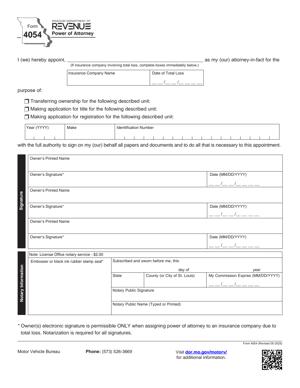
Form 4054 – Power of Attorney
Fill out nowJurisdiction: Country: United States | Province or State: Missouri
Form 4054 – Power of Attorney is a written document that allows you to authorize another person to act on your behalf in specific matters handled by the Missouri Department of Revenue. It creates a formal relationship between you and a representative, often for tax or motor vehicle issues.
You use this form when you want someone else to communicate with the department, access your records, or handle filings for you. This may include a family member, accountant, attorney, or another trusted person.
The document matters because state agencies generally will not share confidential information with third parties unless you have given written permission. Form 4054 – Power of Attorney provides permission in a structured, recognized format.
If you are about to complete this form, you need to understand what authority you are giving, how long it lasts, and what information must be included for it to be accepted. Clear and accurate completion helps prevent delays or rejected submissions.
What is Form 4054 – Power of Attorney?
Clear definition
Form 4054 – Power of Attorney is an authorization form used to appoint a representative to act for you in dealings with the Missouri Department of Revenue. It is not a general power of attorney for all personal or financial matters. Instead, it is limited to matters within the department’s authority.
The form identifies you as the taxpayer or applicant and names the individual or individuals who can represent you. It also describes the specific tax types, periods, or issues covered by the authorization.
Once properly completed and accepted, the department may discuss your confidential information with the named representative and allow that person to perform certain acts on your behalf.
Who typically uses this form?
Individuals often use this form when they need help resolving tax issues, responding to notices, or handling vehicle or title matters. Business owners also use it to allow employees or outside professionals to manage tax filings or correspondence.
Accountants and tax preparers frequently request this authorization so they can speak directly with the department about a client’s account. Attorneys may use it when representing someone in a dispute or audit.
Family members may use the form if they are helping an elderly relative manage state tax matters or vehicle transactions. In business settings, officers or managers may authorize a staff member to communicate with the department about withholding, sales tax, or other obligations.
Why might you need this form?
You may need this form if you cannot personally handle your matter due to time constraints, travel, illness, or the complexity of the issue. State agencies typically require written authorization before they will discuss confidential information with anyone else.
You might also need it if you want a professional to negotiate a payment arrangement, respond to an audit, or correct errors in past filings. Without proper authorization, the department may refuse to provide details or accept documents from your representative.
Using the correct form helps avoid misunderstandings about who is authorized and what they are allowed to do. It creates a clear record of your intent and the scope of authority granted.
Typical real-life scenarios
- You receive a notice about unpaid state income tax. You hire an accountant to review your records and speak directly with the department. To allow that communication, you complete the form and specify the tax years involved.
- You run a small business and want your office manager to handle sales tax filings and correspondence. By submitting this document, you authorize the manager to receive information and respond on behalf of the business.
- You are deployed overseas or traveling for an extended period. You authorize a trusted relative to address vehicle registration or title issues while you are away.
- You are facing an audit and want an attorney to represent you in discussions and meetings. The form allows the attorney to access relevant records and speak for you within the scope you define.
- You are settling an estate and need to resolve outstanding tax matters for the deceased person. An authorized representative may use the form to interact with the department regarding specific accounts or periods.
When would you use Form 4054 – Power of Attorney?
You would use Form 4054 – Power of Attorney when you want someone else to interact with the Missouri Department of Revenue about your tax or related matters. This includes situations where the department requires direct authorization before discussing account details.
It is commonly used during audits, collection actions, amended filings, refund claims, and disputes. In these cases, a representative may need to review records, submit documents, and communicate regularly with agency staff.
You might also use the form when applying for or correcting motor vehicle titles, registrations, or related transactions if the department requires authorization for a third party to act.
For businesses, the form may be used when assigning responsibility for withholding tax, sales tax, or corporate income tax communications to a designated employee or outside professional.
If you anticipate ongoing interaction with the department over a defined period, such as multiple tax years, you may include those periods in the authorization. If your matter is limited to a single issue or year, you can narrow the scope accordingly.
The form is especially relevant when confidentiality rules apply. Tax and motor vehicle records are typically protected, and agencies are cautious about sharing information without clear written consent.
Legal characteristics of Form 4054 – Power of Attorney
Form 4054 – Power of Attorney is a limited authorization document. It grants only the powers described in the form and only for matters within the Missouri Department of Revenue’s authority.
For the document to be effective, it generally must clearly identify the principal, the representative, and the scope of authority. Accurate names, addresses, and identifying numbers are important because the department uses them to match the authorization to the correct account.
Signatures are a critical element. The principal must sign the form. If the principal is a business entity, an authorized officer or representative must sign in the proper capacity. Missing or incomplete signatures commonly lead to rejection or delays.
The form may require specific details about the type of tax, account number, or tax periods covered. If these sections are left blank or are inconsistent with department records, the agency may not accept the filing.
In general, a power of attorney for tax matters is separate from a general durable power of attorney used for broader financial or health care decisions. Having a separate document does not automatically authorize representation before the department unless it meets the agency’s requirements.
High-level differences can exist across states regarding notarization or witnessing requirements. Some jurisdictions require notarization for certain powers of attorney, while others do not for tax-specific forms. It is important to follow the instructions provided with the Missouri form to ensure acceptance.
The form does not transfer ownership of property. It does not make the representative responsible for your tax debt unless separate agreements are in place. It also does not replace your obligation to comply with tax laws or filing requirements.
Is it legally binding?
When properly completed and signed, this document is generally legally binding for the limited purpose described. It creates a formal authorization that the Missouri Department of Revenue can rely on when dealing with your representative.
It becomes effective once it is executed according to the form’s requirements and recognized by the department. From that point, the agency may communicate with the named representative within the scope of authority granted.
If the form is incomplete, contains errors, or lacks required signatures, it may not be treated as valid. In that case, the department may refuse to disclose information or accept actions taken by the representative.
The authorization typically remains in effect until it is revoked, replaced, or limited by a later filing, depending on the form’s terms. You retain the ability to act on your own behalf unless the form explicitly states otherwise.
How to fill out Form 4054 – Power of Attorney
Step 1 – Identify the principal
Enter your full legal name as it appears in the department’s records. If you are filing on behalf of a business, use the exact registered business name.
Include your current mailing address and any identifying numbers requested, such as a Social Security number or federal employer identification number. Accuracy here ensures the authorization is linked to the correct account.
If there are multiple principals, such as joint filers or co-owners, make sure each person’s information is entered as required.
Step 2 – Identify the representative
Provide the full name of the person you are appointing. Include their mailing address, phone number, and any other contact information requested on the form.
If you are appointing more than one representative, list each one clearly in the designated space. Some forms allow multiple representatives to act separately or jointly, so review how the form describes their authority.
Confirm that the individual is willing to serve in this role before listing them. The department will rely on the contact information you provide.
Step 3 – Specify the tax types or matters covered
Indicate the specific type of tax or issue involved, such as individual income tax, sales tax, withholding tax, or motor vehicle matters. Be as precise as the form allows.
If the authorization relates to particular tax years or periods, list each year or range clearly. Avoid vague descriptions that could create confusion about the scope.
If you want to limit the authority to a single issue, describe that issue in the space provided. Clear limits help define what the representative may discuss or handle.
Step 4 – Define the scope of authority
Review the section that describes what the representative is allowed to do. This may include receiving confidential information, signing certain documents, or representing you in discussions.
Some forms include optional powers that you must specifically grant or withhold. Read each line carefully and complete any checkboxes or blanks as directed.
If there are powers you do not want to grant, ensure the form reflects those limits. The department will follow what is written in the document.
Step 5 – Review for prior authorizations
If you have previously filed a power of attorney with the department, consider whether this new filing replaces or supplements it. Some forms automatically revoke earlier authorizations for the same matters.
Check the relevant section to indicate whether you intend to revoke prior authorizations. Provide details if the form asks for them.
Clarity in this section helps prevent overlapping or conflicting authorizations in the department’s records.
Step 6 – Sign and date the form
Sign your name exactly as required. If you are signing for a business, include your title or capacity, such as officer, partner, or manager.
Enter the date of signature. The date establishes when the authorization was granted and can affect how the department processes it.
If the form requires the representative to sign a declaration or acknowledgment, ensure that the section is completed before submission.
Step 7 – Confirm completeness before submission
Read the entire form from beginning to end. Verify that all required fields are filled in, names are spelled correctly, and identifying numbers match official records.
Check that every required signature and date is present. Incomplete forms are a common cause of delay.
Once you confirm accuracy, submit the form using the method described in the instructions, such as mailing or delivering it to the appropriate office.
Legal terms you might encounter in Form 4054 – Power of Attorney
- Principal: The principal is you, the person granting authority. Your full legal name must match the name on file with the Missouri Department of Revenue. If your name does not match exactly, the agency may delay or reject recognition of the authorization.
- Representative: The representative is the person you appoint to act on your behalf. This can be an attorney, accountant, enrolled agent, family member, or another trusted individual. The form will require identifying details so the Department of Revenue knows exactly who is authorized to speak for you.
- Tax Matters: This refers to the specific types of taxes covered by the authorization. You may need to identify income tax, sales tax, withholding tax, or other state tax types. Only the matters listed on the form will fall within your representative’s authority.
- Tax Periods: Tax periods are the specific years or quarters involved. You must clearly list the periods you want your representative to handle. If a tax year or period is not included, the representative may not be allowed to discuss it.
- Scope of Authority: This defines what your representative is allowed to do. It may include receiving confidential information, negotiating payment plans, signing certain documents, or representing you in hearings. The form’s language controls these permissions.
- Revocation: Revocation means canceling a previous power of attorney. Form 4054 – Power of Attorney may include language that automatically revokes earlier authorizations for the same matters and periods unless you state otherwise. You should review this carefully before signing.
- Declaration of Representative: This is a statement signed by the representative confirming they are authorized and willing to act. It also confirms their professional status if applicable. Without this declaration, the form may be incomplete.
- Signature and Date: Your signature and the date you sign make the document effective. If you are signing on behalf of a business, you must have authority to do so. An unsigned or undated form is not valid.
- Confidential Information: This refers to private tax information protected by law. By signing this document, you allow the Department of Revenue to share that information with your named representative. The permission extends only to the matters and periods you list.
FAQs
Does this document give my representative full control over all my taxes?
No. This document only covers the specific tax types and periods you list. When you complete the sections for tax matters and tax periods, you are defining the limits. If you leave a tax type or year out, your representative cannot access or act on it.
When does Form 4054 – Power of Attorney become effective?
It generally becomes effective once you properly complete and sign it, and the Department of Revenue processes it. Make sure the signature and date fields are filled in. If the form is missing a signature, it will not be recognized.
Can I appoint more than one representative?
Yes, if the form provides space for multiple representatives. You must enter complete identifying details for each person. If you want them to act independently, check whether the form requires you to specify that; otherwise, the agency may assume joint authority.
What if I already filed a previous power of attorney?
You should review whether this form revokes earlier authorizations for the same tax matters and periods. If you want to keep an earlier representative for certain years or tax types, confirm that those details are clearly separated. Overlapping periods can unintentionally cancel prior permissions.
Can my representative sign my tax return using this form?
Only if the scope of authority section allows it, and if tax rules permit return signing in your situation. Read the section about signing authority carefully. If it does not clearly grant that power, your representative may be limited to receiving information and discussing your account.
Do I need to attach any supporting documents to Form 4054 – Power of Attorney?
If you are signing as a business officer, partner, trustee, or other fiduciary, you may need to ensure your title is clearly listed. The Department of Revenue must be able to confirm you have the authority to grant this permission. Incomplete title information can delay acceptance.
How do I know if the Department of Revenue accepted this form?
You or your representative can confirm acceptance by contacting the agency after submission. Once processed, the agency will speak with your representative about the listed matters. If they refuse to disclose information, it often means the document has not yet been recorded or has an error.
Can I cancel or change this authorization later?
Yes. You can revoke it by submitting a new power of attorney that replaces the earlier one or by sending a written revocation that clearly identifies the authorization you are canceling. Be sure to include your name, identifying number, and the tax matters affected so the correct record is updated.
Checklist: Before, During, and After Form 4054 – Power of Attorney
Before
- Confirm the exact legal name and identification number on file with the Department of Revenue.
- Decide which tax types and periods you want covered.
- Choose a representative you trust and confirm they agree to act.
- Gather prior tax notices or account information for accurate period entry.
- Review any existing powers of attorney to avoid unintended revocation.
- Verify your authority to sign if acting for a business entity.
- Check whether multiple representatives are needed.
During
- Enter your full legal name exactly as registered.
- Provide complete contact information for each representative.
- Clearly list each tax type and specific tax period.
- Review the scope of authority language before signing.
- Indicate whether prior authorizations should remain in effect.
- Ensure all required signatures are included.
- Double-check dates for accuracy and consistency.
After
- Make copies for your records and your representative.
- Submit the form using the accepted method.
- Confirm receipt or processing with the Department of Revenue.
- Notify prior representatives if their authority has changed.
- Keep a record of the submission date.
- Monitor your tax account to ensure the representative has access.
- Update internal compliance files if you are a business.
Common mistakes to avoid with Form 4054 – Power of Attorney
- Mistake: Listing vague tax periods like “all years,” which happens because you want broad coverage, but it can cause processing delays or rejection, so do not forget to specify clear years or quarters if required.
- Mistake: Misspelling your legal name or using a nickname, which often occurs from habit, but may prevent the agency from matching your account, so do not forget to use the exact name on your tax records.
- Mistake: Forgetting to sign and date the form, which happens when you focus on filling in details, but makes the document invalid, so do not forget to review the signature section before submitting.
- Mistake: Appointing a representative without confirming their contact details, which can lead to misdirected communications, so do not forget to verify addresses and phone numbers.
- Mistake: Overlooking prior powers of attorney, which may unintentionally revoke earlier authorizations, so do not forget to check whether you want previous representatives to remain authorized.
- Mistake: Assuming the representative can sign tax returns automatically, which may not be permitted under the scope provided, so do not forget to review the authority section carefully.
What to do after filling out Form 4054 – Power of Attorney
Once you complete the form, pause before sending it. Review every entry line by line. Make sure names, identification numbers, tax types, and periods are accurate. Small errors can delay recognition.
Next, prepare clean copies. Keep at least one copy for yourself and give one to your representative. If you are a business, place a copy in your compliance or tax records file.
- Step 1: Confirm all signatures and dates are present.
- Step 2: Make legible copies for your records.
- Step 3: Submit the form using the method accepted by the Missouri Department of Revenue.
- Step 4: Note the date and method of submission in your records.
- Step 5: Follow up with the Department of Revenue to confirm receipt.
- Step 6: Ask your representative to verify they can access your tax information.
- Step 7: Notify any prior representatives if their authority has ended.
- Step 8: Monitor incoming mail or online account messages for confirmation of representation.
- Step 9: Update internal procedures if your business has accounting or compliance staff.
- Step 10: Store the original in a secure location with other important tax documents.
After confirmation, stay engaged. A power of attorney does not remove your responsibility for your taxes. You should remain informed about filings, deadlines, and payments. Check in with your representative regularly.
If your situation changes, such as appointing a new advisor or resolving a tax issue, review whether this authorization still reflects your needs. Keeping your records current helps prevent confusion and ensures the right person can act for you when necessary.
Disclaimer: This guide is provided for informational purposes only and is not intended as legal advice. You should consult a legal professional.