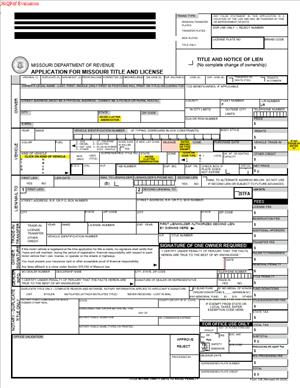
Form 108 – Application for Missouri Title and License
Fill out nowJurisdiction: Country: United States | Province or State: Missouri
Form 108 – Application for Missouri Title and License is the main document used to apply for a vehicle title and registration in Missouri. If you recently bought a vehicle, received one as a gift, or moved into the state, this is likely the form you will complete.
This form connects you to the official vehicle record. It tells the state who owns the vehicle, how it was acquired, and how it will be registered. Without it, you cannot legally obtain a Missouri title or license plates.
If you are handling this process yourself, the form can feel detailed. It asks for specific information about the vehicle, the owner, and the transaction. Each section has a purpose, and accuracy matters.
Understanding what the form does before you start makes the process smoother. When you know why each part exists, you can avoid common mistakes and delays.
What is Form 108 – Application for Missouri Title and License?
Clear definition
Form 108 – Application for Missouri Title and License is the official document used to request a Missouri certificate of title and vehicle registration. It is submitted to the Missouri Department of Revenue as part of the titling and licensing process.
A vehicle title is the legal record of ownership. Registration and license plates allow the vehicle to be driven on public roads. This form combines both requests into one filing.
The document collects identifying details. It includes information about the vehicle, the owner, any lienholders, and the type of registration requested. It may also calculate taxes and fees owed as part of the transaction.
Completing the form does not automatically issue a title or plates. It begins the formal review process by the state agency responsible for motor vehicle records.
Who typically uses this form?
Most often, private vehicle buyers use this form after purchasing a car, truck, motorcycle, or other motor vehicle. If you bought a vehicle from a dealership or a private seller, you may need to complete it as part of the transfer process.
New Missouri residents also use this form. If you move to Missouri and bring a vehicle titled in another state, you generally apply for a Missouri title and registration.
People who inherit a vehicle, receive one as a gift, or retitle a vehicle after paying off a loan may also use this document. In some cases, business owners use it when titling vehicles in a company name.
Dealership staff often prepare the form on behalf of buyers. However, self-represented individuals frequently complete and submit it on their own.
Why might you need this form?
You may need this form when ownership of a vehicle changes. A change in ownership must be reflected in the official title record. Without an updated title, the prior owner may still appear in state records.
You may also need it to register a newly purchased vehicle. Registration connects the vehicle to license plates and allows lawful operation on Missouri roads.
Another reason involves liens. If a lender finances your purchase, the lienholder’s interest is recorded on the title. This form provides space to list the secured party.
In some cases, you may need it to correct or update information. For example, you might use it when adding or removing an owner, or when updating an address linked to the vehicle record.
Typical real-life scenarios
- You buy a used car from a private seller in Missouri. The seller signs over the title to you. To place the vehicle in your name and obtain plates, you complete this form and submit it with the signed title and required fees.
- You purchase a vehicle from someone in another state. You bring the car into Missouri and need a Missouri title. The form helps transfer the out-of-state ownership record into the Missouri system.
- You pay off your auto loan. The lender releases its lien. To receive a clear title without the lien listed, you may submit documentation along with the appropriate application form reflecting the change.
- You receive a vehicle as a gift from a family member. Even though no money changes hands, the ownership transfer still requires official documentation. This form records the new ownership and may address tax considerations tied to the transfer.
- You form a small business and want company vehicles titled in the business name. The form allows you to list the legal entity as the owner, along with any required identifying information.
- You relocate to Missouri and bring your vehicle with you. To comply with local requirements, you apply for the Missouri title and registration using the appropriate application form.
When would you use Form 108 – Application for Missouri Title and License?
You use this form when a vehicle needs to be titled in Missouri for the first time under your ownership. This typically happens after a sale, gift, inheritance, or relocation.
Timing often matters. Many states set deadlines for applying for title and registration after purchase or entry into the state. Missing those deadlines can lead to added costs or penalties. Being aware of the timeframe helps you plan your submission.
You also use the form when requesting license plates. Registration is not permanent. It may require renewal, but the initial registration linked to a new title often begins with this application.
If there is a lien on the vehicle, this is the stage where that interest is formally recorded. The lender’s name and address are listed so the title reflects the secured party’s rights.
In some cases, you may use the form to change the way the vehicle is registered. For example, you might change from individual ownership to joint ownership. You may also update the type of registration requested, depending on the vehicle’s use.
If you are acting on behalf of someone else, such as a family member or business, you may complete the form in a representative capacity. In those situations, additional documentation may be required to show your authority to act.
Legal characteristics of Form 108 – Application for Missouri Title and License
This form is an official government filing. It becomes part of the state’s motor vehicle records once processed and accepted. The information you provide is used to create or update a legal title record.
Accuracy is critical. Incorrect vehicle identification numbers, misspelled names, or mismatched signatures can delay processing. Errors may require corrections or additional forms before the application is accepted.
Signatures play an important role. The owner, and in some cases co-owners, must sign the form. If there is a lienholder, its information must be complete and accurate. Missing signatures are a common cause of rejection.
The vehicle identification number, often called the VIN, must match the number shown on the prior title or supporting documents. Even a single incorrect digit can prevent the state from issuing a valid title.
Supporting documents are usually required. These may include the signed prior title, proof of identification, proof of insurance, inspection records, or lien release paperwork. The form works together with these documents to establish legal ownership.
Different types of vehicles may have additional requirements. For example, vehicles coming from another state may require a physical inspection. Certain vehicles, such as trailers or specialty vehicles, may follow slightly different processes.
This form does not create ownership by itself. Ownership typically transfers based on the signed title from the previous owner. The form formally records that transfer with the state.
It also does not serve as a bill of sale. While it may reference purchase price and taxes, it is not a contract between buyer and seller. Its primary function is administrative and record-based.
High-level differences can exist between states. For example, some states separate title and registration applications into different documents. Missouri combines these processes in this single form. If you are used to another state’s system, the combined structure may look different from what you expect.
Processing times can vary. Submission does not mean immediate issuance. The form must be reviewed and approved before a new title is printed and registration finalized.
Is it legally binding?
Form 108 – Application for Missouri Title and License is legally significant because it is a sworn government filing. When you sign it, you certify that the information provided is true and correct to the best of your knowledge.
Your signature confirms your request for the title and registration. It also acknowledges responsibility for any applicable taxes and fees. Providing false information on a government document can carry serious consequences.
Once the application is accepted and processed, the resulting title is a legal record of ownership. That record can be relied on by buyers, lenders, and government agencies.
However, the form itself is not a contract between private parties. It does not replace a purchase agreement or bill of sale. Its legal effect comes from its role in updating the official state record, not from creating a private agreement.
If the form is incomplete or contains material errors, it may be rejected. In that case, no legal change to the title record occurs until a corrected application is accepted.
How to fill out Form 108 – Application for Missouri Title and License
Step 1 – Identify the type of application
Begin by reviewing the top portion of the form. This section usually asks you to indicate the type of transaction. You may need to show whether you are applying for a title, registration, or both. Select the options that match your situation, such as transfer of ownership, new title, or registration only.
Step 2 – Enter vehicle information
Locate the section requesting vehicle details. Carefully enter the vehicle identification number exactly as it appears on the existing title or vehicle documents. Include the year, make, model, body style, and color if requested. Accuracy here is essential because the Vehicle Identification Number links the application to the correct vehicle record.
Step 3 – Provide odometer information if required
If the form includes an odometer disclosure section, record the current mileage as shown on the vehicle’s odometer. Do not estimate or round the number unless the form specifically instructs you to do so. This information helps establish the vehicle’s mileage history at the time of transfer.
Step 4 – Complete owner information
Enter your full legal name as it should appear on the title. If there are co-owners, list each person’s name in the designated spaces. Provide your residential address and any other requested contact details. Use consistent spelling and formatting to match your identification documents.
Step 5 – Indicate ownership structure
If more than one owner is listed, the form may ask how ownership is held. This can affect how the vehicle may be sold or transferred in the future. Read the wording carefully and select the option that reflects your intended ownership arrangement.
Step 6 – List lienholder information if applicable
If a lender financed the vehicle, provide the lienholder’s full name and mailing address in the lien section. This ensures the title reflects the lender’s secured interest. Double-check the spelling and address details, as errors may delay the lender’s ability to receive the title record.
Step 7 – Report purchase price and tax details
Enter the purchase price or other value information requested. The form may calculate or reference taxes owed based on that amount. Ensure the numbers match your supporting documents, such as the signed title or bill of sale.
Step 8 – Review exemptions or special conditions
Some sections address exemptions, such as gifts, inherited vehicles, or other special circumstances. If any of these apply, complete the relevant part of the form. Provide additional documentation if required to support the exemption or special classification.
Step 9 – Sign and date the application
Locate the signature section near the end of the form. Sign your name exactly as it appears in the owner information section. If there are co-owners, each person may need to sign. Enter the date of signing in the format requested on the form.
Step 10 – Confirm completeness before submission
Before submitting, read through every section of the completed form. Verify that all required fields are filled in, signatures are present, and numbers match the supporting documents. Make sure any required attachments are included. Once you are confident the information is accurate and complete, the form is ready for submission to the appropriate office.
Legal terms you might encounter in Form 108 – Application for Missouri Title and License
- Assignment of Title: This refers to the section on the existing certificate of title where the current owner transfers ownership to you. You must ensure the seller has properly completed and signed this portion before you submit your application. If the assignment is incomplete or altered, your title application can be delayed or rejected.
- Odometer Disclosure Statement: This is a required statement showing the vehicle’s mileage at the time of sale. On this form, you confirm the mileage is accurate to the best of your knowledge. Incorrect or missing mileage information can affect the validity of the transfer and may require additional documentation.
- Lienholder: A lienholder is a person or financial institution that has a legal claim on the vehicle because of a loan. If you financed the vehicle, you must list the lienholder’s full legal name and address. This ensures the title reflects the lien and protects the lender’s interest.
- Joint Ownership: This term describes how more than one person holds title to the vehicle. The way names are connected, such as “and” or “or,” determines whether both owners must sign future documents. Your selection affects how the vehicle can be sold or transferred later.
- Primary Owner: The primary owner is the first person listed on the application and title. This name typically appears first on the certificate and in official records. You should ensure the spelling and order of names match your identification documents.
- Vehicle Identification Number (VIN): The VIN is a unique 17-character code assigned to the vehicle. You must enter it exactly as it appears on the vehicle and current title. A single incorrect digit can cause processing delays or require a Vehicle Identification Number verification.
- Taxable Purchase Price: This is the amount you paid for the vehicle that may be subject to sales tax. You must report the actual purchase price unless an exemption applies. Underreporting can lead to penalties or reassessment.
- Title Branding: Branding refers to a permanent label placed on a title to indicate specific history, such as salvage or rebuilt status. If the vehicle has a brand, it must be properly disclosed. The brand becomes part of the public record and affects resale value.
- Application Date: This is the date you sign the form. It establishes when you are formally requesting title and registration. Using the wrong date can create confusion about timeliness and possible late fees.
FAQs
What information do I need before starting Form 108 – Application for Missouri Title and License?
You need the current certificate of title assigned to you, the vehicle’s VIN, the exact purchase price, the odometer reading, and your full legal name and address as shown on your identification. If there is a loan, you also need the lienholder’s complete legal name and mailing address. Having these details ready helps you avoid leaving required fields blank.
Do all owners have to sign this document?
Yes, if more than one owner is listed, each person who will appear on the new title must sign where required. The way you list names, such as using “and” between them, can determine whether both signatures are required now and for future transactions. Make sure the signatures match the printed names exactly.
What happens if I make a mistake while filling it out?
If you make a minor error before signing, you may be able to neatly correct it according to the instructions on the document. Do not use correction fluid or obscure the original entry. If the error is significant, you may need to complete a new form to prevent rejection.
How do I know if I need to list a lienholder?
If you borrowed money to buy the vehicle and the lender will hold an interest until the loan is paid off, you must list that lender on this form. Confirm the exact legal name and address of the lender. If you leave this section blank when a loan exists, the title may not properly reflect the lien.
Where do I enter the purchase price, and why does it matter?
There is a designated section where you report the amount you paid for the vehicle. This figure is used to calculate applicable taxes and fees. Enter the actual agreed price and check whether any exemption boxes apply to your situation.
What if the name on my identification is slightly different from the assigned title?
The name you enter should match your current legal identification. If the assigned title shows a variation, such as a missing middle initial, review supporting documents to confirm consistency. Differences can trigger questions and delay processing.
Does this form change the public record immediately?
The information you submit becomes part of the official vehicle record once processed and accepted. Until it is approved, the prior record remains in place. You should wait for confirmation, such as a receipt or issued title, before assuming the record has been updated.
What should I double-check before submitting the Form 108 – Application for Missouri Title and License?
Review the Vehicle Identification Number (VIN), purchase price, odometer reading, owner names, and signatures. Confirm that all required attachments, including the assigned title and any supporting statements, are included. Make sure every required signature is present and dated.
Checklist: Before, During, and After Form 108 – Application for Missouri Title and License
Before
- Gather the properly assigned certificate of title from the seller.
- Confirm the Vehicle Identification Number directly from the vehicle, not just paperwork.
- Write down the exact odometer reading at the time of transfer.
- Verify the correct legal spelling of all owner names.
- Obtain the lienholder’s full legal name and mailing address if financing.
- Confirm the actual purchase price and any applicable tax exemption.
- Review identification documents for name and address consistency.
During
- Select the correct application type at the top of the form.
- Enter the Vehicle Identification Number carefully, checking each character.
- Record the odometer reading exactly as shown.
- Print owner names clearly and in the correct order.
- Indicate joint ownership structure accurately.
- Complete the lienholder section if there is a loan.
- Report the purchase price honestly and fully.
- Sign and date the application in the required spaces.
After
- Make a complete copy of the signed application for your records.
- Keep a copy of the assigned title and bill of sale.
- Submit the form with the required fees and supporting documents.
- Obtain a receipt or proof of submission.
- Track the status if processing times are provided.
- Store the new title securely once issued.
- Confirm the lien is properly recorded if financing was involved.
Common mistakes to avoid with Form 108 – Application for Missouri Title and License
- Mistake: Entering the wrong Vehicle Identification Number because you copied it from memory, which leads to processing delays or rejection, so always verify it directly from the vehicle, and do not forget to double-check every character.
- Mistake: Leaving the lienholder section blank when you have a loan, often because you assume the lender will handle it, which can result in an incorrect title, so do not forget to list the lender’s full legal name and address.
- Mistake: Reporting an inaccurate purchase price to reduce taxes, which can trigger penalties or reassessment, so do not forget to enter the true sale amount.
- Mistake: Missing a required signature because you thought only one owner needed to sign, which causes the application to be returned, so do not forget to review all signature lines carefully.
- Mistake: Using nicknames or inconsistent name formats, which can create identity mismatches in the record, so do not forget to match names exactly to legal identification.
- Mistake: Submitting the form without required attachments, such as the assigned title, which leads to rejection, so do not forget to assemble all supporting documents before filing.
- Mistake: Failing to date the application correctly, which can affect fee calculations or timeliness, so do not forget to enter the actual date you sign.
- Mistake: Making messy corrections or using correction fluid, which can invalidate the document, so do not forget to complete a new form if errors are substantial.
What to do after filling out Form 108 – Application for Missouri Title and License
Once you finish completing the form, pause before submitting it. A careful review now can save you weeks of delay later. Read every line again. Compare what you entered against the assigned title and your identification.
- Step 1: Make a clear copy of the completed and signed application for your personal records.
- Step 2: Copy all supporting documents, including the assigned title and any odometer or lien paperwork.
- Step 3: Confirm the total fees and taxes due based on the purchase price and registration choices.
- Step 4: Assemble the full packet in the correct order so nothing is overlooked.
- Step 5: Submit the documents and payment through the appropriate filing method available to you.
- Step 6: Obtain a dated receipt, confirmation, or proof of submission.
- Step 7: Monitor the processing timeline and watch for mailed correspondence.
- Step 8: Review the issued title carefully once you receive it to confirm that the names, Vehicle Identification Number, and lien details are correct.
- Step 9: Store the certificate of title in a secure location, not in the vehicle.
- Step 10: Update your personal records to reflect the new ownership and registration status.
If you notice an error on the issued title, act promptly. Corrections are generally easier when addressed quickly. Keep all receipts and copies together in one file so you can respond to any future questions about ownership, taxes, or liens. Good recordkeeping protects you if you later sell the vehicle or resolve a financing issue.
Disclaimer: This guide is provided for informational purposes only and is not intended as legal advice. You should consult a legal professional.