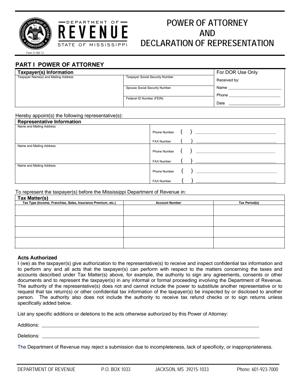
Power of Attorney and Declaration of Representation
Fill out nowJurisdiction: Country: United States | Province or State: Mississippi
The Power of Attorney and Declaration of Representation is a document that allows you to authorize another person to represent you before a government agency. In Mississippi, this form is commonly connected to tax matters handled by the state revenue authority. It creates a clear, written record of who can act on your behalf.
You might use the Power of Attorney and Declaration of Representation if you want a professional, family member, or other trusted person to communicate with the agency for you. This can include discussing your account, receiving confidential information, or signing certain documents within the limits you set.
If you are about to complete this form, you likely want to know exactly what authority you are giving and how it works. This document does not transfer ownership of your property. It does not give someone unlimited control over your affairs. It is focused on representation in specific matters you identify.
Understanding how this form works helps you avoid delays. Missing details, unclear authority, or unsigned sections can slow down processing. Taking a few minutes to understand each section makes the filing smoother and more effective.
What is a Power of Attorney and Declaration of Representation?
Clear definition
The Power of Attorney and Declaration of Representation is a written authorization that allows someone else to act for you in defined matters. In the tax context, it typically authorizes a representative to communicate with the state revenue agency about your tax account.
The “power of attorney” portion grants authority. The “declaration of representation” portion confirms that the representative is eligible and agrees to act in that role. Together, these sections create a formal record of who can access your confidential information and what they can do.
This form is not the same as a general financial power of attorney. It is usually limited to specific tax years, tax types, or issues. The scope depends on how the document is completed.
Who typically uses this form?
Individuals often use this form when they want a tax professional to handle discussions with the state. This may include accountants, attorneys, enrolled agents, or other authorized representatives.
Business owners also use it. If you operate a corporation, partnership, or limited liability company, you may appoint someone to deal with sales tax, withholding tax, or other business tax matters.
Estates and trusts sometimes rely on this document when a fiduciary needs help from a professional. In those cases, the person signing must have authority to act for the estate or trust.
In some situations, family members use the form when assisting an elderly or unavailable taxpayer. The authority granted depends on what is written in the document.
Why might you need this form?
You may need this form if you cannot attend meetings or respond to notices yourself. It allows your representative to step in and speak directly with the agency.
You might also use it if tax matters are complex. A representative can review records, respond to audits, and clarify issues on your behalf.
If you receive a notice and feel unsure how to proceed, authorizing a professional can streamline communication. The agency will generally speak only with you or someone you formally appoint.
Another reason is privacy. Once the form is on file, the agency can share confidential information with your named representative. Without written authorization, they may refuse to discuss your account with anyone else.
Typical real-life scenarios
- You receive a letter stating that your return is under review. You are busy with work and want your accountant to handle all communication. Filing this document allows the accountant to call the agency, request records, and respond to questions for the tax periods listed.
- Your small business is being audited for sales tax. You prefer that your tax advisor manage the audit process. By submitting the form, you allow the advisor to attend meetings, submit documents, and discuss findings directly with the auditor.
- You are moving out of state, but still have unresolved Mississippi tax matters. You authorize a local representative to address outstanding issues, so you do not need to travel back for meetings or hearings.
- A family member is helping you organize finances after an illness. You sign the form so that the person can contact the agency about payment arrangements and clarify balances due, within the authority you grant.
- An estate is filing final income tax returns for a deceased individual. The executor authorizes a tax professional to manage communications related to those returns. The form provides a written basis for that representation.
When would you use a Power of Attorney and Declaration of Representation?
You would use the Power of Attorney and Declaration of Representation when you want someone else to represent you in specific dealings with the Mississippi Department of Revenue. This often arises during audits, collections, appeals, or routine account management.
It is commonly used when you receive a notice requesting additional information. Rather than handling the response yourself, you may prefer a representative to review the notice, gather records, and prepare a reply.
Business entities use the form when internal staff are not handling tax matters directly. For example, a company may authorize an outside accountant to manage ongoing compliance and communications.
You might also use the document when setting up payment arrangements. If you want a representative to negotiate terms or discuss balances, written authorization helps ensure the agency can speak openly with that person.
If multiple tax types are involved, such as income tax and sales tax, the form can identify each category. This clarifies the representative’s authority and avoids confusion about what is covered.
The document is also useful when you anticipate extended interaction with the agency. If a matter will likely involve several calls or submissions, having a representative formally recognized can reduce repeated verification steps.
Legal characteristics of Power of Attorney and Declaration of Representation
This document becomes effective when it is properly completed, signed, and accepted by the relevant agency. It must clearly identify the taxpayer, the representative, and the matters covered. Ambiguity can lead to rejection or limited recognition.
A valid form typically includes your name, address, and identifying number, such as a Social Security number or employer identification number. It also lists the representative’s name and contact information. Missing identifying details can delay processing.
The scope of authority is defined by the tax matters and periods listed. If you do not specify certain years or tax types, the representative may not be able to act on those issues. Precision matters.
Signatures are essential. The taxpayer or authorized business officer must sign and date the document. The representative must also sign the declaration section, confirming eligibility and acceptance of responsibility. Unsigned forms are commonly rejected.
In some cases, additional documentation may be required if someone signs on behalf of a business or estate. The agency may need proof that the signer has authority to act for that entity. Without clear authority, the form may not be honored.
High-level requirements can vary by jurisdiction. Some states have unique formatting rules or specific representative categories. In Mississippi, the form is structured to align with the state’s administrative procedures, which may differ from federal forms or those used in other states.
This document does not give your representative unlimited control. It does not authorize them to manage your bank accounts, sell property, or make general financial decisions. Its effect is limited to the matters described within it.
It also does not automatically remain in effect forever. The duration may depend on what is written in the form and whether you later revoke it. Filing a new power of attorney can sometimes replace earlier authorizations.
If information is inconsistent, such as mismatched tax periods or incorrect identification numbers, processing can be delayed. Clear and accurate completion helps avoid these problems.
Is it legally binding?
When properly completed and accepted, this document is legally binding within its stated scope. It authorizes the named representative to act for you in the specified matters before the agency.
The binding nature comes from your signature and the formal recognition of the document by the agency. Once on file, the agency generally treats the representative’s actions within the granted authority as if they were your own.
However, the binding effect is limited. If a representative acts outside the authority described, those actions may not be recognized. The document does not create unlimited power.
Revocation is typically possible. If you decide to end the authorization, you can generally do so by submitting a written revocation or a new form that replaces the prior one. Until that happens, the existing authorization may remain effective for the matters listed.
How to fill out the Power of Attorney and Declaration of Representation
Step 1 – Identify the taxpayer
Begin by entering your full legal name exactly as it appears on your tax records. Include your current mailing address and contact information. Provide your identifying number, such as a Social Security number or employer identification number, depending on whether you are an individual or a business.
If the taxpayer is a business entity, use the registered business name. Ensure the information matches prior filings to avoid confusion in agency records.
Step 2 – Identify the representative
Enter the full name of the person you are authorizing. Include their mailing address, phone number, and any professional identification details requested in the form. This section ensures the agency knows exactly who may receive your confidential information.
If you are appointing more than one representative, list each one as instructed in the form. Be clear and complete, so there is no uncertainty about who is covered.
Step 3 – Describe the tax matters covered
Specify the type of tax involved, such as income tax, sales tax, or withholding tax. Then list the relevant tax years or periods. This defines the scope of authority.
Be precise. If you only want the representative to handle certain years, list only those years. If multiple tax types are involved, identify each one clearly in the space provided.
Step 4 – Define the acts authorized
Review the section that explains what your representative is allowed to do. This may include receiving information, signing agreements, or representing you in conferences. Some forms allow you to limit certain powers by crossing out or modifying language.
Read this section carefully before signing. The language describes the authority you are granting within the tax matters listed.
Step 5 – Review prior authorizations
If the form includes a section about revoking earlier powers of attorney, indicate whether this document replaces any previous filings. Some forms automatically revoke earlier authorizations for the same matters unless you state otherwise.
Consider whether you want prior representatives to remain authorized. Complete this section according to the instructions provided on the form.
Step 6 – Sign and date the form
Sign your name in the space provided. Print your name and title if signing for a business, estate, or trust. Date the form on the day you sign it.
If you are signing in a representative capacity, such as an officer of a corporation or executor of an estate, include your title. This shows the basis for your authority to sign.
Step 7 – Representative declaration and signature
Ensure that your representative completes the declaration section. They must sign and date the form, confirming that they are authorized and eligible to represent you.
Without the representative’s signature, the declaration portion is incomplete. Verify that all required fields in this section are filled in before submission.
Step 8 – Review for accuracy and submit
Read the entire document once more. Check names, identification numbers, tax periods, and signatures. Confirm that every required section is complete.
After reviewing, submit the form according to the instructions provided with it. Keep a copy for your records so you have proof of the authority granted and the scope described.
Legal terms you might encounter in a Power of Attorney and Declaration of Representation
- Taxpayer Identification Number (TIN): This is the number used by the tax authority to identify you. For individuals, it is typically a Social Security number. For businesses, it may be an Employer Identification Number. On this form, the TIN must match the tax authority’s records exactly, or the authorization may not be processed.
- Representative: This is the person you authorize to act on your behalf. The representative may be an attorney, accountant, enrolled agent, or other eligible individual. The form will require their full legal name, address, and contact information.
- Tax Period: This refers to the specific year, quarter, or filing period covered by the authorization. You must clearly list each period you want your representative to handle. If you leave out a period, your representative cannot act for that timeframe.
- Tax Matter: This describes the type of tax involved, such as income tax, sales tax, withholding tax, or another category. The form usually provides space to list multiple tax types. Be precise, because the authority granted applies only to the matters you specify.
- Authorized Acts: These are the actions your representative is allowed to take. This may include receiving confidential information, signing agreements, attending hearings, or negotiating payment arrangements. The form defines the scope of these powers.
- Declaration of Representation: This is the section your representative completes to confirm they are eligible and authorized to represent you. By signing it, they affirm their professional status and that they will act according to applicable rules.
- Revocation: Revocation means canceling a prior power of attorney. Some versions of this document automatically revoke earlier authorizations for the same matters unless you state otherwise. You may need to list any existing authorizations you want to keep in effect.
- Signature Authority: This refers to your legal right to sign the form. If you are signing for a business, you must have proper authority, such as being an officer, partner, or authorized manager. The title you list next to your signature confirms this authority.
- Confidential Tax Information: This includes your returns, account balances, audit details, and correspondence. By signing the form, you allow the tax agency to share this information with your named representative.
- Fiduciary: A fiduciary is someone who manages financial matters for another person, such as an executor, guardian, or trustee. If a fiduciary is involved, additional documentation may be required to show legal authority before the representative can act.
FAQs
Can I limit what my representative is allowed to do?
Yes. In the section where you describe authorized acts, you can restrict powers. For example, you may allow the person to receive information but not to sign agreements or settle liabilities. Make sure any limits are written clearly in this document so the tax agency understands the boundaries.
Do I need to list every tax year separately?
Yes. You must identify each tax period covered. If you write “all years,” the agency may reject it unless that wording is specifically allowed. Check that every year, quarter, or filing period you want included is clearly entered before you sign.
What happens to older authorizations when I file the Power of Attorney and Declaration of Representation?
In many cases, filing a new authorization automatically replaces earlier ones for the same tax matters and periods. If you want to keep an older authorization active, you may need to attach a copy and clearly state that it remains in effect. Review the revocation section carefully before submitting.
Can more than one representative be listed on this form?
Yes. You can name multiple representatives. Make sure each person’s full legal name and contact information are complete. Each representative may need to sign the declaration section to confirm eligibility.
Does this form allow my representative to sign my tax return?
Not automatically. Some versions allow return signing only in specific circumstances, such as illness or absence. If return signing authority is granted, it must be clearly indicated in the authorized acts section and may require additional explanation.
When does the authorization become effective?
It generally becomes effective once the tax authority receives and processes it. Signing the document does not mean it is immediately active. You may need to confirm acceptance before your representative can access your account.
What if my name has changed or does not match the tax agency’s records?
The name you enter must match the records exactly. If it does not, processing may be delayed. If you recently changed your name, ensure the agency has updated records before or at the same time you submit this form.
Can I cancel this authorization later?
Yes. You can revoke it at any time by submitting a written revocation or by filing a new Power of Attorney and Declaration of Representation that replaces it. Make sure the revocation clearly identifies the tax matters and periods being canceled so there is no confusion.
Checklist: Before, During, and After Power of Attorney and Declaration of Representation
Before
- Confirm the exact legal name and taxpayer identification number on file with the tax agency.
- Gather all relevant tax notices and correspondence for the periods involved.
- Decide which tax types and periods you want covered.
- Choose a representative who is eligible and willing to sign the declaration.
- Review any existing authorizations to see whether they should remain active.
- Verify that the person signing for a business has proper signature authority.
- Check whether additional documents are needed for fiduciaries or estates.
During
- Enter your full legal name and identification number exactly as recorded.
- Provide complete contact details for each representative listed.
- Clearly describe each tax matter and period covered.
- Specify any limits on the representative’s authority.
- Review the section about revoking prior authorizations.
- Ensure all required signatures and dates are included.
- Confirm titles are listed when signing for a business entity.
- Double-check for missing pages or incomplete fields.
After
- Make a complete copy of the signed document for your records.
- Submit the form using the approved delivery method.
- Confirm that the tax agency has processed and accepted it.
- Inform your representative once acceptance is confirmed.
- Keep proof of submission, such as a receipt or confirmation notice.
- Monitor correspondence to ensure your representative receives copies.
- Update your internal records to reflect the active authorization.
- Revoke outdated authorizations if circumstances change.
Common mistakes to avoid with Power of Attorney and Declaration of Representation
- Mistake: Listing vague tax periods like “all years” without confirming acceptance rules, which happens because it seems simpler, but can lead to rejection; do not forget to specify exact years or quarters when required.
- Mistake: Entering a nickname or shortened business name, which often occurs out of habit, but may delay processing because records do not match; do not forget to use the exact legal name on file.
- Mistake: Forgetting the representative’s signature in the declaration section, which happens when you focus only on your own signature, but results in an incomplete filing; do not forget that both parties may need to sign.
- Mistake: Failing to review prior authorizations, which occurs when you assume they remain active, but may unintentionally revoke earlier permissions; do not forget to attach copies if you intend to keep them.
- Mistake: Allowing someone without proper business authority to sign, which happens in larger organizations, but can invalidate the document; do not forget to confirm the signer’s official role and title.
- Mistake: Submitting the form without keeping a copy, which is common when filing quickly, but leaves you without proof of what was authorized; do not forget to store a complete, signed version.
- Mistake: Omitting specific tax types, which can occur if you focus only on one issue, but prevents the representative from handling related matters; do not forget to list every applicable tax category.
- Mistake: Assuming authorization is immediate upon signing, which happens due to a misunderstanding, but may delay urgent matters if processing is pending; do not forget to confirm acceptance before relying on it.
What to do after filling out the Power of Attorney and Declaration of Representation
Once you complete and sign the form, your next steps matter. Proper follow-through ensures your representative can act without delays.
- Step 1: Review the entire document one more time for accuracy. Check names, identification numbers, tax types, and periods.
- Step 2: Make at least one clear copy for your records before submitting the original.
- Step 3: Provide a copy to your representative so they know exactly what authority has been granted.
- Step 4: Submit the form using the accepted delivery method, whether by mail, fax, or electronic submission if available.
- Step 5: Keep proof of submission, such as certified mail tracking, fax confirmation, or electronic receipt.
- Step 6: Wait for confirmation that the authorization has been processed. Processing times can vary.
- Step 7: Contact the tax agency if you do not receive confirmation within a reasonable timeframe.
- Step 8: Once accepted, confirm with your representative that they can access your account information.
- Step 9: Monitor future correspondence to ensure both you and your representative receive appropriate notices.
- Step 10: Update your records if you later change representatives or wish to revoke the authorization.
Stay organized. Keep all related documents together, including tax notices, copies of correspondence, and the signed authorization. If your circumstances change, act promptly to update or revoke the document so your records stay current.
Disclaimer: This guide is provided for informational purposes only and is not intended as legal advice. You should consult a legal professional.