PC 577 – Inventory
Fill out nowJurisdiction: Country: United States | Province or State: Michigan
If you are handling a probate estate in Michigan, you may need to complete PC 577 – Inventory. This form is used to list everything the deceased person owned at the time of death. It gives the probate court a clear picture of the estate’s assets.
PC 577 – Inventory is often required after you are appointed as a personal representative. The court expects a detailed accounting of property and its date-of-death value. This document becomes part of the official probate record.
Filling out this form is more than listing bank accounts. You must identify real estate, vehicles, personal property, and financial assets. Accuracy matters because the values reported can affect taxes, fees, and distributions.
If you are preparing to complete this form, you likely want to know what to include, how to value property, and what mistakes to avoid. The sections below walk you through what this form is, when it is used, and how to complete it clearly and correctly.
What is PC 577 – Inventory?
Clear definition
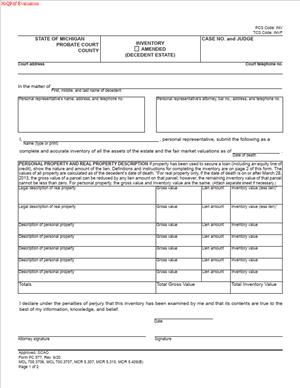
PC 577 – Inventory is a probate court document used in Michigan to report a deceased person’s assets. It lists property owned at the time of death and assigns a fair market value to each item as of that date.
The form is not a guess or rough estimate. It is a structured filing that separates different types of property. This often includes real estate, bank accounts, stocks, retirement accounts payable to the estate, business interests, and tangible personal property.
The purpose is transparency. The court, beneficiaries, and interested parties can see what makes up the estate and how much it is worth. It establishes the financial starting point for the probate process.
Who typically uses this form?
The personal representative most commonly completes and files this form. A personal representative may be named in a will or appointed by the court if there is no will.
In informal probate proceedings, the personal representative usually prepares and submits the inventory directly. In supervised proceedings, the court may take a more active role in reviewing the information.
Sometimes an attorney, accountant, or professional fiduciary helps prepare the document. Even then, the personal representative remains responsible for ensuring the information is accurate and complete.
Why might you need this form?
You may need this form because the court requires a full accounting of estate assets. The probate process involves gathering, protecting, and distributing property. The inventory is the first formal summary of what exists.
It also helps determine probate fees. In many cases, court costs are tied to the total value of the estate. An incomplete or inaccurate inventory can affect how those fees are calculated.
The inventory provides clarity for beneficiaries. It sets expectations about what assets are available for debts, expenses, and distributions. Without this document, disputes are more likely to arise.
Typical real-life scenarios
- A parent passes away owning a home, several bank accounts, and a vehicle. The adult child appointed as personal representative must list each asset and assign a date-of-death value before moving forward with distributions.
- An individual dies with a small investment portfolio and personal belongings, but no real estate. Even though the estate appears simple, the personal representative still prepares an inventory to document the total value.
- A person dies owning a small business interest. The personal representative must identify that interest and determine its value at the time of death. This may require reviewing financial records or obtaining an appraisal.
- An estate includes real property in more than one county. The personal representative must list each parcel separately, including its legal description and estimated fair market value.
- A deceased person owned valuable collectibles, such as coins or artwork. The inventory must reflect those items and their fair market value, not just their original purchase price.
When would you use PC 577 – Inventory?
You use this form after you are officially appointed as personal representative and begin administering the estate. It is part of the early stages of probate, once you have the authority to act on behalf of the estate.
The timing often depends on court rules and the type of probate proceeding. There is typically a deadline measured from the date of appointment. The court expects the inventory within that time frame.
You would not use this form before an appointment because you do not yet have legal authority to act for the estate. After the appointment, one of your first responsibilities is identifying and securing assets. The inventory reflects the results of that effort.
This form is generally used in estates that require formal probate administration. Estates that qualify for simplified or alternative procedures may follow a different process and may not require the same inventory filing.
If new assets are discovered after the original filing, an amended inventory may be prepared. This ensures the estate record remains accurate as administration continues.
Legal characteristics of PC 577 – Inventory
PC 577 – Inventory is a court filing. It becomes part of the probate case record once submitted. Because it is filed with the court, it must be complete and truthful to the best of your knowledge.
The form usually requires identification of each asset and its fair market value at the date of death. Fair market value generally means the price the asset would sell for between a willing buyer and seller in an open market.
Common issues that cause problems include leaving out assets, using incorrect valuations, or combining unrelated property into a single, unclear entry. Vague descriptions such as “miscellaneous items” without further detail can create confusion.
Another frequent issue is listing assets that do not belong to the probate estate. Some property passes automatically outside of probate, such as certain jointly owned property or accounts with named beneficiaries. Including those items can distort the total estate value.
Different probate proceedings may have slightly different requirements for serving or sharing the inventory with interested persons. The basic purpose remains the same: to disclose estate assets and values clearly.
This form does not transfer ownership of property. It does not approve distributions. It does not settle debts. It is a reporting document that supports the broader probate process.
Is it legally binding?
PC 577 – Inventory is legally significant because it is filed with the probate court under your authority as personal representative. By signing it, you are affirming that the information is accurate to the best of your knowledge.
The values listed may be relied upon for calculating court fees and guiding distributions. If the information is later shown to be materially inaccurate, it can lead to questions or objections from beneficiaries or other interested parties.
However, the form itself does not create new legal rights. It does not determine who ultimately receives property. Those outcomes are governed by the will, state law, court orders, and the overall administration process.
Its binding effect comes from its role in the probate case. Once filed, it stands as the estate’s official statement of assets and values unless amended or corrected through proper procedures.
How to fill out PC 577 – Inventory
Step 1 – Enter the court and case information
At the top of the form, fill in the name of the probate court and the county where the case is filed. Enter the case number exactly as it appears on your appointment documents. Provide the full legal name of the deceased person as listed in the probate case.
This information links the inventory to the correct estate file. Even small errors in the case number or name can delay processing.
Step 2 – Identify yourself as a personal representative
In the section that asks for fiduciary information, enter your full name and address as the appointed personal representative. Include any other requested contact information.
Use the same name format that appears on your letters of authority. Consistency across filings helps prevent confusion in the court record.
Step 3 – List real property
In the section designated for real estate, list each parcel owned by the deceased at the time of death. Provide the property address and, if requested, a legal description.
State the fair market value as of the date of death. This value is often based on an appraisal, tax assessment, or comparative market analysis. Do not list the mortgage balance here unless the form specifically asks for liens or encumbrances.
If there are multiple properties, list them separately. Avoid grouping different parcels into a single combined value.
Step 4 – List cash and financial accounts
In the section for cash and financial assets, identify each bank account, credit union account, or similar holding that is part of the probate estate. Include the name of the institution and the last four digits of the account number if space is provided.
Record the balance as of the date of death. This may require obtaining statements or confirmation from the financial institution.
Separate each account into its own line entry. This makes the record clear and easier to verify later.
Step 5 – List investments and securities
For stocks, bonds, mutual funds, or brokerage accounts owned by the estate, provide a description that identifies the type of asset. Include the number of shares or units if applicable.
Use the fair market value on the date of death. This may involve reviewing historical price data for publicly traded securities or obtaining a statement from the brokerage.
If the estate includes closely held business interests, describe the ownership interest and state its estimated value. The method used to determine value should be reasonable and consistent.
Step 6 – List personal property
In the section for tangible personal property, include vehicles, household furnishings, jewelry, tools, and other physical items of value. For vehicles, include identifying details such as make, model, and year.
You may group ordinary household items together if the form allows, but high-value items are typically listed separately. Assign a fair market value to each item or grouped category.
Use realistic resale values rather than original purchase prices. The goal is to reflect what the property was worth on the open market at the time of death.
Step 7 – Calculate the total value of the estate
After listing all categories of assets, add the values together to determine the total inventory value. Enter this total in the space provided on the form.
Double-check your math. The total is important because it may affect court fees and other administrative calculations.
Review each section to confirm that no asset has been counted twice or left out.
Step 8 – Review and sign the form
Carefully read through the completed inventory before signing. Confirm that all known probate assets are included and that values are assigned consistently.
Sign the form where indicated. By signing, you are confirming that the information is complete and accurate to the best of your knowledge.
Once signed, prepare the form for filing with the probate court according to the instructions provided with your case.
Legal terms you might encounter in PC 577 – Inventory
- Decedent: The decedent is the person who died. This form records everything the decedent owned at the time of death that becomes part of the estate. You must make sure the name of the decedent matches the name used in the court file.
- Personal Representative: This is the person legally appointed to manage the estate. If you are completing this document, you are acting in that role. Your authority comes from the court, and you must stay within that authority when listing and valuing assets.
- Date of Death Value: This is the fair market value of each asset on the exact date the decedent died. You do not use today’s value. You must determine what each item was worth on that specific date.
- Fair Market Value: Fair market value means the price an item would sell for between a willing buyer and seller. On this form, you estimate or document that value for each listed asset. The number you write affects the total estate value.
- Real Property: Real property refers to land and anything permanently attached to it, such as a house or building. You must describe the property clearly and provide its date-of-death value. Legal descriptions may be required, not just street addresses.
- Tangible Personal Property: These are physical items you can touch, like vehicles, furniture, jewelry, and tools. You group and list these items with reasonable detail. High-value items should be described individually.
- Intangible Personal Property: These are non-physical assets such as bank accounts, stocks, retirement accounts payable to the estate, and business interests. You must identify the institution or source and provide the balance as of the date of death.
- Encumbrance: An encumbrance is a debt or claim attached to property, such as a mortgage or lien. Even if the property has a loan against it, you still list the full value. Debts are typically handled separately from asset values.
- Receivable: A receivable is money owed to the decedent at the time of death. This could include unpaid wages, refunds, or loans made to others. You must list these as estate assets if they were legally owed.
- Estate Asset: An estate asset is anything owned solely by the decedent that does not automatically transfer to someone else. Only these assets are included in this document. You must carefully separate estate assets from non-estate assets.
FAQs
What if I cannot find the exact value of an asset on the date of death?
You should make a reasonable effort to determine the date-of-death value. Check account statements, appraisals, tax records, or written estimates. If exact figures are not available, use the best documented estimate you can support. Keep copies of how you calculated each value in case the court or an interested person asks for clarification.
Do I include assets that had a joint owner or named beneficiary on PC 577 – Inventory?
Generally, you only include assets that are part of the probate estate. If an asset passed automatically to a joint owner or named beneficiary, it may not belong on PC 577 – Inventory. Review how the asset was titled and whether it transfers outside of probate before deciding. When in doubt, verify whether your appointment order includes authority over that asset.
What if I discover a new asset after I file this form?
If you later find property that belongs to the estate, you may need to update the court record. That often means preparing an amended inventory reflecting the newly discovered asset and its value as of the date of death. Do not ignore newly found assets, because the estate total must be accurate.
How detailed do I need to be when listing personal property?
You must provide enough detail so the property can be reasonably identified. For common household goods of modest value, grouping is usually acceptable. For vehicles, collectibles, or high-value items, list them separately with identifying details such as make, model, or serial number. The goal is clarity, not unnecessary length.
What happens after I submit PC 577 – Inventory to the court?
After submission, the court reviews the document for completeness. If something is missing, you may receive a notice to correct it. If it is accepted, it becomes part of the official court file and may be accessible to interested persons. Keep a conformed copy for your records once PC 577 – Inventory is filed.
Do I need to attach supporting documents to this form?
In many cases, you are not required to attach every bank statement or appraisal to this document. However, you must have documentation to support the values you list. Bring or provide supporting documents if the court requests proof or if an interested person challenges a value.
What if an interested person disagrees with the value I listed?
If someone disputes a value, you should be prepared to explain how you determined it. Provide appraisals, account statements, or other written support. The court may require additional evidence if the disagreement cannot be resolved informally. Accurate documentation protects you in your role.
Can I correct a mistake after I file this document?
Yes, errors can usually be corrected by filing an amended inventory. Act quickly once you notice a mistake. Make sure the revised version clearly reflects the corrected information and updates the total value if necessary. Keep records of both the original and corrected filings.
Checklist: Before, During, and After PC 577 – Inventory
Before
- Obtain your official appointment as personal representative.
- Collect the decedent’s financial records, deeds, titles, and tax returns.
- Identify all bank accounts and request date-of-death balances.
- Locate real estate documents and confirm ownership status.
- Review how each asset is titled to determine if it is part of the estate.
- Create a working list of all known assets.
- Determine whether professional appraisals are needed.
- Confirm the deadline for filing the inventory with the court.
During
- Enter the correct court and case number exactly as assigned.
- Verify the spelling of the decedent’s name matches court records.
- List each category of asset in the proper section.
- Use date-of-death values for every item.
- Provide clear descriptions for real property and high-value items.
- Double-check math when totaling asset values.
- Review whether any assets were accidentally omitted.
- Sign the form where required in your capacity as personal representative.
After
- Make copies of the completed and signed document.
- File the original with the court using the required method.
- Confirm that the court accepted the filing.
- Provide copies to interested persons if required.
- Store supporting documentation in your estate records.
- Update your internal asset tracking list to match the field totals.
- Calendar reminders to amend the inventory if new assets are discovered.
Common mistakes to avoid with PC 577 – Inventory
- Mistake: Listing current market values instead of date-of-death values, which happens because you look at recent statements, and this can distort the estate total and create disputes; do not forget to confirm the exact date of death before entering any numbers.
- Mistake: Including assets that pass outside probate, which happens when you do not check beneficiary designations, and this can inflate the estate value and confuse the record; do not forget to verify how each asset is titled.
- Mistake: Forgetting small accounts or refunds, which happens when you rely only on memory, and this can leave the inventory incomplete; do not forget to review mail, tax returns, and prior statements.
- Mistake: Providing vague descriptions of valuable items, which happens when you group everything together, and this can trigger objections or court questions; do not forget to separately describe high-value property.
- Mistake: Miscalculating the total estate value, which happens with manual addition errors, and this can affect fees and reporting; do not forget to double-check your math.
- Mistake: Failing to amend the inventory after discovering new property, which happens when you assume the first filing is final, and this can make the court record inaccurate; do not forget that your duty to report assets continues.
- Mistake: Signing without reviewing authority, which happens when you rush to meet a deadline, and this can lead to acting beyond your appointment; do not forget to confirm you are officially appointed before filing.
- Mistake: Not keeping proof of valuations, which happens when you assume no one will question the numbers, and this can leave you unprepared in a dispute; do not forget to retain statements and appraisals in your records.
What to do after filling out PC 577 – Inventory
Once you complete the form, pause and review it carefully. Read every line as if you were seeing it for the first time. Confirm names, numbers, and totals. Make sure the values reflect the date of death, not a later date.
Next, organize your backup documents. Keep account statements, property records, and appraisals together in one file. You may not need to file them, but you should be ready to produce them if asked.
- Step 1: Make at least two copies of the signed inventory—one for the court file and one for your estate administration records.
- Step 2: File the original with the probate court handling the estate, following the required submission method.
- Step 3: Confirm receipt and acceptance by checking the case docket or contacting the clerk.
- Step 4: Note the filing date in your personal representative records.
- Step 5: Provide copies to interested persons if required in your case.
- Step 6: Update your internal accounting ledger to match the total estate value reported.
- Step 7: Use the inventory totals as a starting point for managing debts, expenses, and distributions.
- Step 8: Monitor for newly discovered assets and document them immediately.
- Step 9: Prepare and file an amended inventory if additional property is found.
- Step 10: Keep the filed inventory accessible as you prepare future accountings or reports.
The inventory becomes the foundation for everything that follows in the estate administration. You will rely on it when paying claims, preparing accounts, and proposing distributions. Treat it as a living reference document. If circumstances change, update your records promptly so the court file remains accurate.
Disclaimer: This guide is provided for informational purposes only and is not intended as legal advice. You should consult a legal professional.