MC 97 – Protected Personal Identifying Information
Fill out nowJurisdiction: Country: United States | Province or State: Michigan
If you are preparing court paperwork in Michigan, you may come across MC 97 – Protected Personal Identifying Information. This form is used when a court requires certain sensitive details but does not allow them to appear in public case documents.
MC 97 – Protected Personal Identifying Information helps keep private data out of the public court file. Courts aim to protect information such as Social Security numbers and financial account numbers from public access. This document allows the court to receive that information securely.
You might be filling out this form along with another filing, such as a complaint, motion, or judgment. It is not a stand-alone request. Instead, it supports another court document that refers to protected information.
If you are representing yourself, this form can feel technical. The key idea is simple: you provide confidential details on this separate form instead of writing them in the main document. That way, the public file stays limited, and the court still has what it needs.
Understanding how and when to use this form can prevent delays. Courts may reject filings that include full personal identifying information in the wrong place. Using this document correctly keeps your case moving forward.
What is MC 97 – Protected Personal Identifying Information?
Clear definition
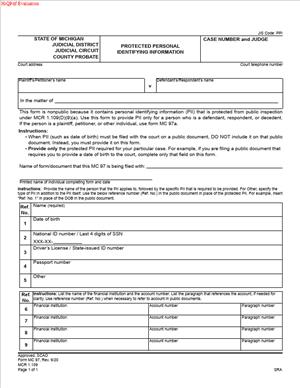
MC 97 – Protected Personal Identifying Information is a court form used in Michigan to submit sensitive personal data separately from the main case filing. It allows the court to access necessary identifying details while keeping those details out of the publicly viewable record.
The form typically includes information such as Social Security numbers, driver’s license numbers, financial account numbers, and dates of birth. These details are often required for enforcement, tracking, or identification purposes. However, they are not meant to appear in public court documents.
This document acts as a confidential attachment. It connects to a specific case and is filed with the court clerk, but it is restricted from general public access.
Who typically uses this form?
Self-represented individuals often use this form when filing in civil, family, or other court matters. Attorneys also use it when preparing documents that require protected data.
You may encounter this form if you are starting a lawsuit, responding to one, or submitting a proposed order. It is commonly used in cases involving money judgments, child support, or enforcement actions where identification is important.
Both plaintiffs and defendants may need to complete it. The need depends on the type of filing and whether protected personal information is required by the court.
Court staff processes the form, but it is not something the opposing party typically receives in the same way as public filings. Its purpose is administrative and protective.
Why might you need this form?
You may need this form because court rules limit how personal identifying information appears in public records. If a rule requires you to include identifying details, you must place them on this separate document instead of in your motion, complaint, or other filing.
For example, if you are seeking a money judgment, the court may require the other party’s Social Security number for enforcement purposes. You would not list that number in the body of your complaint. Instead, you would place it on this protected form.
Using this document reduces the risk of identity theft or misuse of sensitive information. Court files are often accessible to the public, either in person or electronically. Separating private data adds a layer of protection.
If you include full personal details in the wrong place, the clerk may reject your filing. You might have to refile corrected documents, which can delay your case.
Typical real-life scenarios
- You file a complaint for unpaid debt and request a money judgment. The court requires certain identifying information about the defendant for enforcement. You place that information on this protected form instead of in the complaint.
- You are involved in a family law matter where financial account numbers are relevant to the court’s decision. Rather than writing full account numbers in your motion, you submit them separately on this document.
- You submit a proposed order that requires personal identifiers for processing. The order references the existence of protected information, but the full details appear only on this form.
- You respond to a lawsuit and need to provide your own identifying information for court records. You use this document so your full Social Security number or driver’s license number does not appear in the public response.
- You are updating information in an ongoing case. The court requires certain identifying details to match records accurately. Instead of amending earlier public filings to add sensitive data, you file this form to provide the required information securely.
When would you use MC 97 – Protected Personal Identifying Information?
You use this form at the same time you file another court document that requires protected personal data. It is not filed on its own without an associated case document.
Typically, you use it when the court rules require full identifying information for internal purposes but prohibit including that information in public filings. This often arises in civil cases involving money, property, or enforcement of judgments.
In family law cases, identifying information may be necessary for support enforcement or record matching. In civil litigation, it may be necessary for collection or verification purposes.
If you are submitting a new case, you might include this form with your initial filing. If you are filing a motion or proposed order in an existing case, you may submit it at that stage instead.
Both the party starting the case and the party responding can use this form. The need depends on what the court requires for that specific filing. The form connects to a case number and must match the parties listed in the main document.
If a judge signs an order that requires protected information for processing, you may provide the required details using this form after the hearing. Timing depends on when the information becomes necessary in the case process.
Legal characteristics of MC 97 – Protected Personal Identifying Information
This form is procedural. It does not argue your position or request relief from the court. Its purpose is to provide confidential data in a controlled way.
For the document to be accepted, it must clearly identify the correct court and case number. The names of the parties must match the main filing exactly. Even small differences in spelling or formatting can create confusion or rejection.
Completeness matters. If required fields are left blank without explanation, the clerk may not process the filing. At the same time, you should only include information that the form requests. Adding extra details that are not required can create complications.
Accuracy is critical. The court may rely on the information for enforcement or record matching. Errors in numbers or dates can lead to administrative problems later in the case.
Common reasons for rejection include missing case numbers, unsigned forms if a signature is required, or filing the form without an associated document. Another frequent issue is placing full identifying information in the public filing instead of on this protected form.
Court practices can vary in how documents are submitted, whether on paper or electronically. However, the general principle remains the same: protected personal identifying information must be separated from the public record.
This form does not replace other required filings. It does not serve as a motion, response, or order. It also does not automatically seal your entire case. It only protects the specific personal data listed on it.
Is it legally binding?
MC 97 – Protected Personal Identifying Information is not a contract or agreement between parties. It does not create legal obligations on its own.
Its legal effect comes from court rules that require certain information to be filed in a protected manner. When properly completed and accepted, it becomes part of the official court record, but in a restricted section.
The form supports the validity of your related filing. If the court requires protected identifiers and you fail to provide them correctly, your main document may not be processed as expected.
When completed accurately and submitted according to court procedure, it fulfills a procedural requirement. It does not decide rights, assign fault, or grant relief. It simply ensures the court has the necessary identifying information in a protected format.
How to fill out MC 97 – Protected Personal Identifying Information
Step 1 – Identify the court and case
At the top of the form, enter the name of the court where your case is filed. Include the case number exactly as it appears on your other documents. Make sure the names of the parties match the caption in your main filing.
Step 2 – Provide the party’s identifying information
Enter the full name of the person whose information is being protected. Then fill in the requested identifiers, such as Social Security number, driver’s license number, date of birth, or financial account numbers, as the form directs. Write clearly and double-check each number for accuracy.
Step 3 – Limit entries to required information
Only include the specific types of information requested on the form. Do not add explanations, arguments, or unrelated details. This document is for identifiers only, not for telling your side of the story.
Step 4 – Review for consistency with your main filing
Compare the names, spelling, and case number on this form with your complaint, motion, or other document. They must match exactly. Confirm that you did not include full identifying numbers in the public document by mistake.
Step 5 – Sign and date if required
If the form includes a signature line, sign and date it where indicated. Use the same name format that appears in the case caption. Check that all required fields are complete before signing.
Step 6 – File the form with the related document
Submit this form at the same time as the filing that requires protected information, unless the court directs otherwise. Make sure it is clearly associated with the correct case so the clerk can place it in the protected section of the court record.
Legal terms you might encounter in MC 97 – Protected Personal Identifying Information
- Protected Personal Identifying Information (PPII): This refers to sensitive data such as Social Security numbers, driver’s license numbers, financial account numbers, and dates of birth. On this form, you list this information separately so it does not appear in the public court file. The court keeps it in a non-public record.
- Nonpublic Record: A portion of the court file that is not accessible to the general public. When you complete this document, the information you provide is stored in this protected section. Only authorized court staff and approved parties can view it.
- Public Record: The part of your case file that anyone can review unless sealed. This form works alongside your main filing to ensure that sensitive data is removed from the public record and placed in a protected file instead.
- Case Caption: The heading on court documents that lists the court name, case number, and parties. You must copy the caption exactly as it appears on your other filings so the clerk can match this document to the correct case.
- Case Number: A unique number assigned to your court case. You enter this number on the form so the protected information is linked to the right file. If the number is wrong or missing, the clerk may not be able to process it correctly.
- Filing Party: The person submitting the document to the court. If you are representing yourself, you are the filing party. Your role determines which identifying information you provide and how you sign the form.
- Redaction: The process of removing or masking sensitive information from documents that will become public. This form supports redaction by placing full identifying details in a confidential filing instead of the main document.
- Clerk of the Court: The court official responsible for receiving, processing, and maintaining case documents. The clerk ensures that your protected information is stored correctly and separated from public materials.
- Verification: A confirmation that the information you provide is accurate. Some filings require you to sign under penalty of perjury, meaning you affirm that the protected information listed is true and complete.
FAQs
Do I need to file MC 97 – Protected Personal Identifying Information every time I submit a court document?
You file this document when your court filing includes sensitive details that should not appear in the public record. If your motion, petition, or other paper contains full Social Security numbers, financial account numbers, driver’s license numbers, or full birth dates, you typically separate that data into this form. If your filing does not contain protected details, you usually do not need to submit it.
What information goes on this form instead of my main court document?
You place full identifying numbers and sensitive data here, while your public document should only show limited or masked versions if required. For example, instead of listing a full account number in your motion, you reference it generally and provide the complete number in this document. Always double-check that the public version does not repeat the full protected information.
Does this form change anything about my case or claims?
No. This document does not alter your legal arguments, deadlines, or requests. It only controls where sensitive information is stored. The court still considers your main filing the same way, but your private data is shielded from public access.
Who can see the information I list?
The general public cannot access the protected section of your file. Court staff and certain authorized individuals may review it as needed for case processing. You should assume that the judge and appropriate court personnel can see it, even though it is not publicly available.
What happens if I forget to include the required identifying information?
If required identifying information is missing from this document, the clerk may reject your filing or issue a notice asking you to correct it. That can delay your case. Review your main document carefully to confirm that every full identifying number has been moved to this form and that nothing essential is left out.
Do I need to sign MC 97 – Protected Personal Identifying Information?
If a signature line appears, you must sign it. Your signature confirms that the information you are providing is accurate and belongs to the correct person in the case. If you are filing on behalf of yourself, sign your own name. If you are authorized to file for someone else, confirm that your authority is clear in the case record.
What if my identifying information changes after I file this document?
If your information changes, you generally need to update the court record. That may involve submitting a new protected information form with the updated details. Make sure the case number matches and that the revised information is complete so the court file stays accurate.
How do I make sure the court matches this document to my other filings?
Copy the case caption exactly as it appears on your primary filing. Confirm that the case number, party names, and court location are identical. File this document at the same time as the related motion or pleading so the clerk can process them together and link the protected information correctly.
Checklist: Before, During, and After MC 97 – Protected Personal Identifying Information
Before
- Review your main court document for any full Social Security numbers, account numbers, driver’s license numbers, or full birth dates.
- Confirm the correct case number and party names as shown on prior court papers.
- Gather all accurate identifying information you may need to list.
- Check whether the court requires this form for your specific type of filing.
- Prepare a clean public version of your main document without fully protected details.
- Make sure you understand which numbers must appear in full and which should be limited in public filings.
- Have your contact information ready in case the clerk needs clarification.
During
- Enter the court name and case number exactly as shown in your case caption.
- Print clearly or type to avoid processing errors.
- List each piece of protected information in the correct section of the form.
- Double-check every number for accuracy before moving on.
- Ensure that no full identifying numbers remain in the public version of your filing.
- Sign and date the form if a signature line is included.
- Keep the information limited to what is required; do not add unnecessary personal details.
After
- Make at least one copy of the completed form for your records, if allowed.
- Attach or submit the form together with your related court document.
- Confirm with the clerk that both documents were received.
- Check any receipt or confirmation notice for accuracy.
- Store your copy in a secure place because it contains sensitive information.
- Monitor your case docket to ensure the filing was accepted.
- Respond promptly if the court notifies you of any deficiency.
- Update your records if you later file an amended or corrected version.
Common mistakes to avoid with MC 97 – Protected Personal Identifying Information
- Mistake: Including full Social Security or account numbers in your main public filing because you forgot to separate them, which happens when you rush, and this can expose your private data in the public record, so do not forget to review every page before filing.
- Mistake: Writing the wrong case number on the form due to copying from memory, which can cause misfiling or delays, so do not forget to match the number exactly to your most recent court document.
- Mistake: Leaving required fields blank because you assume the court already has the information, which may result in rejection, so do not forget that this form must stand on its own.
- Mistake: Failing to sign the document when a signature is required, often because you focus only on the information fields, which can invalidate the filing, so do not forget to check the bottom of the form.
- Mistake: Submitting the protected form without the related motion or pleading, which can confuse processing and delay your case, so do not forget to file them together.
- Mistake: Adding extra personal details that are not requested, usually out of caution, which increases privacy risk, so do not forget to limit entries to only what the form requires.
- Mistake: Not keeping a secure copy for your records, which can create problems if questions arise later, so do not forget to store your copy safely.
- Mistake: Ignoring a clerk’s notice about missing or inconsistent information, which can stall your case, so do not forget to respond promptly and correct any errors.
What to do after filling out MC 97 – Protected Personal Identifying Information
Once you complete the form, pause and review it line by line. Accuracy matters more than speed. You are handling sensitive data that affects both privacy and court processing.
- Step 1: Compare the completed form against your main court document and confirm that all full identifying numbers appear only on the protected form.
- Step 2: Verify that the case caption, including court name and case number, matches your other filings exactly.
- Step 3: Sign and date the form if required, making sure your signature is clear and consistent with other court documents.
- Step 4: Make a copy for your personal records, if court rules allow copies of protected filings to be kept by the parties.
- Step 5: Assemble your filing packet so the protected form is submitted at the same time as the related motion, petition, or response.
- Step 6: File the documents using the approved method for your court, such as in person, by mail, or through an electronic filing system if available.
- Step 7: Obtain confirmation of filing, such as a stamped copy, receipt, or electronic notice showing the date and time accepted.
- Step 8: Review the case docket or confirmation notice within a few days to ensure the documents were processed correctly.
- Step 9: Store your copy in a secure location, such as a locked file or password-protected digital folder, because it contains full identifying numbers.
- Step 10: If you later amend your main document and it includes different protected details, prepare and file an updated protected information form so the court record remains complete.
Taking these steps helps you protect your privacy while keeping your case on track. Careful handling of sensitive information reduces delays and prevents unnecessary exposure of personal data.
Disclaimer: This guide is provided for informational purposes only and is not intended as legal advice. You should consult a legal professional.