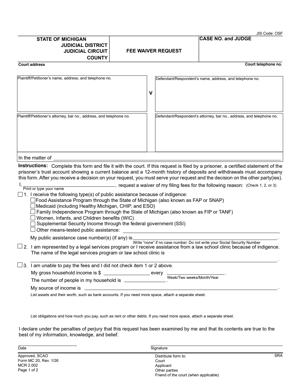
MC 20 – Fee Waiver Request
Fill out nowJurisdiction: Country: United States | Province or State: Michigan
If you cannot afford court filing fees, the MC 20 – Fee Waiver Request allows you to ask the court to waive those costs. It is a financial disclosure form submitted at the beginning of a case or during an existing case.
This form is designed for people who have limited income or receive public assistance. It gives the court a clear picture of your financial situation so it can decide whether to excuse certain fees.
Court fees can include filing fees, motion fees, and other required payments. Without a waiver, those costs may prevent you from starting or continuing a case.
The MC 20 – Fee Waiver Request matters because it can remove a financial barrier to accessing the court system. If approved, it may allow your case to move forward without an upfront payment.
You are not asking for a decision on your legal claims. You are asking the court to review your finances and decide whether you qualify for relief from fees.
What is MC 20 – Fee Waiver Request?
Clear definition
The MC 20 – Fee Waiver Request is a court form used in Michigan to ask that certain court fees be waived. It is a written request explaining your income, expenses, and financial resources.
By completing this document, you are providing financial information under penalty of perjury. The court uses that information to determine whether you meet the criteria for a fee waiver.
The form does not automatically remove fees. A judge or authorized court official reviews your submission and issues a decision.
Who typically uses this form?
People who are starting a lawsuit but cannot afford the filing fee often use this form. It is also used by defendants, respondents, or other parties who must pay fees during a case.
Self-represented individuals frequently complete this document. It is common in family law cases, small claims matters, landlord-tenant disputes, and civil cases.
Individuals receiving public benefits or living on a limited income may rely on this form to continue participating in court proceedings.
Why might you need this form?
Court fees are required for many actions, including filing a complaint, submitting motions, or requesting certain hearings. If you do not pay the required fee, the court may not process your paperwork.
If paying the fee would cause financial hardship, this form provides a way to request relief. It allows the court to consider your ability to pay before requiring payment.
In some situations, you may need the waiver to serve papers, obtain certified copies, or request other services that involve additional charges.
Typical real-life scenarios
- You are filing for divorce and cannot afford the filing fee. You complete the fee waiver request along with your complaint so the court can review both at the same time.
- You are being sued and need to file a response. The response requires a filing fee, but your income is limited. You submit the waiver request to avoid delaying your response.
- You want to file a motion in an ongoing custody case. A motion fee applies, and your current income does not cover that cost. You request a waiver before the hearing date.
- You are seeking a personal protection order or another civil remedy and are unsure whether fees apply. You submit the form to clarify whether you qualify for waived costs based on your financial condition.
When would you use MC 20 – Fee Waiver Request?
You would use this form when a court requires payment, and you cannot reasonably afford it. The request is usually filed at the same time as the document that triggers the fee.
If you are starting a new case, the waiver request is commonly submitted with your initial filing. This allows the court to review your financial information before processing the case.
If you are already involved in a case and need to file additional documents that require payment, you may use this form at that stage. The court will review your current financial status at the time of submission.
Both plaintiffs and defendants may use the form. Any party responsible for paying a court fee may request a waiver if they meet the financial criteria.
Timing matters. If the waiver is not approved, the court may require payment before moving forward. Filing the request early helps avoid delays.
Legal characteristics of MC 20 – Fee Waiver Request
This document is a formal financial disclosure. You are required to provide truthful and complete information about income, public assistance, assets, and expenses.
The form typically asks about employment, government benefits, cash on hand, bank accounts, property, and monthly bills. The court reviews these details to assess financial hardship.
A request may be denied if the information is incomplete, inconsistent, or unclear. Missing signatures, unanswered questions, or incorrect case information can also cause delays or rejection.
Accuracy is essential. If the court later discovers that the information was false or misleading, it may revoke the waiver and require payment of previously waived fees.
Approval standards may vary slightly depending on court practices, but the general focus is on income level and ability to pay. Courts commonly consider whether you receive certain public benefits or fall below specific income thresholds.
This form does not decide your legal case. It does not affect the merits of your claims or defenses. It only addresses whether fees will be required.
Is it legally binding?
The MC 20 – Fee Waiver Request is not a contract between parties. It is a sworn statement made to the court.
When you sign the form, you are certifying that the information is true to the best of your knowledge. That certification carries legal weight. False statements can have consequences.
If the court grants the waiver, the order allowing fees to be waived becomes effective as part of the court record. That order governs whether payment is required for the specified filings or services.
The decision applies only to the fees covered by the approval. It does not guarantee that all future costs in the case will be waived.
How to fill out MC 20 – Fee Waiver Request
Step 1 – Complete the case caption
At the top of the form, enter the court name, case number if available, and the names of the parties. The information must match your other court documents. If you are starting a new case and do not yet have a case number, follow the standard formatting used on your initial filing.
Step 2 – Identify the fees you are asking to waive
Indicate the type of filing or service connected to your request. This may include an initial filing fee, motion fee, or other court costs. Be clear about what action you are taking so the court understands the context of your request.
Step 3 – Provide information about public assistance
The form typically asks whether you receive specific government benefits. Answer each question accurately. If you receive benefits, indicate the type of assistance. This information may affect how the court evaluates your eligibility.
Step 4 – Report your income
List all sources of income, including wages, self-employment earnings, disability payments, unemployment benefits, child support received, or other funds. Provide amounts as requested, often on a monthly basis. Use recent and accurate figures.
Step 5 – Describe your assets
Disclose cash on hand, bank account balances, and any significant property. The form may ask about vehicles, real estate, or other valuable items. Provide reasonable estimates if exact amounts are not available.
Step 6 – Outline your monthly expenses
Include regular expenses such as rent or mortgage, utilities, food, transportation, insurance, and medical costs. Present a clear picture of your financial obligations. This helps the court assess whether paying the fee would create hardship.
Step 7 – Review for completeness and accuracy
Read through each section before signing. Confirm that all required questions are answered and that the figures are consistent. Check that names, dates, and case information match your other documents.
Step 8 – Sign and date the form
Sign the document where indicated. By signing, you are certifying that the information is true. Enter the date of signing. An unsigned form is usually not processed.
Step 9 – Submit the form to the court clerk
File the completed form with the clerk’s office, typically at the same time as the document requiring the fee. Keep a copy for your records. After submission, wait for the court to review and issue a decision regarding your request.
Legal terms you might encounter in MC 20 – Fee Waiver Request
- Indigency: This refers to your financial inability to pay court fees. On this form, you are explaining why your income and assets are not enough to cover filing fees and still meet your basic needs. The court uses this information to decide if you qualify for a waiver.
- Public Assistance: This includes government benefits such as food assistance, cash assistance, disability benefits, or other need-based programs. The form asks whether you currently receive these benefits because eligibility can support your request for a fee waiver.
- Gross Income: Gross income is the total amount you earn before taxes and deductions. The form typically requires you to list gross monthly income so the court can see your full earnings picture.
- Assets: Assets are items of value you own. This may include bank account balances, vehicles, real estate, or other property. You must disclose these because the court considers both income and assets when reviewing your request.
- Liabilities: Liabilities are debts or financial obligations you owe, such as credit card balances, loans, or medical bills. While not always labeled directly as “liabilities,” the form may ask about expenses and debts to understand your financial situation.
- Court Costs: Court costs are fees charged by the court for filing documents, issuing summonses, serving papers, or other procedural steps. This form asks you to specify which costs you want waived.
- Verification: Verification refers to confirming that the information you provide is true. By signing the form, you verify that everything listed about your finances is accurate.
- Perjury: Perjury means making false statements under oath. When you sign the form, you are declaring under penalty of perjury that your information is truthful. False information can result in penalties or the denial of your request.
- Case Caption: The case caption appears at the top of the document. It includes the court name, case number, and the names of the parties. You must copy this exactly as it appears on your other court papers.
- Order: An order is a written decision signed by a judge. After reviewing your request, the judge may issue an order granting or denying your fee waiver.
FAQs
Do I need to file MC 20 – Fee Waiver Request at the same time as my other court papers?
Yes. In most situations, you submit this document together with the paperwork that requires a filing fee. The clerk reviews your request before processing your main filing. If you wait and submit it later, your case documents may not be accepted until the fee issue is resolved.
What income amount should I write if my pay changes from month to month?
Use your average gross monthly income. Look at recent pay stubs and calculate a typical monthly amount before taxes. If your income recently dropped or increased, note the change clearly so the court understands your current financial situation.
Do I have to list cash I keep at home or money in digital payment accounts?
Yes. This form asks you to report all available funds, not just traditional bank accounts. Include cash on hand and balances in any financial account you control. Leaving these out can affect the court’s trust in your application.
What happens after I submit this document to the clerk?
The clerk forwards your request to a judge for review. The judge may approve it, deny it, or ask for more information. You will usually receive a signed order showing the decision. Keep that order with your case records.
Will the other party, in my case, see the financial information I provide?
Your filing becomes part of the court record. Depending on the case type and court procedures, the other party may have access to documents in the file. You should assume that the information you provide could be reviewed by the judge and possibly the opposing party.
If the judge denies my request, can I still move forward with my case?
Yes, but you will need to pay the required fees for your documents to be processed. The court’s order will explain whether the denial is final or whether you may provide additional information. Read the order carefully so you know your next step.
Do I need to attach proof of my income or public benefits?
Some courts require documentation, such as pay stubs or benefit letters, while others decide based on what you write. Check the filing instructions from the clerk. If you attach documents, make sure they match the amounts listed on this form.
What date should I use when I sign the form?
Use the actual date you sign it. Do not pre-date or backdate the signature. The signature date shows when you confirmed that the financial information was accurate and complete.
Checklist: Before, During, and After MC 20 – Fee Waiver Request
Before
- Gather recent pay stubs or proof of income.
- Collect information about public assistance benefits.
- Check balances for all bank and financial accounts.
- List your monthly bills and regular expenses.
- Confirm the correct case caption and case number.
- Review the filing fee amount you are asking to waive.
- Make sure your personal contact information is current.
During
- Write clearly and use black or blue ink if completing by hand.
- Fill out every required field; do not leave blanks unless instructed.
- Use monthly amounts when reporting income and expenses.
- Double-check that numbers are accurate and consistent.
- Identify all fees you want waived.
- Read each statement before signing under penalty of perjury.
- Sign and date the form in the correct place.
After
- Make at least one copy for your records.
- File the original with the court clerk.
- Ask the clerk how you will be notified of the decision.
- Watch for a signed order from the judge.
- Keep the order with your case documents.
- Pay attention to any deadlines tied to your main filing.
- Update your records if your financial situation changes.
- Follow any instructions included in the court’s order.
Common mistakes to avoid with MC 20 – Fee Waiver Request
- Mistake: Leaving out sources of income because you think they are too small to matter, which often happens when people focus only on wages; this can damage credibility and lead to denial, so do not forget to include every source, even part-time or irregular payments.
- Mistake: Reporting net income instead of gross income because pay stubs highlight take-home pay; this can misrepresent your finances and delay review, so do not forget to use the amount before taxes and deductions.
- Mistake: Forgetting to list assets like vehicles or savings because you assume they are protected; this may appear incomplete and cause the judge to question accuracy, so do not forget to disclose all property you own.
- Mistake: Failing to sign and date the form because you are rushing to file; unsigned forms are often rejected, so do not forget to complete the signature section under penalty of perjury.
- Mistake: Submitting the form without copies because you assume the court will provide them; this can leave you without proof of what you filed, so do not forget to keep a complete copy for yourself.
- Mistake: Ignoring a denial order because you feel discouraged; this can stall your case and cause missed deadlines, so do not forget to read the order carefully and act within any stated time limits.
- Mistake: Providing outdated financial information because gathering new documents feels inconvenient; this can lead to an inaccurate decision, so do not forget to update figures to reflect your current situation.
- Mistake: Writing estimates without checking actual numbers because you are unsure of exact amounts; inconsistent figures can raise questions, so do not forget to verify amounts using recent statements or records.
What to do after filling out MC 20 – Fee Waiver Request
Once you complete the form, your next steps matter just as much as the information you provided. A properly filed request ensures your main case can move forward without unnecessary delays.
- Step 1: Review the entire form one more time. Confirm that every required section is filled in and that your numbers are consistent across income, assets, and expenses.
- Step 2: Sign and date the form if you have not already done so. Make sure the signature matches the name used in your case caption.
- Step 3: Make at least one complete copy for your personal records. If possible, keep both a paper copy and a scanned digital version.
- Step 4: Attach any required supporting documents, such as proof of public assistance or recent pay information, if the court expects documentation.
- Step 5: Submit the original form to the court clerk along with your main filing documents. If filing in person, ask the clerk to stamp your copy as received.
- Step 6: If filing by mail or electronically, confirm that the court received your submission. Keep any confirmation number, receipt, or email acknowledgment.
- Step 7: Monitor your mail, email, or court account for a signed order from the judge. The order will state whether your fees are waived or must be paid.
- Step 8: If the request is approved, keep the signed order with your case file. You may need to show it if questions arise about payment.
- Step 9: If the request is denied, review the order carefully. Determine whether you must pay immediately or whether you can provide more information.
- Step 10: Track all deadlines related to your main case. A pending or denied fee waiver does not automatically extend court deadlines unless the order says so.
Staying organized protects your case. Keep all related paperwork together in one folder. Update your financial information if your situation changes while the case is ongoing. If the court asks for clarification, respond promptly and provide clear, consistent information. Careful follow-through ensures that your request is processed smoothly and your case continues without avoidable obstacles.
Disclaimer: This guide is provided for informational purposes only and is not intended as legal advice. You should consult a legal professional.