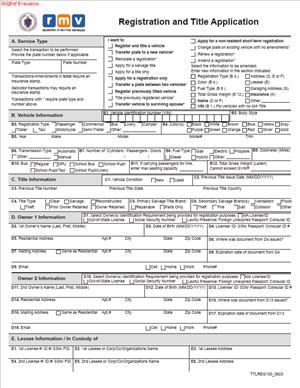
TTLREG100 – Registration and Title Application
Fill out nowJurisdiction: Country: United States | Province or State: Massachusetts
The TTLREG100 – Registration and Title Application is the main form used to apply for a vehicle registration and certificate of title in Massachusetts. If you are buying, transferring, or registering a vehicle, this document is often part of the process. It connects you, the vehicle, and the state’s motor vehicle records.
You use this form to tell the Registry of Motor Vehicles who owns the vehicle and who is responsible for registering it. It collects identifying details about the vehicle, the owner, and any lienholder. It also records information about insurance coverage and sales or transfer details.
If you are about to fill out this form, you likely want to make sure it is accepted without delay. Errors or missing information can lead to rejection or processing issues. That can delay your ability to legally drive the vehicle.
Understanding what this form does will help you complete it correctly the first time. This guide explains what the form is, when it is used, and how to fill it out step by step.
What is TTLREG100 – Registration and Title Application?
Clear definition
The TTLREG100 – Registration and Title Application is a state-issued document used to request vehicle registration and a certificate of title in Massachusetts. It serves as a formal application to record vehicle ownership and authorize registration for use on public roads.
The title portion establishes legal ownership of the vehicle. The registration portion allows the vehicle to be assigned license plates and legally operated. Both parts are often handled together through this single form.
The document gathers detailed information. This includes the vehicle identification number, make, model, year, color, and mileage. It also collects owner details, insurance certification, and lienholder information if the vehicle is financed.
Who typically uses this form?
Most commonly, buyers of new or used vehicles complete this form. If you purchase a vehicle from a dealer, the dealer may prepare much of the form. If you buy from a private seller, you are more directly involved in completing and submitting it.
Current owners also use the form when transferring ownership. This can happen during a sale, a gift, or a family transfer. In these situations, both the previous owner and the new owner may need to provide information or signatures.
Lenders may be involved if the vehicle is financed. In that case, lienholder information is included to reflect the lender’s legal interest in the vehicle.
Insurance agents also play a role. In Massachusetts, proof of insurance is typically integrated into the registration process. An authorized insurance representative may need to stamp or electronically confirm coverage before the registration is processed.
Why might you need this form?
You need this form when you want the state to recognize you as the legal owner of a vehicle. Without a proper title, ownership can be unclear, especially in disputes or future sales.
You also need it to legally register a vehicle for use on public roads. Driving an unregistered vehicle can lead to fines, penalties, or other consequences. Registration ties the vehicle to you and confirms that required information has been filed.
If you move to Massachusetts from another state, you may use this form to transfer your out-of-state title and obtain Massachusetts registration. This updates the vehicle’s records and brings them into compliance with state requirements.
You may also need it when making certain changes, such as correcting ownership information or updating how the vehicle is titled. In those cases, the form helps formalize the change in the state’s records.
Typical real-life scenarios
- You buy a used car from a private seller. The seller signs over the existing title to you. You then complete this form to apply for a new title in your name and register the vehicle.
- You purchase a new car from a dealership. The dealership prepares the application and gathers your information. You review and sign the form before it is submitted for processing.
- You receive a vehicle as a gift from a family member. Even though no money changes hands, the transfer must still be recorded. The form captures the transfer details and establishes you as the new titled owner.
- You refinance your auto loan. A new lender now has a security interest in the vehicle. Updated lienholder information may need to be recorded to reflect the current financing arrangement.
- You move to Massachusetts with a vehicle titled in another state. You complete the application to obtain a Massachusetts title and registration so the vehicle can be legally operated in your new state of residence.
When would you use TTLREG100 – Registration and Title Application?
You use this form whenever a vehicle’s ownership or registration status needs to be formally recorded or updated in Massachusetts. This most often happens at the time of purchase, whether the vehicle is new or used.
If you are the buyer in a private sale, you use the form shortly after the transaction. It allows the state to issue a new title in your name and register the vehicle under your responsibility.
If you are transferring ownership due to a family arrangement, such as adding or removing a co-owner, the form may be part of that process. It documents the updated ownership structure.
When a vehicle is financed, the form is used to record the lien. If the vehicle is later paid off and the lien is released, separate documentation is typically involved, but the original title application captured the lender’s interest.
People relocating from another state often use this form soon after establishing residency. It brings the vehicle into the Massachusetts system and replaces the out-of-state registration and title.
Businesses also use this form when purchasing vehicles for company use. In those cases, the business entity is listed as the owner, and an authorized representative signs on its behalf.
Legal characteristics of TTLREG100 – Registration and Title Application
This form functions as an official request to a state agency. It becomes effective when properly completed, signed, and accepted for processing. Acceptance depends on accuracy, completeness, and supporting documentation.
For the application to be valid, required fields must be filled in clearly and correctly. This usually includes accurate vehicle identification numbers, owner information, insurance certification, and signatures. Missing signatures are a common cause of rejection.
Inconsistent information can also cause problems. For example, if the name on the form does not match the name on the title assignment or identification documents, processing may be delayed. Discrepancies in the vehicle identification number are especially serious and can result in denial until corrected.
If there is a lien, the lienholder’s information must be complete and accurate. Errors in lender details can affect how the title is issued and who holds the legal document.
Different states handle registration and titling processes in slightly different ways. Some separate title and registration applications. In Massachusetts, they are commonly combined into one filing. If you are familiar with another state’s system, the structure may look different, but the core purpose is similar.
This form does not replace a bill of sale in all cases, nor does it automatically resolve disputes over ownership. It records information provided to the state. If the underlying transaction is disputed or fraudulent, separate legal processes may be required to resolve those issues.
It also does not serve as proof of insurance by itself. While insurance information is included as part of the process, actual coverage depends on the policy issued by your insurer.
Is it legally binding?
The TTLREG100 – Registration and Title Application has legal significance once submitted and accepted. By signing it, you are certifying that the information provided is true to the best of your knowledge. False statements can carry legal consequences.
When the state issues a certificate of title based on this form, that title becomes official evidence of ownership. It is relied upon in future sales, financing transactions, and ownership disputes.
However, the form itself does not create ownership out of nothing. Ownership generally arises from the underlying transaction, such as a sale or transfer. The form records that change in the official system.
The registration portion allows the vehicle to be lawfully operated when all conditions are met. It does not guarantee roadworthiness or compliance with other laws. Separate inspection or emissions requirements may apply.
How to fill out TTLREG100 – Registration and Title Application
Step 1 – Review the entire form before writing
Read through the entire document from top to bottom. Notice the sections for vehicle information, owner details, insurance certification, lienholder information, and signatures. This helps you gather all required information before you begin.
Step 2 – Enter vehicle information
Provide the vehicle identification number exactly as it appears on the vehicle and prior title. Include the year, make, model, body type, and color. Enter the current odometer reading if required. Double-check every digit of the identification number, as errors here often cause delays.
Step 3 – Complete owner information
Write your full legal name as you want it to appear on the title. Include your residential address and any mailing address if different. If there is more than one owner, list each person’s name as instructed and indicate the ownership relationship if the form requests it.
Step 4 – Provide transfer or sale details
Enter the date of sale or transfer. Include the purchase price or indicate if the vehicle was a gift, if the form provides that option. Make sure the information matches any supporting documents, such as the assigned title or bill of sale.
Step 5 – Add lienholder information if applicable
If the vehicle is financed, enter the full legal name and address of the lender. This ensures the lien is properly recorded. If there is no loan, confirm that the section reflects that no lien applies.
Step 6 – Confirm insurance certification
Ensure that required insurance information is completed. This may include policy details and an authorized insurance representative’s confirmation. Check that the insurance information aligns with the vehicle and owner listed on the form.
Step 7 – Review all entries carefully
Go back through each section. Compare the information with your title, identification, and any financing documents. Look for spelling errors, incorrect numbers, or blank fields that require completion.
Step 8 – Sign and date the form
Sign your name where indicated. If there are co-owners, each person may need to sign. Make sure the date is accurate. Your signature confirms that the information is complete and truthful.
Step 9 – Submit the completed application
Submit the form along with any required supporting documents and fees as part of the registration and title process. Keep copies of everything you provide for your records.
Legal terms you might encounter in TTLREG100 – Registration and Title Application
- Registered Owner: This is the person or business whose name appears on the vehicle registration. The registered owner is responsible for maintaining insurance and ensuring the vehicle complies with state requirements. On this form, you must clearly list the full legal name and address of each registered owner exactly as they should appear in the official record.
- Titled Owner: The titled owner is the person or entity that legally owns the vehicle. In many cases, the registered owner and titled owner are the same, but not always. This form distinguishes between registration and title because ownership and responsibility for operating the vehicle can be separated.
- Lienholder: A lienholder is a lender or financial institution that has a legal claim on the vehicle until a loan is paid in full. If you financed the vehicle, the lienholder’s name and address must be entered accurately. This ensures the title reflects the lender’s interest.
- Odometer Disclosure: This refers to the required statement of the vehicle’s mileage at the time of sale or transfer. You must record the exact mileage as shown on the dashboard. Providing false mileage can lead to serious legal and financial consequences.
- Assignment of Title: This is the section where the current owner signs over ownership to a new owner. It confirms that the seller transfers rights in the vehicle. If this portion is incomplete or incorrect, the title transfer may be rejected.
- Joint Ownership: This term describes when two or more people share ownership of the vehicle. The way names are connected (for example, “and” versus “or”) affects who must sign in the future. The wording you choose determines how ownership decisions are handled later.
- Insurance Certification: This confirms that the vehicle is covered by an active insurance policy that meets minimum legal requirements. You may need to provide policy details directly on this form. Without valid insurance information, registration cannot be completed.
- Sales or Use Tax: This is the tax assessed when ownership of a vehicle changes. The amount may be based on the purchase price or fair market value. You must report the sale amount accurately because it affects the tax calculation.
- Power of Attorney: This is a legal document allowing someone else to sign on your behalf. If you are not signing personally, a properly completed power of attorney must usually accompany this form. The signature must clearly indicate that it is made in a representative capacity.
- Vehicle Identification Number (VIN): The VIN is a unique 17-character code assigned to the vehicle. It must match exactly across all documents. Even one incorrect digit can delay processing or cause rejection.
FAQs
What effective date should I use for the registration or title transfer?
Use the actual date the ownership transfer or registration change takes effect, usually the date of sale shown on the title or bill of sale. Make sure the date on this form matches the date on supporting documents. If the dates do not align, processing may be delayed. Always double-check that the seller’s signature date and your entry date are consistent.
What if the name on my identification does not exactly match the name I write on this document?
You should enter your full legal name exactly as it appears on your government-issued identification. If there is a middle initial or suffix, include it if it appears on your ID. Differences between your ID and what you write can lead to rejection or requests for clarification. If your name recently changed, ensure your supporting documents reflect that change before submission.
Do all owners have to sign the TTLREG100 – Registration and Title Application?
If more than one owner is listed, the required signatures depend on how the names are joined. If the names are connected with “and,” typically all listed owners must sign. If connected with “or,” one owner may be able to sign alone. Check how the ownership is shown in the title assignment section and ensure the correct parties sign in the designated signature spaces.
What happens if I make a mistake while filling out this form?
Minor errors, such as misspellings or incorrect numbers, can result in rejection. Avoid using correction fluid or crossing out information unless specifically permitted. If you notice a mistake before submission, it is usually cleaner to complete a new copy of this document. Make sure all corrected entries are clear and legible.
Do I need to attach additional documents when submitting this form?
In most cases, yes. You typically need the signed title, proof of insurance, and possibly a bill of sale. If a lien exists, lienholder information must be included accurately. Review each section of this form and confirm that any referenced documents are attached before submitting.
How do I confirm that my application was accepted?
After submission, you should receive confirmation in the form of a receipt, registration certificate, or other official notice. Review the issued documents carefully to confirm your name, address, VIN, and lienholder details are correct. If something does not match what you entered, address it promptly. Keep all receipts and copies for your records.
Can someone else sign on my behalf?
Yes, but only if they have proper authority, such as a valid power of attorney. The person signing must indicate that they are signing as an authorized representative. The supporting authorization document should be submitted with this form. Without proof of authority, the signature may not be accepted.
What information becomes part of the public record once this document is processed?
Ownership details, vehicle description, VIN, and lienholder information typically become part of the official motor vehicle record. The address you provide may also be recorded. Make sure everything you enter is accurate and current because it updates the official record tied to the vehicle.
Checklist: Before, During, and After TTLREG100 – Registration and Title Application
Before
- Gather the current vehicle title and confirm it is properly signed.
- Verify the VIN on the vehicle matches the VIN on the title.
- Have your government-issued identification ready.
- Obtain proof of active insurance coverage.
- Confirm the exact purchase price and date of sale.
- Collect lienholder details if the vehicle is financed.
- Review how ownership should be listed (individual or joint).
During
- Print clearly using dark ink.
- Enter the VIN carefully, checking each character.
- Write your full legal name exactly as it should appear on the record.
- Complete all required owner and address fields.
- Fill in lienholder information accurately, if applicable.
- Record the odometer reading exactly as shown.
- Double-check sale price and tax-related entries.
- Ensure all required signatures are provided.
After
- Make a full copy of the completed form for your records.
- Confirm all supporting documents are attached.
- Submit the application through the appropriate filing method.
- Obtain a dated receipt or confirmation of submission.
- Review issued registration or title documents for accuracy.
- Store copies of all paperwork in a safe place.
- Update your personal records with new registration details.
Common mistakes to avoid with TTLREG100 – Registration and Title Application
- Mistake: Entering the wrong VIN because you copied it from memory instead of the vehicle, which happens easily and can cause rejection; always verify each character directly from the vehicle and the title before submitting.
- Mistake: Listing a nickname or shortened name instead of your full legal name, which often occurs out of habit and may delay processing; do not forget to match your identification exactly.
- Mistake: Forgetting to include lienholder information when the vehicle is financed, which happens when buyers assume the dealer handled it and can result in an incomplete title record; always confirm whether a lien should be recorded.
- Mistake: Leaving signature fields blank because you think one signature is enough, which commonly occurs with joint owners and can invalidate the transfer; make sure every required party signs in the correct place.
- Mistake: Recording an incorrect odometer reading due to rushing, which can create legal complications and require correction forms later; do not forget to copy the mileage carefully.
- Mistake: Submitting the form without required attachments, which often leads to delays or rejection; always double-check that the signed title, insurance confirmation, and any supporting documents are included.
- Mistake: Using correction fluid or heavily crossing out errors, which can make the document unacceptable for processing; if you make a significant error, complete a fresh copy instead.
- Mistake: Failing to review the final issued registration or title for accuracy, which happens when people assume everything is correct and can leave mistakes in the public record; do not forget to verify all details immediately after approval.
What to do after filling out TTLREG100 – Registration and Title Application
Once you finish completing the form, slow down before you submit it. A careful review now can save weeks of delay later. Compare every major entry against your supporting documents. Confirm spelling, numbers, and dates.
- Step 1: Review the completed form line by line and compare it with the title, bill of sale, and insurance information.
- Step 2: Make a clear photocopy or scanned copy of the entire application and all attachments for your personal records.
- Step 3: Organize your documents in a logical order, with the completed application on top and supporting documents behind it.
- Step 4: Submit the application using the accepted submission method available to you, ensuring you follow all procedural requirements.
- Step 5: Obtain proof of submission, such as a receipt, confirmation page, or stamped copy.
- Step 6: Monitor your mail or official communication channels for confirmation of processing.
- Step 7: When you receive your registration certificate or title, review it immediately for accuracy.
- Step 8: If you identify an error, act quickly to correct it by contacting the appropriate office and providing documentation.
- Step 9: Store the official documents in a secure location, such as a fireproof folder or safe.
- Step 10: Update your insurance provider and personal records if any ownership or registration details have changed.
Keep your copies for as long as you own the vehicle. If questions arise later about ownership dates, mileage disclosures, or lien status, your retained documents will help you resolve them quickly. Staying organized protects you.
Disclaimer: This guide is provided for informational purposes only and is not intended as legal advice. You should consult a legal professional.