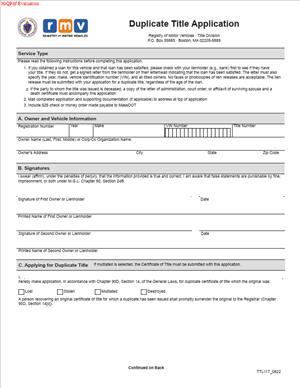
TTL117 – Duplicate Title Application
Fill out nowJurisdiction: Country: United States | Province or State: Massachusetts
The TTL117 – Duplicate Title Application is the form you use in Massachusetts to request a replacement vehicle title. If your original title is lost, damaged, or stolen, this form starts the process to get a new one.
A vehicle title is the legal document that shows ownership. Without it, you may not be able to sell, transfer, or refinance your vehicle. Lenders, buyers, and insurers often require a valid title.
This form matters because the title is proof of your rights in the vehicle. If the document is missing, you cannot easily complete transactions that depend on clear ownership.
The TTL117 – Duplicate Title Application is handled through the Massachusetts Registry of Motor Vehicles. When you submit it properly, the agency reviews your request and, if approved, issues a duplicate title.
Understanding what information the form asks for will help you avoid delays. Small errors can slow down processing or lead to rejection.
What is TTL117 – Duplicate Title Application?
Clear definition
The TTL117 – Duplicate Title Application is an official Massachusetts form used to request a replacement certificate of title for a motor vehicle. It is a formal filing with the state agency that manages vehicle records.
When you complete this document, you are asking the state to issue a new title that replaces the original. The duplicate carries the same legal effect as the first title, but it is marked as a reissued document.
The form collects identifying details about the vehicle and the current owner. It also confirms that the original title is no longer available for use.
Who typically uses this form?
Vehicle owners most often use this form. If your name appears as the owner on the state’s title record, you are generally the person who can request a duplicate.
Co-owners may also use it. If more than one name is listed on the title, the form may require signatures from each owner, depending on how ownership is recorded.
Lienholders sometimes use this form when they hold the title as security for a loan. If a title in their possession is lost or damaged, they may request a duplicate in line with state procedures.
Authorized representatives may complete and submit the form on behalf of an owner. In those cases, additional documentation is often required to show authority.
Why might you need this form?
You may need this form if your original title is lost. Titles are often misplaced during moves or after a vehicle is paid off.
You may also need it if the title was stolen. Replacing the document helps protect your ownership record and prevents misuse of the original.
A damaged title is another common reason. If the document is torn, illegible, or altered, it may not be accepted for a sale or transfer.
You might also discover that you need a duplicate when preparing to sell your vehicle. Buyers typically expect a valid, readable title at closing.
Typical real-life scenarios
- You decide to sell your car and cannot find the title in your records. The buyer wants to complete the transaction quickly. You submit the form to obtain a replacement before the sale.
- You finish paying off an auto loan. The lender indicates that the title was mailed years ago, but you never received it. To proceed with a transfer, you apply for a duplicate.
- Your home experiences water damage, and important papers are ruined. The vehicle title is no longer legible. You request a new one to restore a clear ownership document.
- Your vehicle title was in a glove compartment that was stolen. Even if the vehicle remains with you, replacing the title helps ensure that only a valid, current document is used for future transactions.
- You are refinancing your vehicle loan. The new lender requires a clean copy of the title. If the existing document is unavailable, you use this filing to request another copy.
When would you use TTL117 – Duplicate Title Application?
You use this form any time the original Massachusetts vehicle title cannot be produced, but you still need a valid title. The timing often relates to a planned transaction.
If you are transferring ownership, you typically need the title in hand. Without it, you cannot complete the endorsement section that assigns the vehicle to a new owner.
If you are updating loan information, a lender may require confirmation of the title record. A duplicate ensures that the document reflects current information on file.
You may also use the form after discovering an administrative issue. For example, if the title was mailed but never received, requesting a replacement corrects the gap.
Vehicle owners, co-owners, lienholders, and authorized agents are the most common users. Each role has a different reason, but the goal is the same: to restore an official ownership document.
This form is not for correcting errors in ownership details or adding or removing names. Those situations often involve separate filings. The duplicate title request focuses only on reissuing the existing ownership record.
Legal characteristics of TTL117 – Duplicate Title Application
The TTL117 – Duplicate Title Application is an official state document. Its effectiveness depends on accurate information, proper signatures, and payment of any required fee.
For the form to be processed, the vehicle identification number, owner names, and other identifying details must match the state’s records. Inconsistencies can cause delays.
Signatures are critical. If the vehicle is titled to multiple owners, the way their names are connected on the title record can affect who must sign. Missing signatures are a common reason for rejection.
Incomplete fields also create problems. Leaving required sections blank or failing to provide contact information can result in the form being returned unprocessed.
In Massachusetts, vehicle titles are governed by state law and administrative rules. While duplicate title processes are similar across many states, the exact requirements vary. A form from another state will not work in Massachusetts.
This document does not change ownership. It does not add or remove a lien. It does not correct spelling errors or update addresses on its own. It only requests a reissued copy of the current title record.
Is it legally binding?
The submission of this form is a formal request to the state. By signing it, you are certifying that the information provided is true and accurate to the best of your knowledge.
Once the state processes the request and issues a duplicate title, that new title becomes the legally recognized proof of ownership; it replaces the prior document.
The form itself does not transfer ownership or create a new ownership right. Its legal effect comes from the state’s issuance of the duplicate certificate.
If false information is provided, the request can be denied, and there may be consequences under state law. Accuracy and honest disclosure are essential for the document to function as intended.
How to fill out TTL117 – Duplicate Title Application
Step 1 – Identify the vehicle
Enter the full vehicle identification number exactly as it appears on registration or insurance documents. Include the make, model, year, and body type if requested. Double-check each character of the VIN to avoid processing delays.
Step 2 – Provide owner information
List the name or names of the current titled owner exactly as shown on the existing state record. Include your mailing address and contact details. The information should match what the Registry has on file to prevent mismatches.
Step 3 – Indicate the reason for the duplicate request
Select or state the reason the original title is unavailable. Common reasons include lost, stolen, or damaged. Be clear and consistent in your explanation if the form requires a written statement.
Step 4 – Confirm lien information
If there is an active lien on the vehicle, provide the lienholder’s name and any requested details. Ensure that the lien information matches the official record. If there is no lien, indicate that clearly in the space provided.
Step 5 – Review ownership structure
Check how the owners are listed, especially if there is more than one name. Confirm whether all listed owners need to sign. Make sure the order and spelling of names are consistent with prior documents.
Step 6 – Sign and date the application
Sign the form in the designated area using your legal name. If multiple owners are required to sign, ensure each person signs in the correct place. Enter the date of signing clearly.
Step 7 – Prepare payment and submission materials
Confirm the required fee amount listed on the form. Prepare an acceptable payment as indicated in the instructions. Attach any required supporting documentation before submitting the application to the appropriate Registry office or processing center.
Legal terms you might encounter in TTL117 – Duplicate Title Application
- Registered Owner: This is the person or business currently listed on the vehicle’s title. In this document, you must enter the registered owner’s name exactly as it appears in the Registry’s records. Even small differences in spelling, punctuation, or order can cause delays.
- Vehicle Identification Number (VIN): The VIN is the unique 17-character code assigned to your vehicle. You will need to enter it exactly as it appears on your registration or previous title. A single incorrect character can prevent the Registry from locating the correct record.
- Lienholder: A lienholder is a lender or party that has a legal claim on the vehicle because of an unpaid loan. If there is an active lien, the duplicate title may be sent directly to the lienholder rather than to you. This section confirms whether anyone else has a financial interest in the vehicle.
- Lien Release: A lien release is proof that a lender no longer has a claim on your vehicle. If your loan has been paid off but the Registry still shows a lien, you may need to provide documentation before a clear duplicate title is issued. This ensures the public record reflects accurate ownership.
- Joint Ownership: This refers to a vehicle titled in the names of two or more people. The way names are joined, such as with “and” or “or,” affects who must sign the application. This form relies on the existing ownership structure in the Registry’s system.
- Reason for Duplicate: This section explains why you are requesting another title. Common reasons include a lost, stolen, damaged, or illegible original. The reason helps the Registry update its records and invalidate the prior document.
- Signature Certification: When you sign, you certify that the information you provided is true and correct. Your signature confirms that you are authorized to request the duplicate title. False statements can lead to penalties and rejection of the application.
- Mailing Address: This is the address where the duplicate title will be sent. It may need to match the address on file or be updated through a separate process. An incorrect or outdated address can result in delivery problems.
- Application Processing Fee: This is the required payment submitted with the form. Without the correct fee, the application will not be processed. Payment confirms that you are formally requesting the Registry to issue a new title.
- Record of Title Issuance: This refers to the official Registry record showing when and to whom a title was issued. When a duplicate is created, the record updates to show the new issuance date. The previous physical title becomes invalid.
FAQs
Do I need to use the exact name that appears on my current title when completing TTL117 – Duplicate Title Application?
Yes. You must enter your name exactly as it appears in the Registry’s records. That includes middle initials, suffixes, or business designations. If the name does not match, the application may be rejected or delayed because the Registry cannot confirm you are the registered owner.
What should I do if I cannot find my vehicle identification number?
You can locate the VIN on your vehicle registration, insurance card, or on the vehicle itself, often on the dashboard near the windshield or inside the driver’s side door frame. Enter all 17 characters carefully. If even one digit is incorrect, the Registry may not find the correct vehicle record, and your application could be returned.
If there is a lien on my vehicle, can I still request a duplicate title?
Yes, but you must accurately list the lienholder as it appears in the Registry’s system. If a lien is active, the duplicate title is often mailed directly to the lienholder, not to you. Make sure the lender’s name is spelled correctly and confirm whether the loan is still open before submitting this form.
What happens if my address has changed since the original title was issued?
You must provide your current mailing address on this document. If the Registry requires a separate address update, complete that process first or at the same time. If the address does not match the record on file, your duplicate title could be sent to the wrong location or held for review.
Do all owners need to sign this form if the vehicle is jointly owned?
It depends on how the names are connected in the ownership record. If the title shows two names joined by “and,” both owners typically must sign. If it shows “or,” one owner’s signature may be sufficient. Review the existing title carefully and make sure the required signatures are included before you submit the form.
Can I use TTL117 – Duplicate Title Application if my title was stolen?
Yes. This document is commonly used when a title is lost or stolen. You will indicate the reason for requesting a duplicate. Once processed, the Registry updates its records and invalidates the previous paper title so it cannot be used improperly.
How long does it take to receive the duplicate title after I submit this form?
Processing times vary. After submission, the Registry reviews the information, confirms ownership, and verifies any lien status. If everything matches the record and the fee is correct, the duplicate title is issued and mailed to the address listed or to the lienholder if applicable.
Will the issuance of a duplicate title change my ownership rights?
No. A duplicate title does not change who owns the vehicle. It simply replaces the prior paper document. The Registry record continues to reflect the same owner and lien information unless you complete additional documents to update those details.
Checklist: Before, During, and After TTL117 – Duplicate Title Application
Before
- Locate your current vehicle registration to confirm the VIN and owner name.
- Check whether there is an active lien on the vehicle.
- Verify the exact spelling and format of the registered owner’s name.
- Confirm your current mailing address is accurate.
- Review how ownership is listed (single owner or joint owners).
- Gather any lien release documents if the loan has been paid off.
- Confirm the required application processing fee amount.
- Make sure you have valid identification if submitting in person.
During
- Enter the VIN carefully, checking each character twice.
- Write the registered owner’s name exactly as shown in Registry records.
- Select or state the correct reason for requesting the duplicate.
- Provide complete lienholder information if applicable.
- Confirm your mailing address is clear and complete.
- Review whether additional signatures are required for joint ownership.
- Sign and date the form in the correct section.
- Double-check that all required fields are filled in.
After
- Make a copy or take a clear photo of the completed form for your records.
- Attach any required lien release documentation.
- Submit the application using the approved method.
- Keep your payment confirmation or receipt.
- Monitor your mail for the delivery of the duplicate title.
- Follow up if you do not receive the title within the expected timeframe.
- Store the new title in a secure location once received.
- Shred or securely discard any damaged prior title documents.
Common mistakes to avoid with TTL117 – Duplicate Title Application
- Mistake: Entering a nickname or shortened name instead of the exact legal name on record, which happens when you rely on memory, leading to processing delays or rejection; do not forget to copy the name exactly as shown on your registration or prior title.
- Mistake: Typing or writing an incorrect VIN because characters look similar, which happens when you rush, causing the Registry to reject the application; do not forget to verify all 17 characters against an official document.
- Mistake: Failing to list an active lienholder because you believe the loan is paid off, which happens when records were never updated, resulting in the title being issued with outdated lien information; do not forget to confirm lien status before submitting.
- Mistake: Missing a required co-owner signature in joint ownership situations, which happens when you assume one signature is enough, leading to the form being returned; do not forget to check whether names are joined by “and” or “or.”
- Mistake: Providing an outdated mailing address, which happens after a recent move, causing the duplicate title to be sent to the wrong location; do not forget to confirm or update your address before filing.
- Mistake: Submitting the application without the correct fee, which happens when fee amounts change or are misread, resulting in automatic rejection; do not forget to verify the current processing fee before sending payment.
- Mistake: Leaving required fields blank because they seem unimportant, which happens when you skim the form, causing delays while the Registry seeks clarification; do not forget to complete every required section clearly.
- Mistake: Forgetting to keep a copy of the completed application, which happens when you submit it quickly, making it harder to resolve issues later; do not forget to save a full copy for your records.
What to do after filling out TTL117 – Duplicate Title Application
Once you complete the form, pause and review it carefully. Small errors cause the most delays. Read each line and compare it against your registration and any prior title documents.
- Step 1: Make a full copy or clear photo of the signed application for your records.
- Step 2: Attach any required supporting documents, such as a lien release if applicable.
- Step 3: Confirm the correct processing fee and prepare your payment in the accepted format.
- Step 4: Choose the appropriate submission method, whether in person or by mail, based on available options.
- Step 5: If mailing, use a secure envelope and clearly write the correct address.
- Step 6: If submitting in person, bring identification and any supporting paperwork.
- Step 7: Obtain and keep a receipt or confirmation showing the date of submission.
- Step 8: Mark your calendar to follow up if you do not receive the duplicate title within the expected timeframe.
- Step 9: Check your mail regularly and ensure someone can receive important documents at the listed address.
- Step 10: Once the duplicate title arrives, review it immediately to confirm that the owner’s name, VIN, and lien information are correct.
After you receive the duplicate title, store it in a secure location such as a locked file cabinet or safe. Do not keep it in your vehicle. If you later sell or transfer the vehicle, you will need this document. Keeping it protected prevents the need to repeat the process.
Finally, update your personal records. If you maintain a vehicle file, place the duplicate title with your registration, insurance information, and any loan documents. Clear organization now saves time and stress later.
Disclaimer: This guide is provided for informational purposes only and is not intended as legal advice. You should consult a legal professional.