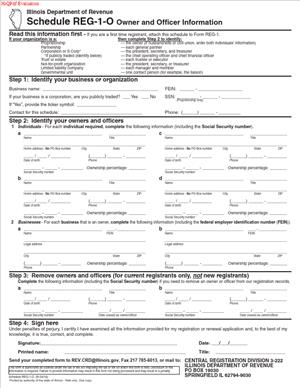
Schedule REG-1-O Owner and Officer Information
Fill out nowJurisdiction: Country: United States | Province or State: Illinois
Schedule REG-1-O Owner and Officer Information is a state filing used to report details about the people who own or manage a business. If you are registering a business or updating its records in Illinois, this document helps the state understand who is responsible for the company.
You complete this form as part of a broader registration or update process. It focuses specifically on individuals with ownership interests or decision-making authority. The information you provide becomes part of the business’s official record.
This schedule matters because state agencies rely on accurate ownership and officer details for tax administration and compliance. If the information is incomplete or inconsistent, your registration or update may be delayed.
If you are about to fill it out, you need to know what information is required, how it connects to your main registration, and what can cause problems. The sections below walk you through each part in practical terms.
What is Schedule REG-1-O Owner and Officer Information?
Clear definition
Schedule REG-1-O Owner and Officer Information is a supplemental form used in Illinois to disclose the individuals who own, control, or manage a business entity. It typically accompanies a primary business registration filing.
The document collects identifying details about each owner, partner, member, corporate officer, or other responsible party. This may include names, addresses, titles, ownership percentages, and identifying numbers.
It does not register the business by itself. Instead, it adds personal and structural details to an existing registration process.
Who typically uses this form?
You may use this form if you are forming a new business entity and registering it for state tax purposes. This includes corporations, limited liability companies, partnerships, and certain sole proprietorships with additional responsible parties.
Existing businesses may also use it when ownership changes. For example, if a new partner joins or an officer resigns, updated information may be required.
Business owners who handle their own filings often complete this form directly. Accountants or internal administrative staff may also prepare it, but the responsibility for accuracy remains with the business.
If your business has more than one person in control, you will likely need to list each qualifying individual separately.
Why might you need this form?
The state needs to know who is legally responsible for business decisions and tax matters. This form provides that transparency.
Ownership information helps establish accountability. If taxes are not paid or filings are missed, the state must know who had authority at the time.
The form also supports accurate recordkeeping. Business names can be similar, but ownership details help distinguish one entity from another.
In some cases, licensing, permitting, or compliance reviews rely on accurate officer and ownership data. An outdated record can create complications later.
Typical real-life scenarios
- You are starting a new limited liability company with two members. As part of your tax registration, you complete this schedule to list both members and their ownership percentages.
- Your corporation elects new officers at its annual meeting. Because leadership changed, you update the state’s records by filing revised owner and officer information.
- You purchase an existing business and become the majority owner. To reflect the transfer of control, you submit updated ownership details.
- Your partnership admits a new partner with a 25 percent interest. You report this change so the official state record matches the current structure of the business.
- You restructure your company from a sole proprietorship into a corporation. The new entity must identify its officers and any shareholders who meet reporting thresholds.
- In each of these situations, the form helps ensure that the state’s records match the reality of who owns and runs the business.
When would you use Schedule REG-1-O Owner and Officer Information?
You typically use Schedule REG-1-O Owner and Officer Information when registering a business for state tax purposes in Illinois. It is often submitted at the same time as an initial registration application.
You may also use it when updating an existing account. If there is a change in ownership, management, or corporate officers, the state record may need to be revised.
If your business adds a new managing member, president, treasurer, or general partner, that change can trigger the need for updated disclosure. The same applies if someone with authority leaves the company.
Certain business structures require more detailed reporting than others. Corporations commonly report officers such as the president, secretary, or treasurer. Limited liability companies often report managing members or managers. Partnerships usually report general partners.
You may also encounter this form during compliance reviews or when reopening a previously closed account. If the state requests updated owner information, this schedule is used to provide it.
In short, you use the form whenever the state needs a clear and current picture of who owns and controls your business.
Legal characteristics of Schedule REG-1-O Owner and Officer Information
This form is an official state document. When you submit it, you are providing information to a government agency for regulatory and tax purposes.
For the form to be effective, it must be complete and accurate. Required fields generally need to be filled in, and identifying details must be consistent with other filings. Names and titles should match your internal records and formation documents.
Common problems include missing ownership percentages, incomplete addresses, mismatched names, or failing to list all required individuals. Inconsistencies between this schedule and your main registration form can lead to processing delays.
Another issue arises when businesses misunderstand who qualifies as an “owner” or “officer.” The definitions may depend on your business structure. A corporation’s officers are not the same as an LLC’s members, even though both may need to be reported.
The form does not create ownership rights. It simply reports them. Ownership and authority come from formation documents, operating agreements, bylaws, partnership agreements, or other governing documents.
Requirements and thresholds can vary by state. In Illinois, the focus is generally on individuals with meaningful control or ownership. Other states may use different forms or terminology for similar disclosures.
Is it legally binding?
Schedule REG-1-O Owner and Officer Information is legally significant because it is a sworn or certified statement made to a state agency. By signing or authorizing its submission, you confirm that the information is true and correct to the best of your knowledge.
The form itself does not create a contract between owners. It does not change your operating agreement or corporate bylaws. Instead, it records information about those arrangements.
However, the information you provide can have legal consequences. If the form lists you as an owner or officer, the state may treat you as a responsible party for certain tax matters during that time period.
Providing false or misleading information on a government filing can result in penalties. Accuracy is critical because the form becomes part of your official business record.
How to fill out Schedule REG-1-O Owner and Officer Information
Step 1 – Identify the Business
Start by entering the full legal name of your business exactly as it appears on your primary registration form. Include any required identification numbers, such as your state account number or federal employer identification number, if the form requests them.
Make sure this information matches your other filings. Even small differences in spelling or punctuation can slow processing.
Step 2 – Indicate the Business Structure
Select or write in your business type, such as corporation, limited liability company, partnership, or sole proprietorship. This determines which individuals you need to report.
Your structure affects who qualifies as an owner or officer. Review your formation documents so your answers align with your official records.
Step 3 – List Each Owner or Officer
Provide the full legal name of each individual who meets the reporting criteria. Do not use nicknames or informal versions of names.
If the form provides multiple lines or sections, complete one for each person. If there are more individuals than spaces available, follow the form’s instructions for adding additional pages.
Step 4 – Provide Contact Information
Enter each person’s current residential address if requested. Some forms may also ask for mailing addresses or business addresses.
Ensure the address is complete, including street number, city, state, and ZIP code. Incomplete addresses are a common reason for follow-up requests.
Step 5 – State the Title or Role
For each individual, specify their title or role within the business. Examples may include president, vice president, managing member, manager, general partner, or owner.
Use the title that appears in your governing documents. Consistency between internal records and this filing helps avoid confusion.
Step 6 – Report Ownership Percentage
If the form asks for ownership percentage, enter the exact percentage held by each owner. Percentages should reflect your current ownership structure.
Check that the total ownership percentages make sense together. For example, in many cases, they add up to 100 percent, depending on how the form is structured.
Step 7 – Provide Identification Details
Some versions of the form request additional identifying information, such as a Social Security number or other taxpayer identification number. Enter the information carefully and double-check for accuracy.
Errors in identification numbers can cause delays and may require correction filings.
Step 8 – Review for Completeness
Before signing, read through the entire Schedule REG-1-O Owner and Officer Information from top to bottom. Confirm that every required field is completed and that names, titles, and percentages are accurate.
Compare the information with your operating agreement, bylaws, or partnership agreement to ensure alignment.
Step 9 – Sign and Date the Form
If a signature is required, an authorized individual must sign and date the form. This is often an owner, officer, or other person with authority to act for the business.
By signing, you certify that the information provided is true and correct to the best of your knowledge at the time of submission.
Legal terms you might encounter in Schedule REG-1-O Owner and Officer Information
- Responsible Party: This is the individual the agency recognizes as accountable for the business’s tax matters. On this form, you may need to identify which owner or officer serves in this role. The responsible party can receive official notices and may be personally liable for certain obligations.
- Principal Officer: A principal officer is a high-level leader in a corporation, such as a president, vice president, secretary, or treasurer. When you complete this document, you must list each principal officer and provide their details. Titles must match your internal corporate records.
- Member: In a limited liability company, owners are called members. The form asks you to list each member if the business is member-managed. You may also need to state each member’s ownership percentage.
- Managing Member: This is a member with the authority to run the daily operations of an LLC. If your company is manager-managed, you must identify who holds this role. The managing member often signs tax-related documents.
- Ownership Percentage: This shows how much of the business each owner controls. The total percentages listed on the form should add up to 100 percent. If they do not, the agency may question the accuracy of your submission.
- Authorized Signer: This is the person legally allowed to sign the form on behalf of the business. The signer’s authority should come from your bylaws, operating agreement, or similar governing document. Signing without proper authority can delay processing.
- Legal Business Name: This is the official name registered with the state and used in tax filings. It must match exactly what appears on your registration documents. Even small differences can cause processing issues.
- Doing Business As (DBA): A DBA is a trade name your business uses that differs from its legal name. If your business operates under a DBA, you may need to ensure that the ownership information matches the entity behind that name.
- Federal Employer Identification Number (FEIN): This is the unique number assigned to your business for tax purposes. You may need to confirm that the FEIN on this document matches your other tax registrations. An incorrect number can misdirect your records.
- Effective Date: This refers to the date the listed ownership or officer information became valid. If ownership changed recently, the effective date helps the agency understand when the change took place.
FAQs
Do I have to list every owner on Schedule REG-1-O Owner and Officer Information?
Yes. You should list every individual who has an ownership interest or holds an officer position that the form requests. If you leave someone out, the agency’s records will be incomplete, which can delay your registration or cause follow-up questions. Review your operating agreement, partnership agreement, or corporate records to confirm you included everyone required.
What if ownership percentages do not add up to 100 percent?
You need to correct the numbers before submitting this document. The total ownership must equal 100 percent unless the structure clearly explains a different allocation method. Double-check math errors and confirm percentages against your internal ownership records to avoid rejection.
Who is allowed to sign this form?
The signer must have authority under your business’s governing documents. This usually means a corporate officer, managing member, general partner, or another authorized representative. Before signing, confirm that the title you enter matches your internal records and that the person understands they are certifying the accuracy of the information.
What happens if an owner has recently changed?
You should list the current owners and provide the correct effective date of the change. The agency relies on this form to update its records. Make sure the date you enter matches your internal documentation so there is no confusion about when the change took effect.
Do I need to attach additional documents with this form?
Sometimes you may need to provide supporting information if the agency cannot verify ownership details from its existing records. Review the instructions that came with this document and confirm whether attachments are required. If you include extra pages, label them clearly and reference them in the appropriate section.
Will the information I provide become part of the public record?
Ownership and officer information provided to a government agency may be maintained in official records. Some details may be accessible through public databases, depending on applicable rules. Before submitting Schedule REG-1-O Owner and Officer Information, make sure you are comfortable that the information reflects your current and accurate business structure.
What if the business name on this form does not exactly match my registration documents?
You should correct it before filing. The legal business name must match your existing tax registration and formation documents character for character. Even small differences like missing punctuation or abbreviations can prevent the form from being properly processed.
How will I know if the agency accepts my submission?
After filing Schedule REG-1-O Owner and Officer Information, watch for confirmation through your normal filing channel. This may include an online status update, a written acknowledgment, or an updated account record. Keep copies of everything you submitted so you can quickly respond if the agency requests clarification.
Checklist: Before, During, and After Schedule REG-1-O Owner and Officer Information
Before
- Review your formation documents to confirm current owners and officers.
- Verify each person’s full legal name and title.
- Confirm ownership percentages total 100 percent.
- Gather identification numbers you may need to reference.
- Check your legal business name against prior tax filings.
- Determine who has the authority to sign.
- Note the effective date of any recent ownership changes.
- Read the form instructions carefully from start to finish.
During
- Enter the legal business name exactly as registered.
- Provide complete names without nicknames or abbreviations.
- Double-check spelling for every listed individual.
- Accurately report titles that match internal records.
- Confirm ownership percentages are correct before moving on.
- Use consistent formatting for addresses and contact details.
- Review each line before proceeding to the next section.
- Ensure the authorized signer completes all required signature fields.
After
- Make a complete copy of the signed form for your records.
- Confirm submission through the proper filing channel.
- Save proof of submission or confirmation receipt.
- Monitor your account for status updates.
- Respond promptly to any follow-up questions.
- Update your internal records to reflect what you submitted.
- Store the document with other official registration papers.
- Calendar a reminder to update the form if ownership changes again.
Common mistakes to avoid with Schedule REG-1-O Owner and Officer Information
- Mistake: Leaving out a minority owner because you think their share is too small, which happens when businesses focus only on majority control, can lead to incomplete records and agency follow-up, so do not forget to list every required owner, regardless of percentage.
- Mistake: Using nicknames or shortened names instead of full legal names, often done out of habit, can cause mismatches with identification records and processing delays, so do not forget to verify each person’s legal name.
- Mistake: Reporting incorrect ownership percentages due to outdated internal records, which happens after informal changes, may result in rejected filings, so do not forget to reconcile percentages before submitting.
- Mistake: Listing someone as an officer without confirming their official title, often caused by internal role changes, can create inconsistencies with corporate documents, so do not forget to match titles exactly to governing documents.
- Mistake: Allowing an unauthorized person to sign because they handle daily paperwork, which happens in small businesses, may invalidate the submission, so do not forget to confirm signing authority first.
- Mistake: Failing to update the effective date after a recent ownership change, often due to oversight, can confuse agency records, so do not forget to align the date with your official change documents.
- Mistake: Submitting the form with a business name that does not exactly match prior filings, which often results from minor spelling differences, can delay processing, so do not forget to compare it carefully to your registration documents.
- Mistake: Forgetting to keep a copy of the signed document, which happens when filing online in a hurry, can leave you without proof of what was submitted, so do not forget to save and store a complete copy.
What to do after filling out Schedule REG-1-O Owner and Officer Information
Once you complete the form, pause before submitting it. A careful final review can prevent weeks of delay. Read every line slowly. Confirm that names, titles, and percentages match your internal records exactly.
- Step 1: Review the entire form for accuracy and completeness.
- Step 2: Confirm the authorized signer has signed and dated the form properly.
- Step 3: Make a full copy of the signed document for your records.
- Step 4: Submit the form using the appropriate filing method available to you.
- Step 5: Save proof of submission, such as a confirmation page or receipt number.
- Step 6: Monitor your business tax account for acknowledgment or updates.
- Step 7: Respond promptly if the agency contacts you for clarification.
- Step 8: Update your internal ownership ledger or corporate record book to reflect the information you submitted.
- Step 9: Inform relevant stakeholders, such as partners or officers, that the filing has been completed.
- Step 10: Set a reminder to update this information promptly if ownership or officer roles change again.
Keep your copy of the completed form with your formation documents, operating agreement, bylaws, and prior tax filings. Organized records make future updates easier. If ownership changes again, do not wait. Update the appropriate registration documents promptly so your official records stay current.
Accurate and timely updates protect your business. They ensure that tax notices reach the correct people. They also reduce the risk of penalties tied to outdated or incomplete information. Treat this form as part of your ongoing compliance routine, not a one-time task.
Disclaimer: This guide is provided for informational purposes only and is not intended as legal advice. You should consult a legal professional.