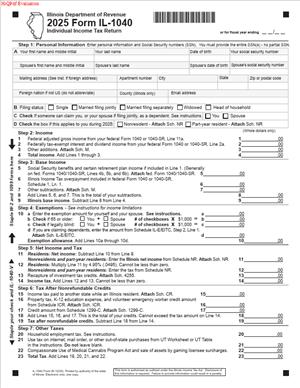
2025 Form IL-1040 – Individual Income Tax Return
Fill out nowJurisdiction: Country: United States | Province or State: Illinois
The 2025 Form IL-1040 Individual Income Tax Return is the main document Illinois residents use to report their annual state income. If you earned income during the year, this is the form that brings everything together for state tax purposes. It summarizes your income, adjustments, credits, and payments to determine whether you owe tax or are due a refund.
You complete this form after finishing your federal return, because much of the information flows from federal totals. The state form builds on those figures and applies Illinois-specific rules. It is part of your annual tax filing and must be completed carefully.
If you are preparing your own return, this document may feel detailed. Each line has a purpose, and small entries can affect your final balance. Understanding what the form asks for before you start makes the process smoother.
This guide walks you through what the form is, when you use it, and how to approach each section. It is written for individuals who are filling it out themselves and want clear, practical explanations.
What is the 2025 Form IL-1040 Individual Income Tax Return?
Clear definition
The 2025 Form IL-1040 Individual Income Tax Return is the standard Illinois state income tax return for individuals. It is used to calculate how much Illinois income tax you owe for the year or how much you should receive back as a refund.
This form reports your total income, applies Illinois additions or subtractions, calculates your tax, and accounts for credits and payments. The result is your final tax balance. It serves as your official state tax filing for the year.
It is a yearly filing. Each tax year has its own version of the form. The 2025 version is used to report income earned during the 2025 tax year, even though you complete and submit it in the following calendar year.
Who typically uses this form?
Most Illinois residents who earn income use this form. This includes employees, self-employed individuals, retirees with taxable income, and people with investment income.
If you live in Illinois for the full year and have income above certain thresholds, you will generally use this document. Part-year residents and some nonresidents with Illinois-source income may also use it, sometimes with additional schedules.
Married individuals may file jointly or separately, depending on how they filed federally and what fits their situation. The form is designed for individual taxpayers, not corporations or partnerships.
Why might you need this form?
You need this form to report your income to the Illinois Department of Revenue and settle your state tax obligation for the year. Without it, the state does not have a complete record of your annual tax calculation.
It is also necessary if you want to claim a refund. If too much tax was withheld from your paycheck, this filing is how you request that overpayment back.
You may need it to claim certain state credits. Some credits reduce the tax you owe, while others can increase your refund. The form ties those credits to your income and tax amount.
In some cases, you may need a completed return for financial purposes. Lenders, housing providers, and other institutions sometimes request a copy of your state tax filing as proof of income.
Typical real-life scenarios
- You worked for an employer in Illinois all year and had state tax withheld from each paycheck. At the end of the year, you receive income statements showing your wages and withholding. You use that information to complete your state return and determine whether you owe more or will receive a refund.
- You moved to Illinois during the year. For part of the year, you lived in another state. You may need to file a report of the income earned while you were an Illinois resident and calculate tax based on your residency period.
- You are self-employed and made quarterly estimated tax payments to Illinois. When you complete your annual return, you compare your total tax with the payments you already made to see if there is a remaining balance or an overpayment.
- You retired and receive a pension or Social Security income. Some types of retirement income may be treated differently under Illinois rules. The form allows you to account for these amounts and determine whether they affect your state tax.
- You received unemployment benefits during the year. You review how Illinois treats that income and include the correct amount on the form to calculate your final tax.
When would you use the 2025 Form IL-1040 Individual Income Tax Return?
You use the 2025 Form IL-1040 Individual Income Tax Return after the close of the 2025 tax year, during the annual filing season. This is when individuals report income earned from January 1 through December 31 of that year.
You would complete it once you have gathered your income statements, such as wage statements, forms reporting interest or dividends, and records of other income. Many people first complete their federal return, then use that information to fill in the Illinois form.
If you had Illinois income but lived outside the state for part or all of the year, you may still use this form to report Illinois-source income. In these cases, additional schedules may be required to allocate income correctly.
You also use this form if you need to amend certain information in a later step of the filing process, although a separate amended return process may apply. The original filing starts with this standard return.
Individuals who made estimated payments during the year use the form to reconcile those payments with their actual tax. Employees who had withheld used it to compare the withheld amount with their calculated tax.
Even if you had little or no income, you might file if you are eligible for certain credits that can result in a refund. The form provides the structure to claim those amounts.
Legal characteristics of 2025 Form IL-1040 Individual Income Tax Return
The 2025 Form IL-1040 Individual Income Tax Return is an official tax document issued by the Illinois Department of Revenue. It becomes part of your state tax record once it is submitted and accepted.
For the form to be effective, it must be complete and accurate. Required identification information, income figures, calculations, and your signature must be included. Missing entries, math errors, or inconsistent information can delay processing or lead to rejection.
The figures on the form generally connect to your federal return. If your state return does not match key federal totals, it may trigger follow-up questions or review. Consistency across documents is important for smooth processing.
Filing deadlines also affect how the form is treated. Submitting after the standard due date may result in interest or penalties on any unpaid tax. Timely submission supports proper processing and reduces the risk of added charges.
High-level differences can apply depending on residency status. Full-year residents, part-year residents, and nonresidents may calculate tax differently or use additional schedules. The core form remains the central document, but supporting forms may adjust how income is taxed.
This form does not replace your federal tax return. It also does not automatically resolve tax issues from prior years. Each tax year stands on its own, and the form addresses only the income and tax for the 2025 tax year.
It does not function as a payment agreement or settlement plan. If you owe tax and cannot pay in full, separate arrangements may be available, but those are not created by simply filing the return.
Is it legally binding?
Yes, the 2025 Form IL-1040 Individual Income Tax Return is legally binding once you sign and submit it. By signing, you confirm that the information provided is true and complete to the best of your knowledge.
Your signature serves as a declaration that the reported income and calculations are accurate. Providing false or intentionally incomplete information can lead to penalties or other consequences under state law.
If you file electronically, your electronic signature carries the same effect as a handwritten one. It represents your acknowledgment that the return reflects your actual tax situation for the year.
Once accepted, the return establishes your official tax liability for that year, subject to later review or adjustment. If errors are discovered, a correction process may apply, but the original filing remains part of your tax record.
How to fill out the 2025 Form IL-1040 Individual Income Tax Return
Step 1 – Gather your records
Before you begin, collect all income statements and tax documents for the year. This may include wage statements, forms reporting interest or dividends, records of business income, and documentation of estimated tax payments. Having everything in one place reduces errors and omissions.
Step 2 – Complete your federal return first
Many lines on the Illinois return are based on figures from your federal return. Finish your federal filing calculations so you can accurately transfer totals. Keep a copy nearby to reference specific line amounts.
Step 3 – Enter your personal information
Fill in your name, current address, and Social Security number exactly as shown on your identification documents. If filing jointly, include your spouse’s information as required. Consistency with prior filings helps avoid processing issues.
Step 4 – Select your filing status
Choose the filing status that matches your federal return, if required by the form instructions. Your filing status affects how your tax is calculated. Confirm that the status selected aligns with your federal filing to avoid mismatches.
Step 5 – Report your federal adjusted gross income
Locate your federal adjusted gross income on your completed federal return. Enter that amount on the appropriate line of the Illinois form. This figure serves as the starting point for your state tax calculation.
Step 6 – Apply Illinois additions and subtractions
Review the section for additions and subtractions specific to Illinois. Add any required income adjustments and subtract amounts that Illinois allows to be excluded. Follow each line carefully and transfer totals accurately.
Step 7 – Calculate your base income and tax
After adjustments, compute your Illinois base income as directed on the form. Apply the state tax rate to determine your initial tax amount. Double-check your math before moving forward.
Step 8 – Claim eligible credits
Enter any credits you qualify for in the designated section. Credits reduce the amount of tax you owe. Ensure each credit is supported by the necessary information or schedules, if required.
Step 9 – Report payments and withholding
List the amount of Illinois tax withheld from your wages and any estimated payments you made during the year. Include other qualifying payments shown on your records. These amounts are subtracted from your calculated tax.
Step 10 – Determine your refund or balance due
Compare your total payments with your total tax. If payments exceed your tax, the difference is your refund. If your tax is higher than your payments, the remaining amount is your balance due.
Step 11 – Review all entries
Go through each line of the form to confirm accuracy. Check identification numbers, income amounts, calculations, and payment entries. A careful review can prevent delays and future corrections.
Step 12 – Sign and date the return
Sign and date the form where indicated. If filing jointly, both spouses must sign if required. Your signature confirms that the information provided is accurate to the best of your knowledge.
Step 13 – Submit the return
Submit the completed form using the accepted filing method. Keep a copy of the final return and any supporting schedules for your records. This copy can help if questions arise later about your filing.
Legal terms you might encounter in the 2025 Form IL-1040 Individual Income Tax Return
- Adjusted Gross Income (AGI): This is your federal adjusted gross income carried over from your federal return. On this form, you start with that number and then apply Illinois-specific additions and subtractions. It is the foundation for calculating your Illinois base income.
- Base Income: This is your Illinois-adjusted income after you apply required additions and subtractions to your federal AGI. The form walks you through this calculation line by line. Your tax is calculated from this amount.
- Exemption Allowance: This is a fixed amount you can subtract for yourself, your spouse, and qualifying dependents. The total depends on how many exemptions you claim. It directly reduces the income subject to tax.
- Nonrefundable Credit: A credit that can reduce your tax liability to zero but will not create a refund by itself. On this form, certain credits lower what you owe, but cannot push your balance below zero.
- Refundable Credit: A credit that can result in a refund even if you owe no tax. If the credit exceeds your tax liability, you may receive the difference as a refund. These credits are clearly identified in the credits section.
- Withholding: This is Illinois income tax already taken out of your wages or other payments during the year. You report this amount from your wage and tax statements. It counts as a payment toward your total tax.
- Estimated Tax Payments: These are payments you made directly to the state during the year, usually if you are self-employed or have income without withholding. You list the total you paid. These payments reduce your remaining balance.
- Overpayment: This happens when your payments and credits are greater than your calculated tax. The form gives you options for what to do with the extra amount. You can request a refund or apply it to next year’s taxes.
- Balance Due: This is the amount you still owe after subtracting all payments and credits from your tax. The form calculates this automatically if you complete each line correctly. You must pay this amount by the due date to avoid penalties and interest.
- Direct Deposit: An option that allows your refund to be electronically transferred to your bank account. You must enter your routing number and account number carefully. Errors can delay your refund.
FAQs
Do I have to complete my federal return before I fill out this form?
Yes. This document starts with figures from your federal return, especially your federal adjusted gross income. You need your completed federal return in front of you so you can transfer the correct numbers to the right lines. If you change your federal return later, you may need to amend this document as well.
What happens if my name or Social Security number does not match state records?
If your name or number does not match what the state has on file, your return may be delayed or rejected. Double-check that your name matches your Social Security card. If you recently changed your name, make sure you update it with the Social Security Administration before filing this form.
Where do I report Illinois tax withheld from my wages?
You enter Illinois withholding on the line designated for state income tax withheld. Use the amounts shown on your wage and tax statements. Do not combine federal and state withholding. Only list the Illinois amount in that specific section.
Can I file the 2025 Form IL-1040 Individual Income Tax Return if I moved out of state during the year?
Yes, but you must indicate your residency status for the year. The form asks whether you were a full-year resident, part-year resident, or nonresident. You must allocate income correctly based on the time you lived in the state and complete any required schedules.
What if I made estimated tax payments during the year?
You report the total estimated payments in the payments section of this document. Keep your payment confirmations or canceled checks nearby. Enter the full amount you paid for the tax year, not what you planned to pay.
How do I know if I need to attach additional schedules?
Review each section carefully. If you claim certain credits, report business income, or make specific additions or subtractions, the instructions will direct you to complete and attach a schedule. If a line refers to a schedule, you must include it or your filing may be incomplete.
Who must sign the return?
You must sign and date the return before submitting it. If you are married and filing jointly, both spouses must sign. If someone else prepares your return, that person must also complete the preparer section. An unsigned return is not considered valid.
How will I know if my return was accepted?
If you file electronically, you should receive an electronic acknowledgment showing whether your return was accepted or rejected. If you mail a paper return, confirmation may take longer. Keep copies of everything you send so you can respond quickly if the state requests clarification.
Checklist: Before, During, and After 2025 Form IL-1040 Individual Income Tax Return
Before
- Gather your completed federal income tax return.
- Collect all wage and tax statements showing Illinois withholding.
- Compile records of estimated tax payments made during the year.
- Organize documents supporting any credits or subtractions you plan to claim.
- Confirm Social Security numbers for you, your spouse, and dependents.
- Verify your current mailing address and banking information.
- Review prior-year return to compare income sources and carryforwards.
During
- Transfer your federal adjusted gross income exactly as shown on your federal return.
- Carefully complete all Illinois additions and subtractions.
- Count exemption allowances accurately.
- Calculate tax using the correct rate and tables.
- Enter withholding and estimated payments precisely.
- Double-check routing and account numbers for direct deposit.
- Review each line for skipped fields or math errors.
- Sign and date the return before submission.
After
- Save a complete copy of your signed return and all attachments.
- Keep proof of filing or electronic acceptance confirmation.
- Monitor your bank account if you requested direct deposit.
- Pay any balance due by the required deadline.
- Store supporting tax documents in a secure place.
- Track any overpayment applied to next year’s taxes.
- Respond promptly to any notices received from the state.
Common mistakes to avoid with the 2025 Form IL-1040 Individual Income Tax Return
- Mistake: Entering the wrong federal adjusted gross income because you guessed or used a draft copy; this happens when you file state before finalizing federal, which can lead to incorrect tax calculations and a notice from the state, so do not forget to use the final filed federal return.
- Mistake: Reporting total federal withholding instead of Illinois withholding; this confusion is common when reading wage statements and can inflate your payments and delay processing, so do not forget to list only the state income tax withheld.
- Mistake: Claiming the wrong number of exemptions because you misunderstood who qualifies; this often results from mixing federal and state rules and can reduce your refund or increase tax due, so do not forget to verify eligibility for each person claimed.
- Mistake: Forgetting to attach required schedules when claiming credits or reporting business income; this happens when you overlook line references and can cause your filing to be considered incomplete, so do not forget to include every referenced schedule.
- Mistake: Providing incorrect direct deposit information due to a typing error; this is common when entering long routing numbers and can delay or misdirect your refund, so do not forget to double-check each digit.
- Mistake: Failing to sign and date the return because you focus only on the numbers; an unsigned return is not valid and will not be processed, so do not forget that both spouses must sign if filing jointly.
- Mistake: Ignoring a balance due after assuming withholding covered everything; this often happens when income changes during the year and can result in penalties and interest, so do not forget to review the final balance line carefully.
What to do after filling out the 2025 Form IL-1040 Individual Income Tax Return
Once you complete the form, pause before submitting it. A short review now can prevent months of delay later.
- Step 1: Review every page slowly. Confirm that names, Social Security numbers, and your address are correct and legible.
- Step 2: Recalculate key figures. Check your base income, total tax, total payments, and refund or balance due amounts.
- Step 3: Confirm attachments. Make sure all required schedules and supporting statements are included and properly labeled.
- Step 4: Sign and date the return. If filing jointly, confirm both signatures are present.
- Step 5: Make a complete copy. Save a digital scan or paper copy of the entire signed return and all attachments.
- Step 6: Submit using your chosen method. If filing electronically, wait for confirmation of acceptance. If mailing, use the correct address and sufficient postage.
- Step 7: Pay any balance due. Submit payment by the deadline to reduce the risk of penalties and interest.
- Step 8: Monitor your refund. If you selected direct deposit, check your bank account. If you requested a paper refund, allow processing time before following up.
- Step 9: Store your records securely. Keep your return, wage statements, and proof of payments for future reference.
- Step 10: Update your tax planning. If you owed more than expected or received a large refund, adjust your withholding or estimated payments for the current year.
Taking these steps helps you close the process properly. You protect yourself from avoidable notices. You also make next year’s filing easier because your records are organized and complete.
Disclaimer: This guide is provided for informational purposes only and is not intended as legal advice. You should consult a legal professional.