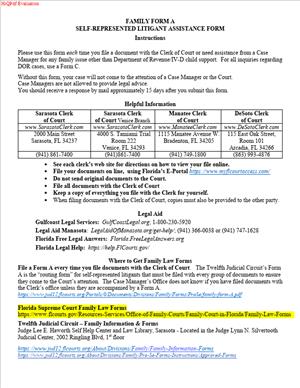
Family Form A – Self-Represented Litigant Assistance Form
Fill out nowJurisdiction: Country: United States | Province or State: Florida
What is a Family Form A – Self-Represented Litigant Assistance Form?
Family Form A is a standardized intake and assistance form for family cases. It is designed for people who represent themselves. You use it to tell the court who you are, what your case is about, and what help you need. It also records how the court and other parties should serve you with papers. It gives the court enough detail to provide case management and direct you to the right resources.
This form sits at the front of your family case file. It does not replace your petitions or motions. It works alongside those filings. It helps you navigate the required steps. It also reduces errors that delay cases. Many courts use this type of form to support self-represented litigants. Family Form A aligns with that purpose in Florida family cases.
Who typically uses this form?
Self-represented spouses, parents, and caregivers. You might be filing for divorce. You might seek a parenting plan, child support, or a change to an old order. You might respond to a case that someone filed against you. You might be a grandparent or relative seeking temporary custody. You might seek an injunction for protection. In all these situations, you still need to organize your case. Family Form A gives you a structured way to do that.
Why would you need this form?
You want a clear path. You want to avoid missing a required form. You want the court to have your current address and email from day one. You want to ask for an interpreter or other accommodation. You want the court to know your case type and the relief you seek. You want guidance on mediation, parenting courses, and financial disclosure. You also want a clean record, so that you understand your duties as a self-represented party.
Typical usage scenarios are straightforward. You plan to file a petition for dissolution of marriage. You complete Family Form A and submit it with your petition. You are a respondent served with a paternity case. You complete Family Form A and file it with your answer. You want to modify a child support order from last year. You complete Family Form A to update your contact details and request a hearing path. You have a related case in another county. You disclose it on this form so the court can manage both matters. The form brings these details into one place. That helps the court move your case faster and more efficiently.
When Would You Use a Family Form A – Self-Represented Litigant Assistance Form?
You use Family Form A at the start of a family case you handle yourself. You can also use it when you enter an existing case without a lawyer. It is often filed with your first pleading. That first pleading might be a petition or an answer. If you are unsure where to start, this form guides you to the right next steps. It captures the core data the court needs early.
For example, you file for divorce with no children. You attach Family Form A. You list your contact details, case type, and requested relief. You request mediation and provide scheduling notes. The court then sets your case on the right track. Another example is a parent establishing paternity and child support. You check those items on the form. You also indicate there are minor children and that a parenting plan is needed. The court sees that a child-related affidavit will be required. You then receive instructions for those filings and for mediation.
Respondents use the form too. You are served with a relocation request. You complete Family Form A and file it with your objection. You provide your service email. You ask for an interpreter. You identify a conflict date. The court and the other party now know how to reach you and how to schedule hearings.
Caretakers and relatives may use it as well. You seek temporary custody of a minor child. You use Family Form A to signal the case type, disclose related dependency matters, and request help locating forms. You also ask for case management. This gives the court a clear picture of the issues and urgency.
You should also use the form when you change your service information. You moved homes or changed email. You file an updated Family Form A to keep the record current. This ensures you receive all notices. It also helps avoid default or missed hearings.
Finally, you may use it to request accommodations. You need an interpreter or an assistive device. You note this on the form. You give reasonable notice and specifics. This allows the court to plan for your needs and keep your case on schedule.
Legal Characteristics of the Family Form A – Self-Represented Litigant Assistance Form
Family Form A is part of your official court file. It is not a final order. It does not decide your case. It supports your case by documenting key facts and requests. Some parts may require you to certify information under penalty of perjury. When you sign, you confirm the truth of what you provide. False statements can lead to sanctions or other penalties. Accuracy matters.
Is it legally binding?
The form itself does not create a judgment or enforceable order. Yet it does create obligations tied to procedure. Your designation of a mailing and email address controls how you are served. If you agree to email service, the other party may serve you by email. If you request an exemption from email service, the court will consider it. Your admissions and certifications on the form may be used in case management. The court may rely on them when issuing scheduling orders.
What ensures enforceability?
Your signature, any verification language, and your certificate of service. Many family filings require a certificate of service. When you fill that out, you confirm that you served the other party. The court expects strict compliance. Failure to serve can delay your case. It can also lead to a hearing being canceled. If you provide a wrong address after notice, you may miss deadlines. That risk falls on you. Keeping this form current reduces that risk.
There are general legal considerations. Family cases often involve sensitive information. Do not include full Social Security numbers or bank account numbers on public pages. Use the appropriate confidentiality notice or addendum if required. If your case involves children, the court will focus on their best interests. You may need a child-related affidavit that covers residence history. Disclose related cases, such as prior injunctions, dependency, or guardianship matters. The court must know about overlapping orders to avoid conflicts.
Mediation is standard in many family cases. On this form, you can express your readiness for mediation. You can also note any safety concerns that affect mediation. Parenting courses are often required when minor children are involved. You can use this form to show whether you have completed the course. You can also request information on how to enroll.
Nonlawyer assistance brings special rules. If a nonlawyer helped you fill out this form, that person may need to disclose that help. The disclosure protects you and makes clear that the helper is not your attorney. This avoids confusion about legal advice versus clerical help. The court wants that clarity.
Finally, remember that this form does not waive filing fees. If you cannot afford fees, you must file a separate indigency application. Family Form A can note that you plan to do so. But the waiver decision happens through a different process.
How to Fill Out a Family Form A – Self-Represented Litigant Assistance Form
1) Gather your information.
- Full legal name and any former names.
- Current mailing address and physical address, if different.
- Primary phone and a backup number.
- Primary email for service and up to two secondary emails.
- Opposing party’s contact details, if known.
- Case number and division, if already assigned.
- Details on minor children, if any.
- Related case numbers and counties, if any.
- Languages for interpreter requests.
- Dates you cannot attend hearings within the next 60 days.
2) Complete the case caption.
- At the top, enter the court name and county.
- Enter the parties as Petitioner and Respondent.
- If you are the person starting the case, you are the Petitioner.
- If the case already exists, copy the caption exactly as it appears.
- Add the case number and division if known. If not, leave blank. The clerk will assign it.
3) Identify your party status and representation.
- Check that you are self-represented.
- If a nonlawyer helped you, complete the helper disclosure section.
- Include the helper’s name, address, and phone. The helper must sign where indicated.
4) Provide your contact information for service.
- Enter your current mailing address.
- Provide your primary email for service. Add secondary emails if you want backups.
- If you cannot use email for service, request an exemption. Explain why on the form.
- Confirm you will update this information if it changes.
5) List the opposing party’s contact information.
- Include their mailing address and email, if you know it.
- If you do not know, state “unknown.” Service may require a different method.
- If there are multiple opposing parties, list each one.
6) Select the case type.
- Check all that apply, such as divorce, paternity, child support, timesharing, or alimony.
- Include modification or enforcement if you are changing a prior order.
- Include name change, relocation, or adoption if relevant.
- For injunctions, indicate if they involve domestic, repeat, or dating violence.
7) Identify minor children, if any.
- List each child’s initials and year of birth. Avoid full dates on public pages.
- Confirm whether a child-related affidavit will be filed.
- Indicate if the child has lived in Florida for the last six months.
- Note any other person claiming custody or timesharing rights.
8) Disclose related cases.
- List any past or current cases involving these parties or children.
- Include family, juvenile, dependency, or injunction matters.
- State the county and case number, if known.
- Explain how the cases relate to each other.
9) State the relief you seek.
- Write a short, clear summary of what you want the court to do.
- If divorce, say whether you seek equitable distribution, alimony, or a name change.
- If parenting issues arise, say you seek a parenting plan and timesharing schedule.
- If child support, say you want support set according to the guidelines.
- If enforcement, describe the order to be enforced and how it was violated.
- If modification, describe the change in circumstances and what you seek.
10) Request assistance and accommodations.
- Check if you want case management or self-help guidance.
- Request mediation referral, if appropriate.
- Ask for an interpreter and list the language. Include dialect if needed.
- State any disability accommodations you need. Be specific.
- Provide reasonable notice so the court can arrange services.
11) Indicate your readiness and scheduling needs.
- Explain whether you have all the required forms or need help identifying them.
- State whether you completed a parenting course, if applicable.
- List dates you are unavailable within the next 60 days.
- Indicate if a remote appearance is acceptable for you.
12) Address financial disclosure and documents.
- Confirm if you will file a financial affidavit. Most family cases require one.
- Indicate whether you will file a child support guidelines worksheet.
- List pay stubs or tax records you will provide for disclosure.
- Do not attach documents that reveal full account numbers on public pages.
13) Complete the nonlawyer disclosure, if used.
- If a nonlawyer helped fill the form, complete that section fully.
- The nonlawyer must read and sign the disclosure.
- You must acknowledge that you did not receive legal advice.
14) Review privacy and confidentiality notices.
- Avoid listing full Social Security numbers or full account numbers.
- Use the appropriate confidentiality notice for protected information.
- For child cases, keep sensitive data in the correct sections or addenda.
15) Sign and date the form.
- Read every statement before signing.
- If the form includes verification language, sign under that statement.
- Print your name below your signature.
- Provide the date you signed.
16) Complete the certificate of service.
- You must serve a copy on each party in the case.
- Check the service method: email, hand delivery, or mail.
- List the addresses and emails used for service.
- Enter the date you served the form and sign the certificate.
17) Prepare attachments and schedules.
- Schedule A: Checklist of forms you have filed or will file. Include petitions, answers, and affidavits.
- Schedule B: Parties and children information summary. Use initials for minors.
- Schedule C: Related cases list with case numbers and counties.
- Schedule D: Requests for interpreter and accommodations with details.
- Schedule E: Financial disclosure summary. Do not include full account numbers.
- Schedule F: Parenting course status. Include the completion date or planned date.
- Schedule G: Proposed orders or scheduling preferences, if any.
18) Make copies and file.
- Keep a complete copy for your records.
- File the original with the family division in your county.
- You may file in person or through the approved electronic system.
- Pay the filing fee or submit an application for indigent status.
- Ask the clerk to stamp your copy as filed if filing in person.
19) Serve the other party.
- Serve the filed form and attachments as indicated in your certificate.
- Keep proof of service, such as an email confirmation or a mail receipt.
- If you are the Petitioner, do not confuse this with formal service of process. That is separate.
20) Track next steps.
- Watch for a case number and division assignment.
- Review any case management order you receive.
- Follow instructions about mediation, courses, and disclosures.
- Calendar dates for deadlines and hearings.
- Update your Family Form A if your contact information changes.
Practical tips help you avoid delays. Use plain, consistent names for all parties across forms. Review each checkbox. Missing a box can change how the court routes your case. Be precise with the relief requested. Vague requests are hard to schedule or resolve. Keep your email active and check it often. Court notices can arrive by email if you have agreed to that. If you change address or email, update it right away. File a new Family Form A with the new information. Then serve it to all other parties.
If safety is a concern, tell the court in the form. You can request that certain contact information be kept confidential. Ask for guidance on how to protect your address in filings. The court can balance safety with notice requirements.
If you need legal advice, consider a short consultation with a lawyer. Many people use limited-scope help for one task. You can still remain self-represented. Family Form A does not prevent that. It helps you work in an organized way, no matter your support level.
Finally, read every section before signing. Your signature carries weight. You certify truthfulness and service. Careful preparation pays off. A complete, accurate Family Form A helps the court manage your case and reduces setbacks. It also helps you understand your obligations and options at each stage.
Legal Terms You Might Encounter (Family Form A – Self-Represented Litigant Assistance Form)
- Self-represented litigant means you handle your case without a lawyer. This form helps you tell the court what help you need and how to contact you. It also confirms you understand basic duties in your case.
- Petitioner is the person who starts the family case. Respondent is the other party. On this form, you will list which one you are so the clerk can place the form in the correct file.
- Case style is the heading that shows the court, the parties’ names, and the case number. You will copy this from your other case papers. You need the correct case style so the clerk files your form in the right case.
- Case number is the unique number the clerk assigns to your case. If you already have a case, you must include this number. If you are filing your first paper, this field might be blank until the clerk assigns a number.
- Clerk of the Court is the office that receives, files, and stamps your documents. You file this form with the clerk so the court and the other party know your contact decisions and service preferences.
- Service of process is how the other party gets notice of filings. This form often includes a section where you agree to get documents by email or mail. Choose a method you check often and keep updated.
- Certificate of service is a statement that tells the court how and when you sent the form to the other party. If the form includes this section, complete it every time you file. It proves you followed the notice rules.
- Notary public or deputy clerk is an official who witnesses your signature on sworn sections. If the form contains a sworn statement, sign only in front of a notary or deputy clerk. Bring photo ID.
- Sworn statement or affidavit is a signed statement made under oath. If you swear to any facts on this form, you must tell the truth. False statements can lead to penalties and harm your case.
- Confidential information refers to items like Social Security numbers, full financial account numbers, and health information. Do not place confidential details on public pages. Use the court’s process for protecting private data.
- Interpreter and disability accommodations are services the court can provide when requested in advance. This form may include a section to request language help or accommodations. Give details early so the court can schedule support.
- Mediation is a process where a neutral person helps you and the other party try to agree. This form may ask if you need help accessing mediation or if special arrangements are required. Accurate answers help the court plan.
- Contact information means your mailing address, phone, and email. This form records where you will receive court papers. If anything changes, file an update immediately so you do not miss notices.
FAQs (Family Form A – Self-Represented Litigant Assistance Form)
Do you need a case number before you file this form?
If your family case already exists, include the case number from your prior papers. If you are using this form as part of your first filing, the clerk assigns a case number when you open the case. If the field is blank at first filing, confirm the clerk attaches your form to the new number.
Do you have to notarize this form?
Check whether the form includes a sworn section. If it has an oath, sign only before a notary or deputy clerk. If it does not include an oath, you typically sign without a notary. Read the signature block carefully before you sign.
Do you have to serve the other party after filing?
Yes, if the form asks for service. Many assistance forms include a certificate of service. If present, you must send a copy to the other party and fill in the date, method, and address or email used. Keep proof you sent it, such as mail receipts or email confirmations.
Do you need to fill every field?
Complete all required sections. If a field does not apply, write “N/A” rather than leaving a blank. Do not skip contact details, case identifiers, or service choices. Incomplete forms may be rejected or cause delays.
Do you have to provide an email address?
If you consent to receive service by email, list one reliable email you control and check often. If you do not consent or do not have a stable email, choose another service method. If you list an email, the court and other party may send documents there.
Do you pay a fee to file this form?
Many assistance forms do not carry a separate fee when filed in an existing case. If the form is part of opening a case, filing fees may apply to the case filing itself. Ask the clerk about any fees at the time of filing.
Do you need to attach proof or exhibits?
Only attach documents that the form asks for or that are necessary to support your requests. If you include attachments, label them clearly. Do not attach sensitive information unless the form requests it and you follow the court’s confidentiality process.
Can you update or correct the form after filing?
Yes. If your contact information changes or you made an error, file an updated or amended form. Title it “Amended” and complete a new certificate of service. Update promptly so you do not miss court notices.
Checklist: Before, During, and After the Family Form A – Self-Represented Litigant Assistance Form
Before signing: Information and documents you need
- Your full legal name as it appears on other court papers.
- The other party’s full legal name, spelled correctly.
- Your case style and case number, if already assigned.
- The county where your case is filed or will be filed.
- Mailing address where you reliably receive mail.
- A stable phone number you answer or check often.
- An email address you control and can check daily, if consenting to email service.
- The other party’s current mailing address and email, if known.
- Any prior orders or case numbers involving the same parties or children.
- Details on language or disability accommodations you need.
- A government-issued photo ID is required if notarization is required.
- Any supporting documents that the form asks you to attach.
During signing: Sections to verify
- Names and spellings for you and the other party.
- Case number and county are accurate and match prior filings.
- Contact information is complete and current.
- Service choices: email, mail, or other allowed methods are selected correctly.
- Confidential information is handled through the court’s process, not on public pages.
- Sworn sections: sign only in front of a notary or deputy clerk if required.
- Date every signature and initial any corrections.
- Certificate of service: list how and when you served the other party, if required.
- Attachments: label them and refer to them in the form where prompted.
- Page count: number each page and check that all pages are present.
After signing: Filing, notifying, and storing
- Make at least two copies: one for you and one to serve.
- File the original with the clerk in your county.
- Ask the clerk to date-stamp your copy or request a filed copy after e-filing.
- Serve the other party as your certificate of service states.
- Keep proof of service, such as an email confirmation or a mail receipt.
- Calendar any deadlines or hearings that the form triggers.
- Store your stamped copy and proof of service together in a safe place.
- If you change address, phone, or email, file an updated form right away.
- Track delivery issues. If mail returns undelivered, address the problem quickly.
- Follow up with the clerk if the form needs correction or an amendment.
Common Mistakes to Avoid (Family Form A – Self-Represented Litigant Assistance Form)
- Don’t forget to use your legal name as it appears on court records.
- Using nicknames or different spellings can split your file or cause delays. The clerk might reject the filing or misfile it under another person.
- Don’t leave the certificate of service blank when service is required.
- If you do not complete and perform the service, the other party may claim a lack of notice. Your requests may stall until service is corrected.
- Don’t mix confidential data into public sections.
- Placing full Social Security numbers or account numbers on public pages can expose you to identity risks. The court may require refiling with redaction, delaying your case.
- Don’t sign a sworn section outside a notary or deputy clerk.
- If the form contains an oath, an improper signature can invalidate the form. You may need to sign again, and your hearing could be postponed.
- Don’t assume email service is set unless you clearly consented.
- If you list an email without consenting or fail to check it, you might miss deadlines. Confirm your choice and monitor that inbox daily.
What to Do After Filling Out the Form (Family Form A – Self-Represented Litigant Assistance Form)
File your form with the clerk
- File the original in the proper county. Use your case number if one exists.
- If the clerk assigns a number at filing, write it on your copy before you leave.
- Ask for a stamped copy for your records. Keep it secure.
Serve the other party
- Follow the service method you selected on your form.
- If you chose email, send from your listed email and keep a copy of the sent message.
- If you chose mail, use the address you listed and keep the receipt.
- Complete or confirm that your certificate of service is accurate and dated.
Track court notices
- Check your mail and email daily for court documents.
- Add hearing dates and response deadlines to your calendar.
- If you receive a notice you do not understand, review it promptly and seek help if needed.
Amend when information changes
- If your contact details change, file an amended form right away.
- Title the new filing “Amended” and update all changed fields.
- Serve the amended form on the other party and keep proof.
Coordinate with related filings
- If this form supports another motion or request, file them together when possible.
- Ensure case style and case number match across all filings.
- Attach the assistance form to other documents if the court or clerk requests it.
Maintain your record
- Keep a file with your stamped copies, service proofs, and any clerk notes.
- Store digital scans of your documents as a backup.
- Bring your file to every court date and mediation session.
Follow up with the clerk
- Confirm the form appears in the docket under your case number.
- If the clerk flags an error, correct it quickly and refile.
- Ask whether any additional forms are needed for your requests.
Prepare for next steps
- If you requested accommodations or an interpreter, confirm scheduling in advance.
- If your filing triggers mediation, expect contact about dates and logistics.
- Respond to any court notices by the stated deadlines.
Stay reachable
- Keep your voicemail inbox clear and check messages daily.
- Monitor your email, including spam or junk folders.
- If you cannot receive mail at your address, take steps to fix the delivery.
If you need to withdraw or replace the form
- File a notice that you are withdrawing the prior filing, if appropriate.
- Submit a corrected form marked “Amended,” then serve it again.
- Keep both versions and service proofs in your file.
If the other party does not receive service
- Recheck the address or email you used.
- Resend using the correct method and update the certificate of service.
- If mail returns undelivered, investigate and document your attempts.
If you move to a new county
- Update your contact information using an amended form.
- Confirm with the clerk whether your case remains in the same county.
- Do not stop checking the old address or email until the court acknowledges your update.
If you need help understanding court notices
- Visit or call the clerk for procedural questions.
- Ask about any form deficiencies or next steps.
- Bring your case number and a stamped copy for reference.
Disclaimer: This guide is provided for informational purposes only and is not intended as legal advice. You should consult a legal professional.