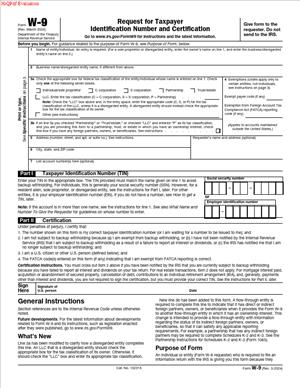
W-9 – Request for Taxpayer Identification Number and Certification
Fill out nowJurisdiction: Country: United States | Province or State: Federal
The W-9 – Request for Taxpayer Identification Number and Certification is a standard U.S. tax form used to collect your taxpayer identification details. You complete it when someone needs your tax information for reporting purposes. It is not a tax return. It is an information form.
If you are working as an independent contractor, consultant, freelancer, or business owner, you may be asked to fill it out. Financial institutions and other payers may also request it. The goal is to match payments made to you with your tax records.
This form belongs to the Federal Department of the Treasury, Internal Revenue Service (IRS). It is used across the United States for federal tax reporting. Even if you live in Ontario, you may be asked to complete it if you have a U.S. tax status or U.S.-source income.
Before you fill it out, it helps to understand what information it asks for and how that information will be used. Small errors can cause delays, backup withholding, or incorrect tax reporting. Knowing what each section means makes the process smoother.
What is a W-9 – Request for Taxpayer Identification Number and Certification?
Clear definition
The W-9 – Request for Taxpayer Identification Number and Certification is a written request for your correct name and taxpayer identification number. It also includes a certification that the information you provide is accurate and that you are not subject to certain withholding rules, unless you indicate otherwise.
The form is not filed by you directly with the IRS in most cases. Instead, you give it to the person or organization that requested it. They use the information to prepare other tax documents that report payments made to you.
In simple terms, it connects your identity to income paid to you. It confirms who you are for tax reporting purposes.
Who typically uses this form?
Independent contractors often complete this form when starting work with a new client. If you provide services but are not treated as an employee, you will commonly be asked for this document.
Business entities, such as corporations, partnerships, and limited liability companies, may also complete it. The form allows them to provide their business name and employer identification number instead of a personal Social Security number.
Financial institutions may request it when you open certain accounts. Investment platforms and lenders may use it to report interest, dividends, or other financial payments.
In some cases, individuals who receive rent, royalties, prizes, awards, or other taxable payments may be asked to complete it.
Why might you need this form?
You may need this form because someone is required to report payments made to you. Federal tax rules require certain payments to be documented and shared with the IRS.
The information you provide helps prevent mismatches between what a payer reports and what you report on your own tax return. If your name and taxpayer identification number do not match IRS records, the payer may be notified of an issue.
Another reason involves backup withholding. If you do not provide a correct taxpayer identification number, or if you are subject to specific withholding rules, the payer may be required to withhold a percentage of your payments and send it to the IRS.
Completing the form accurately reduces the risk of payment delays or unnecessary withholding.
Typical real-life scenarios
- You start freelance graphic design work for a U.S. company. Before issuing payment, the company asks you to complete this form so it can prepare an annual information return reflecting what it paid you.
- You form a single-member limited liability company and provide consulting services. A client requests this document to record your business name and employer identification number instead of your personal number.
- You earn interest from a U.S.-based financial account. The institution asks for the form to confirm your taxpayer identification number for year-end reporting.
- You receive rental income from a property located in the United States. The property manager may request this form to report the total rent paid to you during the year.
- You settle a legal claim and receive a payment that must be reported. The paying party may request this document before releasing funds.
When would you use W-9 – Request for Taxpayer Identification Number and Certification?
You use this form when a payer formally asks you to provide your taxpayer identification information. The request usually happens before payments begin or before a reportable payment is issued.
If you are beginning a new contractor relationship, you may be asked to complete it as part of onboarding. It often appears alongside service agreements and payment setup forms.
You may also use it when updating your information. For example, if your business name changes, you convert from a sole proprietor to a corporation, or you obtain a new employer identification number, a payer may request an updated form.
Financial transactions can also trigger its use. Opening certain accounts, restructuring investments, or receiving settlement funds may involve a request for your taxpayer details.
In cross-border situations, someone living in Ontario but with U.S. tax obligations may encounter this form when dealing with U.S. companies. The key factor is not where you live, but whether the payment is subject to U.S. reporting rules.
Legal characteristics of W-9 – Request for Taxpayer Identification Number and Certification
This form has a specific structure defined by the IRS. It includes fields for your name, business name if applicable, federal tax classification, address, and taxpayer identification number. It also contains a certification section that you sign.
For the form to be effective, the information must match IRS records. The name and taxpayer identification number combination is especially important. Mismatches can trigger notices and administrative follow-up.
Common problems include leaving required fields blank, using an incorrect tax classification, or providing an outdated address. Failing to sign the certification section can also make the document incomplete.
The form operates under federal U.S. tax law. State or provincial rules may differ, but the W-9 itself is tied to federal reporting requirements. If you are in Ontario and dealing with U.S. income, the federal U.S. rules generally control the use of this document.
It is important to understand what the form does not do. It does not determine whether you are properly classified as an employee or contractor. It does not create a contract for services. It does not calculate your tax or replace filing a tax return.
It is an information and certification document. Its purpose is limited to reporting and withholding compliance.
Is it legally binding?
The certification section of the form is legally significant. When you sign it, you declare under penalty of perjury that the information provided is correct and that you are not subject to backup withholding, unless you have indicated otherwise.
This means your signature carries legal weight. Providing false information can lead to penalties under federal tax law. The form relies on your truthful self-certification.
However, the document is not a contract between you and the payer. It does not set payment terms or define your legal relationship. Its binding effect relates to the accuracy of the information and the certification you provide, not to the broader business arrangement.
How to fill out W-9 – Request for Taxpayer Identification Number and Certification
Step 1 – Enter your name
On the first line, write the name that matches your tax return. If you are an individual, this is typically your legal personal name. The name must align with the taxpayer identification number you will enter later.
Accuracy here matters. The IRS matches this name with the number you provide.
Step 2 – Add your business name, if different
If you operate under a business name, trade name, or disregarded entity name, enter it on the second line. If you do not have a separate business name, you may leave this line blank.
This line helps payers identify your business while still reporting income under the correct legal name.
Step 3 – Select your federal tax classification
Check the box that reflects your federal tax status. Options typically include individual or sole proprietor, corporation, partnership, limited liability company, and other categories.
If you select a limited liability company, you may need to indicate the tax classification of that entity. This step helps the payer determine what type of information to return to issue.
Step 4 – Note any exemptions if applicable
There are spaces to indicate exemption codes, such as exemption from backup withholding or certain reporting rules. Many individuals leave this blank because exemptions often apply only in specific situations.
If an exemption applies to you, the correct code is entered in the designated field.
Step 5 – Provide your address
Enter your current mailing address. This is where the payer may send information returns or correspondence related to reported payments.
Use a complete address, including apartment or unit number if relevant. Consistency with your tax records reduces confusion.
Step 6 – Enter your taxpayer identification number
In the taxpayer identification number section, provide either your Social Security number or your employer identification number, depending on your tax status.
Individuals and sole proprietors commonly use a Social Security number. Businesses and certain entities use an employer identification number.
Write the number clearly in the spaces provided. An incorrect number can result in backup withholding or follow-up notices.
Step 7 – Review the certification statements
Before signing, read the certification section carefully. It confirms that the number you provided is correct and that you are not subject to backup withholding, unless you have been notified otherwise.
It also addresses your status regarding U.S. person classification for federal tax purposes.
Make sure the statements are accurate as they apply to your situation.
Step 8 – Sign and date the form
Sign your name in the signature line. Enter the date of signing.
Your signature finalizes the certification. Once signed, give the completed form to the person or organization that requested it. In most cases, you keep a copy for your records and do not send it directly to the IRS.
Legal terms you might encounter in W-9 – Request for Taxpayer Identification Number and Certification
- Taxpayer Identification Number (TIN): A TIN is the number the government uses to identify you or your business for tax purposes. On this form, you must provide either your Social Security Number (SSN), Employer Identification Number (EIN), or another approved number. The name on the form must match the TIN exactly as it appears in official tax records.
- Social Security Number (SSN): An SSN is a nine-digit number issued to individuals. If you are a sole proprietor without an EIN, an independent contractor, or an individual providing services, you typically enter your SSN. It must match the legal name shown on your tax return.
- Employer Identification Number (EIN): An EIN is a nine-digit number assigned to businesses and certain entities. Corporations, partnerships, LLCs (in many cases), estates, and trusts usually provide an EIN. If you operate under a business name, you still need to ensure the primary name line matches the tax records connected to the EIN.
- Federal Tax Classification: This section asks you to select how you are classified for federal tax purposes, such as individual/sole proprietor, C corporation, S corporation, partnership, trust/estate, or limited liability company. Your selection affects how the payer reports payments to you. Choosing the wrong classification can lead to incorrect tax reporting forms later.
- Limited Liability Company (LLC): An LLC is a flexible business structure. On this form, if you check LLC, you must also enter a letter (such as C, S, or P) to show how the LLC is taxed. The tax classification, not just the business structure, determines how income is reported.
- Backup Withholding: Backup withholding is a requirement that a payer withhold a percentage of your payment and send it to the government if certain conditions apply. By signing this document, you certify that you are not subject to backup withholding unless you have been notified otherwise. If your TIN is incorrect or you fail to certify properly, the payer may be required to withhold funds.
- Certification: The certification is the statement you sign at the bottom of the form. You confirm that your TIN is correct, that you are not subject to backup withholding (unless notified), and that you are a U.S. person. Your signature makes these statements legally enforceable.
- U.S. Person: For this document, a U.S. person generally includes a U.S. citizen, resident alien, or certain domestic entities. By signing, you confirm that you meet this definition. Non-U.S. persons generally use a different form.
- Exempt Payee Code: Some entities are exempt from backup withholding or certain reporting requirements. If you qualify, you may enter an exempt payee code in the designated space. Most individuals and sole proprietors leave this blank unless they know they qualify.
- Requester: The requester is the person or organization asking you to complete the form. This could be a client, bank, financial institution, or company paying you. You return the completed document to the requester, not directly to the government.
FAQs
Do I send the W-9 – Request for Taxpayer Identification Number and Certification directly to the government?
No. You give this form to the person or organization that asked you to complete it. They keep it in their records and use the information to prepare tax reporting forms if required. You should confirm the correct contact person and submission method before sending it.
What name should I enter on the first line?
Enter the name that matches the tax return associated with your TIN. If you are an individual, use your legal name as it appears on your Social Security card or tax return. If you are a business entity, use the legal business name tied to your EIN.
What if I have both a personal name and a business name?
You put your legal name on the first line and your business or “doing business as” name on the second line. The first line controls the TIN match. If the names do not align with tax records, the requester may receive a mismatch notice.
How do I know which federal tax classification to check?
Look at how you file your federal income tax return. If you file as a sole proprietor, select individual/sole proprietor. If you formed an LLC, confirm how it is taxed and enter the appropriate letter if required. Your classification must reflect your tax status, not just your business structure.
What happens if my TIN does not match my name?
The requester may be notified that the combination does not match government records. This can trigger backup withholding or a request for a corrected document. You may be asked to complete a new form with corrected information.
When am I subject to backup withholding?
You are generally subject to backup withholding if you have been notified that you provided an incorrect TIN or underreported certain income. If that applies, you cannot certify that you are exempt. You must review the certification statements carefully before signing.
Do I need to update this document if my information changes?
Yes. If your legal name, business name, address, or TIN changes, you should provide an updated form to the requester. This ensures future payments and reporting forms reflect accurate information.
Is my signature required for the form to be valid?
Yes. Your signature and date complete the certification section. Without your signature, the requester may treat the form as incomplete and could delay payment or apply backup withholding until a signed copy is received.
Checklist: Before, During, and After W-9 – Request for Taxpayer Identification Number and Certification
Before
- Confirm who is requesting the form and why they need it.
- Verify your legal name as shown on your most recent tax return.
- Locate your correct TIN (SSN or EIN) from official documents.
- Confirm your federal tax classification.
- Check whether you have ever received a backup withholding notice.
- Determine if you qualify for any exemption codes.
- Ensure you have a secure way to send the completed form.
During
- Enter your legal name exactly as it appears in tax records.
- Add your business name if it differs from your legal name.
- Select only one federal tax classification.
- If you select LLC, enter the correct tax classification letter.
- Provide your current mailing address.
- Carefully type or write your TIN to avoid digit errors.
- Review the certification statements line by line.
- Sign and date the form only after confirming all entries.
After
- Make a copy for your personal records.
- Send the form only to the requester, not to a public office.
- Use secure transmission if sending electronically.
- Confirm receipt with the requester if appropriate.
- Store your copy with other tax documents.
- Monitor future payments for any unexpected withholding.
- Update the form promptly if your information changes.
Common mistakes to avoid with W-9 – Request for Taxpayer Identification Number and Certification
- Mistake: Entering a nickname or trade name on the first line because you use it publicly, which happens when people focus on branding instead of tax records; this can cause TIN mismatches and backup withholding, so do not forget that the first line must match official tax filings.
- Mistake: Choosing the wrong federal tax classification because you assume your business structure automatically determines it; this leads to incorrect reporting forms, so do not forget to verify how you are taxed, not just how you are organized.
- Mistake: Transposing digits in your TIN due to rushing, which can trigger mismatch notices and payment delays; do not forget to double-check each number against an official document.
- Mistake: Leaving the certification unsigned because you think typed information is enough; this makes the form incomplete and may delay payment, so do not forget to sign and date it.
- Mistake: Sending the completed form through unsecured channels without considering data sensitivity, which happens when speed is prioritized over privacy; this increases the risk of identity misuse, so do not forget to use a secure method.
- Mistake: Ignoring a prior backup withholding notice and certifying incorrectly, often because you assume the issue resolved itself; this can result in compliance problems, so do not forget to confirm your current status before signing.
- Mistake: Failing to update the form after a name or entity change, which happens during business restructuring; this can lead to incorrect tax reporting, so do not forget to provide an updated document when your details change.
- Mistake: Providing the wrong address because you recently moved and forgot to update records; this may cause important tax documents to be sent to the wrong place, so do not forget to enter your current mailing address.
What to do after filling out W-9 – Request for Taxpayer Identification Number and Certification
Once you complete the form, your job is not quite finished. You need to handle delivery, confirmation, and recordkeeping carefully. This document contains sensitive information. Treat it that way.
- Step 1: Review every entry one more time for accuracy, especially your name and TIN.
- Step 2: Confirm the correct recipient and how they want to receive it.
- Step 3: Make a clear copy or secure digital version for your records.
- Step 4: Submit the form using the requested method, such as secure upload, encrypted email, or hand delivery if appropriate.
- Step 5: Request confirmation that the document was received and accepted.
- Step 6: Note the date you provided the form and to whom you sent it.
- Step 7: Monitor your first payment to ensure no unexpected backup withholding was applied.
- Step 8: Watch for any follow-up communication about name or TIN mismatches.
- Step 9: Store your copy with your annual tax documents for that year.
- Step 10: Update internal business records so your accounting files reflect the same name and TIN combination you provided.
If the requester later informs you of an issue, respond quickly. You may need to submit a corrected version. Do not alter a previously signed copy. Instead, complete a new form with accurate information and a current signature date.
Keep in mind that this document supports future information returns issued in your name or your business’s name. Accurate completion now reduces problems when you file your tax return later. Staying organized and proactive protects your income flow and helps prevent unnecessary withholding or reporting errors.
Disclaimer: This guide is provided for informational purposes only and is not intended as legal advice. You should consult a legal professional.