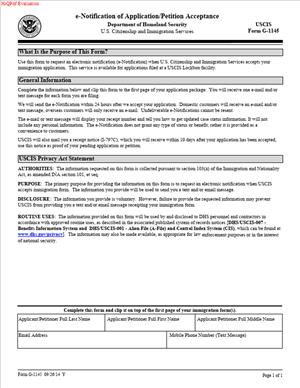
USCIS Form G-1145 – E-Notification of Application or Petition Acceptance
Fill out nowJurisdiction: Country: United States | Province or State: Federal
USCIS Form G-1145 – E-Notification of Application or Petition Acceptance is a short document you attach to certain immigration filings. It allows you to receive an electronic confirmation when your package is accepted.
If you are mailing an application or petition to U.S. Citizenship and Immigration Services, you may want quick proof that it arrived. This form gives you that early confirmation by email and/or text message.
It does not replace any main application. Instead, it travels with your filing and helps you get notified once the agency accepts your package for processing.
For many people, this first confirmation reduces stress. You know your submission reached the intake facility and was entered into the system.
Understanding how this document works helps you avoid delays and missed updates. Even though it is simple, small mistakes can prevent you from receiving notifications.
What is USCIS Form G-1145 – E-Notification of Application or Petition Acceptance?
Clear definition
USCIS Form G-1145 – E-Notification of Application or Petition Acceptance is a one-page request form. You attach it to the front of certain immigration applications or petitions filed with U.S. Citizenship and Immigration Services.
By completing this form, you ask the agency to send you an electronic message when they accept your filing. The notice typically comes as an email, a text message, or both.
The notification usually includes your receipt number. That number allows you to track your case status after it is entered into the system.
This form does not contain details about your eligibility. It only provides contact information for notification purposes.
Who typically uses this form?
You might use this form if you are filing an immigration benefit request by mail. This includes individuals applying for status, employment authorization, travel documents, or petitions for family members.
Petitioners, applicants, and sometimes employers include it with their paper filings. If you are sending a package to a lockbox or service center, this form may be placed on top of your main application.
Self-represented individuals often use it because it provides fast confirmation. Representatives filing on behalf of clients may also include it to monitor case intake.
It is generally used in paper submissions rather than online filings. If you file online through an electronic system, electronic notifications are often built into that process.
Why might you need this form?
When you mail an important immigration filing, you may worry about whether it arrived. Postal tracking confirms delivery, but it does not confirm acceptance into the immigration system.
This form bridges that gap. It lets you know your package was opened, reviewed for basic intake requirements, and entered into processing.
You may need this early notice to plan next steps. For example, you might be waiting for a receipt number to schedule appointments or respond to employer questions.
It also gives you a written record that your filing was received. That record can be helpful for personal tracking and organization.
Typical real-life scenarios
- You file an application for employment authorization. You need proof that your case was received so you can update your employer. An electronic notification provides the receipt number quickly.
- You submit a petition for a family member. You want to track progress as soon as possible. The notification allows you to begin monitoring the case status online once you receive the receipt number.
- You are applying for an extension of status close to your current expiration date. You want confirmation that your filing was accepted before that date passes. An electronic message provides early reassurance.
- You send a large packet with multiple forms and fees. You want to know that the package was not rejected at intake for missing basic elements. The notification signals that it cleared the initial review stage.
When would you use USCIS Form G-1145 – E-Notification of Application or Petition Acceptance?
You would use USCIS Form G-1145 – E-Notification of Application or Petition Acceptance when you are mailing a paper application or petition and want electronic confirmation of acceptance.
It is commonly used at the same time as the initial submission of your immigration benefit request. You include it in the same envelope as your main forms and supporting documents.
Applicants filing from within the United States often attach it to the front of the package. Petitioners filing on behalf of someone else may also include it so they receive the receipt number directly.
If you are sending multiple applications in one envelope, you may include a separate notification form for each main application. This helps ensure each case generates its own electronic notice.
You would not typically use it if you are filing online through an electronic portal. In those systems, account alerts often serve a similar purpose.
It is also not used after a case is already in progress. The form is meant for initial intake, not for requesting updates later in the process.
Legal characteristics of USCIS Form G-1145 – E-Notification of Application or Petition Acceptance
This form functions as a request for communication. It becomes effective when it is properly completed and attached to a qualifying paper filing.
For it to work as intended, the contact information must be clear and accurate. An incorrect phone number or email address can prevent you from receiving the notification.
The form must be placed according to filing instructions, often on top of the application package. If it is buried within the documents, intake staff may not process it as intended.
A common problem is forgetting to sign where required. Even though the form is simple, missing information can result in no electronic notice being sent.
At a high level, the rules governing immigration filings are federal. This means the process is generally consistent across states. However, different filing locations may have slightly different intake procedures.
This document does not replace the official paper receipt notice that is mailed after acceptance. The electronic notification is an added courtesy, not the formal evidence of filing.
It also does not guarantee approval. Acceptance into processing only means the application met basic intake requirements.
Is it legally binding?
USCIS Form G-1145 – E-Notification of Application or Petition Acceptance is not a contract. It does not create legal obligations between you and the government beyond requesting electronic communication.
By signing it, you confirm that the contact information provided is accurate to the best of your knowledge. You are authorizing the agency to send notifications to that email address or phone number.
The electronic message you receive is informational. The official legal acknowledgment of your case is typically the paper receipt notice issued after acceptance.
The form does not change your rights, eligibility, or deadlines. It simply affects how you are notified about case intake.
How to fill out USCIS Form G-1145 – E-Notification of Application or Petition Acceptance
Step 1 – Read the form carefully
Start by reviewing the entire page before writing anything. Confirm that you are using the current edition of the form and that it matches the filing you are submitting.
Pay attention to where it instructs you to place the form within your application package. This helps ensure the notification request is processed correctly.
Step 2 – Provide your full name
Enter your full legal name in the space provided. Use the same name that appears on your main application or petition.
Make sure spelling matches exactly. Inconsistent spelling can create confusion when your case is entered into the system.
If you are the petitioner filing for someone else, follow the instructions on whose name should appear. The name should match the primary applicant or petitioner associated with the filing.
Step 3 – Enter your email address
Write a clear and active email address. Double-check for typos, missing letters, or extra spaces.
Use an account you check regularly. The electronic acceptance message will be sent to this address once your filing is entered into processing.
If you no longer have access to the email address provided, you may miss the notification. Accuracy here is important.
Step 4 – Provide your mobile phone number
Enter your mobile phone number in the format requested on the form. Include the correct area code.
The number should be able to receive text messages. If you enter a landline or an incorrect number, you may not receive a text alert.
Review the digits carefully before moving on. A single incorrect number can prevent delivery.
Step 5 – Sign and date if required
If the form includes a signature line, sign your name as instructed. Use your usual handwritten signature if filing on paper.
Add the date in the required format. This confirms that you completed the request for electronic notification.
Unsigned forms may not be processed for notification purposes.
Step 6 – Place the form on top of your application package
After completing the form, place it on top of the first page of your main application or petition. Do not staple it in a way that hides information.
Keep it visible and easy to locate. This helps intake staff identify your request for electronic notification quickly.
Then assemble the rest of your filing according to the instructions for your specific application, ensuring the notification form remains at the front before mailing the full package.
Legal terms you might encounter in USCIS Form G-1145 – E-Notification of Application or Petition Acceptance
- Applicant: The applicant is the person who is requesting an immigration benefit. If you are filing for yourself, you are the applicant. Your name on this form should match exactly how it appears on the main application or petition you are submitting.
- Petitioner: A petitioner is someone who files an immigration request on behalf of another person. For example, a family member or employer may act as the petitioner. The contact information on this document should relate to the person who wants to receive the electronic notification.
- Receipt Notice: A receipt notice is the official confirmation that the agency has received and accepted your filing. This form allows you to get an electronic alert when that receipt notice is issued. The formal paper receipt will still be mailed to the address listed on your main application.
- Filing Package: Your filing package includes your main form, supporting documents, filing fee (if required), and this document. This sheet should be placed on top of the entire package. It helps intake staff quickly see that you are requesting electronic notification.
- Acceptance: Acceptance means the agency has received your package and determined that it meets basic intake requirements. It does not mean your case is approved. The electronic notification you receive relates only to this initial acceptance stage.
- E-Notification: E-notification refers to an email and/or text message alert. It is sent to confirm that your application or petition has been accepted and received. It is not a substitute for official mailed correspondence.
- Contact Information: This includes your email address and mobile phone number. You must provide accurate and legible information so the system can send you updates. If the contact details are incorrect or unreadable, you may not receive the notification.
- Form Edition Date: The edition date appears at the bottom of the form page. It shows which version of the document you are using. You should make sure you are using the current edition accepted at the time you file your package.
- Lockbox Facility: A lockbox facility is a centralized intake location where certain applications and petitions are first received. Staff at these facilities process payments and issue receipt numbers. This form is typically reviewed during that intake stage.
FAQs
Do I have to include USCIS Form G-1145 – E-Notification of Application or Petition Acceptance with every filing?
No. This document is optional. You include it only if you want to receive an email and/or text message confirming that your package has been accepted. If you do not include it, you will still receive a paper receipt notice by mail if your filing is accepted.
Who should put their email and phone number on this form?
The person who wants to receive the electronic notification should provide their contact information. That may be you as the applicant, or it may be the petitioner if someone else is filing on your behalf. Make sure the name listed matches the role in the main application so there is no confusion during intake.
Will this document notify me if my case is approved?
No. This form only triggers an alert when your filing is accepted, and a receipt number is created. It does not provide updates about case approval, requests for evidence, or denials. Those updates are sent separately through official notices or case status systems.
What happens if I write the wrong email address or phone number?
If the contact information is incorrect or illegible, the system may not be able to send the alert. There is no follow-up to correct the contact details after submission through this sheet. You would still receive the paper receipt by mail, but you may miss the faster electronic confirmation.
Do I need to sign this form?
You should review the current version of the document to see whether a signature is required. Many editions do not require a signature, but you must still complete the requested contact fields clearly. If a signature line appears, follow the instructions exactly and ensure the correct person signs.
Where exactly should I place this document in my package?
Place it on top of your entire filing package. It should be the first page staff see when they open your envelope. Do not staple it deep inside the packet, and do not separate it from the main application.
Will I still receive a paper receipt if I file this form?
Yes. The electronic alert does not replace the official paper receipt notice. After acceptance, the formal notice with your receipt number will still be mailed to the address listed on your main filing.
Does this form change my official mailing address or public record?
No. This document only provides contact information for electronic notification of acceptance. It does not update your mailing address, legal name, or any other information in your official record. Any address change must be made through the proper change-of-address process.
Checklist: Before, During, and After USCIS Form G-1145 – E-Notification of Application or Petition Acceptance
Before
- Confirm you want electronic notification in addition to paper mail.
- Download the current edition of the form.
- Review the main application to ensure name consistency.
- Decide whose email and phone number will be listed.
- Double-check that the mobile number can receive text messages.
- Make sure the email inbox has space and is regularly monitored.
- Gather your full filing package so you can attach this sheet properly.
During
- Print clearly in black ink if completing by hand.
- Write your full legal name exactly as shown on the main form.
- Enter a legible and accurate email address.
- Provide a valid mobile phone number with correct digits.
- Recheck the spelling of your email before finalizing.
- Confirm that the contact information belongs to the correct person.
- Do not staple over important text or barcodes.
- Place the completed sheet on top of the entire package.
After
- Make a complete copy or scan of the entire filing package.
- Save a digital copy of this document with your records.
- Note the date you mailed or submitted the package.
- Track delivery if you used a mailing service with tracking.
- Monitor your email inbox, including spam or junk folders.
- Watch for a text message from a government sender.
- Wait for the official paper receipt in the mail.
- Store the receipt notice with your immigration records.
Common mistakes to avoid with USCIS Form G-1145 – E-Notification of Application or Petition Acceptance
- Mistake: Writing an incorrect or incomplete email address because you rush, which can prevent you from receiving the electronic alert and delay your awareness of acceptance; do not forget to review each character carefully before submitting.
- Mistake: Listing a phone number that cannot receive text messages, often because it is a landline or outdated number, which results in no text notification; do not forget to confirm the number is active and mobile.
- Mistake: Placing the form in the middle or back of the package, which can cause intake staff to miss it and skip sending e-notification; do not forget to put it on top of the entire filing.
- Mistake: Assuming this document updates your mailing address, which happens when you confuse contact details with official record changes, leading to missed mailed notices; do not forget that address updates require a separate process.
- Mistake: Using a nickname or a different name than the one on the main application, which can create confusion during intake and slow processing; do not forget to match your legal name exactly.
- Mistake: Forgetting to keep a copy of the completed sheet, which can make it harder to verify what contact information you provided if you do not receive a notification; do not forget to save a full copy of your submission.
What to do after filling out USCIS Form G-1145 – E-Notification of Application or Petition Acceptance
Once you complete this document, your focus should shift to careful assembly and tracking. Small steps now can prevent stress later.
- Step 1: Review the completed sheet one more time for spelling errors in your email and phone number.
- Step 2: Confirm that the name listed matches the main application exactly, including middle names and suffixes if used.
- Step 3: Place the form on top of your entire filing package, making sure it is visible when the envelope is opened.
- Step 4: Make a complete copy or scanned PDF of everything you are submitting, including this sheet and all supporting documents.
- Step 5: Prepare your mailing envelope according to the filing instructions for your main form, ensuring correct address formatting.
- Step 6: If mailing, consider using a delivery method that provides tracking so you can confirm when the package arrives.
- Step 7: After delivery is confirmed, monitor your email inbox and text messages closely for several days.
- Step 8: Check your spam or junk email folder regularly so you do not miss the electronic alert.
- Step 9: When you receive the electronic notification, save or screenshot it for your records.
- Step 10: Wait for the official paper receipt notice and store it in a safe, organized file with copies of your entire submission.
Keep all related documents together in one secure place. Create a simple folder, either physical or digital, labeled with the type of application and filing date. This helps you respond quickly if you later receive a request for additional evidence or need to reference your receipt number.
If you do not receive an electronic notification but your tracking shows delivery, do not panic. Electronic alerts are a convenience, not the official proof of filing. The paper receipt notice is the formal confirmation of acceptance. Continue checking your mail and keep your records organized so you can track your case confidently.
Disclaimer: This guide is provided for informational purposes only and is not intended as legal advice. You should consult a legal professional.