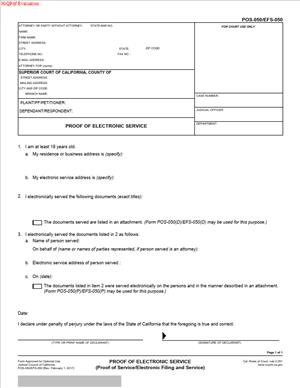
POS-050 – Proof of Electronic Service
Fill out nowJurisdiction: Country: United States | Province or State: California
The POS-050 – Proof of Electronic Service is a court form used to confirm that you sent legal documents to another party by electronic means. It creates a written record that the service was completed. In California court cases, proving service is just as important as filing the document itself.
If you are representing yourself, you may need this form after you email court papers to the other side. The court does not assume service happened just because you say it did. You must provide written proof.
This form does not contain your legal arguments. It does not change your case. Its purpose is narrow but critical. It shows when, how, and to whom documents were sent electronically.
Understanding this form before you complete it helps you avoid delays. Courts may reject filings or continue hearings if service is not properly documented.
What is POS-050 – Proof of Electronic Service?
Clear definition
POS-050 – Proof of Electronic Service is a California Judicial Council form used to confirm that court documents were served electronically. “Electronic service” usually means service by email or through an approved electronic filing system.
When you file papers with the court, you must also provide proof that the other parties received copies. This form serves as proof that the service was done electronically instead of by mail or personal delivery.
It includes details such as the name of the person served, their email address, the date and time of transmission, and the documents sent. The person who completed the service signs the form under penalty of perjury.
Who typically uses this form?
Self-represented litigants often use this form when handling civil, family, or probate matters. Attorneys also use it when electronic service is permitted or required in a case.
The person who fills it out is usually not the party to the case. In many situations, someone over 18 who is not involved in the case completes the service and signs the form. In some courts and case types, electronic filing systems handle service automatically, but the proof still needs to be documented.
Court staff do not complete this form for you. It is your responsibility, or the responsibility of your server, to prepare and submit it correctly.
Why might you need this form?
You may need this form whenever you serve court documents electronically. Common examples include motions, declarations, oppositions, notices, and other filings that must be shared with the other side.
If you file a motion and email a copy to opposing counsel, the court expects written confirmation that the email was sent properly. Without proof of service, the judge may not consider your filing.
In many California courts, electronic service is common in civil cases. When parties agree to accept electronic service, or when the court orders it, this form becomes part of the regular filing process.
Typical real-life scenarios
- You file a motion to change a court date. After filing, you email the motion and supporting documents to the opposing party’s attorney. You then complete this form to show that the documents were sent electronically.
- You are involved in a family law matter. The other party has agreed in writing to accept service by email. Each time you file a declaration or response, you send it by email and prepare this proof of service.
- You are responding to a motion in a civil case. The court uses an electronic filing system, but electronic service is not automatic for all parties. You ensure the documents are emailed to all required recipients and complete the form to confirm service.
- You are assisting someone with their case. As a non-party over 18, you send the documents by email on their behalf. You complete and sign the proof of electronic service because you performed the service.
When would you use POS-050 – Proof of Electronic Service?
You use this form after you have electronically served documents in a California court case. It is typically completed the same day the documents are transmitted.
Electronic service is often used when the parties have agreed to accept documents by email. An agreement may be written, or it may occur through participation in an electronic filing system that includes service features.
In civil cases, electronic filing and service are common in many counties. In some case types, courts may require electronic filing, which can include electronic service through the system. Even then, documentation of service remains important.
You may also use this form when the court has ordered that documents be served electronically. Once such an order is in place, each qualifying document sent electronically requires proof.
If multiple parties are involved, you must serve each one who is entitled to receive documents. The form allows you to list each person served and their electronic address.
This form is not used for the initial service of a summons in most situations. Initial service often requires personal delivery or another formal method. Electronic service is more commonly used after a party has appeared in the case or agreed to accept it.
Legal characteristics of POS-050 – Proof of Electronic Service
This form functions as a sworn statement. The person who signs it declares under penalty of perjury that the information is true and correct. That declaration gives the document legal weight.
For the form to be effective, it must be complete and accurate. Required fields typically include the case name, case number, court information, names and electronic addresses of the persons served, the date of transmission, and a list of the documents sent.
Common reasons for rejection or problems include missing case numbers, incorrect email addresses, failing to list all documents served, or having the wrong person sign the form. If the party to the case signs as the server when not allowed, the proof may be questioned.
Another frequent issue is inconsistency. If the date of service on this form does not match the date stated in your motion or declaration, it may create confusion. Courts expect internal consistency across your filings.
Electronic service rules can vary by case type. Civil, family, probate, and other divisions may have different procedures or local practices. Some courts rely heavily on electronic filing systems that generate their own service notices. Others require a separately completed proof of service form.
This document does not prove that the recipient opened or read the email. It confirms that the documents were transmitted to the listed electronic address. Questions about receipts are handled separately, often based on the declaration and any supporting records.
It also does not extend deadlines automatically. Service method can affect how deadlines are calculated, but the form itself does not change the timeline. It simply records what was done.
Is it legally binding?
The form is legally significant because it is signed under penalty of perjury. By signing, the server declares that the electronic service occurred as stated. False statements can carry serious consequences.
While the form does not create a contract or court order, it becomes part of the official court record once filed. Judges rely on it to determine whether proper notice was given.
If the form is properly completed and filed, it generally satisfies the requirement to prove electronic service in that case. If it is incomplete or inaccurate, the court may treat service as defective, which can delay hearings or rulings.
How to fill out POS-050 – Proof of Electronic Service
Step 1 – Court and case information
At the top of the form, enter the name of the court, its address, and the branch name if applicable. Fill in the case name exactly as it appears on other filed documents. Include the case number without altering spacing or punctuation. Accuracy here ensures the proof is matched to the correct file.
Step 2 – Party or attorney information
Provide the name, address, phone number, and email of the attorney or self-represented party on whose behalf the documents were served. This section identifies who is connected to the filing, not who performed the service.
Step 3 – Person serving the documents
Enter the name of the person who performed the electronic service. Confirm that this person meets the basic eligibility requirements, such as being over 18 and not a party to the case if required. Include the server’s residence or business address as requested on the form.
Step 4 – Statement of electronic service eligibility
Complete the section that states why electronic service is permitted. This may involve indicating that the parties agreed to accept electronic service or that the court ordered it. Check the appropriate box and ensure it reflects the circumstances of your case.
Step 5 – Date and time of transmission
Write the exact date the documents were transmitted electronically. Include the time of transmission if the form requests it. Use the same date that appears in any related declarations or filings to maintain consistency.
Step 6 – Electronic service address of each person served
List the full name of each person served and their electronic service address, usually an email address. Double-check spelling and formatting. An incorrect address can create questions about whether the service was completed properly.
If more space is needed, attach an additional page as allowed by the form. Ensure any attachment clearly references the case name and number.
Step 7 – Documents served
Identify each document that was electronically served. Use the exact titles as they appear on the documents themselves. For example, include full names such as “Notice of Motion and Motion to Compel” or “Declaration of [Name] in Support of Motion.” This avoids confusion about what was transmitted.
Step 8 – Declaration under penalty of perjury and signature
Read the declaration carefully. The server must sign and date the form, declaring under penalty of perjury that the information is true and correct. The signature may be handwritten or in an accepted electronic format, depending on the filing method.
Once signed, the form is ready to be filed with the court, typically together with or shortly after the documents that were electronically served.
Legal terms you might encounter in POS-050 – Proof of Electronic Service
- Electronic Service: This means delivering court documents by email or another approved electronic method instead of by mail or in person. On this form, you confirm that you sent the documents electronically and identify how you sent them. The court relies on your statement to confirm proper delivery.
- Service Address (Electronic): This is the email address or electronic service address where you sent the documents. You must list the exact address used. The court checks this to confirm that you served the correct person at the address they provided for service.
- Declarant: The declarant is the person who actually performed the electronic service. This person completes and signs the form. By signing, the declarant swears that the information is true.
- Declaration Under Penalty of Perjury: This is a formal statement that everything you wrote is true to the best of your knowledge. It appears near the signature line. Signing under penalty of perjury means you can face legal consequences if the information is intentionally false.
- Date of Service: This is the exact calendar date when the documents were sent electronically. It establishes when the service occurred. Deadlines for responses often run from this date.
- Time of Transmission: This is the specific time you sent the documents. It can matter if service deadlines depend on the time of day. You must enter the time accurately as it appears in your email or electronic service confirmation.
- Person Served: This refers to each party or attorney who received the documents. You must list their name and electronic service address. If you serve more than one person, each must be clearly identified.
- Case Number: This is the unique number assigned to your court case. You must enter it exactly as it appears on other filed documents. If it does not match, the court may not associate the proof of service with the correct case.
- Court Name and Address: This identifies the specific Superior Court location handling your case. The form requires you to list the proper court branch. This ensures the proof is filed in the correct case file.
- Documents Served: This section lists the exact titles of the documents you sent electronically. The titles must match the documents you filed or intend to file. If the titles are unclear or incomplete, the proof may not cover all the documents you sent.
FAQs
Do I have to file POS-050 – Proof of Electronic Service every time I email court documents to the other side?
You generally need to complete this document each time you serve documents electronically, in your case. The court uses it to confirm that service happened. If you file a motion, response, or other paper and serve it by email, you should also file this proof to show when and how you sent it.
What exact date should I write as the date of service?
Enter the calendar date when you actually transmitted the email or electronic service. Do not use the date you prepared the documents unless it is the same day you sent them. Check your sent email folder to confirm the correct date before you write it on the form.
What if I made a typo in the recipient’s email address?
If you realize the address was incorrect, service may not be valid. You should resend the documents to the correct address and complete a new proof showing the accurate transmission details. The form must reflect the real service event, including the correct address and date.
Can I sign this document if I did not personally send the email?
No. The person who actually performed the electronic service must complete and sign this document. The signer is declaring under penalty of perjury that they sent the documents. If someone else sent the email, that person must be the declarant.
Do I need to attach a copy of the email confirmation or the sent message?
This document itself does not require you to attach the email unless the court specifically asks for additional proof. However, you should keep a copy of the sent email and any delivery confirmation for your records. If service is ever questioned, those records help support what you declared.
What happens if I forget to list one of the documents I sent?
Only the documents listed are officially covered by the proof. If you left one out, you may need to prepare and file a corrected or additional proof showing that document and the correct transmission details. Always compare the list on this form with the actual files you sent before signing.
Does electronic service change the deadline for the other party to respond?
Response deadlines often run from the date of service listed on this document. Some rules treat electronic service differently from mail service. Always calculate deadlines based on the service date you entered and confirm how electronic delivery affects timing in your case.
Will this document become part of the public court record?
Yes. Once filed, this document becomes part of the court file. It shows who was served, at what electronic address, and on what date. Make sure names, addresses, and the case number are accurate because they will appear in the official record.
Checklist: Before, During, and After POS-050 – Proof of Electronic Service
Before
- Confirm that electronic service is permitted or agreed to in your case.
- Verify the correct electronic service address for each person you will serve.
- Make sure the documents are finalized and match their intended titles.
- Check the case number and court name on your main document.
- Ensure the person who will sign actually performs the service.
- Review deadlines to confirm you are serving on time.
- Prepare a complete list of every document you will send.
During
- Send the documents to the correct electronic service addresses.
- Double-check the spelling of each email address before clicking send.
- Note the exact date and time of transmission.
- Save a copy of the sent message and any confirmation.
- Enter the full names of all persons served on the form.
- List each document title exactly as it appears on the filed papers.
- Complete every required section without leaving blanks.
After
- Review the completed form for accuracy and consistency.
- Sign the declaration under penalty of perjury.
- Make copies of the signed form for your records.
- File the signed form with the court if required.
- Confirm that the court accepted the filing.
- Keep the electronic confirmation of service with your case file.
- Update your personal case calendar with the service date.
- Monitor for any response filed by the other party.
Common mistakes to avoid with POS-050 – Proof of Electronic Service
- Mistake: Listing the wrong case number because you copied it from an old document, which can cause the proof to be filed in the wrong case and delay proceedings; always verify the number against your most recent court paper before signing.
- Mistake: Signing the form when you did not actually send the email, which happens when offices divide tasks, but this can invalidate the declaration and expose the signer to penalties; never forget that the actual server must sign.
- Mistake: Entering the document preparation date instead of the transmission date, which can miscalculate deadlines and create disputes; always confirm the real send date from your email record.
- Mistake: Forgetting to list one or more documents served because you assume “see attached” is enough, which may leave some documents without proof of service; do not forget to write out each document title clearly.
- Mistake: Using an outdated or incorrect email address, often pulled from old correspondence, which can result in ineffective service; always confirm the current service address before sending.
- Mistake: Failing to file the proof with the court after serving, which can make it appear that service never happened; do not forget that service and proof of service are separate steps.
- Mistake: Leaving sections blank because they seem unimportant, which can lead the clerk to reject the filing; complete every required field carefully.
- Mistake: Not keeping a copy of the sent email or confirmation, which makes it hard to defend your declaration if challenged; never forget to save and store electronic evidence of service.
What to do after filling out POS-050 – Proof of Electronic Service
Once you complete the form, your job is not finished. You must make sure the proof is properly signed, filed, and stored. Courts rely on this document to confirm that notice was given. If it is missing or inaccurate, your filing could be delayed or challenged.
Start by reviewing the entire form one more time. Check names, email addresses, the case number, and the list of documents served. Make sure the date and time of transmission match your email records exactly.
- Step 1: Confirm that the person who performed the service has signed and dated the form.
- Step 2: Make at least one copy of the signed form for your records.
- Step 3: Attach the proof to the documents you are filing, if required, or prepare it as a separate filing.
- Step 4: File the signed proof with the Superior Court of California handling your case.
- Step 5: If filing electronically, upload the form in the correct category so it is clearly labeled as a proof of service.
- Step 6: If filing in person or by mail, follow the court’s filing procedures and include any required cover sheets.
- Step 7: Wait for confirmation that the court accepted your filing, and check that it appears in the case docket.
- Step 8: Save the filed-stamped copy in both digital and paper format, if possible.
- Step 9: Keep a copy of the sent email and any delivery or read confirmations with your case documents.
- Step 10: Mark your calendar with any response deadline that runs from the service date you listed.
Staying organized protects you. Keep a dedicated folder for proofs of service in your case file. Label each one by date and by the documents served. If the other side claims they were not served, you will be ready to show exactly when and how you sent the documents.
Finally, monitor your case. Watch for any response or objection. If the court issues notices about filing defects or missing information, address them quickly. Accurate service and proof keep your case moving forward and reduce the risk of unnecessary delays.
Disclaimer: This guide is provided for informational purposes only and is not intended as legal advice. You should consult a legal professional.