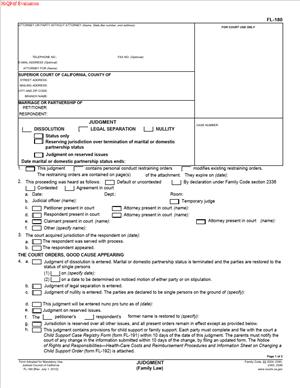
FL-180 – Judgment
Fill out nowJurisdiction: Country: United States | Province or State: California
FL-180 – Judgment is the court form used to finalize a divorce, legal separation, or nullity in California family law cases. It is the document that turns agreements and court decisions into an official judgment. Once entered by the court, it becomes a formal order that ends or changes the marital relationship.
If you are representing yourself, this is one of the most important forms in your case. It is not just paperwork. It is the document that states exactly what the court orders regarding your marital status, property, debts, support, and other issues.
You usually prepare FL-180 – Judgment near the end of your case. It may be submitted after a default, after a written agreement, or after a trial. The form summarizes the outcome and presents it to the judge for signature.
Understanding how this form works helps you avoid delays. Small mistakes can cause rejection or require corrections. A clear, complete judgment makes enforcement and future reference much easier.
What is FL-180 – Judgment?
Clear definition
FL-180 – Judgment is the official California family law form used to record the court’s final decision in a divorce, legal separation, or nullity case. It is filed in the Superior Court where the case was started. Once signed by a judge and entered by the clerk, it becomes the final judgment in your case.
This document identifies the parties, confirms the type of case, and states what the court orders. It may incorporate other attached forms that address property division, child custody, visitation, child support, spousal support, and attorney’s fees.
The form itself acts as the cover judgment. It often works together with additional attachments that provide the detailed terms. Without it, there is no final judgment entered in the court file.
Who typically uses this form?
FL-180 – Judgment is used by spouses or domestic partners involved in a California family law case. Either party may prepare it, depending on who is submitting the proposed judgment to the court.
It is commonly used by self-represented individuals who have reached a written agreement. It is also used when one party defaults and the other seeks a default judgment. In contested cases, it may reflect the judge’s decision after a hearing or trial.
Court staff, judges, and clerks rely on this form to understand the final outcome of the case. It becomes part of the permanent court record.
Why might you need this form?
You need this form to officially end your marriage or domestic partnership. Filing petitions and serving papers do not by themselves finalize the case. The judgment does that.
You also need it to make your agreements enforceable. If you and the other party agree on property, custody, or support, those terms become court orders when included in the judgment.
Financial institutions, employers, and government agencies may require proof of divorce. A filed and entered judgment provides that proof. It confirms your marital status and the effective date of termination.
Typical real-life scenarios
- You and your spouse reach a full written settlement agreement. You attach that agreement to FL-180 – Judgment and submit it for the judge’s signature. Once entered, your agreement becomes a court order.
- Your spouse was served but never responded. You request a default and prepare the judgment reflecting the terms you requested in your petition. The court reviews the documents and, if proper, enters the judgment.
- You had a trial because you could not agree on support or property division. After the judge announces a decision, the judgment is prepared to reflect those rulings. It formally records what the court ordered.
- You resolve only some issues by agreement, such as property division, but you need the court to decide custody or support. The judgment can combine agreed terms and court-ordered terms in one final document.
When would you use FL-180 – Judgment?
You use this form at the end of a California divorce, legal separation, or nullity case. It comes after the initial petition, service of process, and any required financial disclosures.
In a default case, the petitioner usually prepares and submits the judgment after the time to respond has passed. The court reviews it to ensure it matches the relief requested in the petition.
In an uncontested case with a written agreement, either party may prepare the judgment once all required disclosures are complete. The agreement is typically attached and referenced in the judgment.
In a contested case, the judgment is prepared after the court makes final decisions. It reflects the court’s rulings and may include detailed attachments for support and property orders.
The timing also matters for marital status termination. In many cases, the marriage cannot terminate earlier than six months from service of the petition. The judgment states the effective date of termination when applicable.
Legal characteristics of FL-180 – Judgment
FL-180 – Judgment becomes effective when a judge signs it, and the clerk enters it into the court record. Entry by the clerk is a key step. Until that happens, the case is not officially finalized.
The judgment must match the relief requested in the petition or response. Courts often reject proposed judgments that go beyond what was originally requested. Consistency between documents is critical.
Common reasons for rejection include missing signatures, incomplete attachments, incorrect dates, and failure to include required financial disclosure declarations. Clerks also review whether the proper boxes are checked and whether attachments are clearly identified.
This form does not, by itself, explain detailed custody schedules or calculate support. Those details are usually included in attached forms or written agreements. The judgment serves as the framework that incorporates those documents.
Family law procedures are governed by state rules. In California, specific Judicial Council forms are required. Other states use different forms and processes, even if the concept of a final judgment is similar.
The judgment also does not automatically enforce itself. If a party does not follow the orders, further court action may be required to enforce them. The judgment creates enforceable orders, but enforcement is a separate process.
Is it legally binding?
Once signed by a judge and entered by the court clerk, FL-180 – Judgment is legally binding. It carries the authority of a court order. Both parties are required to follow their terms.
The binding effect depends on the proper procedure. Service, disclosures, and procedural requirements must be completed correctly. If the court enters the judgment, it is presumed valid unless later set aside through proper legal process.
The judgment may be modified in limited circumstances, such as changes in child support or custody based on changed circumstances. Property division is generally final once entered, except in specific situations allowed by law.
Because it is a court order, failing to comply can lead to enforcement actions. The court retains jurisdiction over certain issues, especially those involving children and support.
How to fill out FL-180 – Judgment
Step 1 – Complete the caption
At the top of the form, fill in the court name and address exactly as listed in your case. Enter the names of the petitioner and respondent as they appear on the petition. Include the case number without changes. This information must match the court record.
Step 2 – Identify the type of case
Check the box that reflects whether your case is for dissolution, legal separation, or nullity. Ensure this matches the original petition. The judgment cannot grant a type of relief that was not requested in the case.
Step 3 – State how the case was resolved
Indicate whether the judgment is by default, by written agreement, or after a contested hearing. Select the option that accurately describes the procedural path of your case. The court uses this to confirm that the correct process was followed.
Step 4 – Address marital or partnership status
Complete the section that states whether the marital or domestic partnership status is terminated. If applicable, include the specific date of termination. Ensure the date complies with required waiting periods and matches the rest of your paperwork.
Step 5 – Reference attached orders
Mark the boxes that show which issues are addressed in the judgment, such as child custody, visitation, child support, spousal support, property division, or attorney’s fees. Attach the necessary forms or written agreements that detail those terms. Clearly label and organize each attachment.
Step 6 – Confirm jurisdiction over children
If minor children are involved, complete the section confirming that the court has jurisdiction. This often relates to residency requirements and prior custody orders. Make sure any required custody-related forms are attached.
Step 7 – Review financial disclosure compliance
Indicate whether each party has complied with required financial disclosure obligations. This is commonly addressed through separate declaration forms filed earlier in the case. Ensure the court file reflects completion of these steps.
Step 8 – Add signatures where required
Sign the judgment where appropriate if you are submitting it as the proposed judgment. If the case involves an agreement, confirm that signatures from both parties appear on the settlement documents. Leave space for the judge’s signature and the clerk’s entry.
Step 9 – Make copies and prepare for submission
Prepare the original and required copies for the court. Ensure all pages are complete, legible, and in the correct order. Include any required accompanying forms so the clerk can process the submission without delay.
Step 10 – Submit the judgment to the court
File the completed FL-180 – Judgment with the court clerk according to local filing procedures. After review and signature by the judge, the clerk will enter the judgment and return filed copies. Once entered, the judgment becomes the official final order in your case.
Legal terms you might encounter in FL-180 – Judgment
- Judgment: A judgment is the final written decision of the court. This document states the official outcome of your divorce, legal separation, or nullity case. Once entered by the court, it becomes enforceable.
- Entry of Judgment: This refers to the date the court clerk officially files and records the judgment. The entry date is critical because it often controls when deadlines start and when your marital status may change.
- Marital Status Termination Date: This is the specific date your marriage or domestic partnership legally ends. The document clearly states this date, and it may be different from the date the judge signs or the clerk files the judgment.
- Dissolution: Dissolution means divorce. When this term appears in the document, it confirms that the marriage or domestic partnership is legally terminated.
- Legal Separation: Legal separation means you remain married but live separately under court orders. The judgment can grant legal separation without ending marital status.
- Nullity: Nullity means the court has declared the marriage or partnership invalid. If nullity is granted, the judgment states that the marriage was not legally valid from the beginning.
- Reservation of Jurisdiction: This means the court keeps the authority to decide certain issues later. The judgment may reserve jurisdiction over matters such as spousal support or property division if they are not fully resolved.
- Incorporation by Reference: This means the judgment includes other attached documents as part of the final order. For example, property agreements or custody orders may be attached and legally included.
- Default: A default occurs when one party does not respond to the case within the required time. The judgment will indicate if the case proceeded by default and whether the respondent participated.
- Stipulation: A stipulation is a written agreement between both parties. If your case was resolved by agreement, the judgment may incorporate your signed stipulation as part of the final court order.
FAQs
When does my divorce become final after the judge signs this document?
Your divorce becomes final on the marital status termination date listed in this document, not necessarily the day the judge signs it. You must look at the specific section that states when marital or partnership status ends. Also, check the clerk’s “entry” date, because the court must officially enter the judgment before it takes legal effect.
Do both parties have to sign the FL-180 – Judgment?
Not always. If your case was resolved by agreement, both parties typically sign to show approval. If it were a default or court decision after a hearing, the judge can sign without the other party’s signature. You must check the signature section to confirm who is required to sign based on how your case was resolved.
What attachments must be included with this form?
This document often refers to attached orders about custody, visitation, child support, spousal support, or property division. You must carefully review each box that indicates attachments. If a box is checked but the attachment is missing, the court may reject your submission.
How do I know if the court has accepted and entered the judgment?
After submission, the clerk stamps the document with a filing date and enters it into the court record. You should receive a filed copy showing the entry date. That stamped copy confirms acceptance. Without the clerk’s filing stamp, the judgment is not officially entered.
What happens if the names on this document do not exactly match earlier filings?
The names must match the original petition and response exactly, including spelling and middle initials. If they do not match, the clerk may reject the filing. You should compare the caption at the top of this document with your initial filing before submitting it.
Can anything in this judgment be changed later?
Some parts can be modified, such as child custody, visitation, or support, if circumstances change. Property division is usually final once entered. To change modifiable terms, you would need to file additional court documents requesting a modification.
What if the marital status termination date is blank?
If that section is blank and it should not be, the court may reject the judgment. You must confirm whether your case requires a specific termination date. Review the section carefully before submission to ensure no required fields are left incomplete.
Does FL-180 – Judgment change public records automatically?
This form updates the court’s official record of your marital status. However, it does not automatically update your name with government agencies or financial institutions. You must use the filed judgment to update identification documents and other records yourself.
Checklist: Before, During, and After FL-180 – Judgment
Before
- Review your settlement agreement or court orders to confirm all terms are final.
- Make sure all required financial disclosures were properly completed.
- Confirm the case number and party names match earlier filings exactly.
- Check whether your case was default, uncontested, or contested.
- Gather all required attachments referenced in the judgment.
- Verify whether a marital status termination date must be included.
- Ensure any name restoration request is clearly stated if applicable.
During
- Complete every section of the caption accurately.
- Mark the correct boxes describing how the case was resolved.
- Insert the correct termination date if required.
- Attach all referenced custody, support, or property orders.
- Review each checked box to ensure consistency with attachments.
- Confirm signature requirements based on your case type.
- Make clean, legible copies before submitting.
- Double-check that no required field is left blank.
After
- File the original with the court clerk as required.
- Obtain filed, stamped copies for your records.
- Calendar the marital status termination date.
- Provide copies to the other party if required.
- Store the judgment in a secure but accessible place.
- Use the field copy to update your name if restored.
- Update beneficiary designations if appropriate.
- Keep proof of service or notice of entry if applicable.
Common mistakes to avoid with FL-180 – Judgment
- Mistake: Leaving required boxes unchecked because you assume they do not apply; this happens when you rush, and it can cause rejection, so do not forget to review every selection carefully.
- Mistake: Listing the wrong marital status termination date due to confusion about waiting periods; this can delay finalization, so do not forget to confirm the correct effective date.
- Mistake: Referring to attachments but failing to include them; this often happens during last-minute assembly and can result in clerk rejection, so do not forget to physically attach all referenced documents.
- Mistake: Using party names that differ from the original petition; this clerical error can invalidate processing, so do not forget to match the caption exactly.
- Mistake: Missing required signatures because you misunderstood whether the case was default or stipulated; this can delay entry, so do not forget to verify who must sign.
- Mistake: Assuming entry happens automatically after mailing; filing requires proper submission and clerk action, so do not forget to confirm official entry.
- Mistake: Forgetting to keep stamped copies; without proof of entry, you may struggle to update records, so do not forget to obtain and store filed copies.
- Mistake: Overlooking reserved jurisdiction language; this can affect future rights, so do not forget to read and understand each reserved issue before submission.
What to do after filling out FL-180 – Judgment
Once you complete the document, shift your focus to filing and confirmation. Completion alone does not make it effective. The court must enter it.
- Step 1: Review every page for accuracy, including names, case number, dates, and attachments.
- Step 2: Make at least two copies of the entire packet, including all attachments.
- Step 3: Confirm signature requirements and obtain any missing signatures.
- Step 4: Submit the original to the court clerk using the accepted filing method.
- Step 5: Wait for the clerk to process and enter the judgment.
- Step 6: Obtain a filed, stamped copy showing the entry date.
- Step 7: Serve notice of entry if required in your case.
- Step 8: Calendar important dates, especially the marital status termination date.
- Step 9: Store the filed judgment securely in both paper and digital form.
- Step 10: Use the entered judgment to update identification, financial accounts, insurance policies, and beneficiary designations if needed.
After entry, read the final version carefully. Make sure all attached orders are included in the filed copy. If something is missing, address it immediately with the court.
Keep your filed copy accessible. You may need it years later for refinancing property, enforcing support, remarrying, or clarifying ownership of assets. Treat it as a core legal record.
Finally, review any ongoing obligations listed in the judgment. Note payment schedules, property transfer deadlines, or custody arrangements. Create reminders for yourself. The judgment is not just a piece of paper. It sets enforceable responsibilities that begin once it is entered.
Disclaimer: This guide is provided for informational purposes only and is not intended as legal advice. You should consult a legal professional.