CIV-110 – Request for Dismissal
Fill out nowJurisdiction: Country: United States | Province or State: California
The CIV-110 – Request for Dismissal is a court form used in California civil cases to officially end all or part of a lawsuit. If you have resolved your dispute, changed your mind, or no longer want to move forward, this document tells the court to close the case or remove certain claims.
You file this form in the same case where the complaint or petition was originally filed. It becomes part of the court record. Once processed, it affects the legal status of your case.
This form is most often used by a plaintiff, cross-complainant, or petitioner. In simple terms, it is used by the person who started a claim. It can apply to the entire case or only specific parties or causes of action.
Understanding this document matters because dismissal changes your rights. In some situations, you may not be able to bring the same claim again. In other situations, you can refile later. The difference depends on how the dismissal is written and entered.
Before you complete the CIV-110 – Request for Dismissal, you need to be clear about what you are dismissing and whether the dismissal is with or without prejudice. That choice has long-term consequences for your case.
What is CIV-110 – Request for Dismissal?
Clear definition
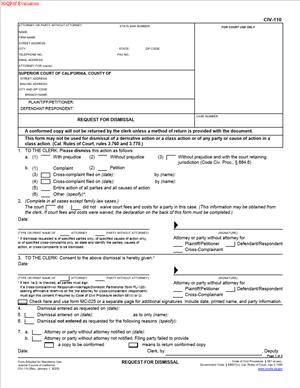
CIV-110 – Request for Dismissal is a California Superior Court form used to ask the court clerk to dismiss a civil case, part of a case, or certain parties from a case. It is a written request to formally end legal claims that were previously filed.
The form allows you to specify whether you are dismissing the entire action, only a complaint, a cross-complaint, or particular causes of action. It also asks whether the dismissal is with prejudice or without prejudice.
When the clerk enters the dismissal, the court record reflects that the identified claims are no longer active. In many situations, no judge hearing is required if the request meets procedural requirements.
Who typically uses this form?
This form is typically used by plaintiffs in civil lawsuits. A plaintiff is the person or business who filed the complaint to start the case.
Cross-complainants also use it. A cross-complainant is someone who filed a cross-complaint within the same case, often in response to the original complaint.
Petitioners in certain civil proceedings may use this form if the case type allows dismissal through clerk processing. The key factor is that the person requesting dismissal must have filed the claim being dismissed.
In some circumstances, attorneys complete and sign the form on behalf of their clients. Self-represented litigants also use it frequently, especially after settlements.
Why might you need this form?
You may need this form if you and the other side reached a settlement agreement. Once the dispute is resolved, dismissal formally closes the case.
You might also use it if you decide not to pursue the claim. This can happen if new information changes your position or if continuing the case is no longer practical.
Sometimes a filing error leads to dismissal. For example, the wrong party may have been named, or the case was filed in the wrong court.
You may also need to dismiss only part of your case. For instance, you might remove one defendant while continuing against another, or drop one cause of action but keep others.
Typical real-life scenarios
- You file a breach of contract lawsuit. Before trial, the parties agree on payment terms. As part of the agreement, you file a request to dismiss the entire case with prejudice. The dismissal reflects that the dispute has been resolved permanently.
- You sue multiple defendants after a car accident. Later, you determine that one defendant was not responsible. You file a request to dismiss that defendant only, while continuing the case against the others.
- You file a complaint and later discover a technical issue, such as incorrect service or incomplete information. You dismiss the case without prejudice so you can correct the problem and potentially refile.
- You file a cross-complaint in response to a lawsuit. After negotiations, you decide not to pursue your cross-claims. You file a dismissal for the cross-complaint, even though the original complaint remains active.
When would you use CIV-110 – Request for Dismissal?
You would use CIV-110 – Request for Dismissal after a case has already been filed and assigned a case number. It is not used to prevent a case from being filed. It is used to end claims that are already part of an open court file.
Timing matters. In many cases, a plaintiff may dismiss the action without needing the other party’s approval if certain procedural stages have not yet been reached. After specific milestones, such as a responsive pleading or certain motions, additional steps or consent may be required.
The form is commonly used before trial, but it can also be used later in the process if a settlement occurs. It may be used before a hearing, after mediation, or even shortly before trial if the dispute resolves.
In cases involving multiple claims or parties, you might use the form more than once. For example, you may dismiss one cause of action early in the case and later dismiss the remainder after settlement.
Self-represented litigants often use this form after informal resolution. Attorneys frequently file it as part of a formal settlement process, sometimes coordinated with a written agreement that outlines payment terms and other obligations.
Legal characteristics of CIV-110 – Request for Dismissal
For a dismissal to be effective, the form must clearly identify the case by name and case number. It must state exactly what is being dismissed. Ambiguity can cause processing delays or confusion in the court record.
The form must be signed by the appropriate party or attorney. If court fees were waived, the form includes a section addressing recovery of waived fees. In some situations, the court may retain the ability to recover those fees from a settlement.
Clerks typically review the form for completeness. Missing signatures, incorrect case numbers, or failure to specify whether the dismissal is with or without prejudice are common reasons for rejection.
There are procedural differences depending on the stage of the case. In some circumstances, once a defendant has filed certain responses, dismissal may require consent or court involvement. These requirements depend on procedural posture rather than the form itself.
This form does not erase past court orders unless specifically addressed. It does not automatically cancel sanctions, attorney fee awards, or other rulings already made. It simply removes the specified claims from active litigation.
It also does not enforce a settlement. If a settlement agreement exists, enforcement typically requires separate steps. The dismissal reflects closure of claims, not compliance with payment terms.
Is it legally binding?
Once entered by the clerk, a dismissal becomes part of the official court record. It has a legal effect on the claims identified in the form. If the dismissal is with prejudice, those claims are generally considered permanently resolved.
A dismissal without prejudice usually allows the filing party to bring the same claim again, subject to time limits and procedural rules. The dismissal itself does not extend filing deadlines.
The binding nature of the dismissal depends on how it is written and entered. A clearly stated dismissal with prejudice typically prevents the same claim from being relitigated between the same parties.
Because dismissal affects your ability to pursue claims in the future, accuracy on the form is critical. The court relies on the written language in the document when recording the status of the case.
How to fill out CIV-110 – Request for Dismissal
Step 1 – Identify the court and case information
At the top of the form, enter the name of the Superior Court and its branch location exactly as it appears on prior filings. Fill in the case number, case name, and party names exactly as shown on the complaint or petition. This ensures the dismissal is applied to the correct file.
Step 2 – Provide your name and contact information
Complete the section listing your name, address, phone number, and, if applicable, your role as attorney or self-represented party. This identifies who is making the request and allows the court to match the signature to the filing party.
Step 3 – Specify what you are dismissing
In the main body of the form, indicate whether you are dismissing the entire action or only specific parts. Mark the box that applies to the complaint, cross-complaint, or other pleading. If you are dismissing only certain causes of action or certain parties, clearly describe them in the space provided.
Step 4 – State whether the dismissal is with or without prejudice
Select the option that reflects your intent. “With prejudice” means the claim is permanently closed. “Without prejudice” means the claim may be filed again, subject to procedural limits. The court record will reflect exactly what you select.
Step 5 – Address court fee waiver information
If court fees were waived earlier in the case, complete the section that addresses recovery of waived fees. Provide the requested information about whether the party whose fees were waived recovered money or value in the case. This section affects how the court handles outstanding fee issues.
Step 6 – Sign and date the form
Sign your name in the designated signature line. Print your name clearly below your signature. Date the form on the day you sign it. If you are represented, your attorney signs instead of you.
Step 7 – Obtain consent if required
If procedural rules require the other party’s consent at your stage of the case, use the section provided for that purpose. The appropriate party signs to indicate agreement to the dismissal. Ensure the signature corresponds to the correct role in the case.
Step 8 – File the completed form with the court clerk
Submit the completed CIV-110 – Request for Dismissal to the clerk of the same Superior Court where the case is pending. After processing, the clerk will enter the dismissal in the court record, officially reflecting the closure of the specified claims.
Legal terms you might encounter in CIV-110 – Request for Dismissal
- With Prejudice: This means the case is permanently closed. If you check this option on the form, you are giving up the right to file the same claim against the same party again. The court will treat the matter as finally resolved.
- Without Prejudice: This means the case is dismissed for now, but you keep the right to refile it later. If you select this option, you are not permanently ending your claim. You may bring the same lawsuit again, as long as time limits and other rules allow it.
- Entire Action: This refers to the whole case. If you dismiss the entire action, every claim against every defendant in that case is ended, based on whether you chose with or without prejudice.
- Complaint: This is the document that started the lawsuit. When you dismiss a complaint, you are withdrawing the claims you filed in that pleading.
- Cross-Complaint: This is a claim filed by a defendant (or sometimes another party) against the plaintiff or another defendant. If a cross-complaint has been filed, it may affect whether you can dismiss the case without that party’s consent.
- Party: A party is any person or entity directly involved in the lawsuit, such as a plaintiff or defendant. This form requires you to clearly identify which party is requesting the dismissal.
- Court Fee Waiver: A fee waiver means the court allowed a party to proceed without paying certain court costs. The form asks whether fees were waived, because the court may have the right to recover those fees in some situations.
- Clerk: The clerk is the court official who processes filed documents. The dismissal is not effective until the clerk enters it into the court record.
- Entry of Dismissal: This is the official act of the court recording that the case, or part of it, has been dismissed. Once entered, the public record reflects that the claims have been withdrawn.
- Proof of Service: This is a separate document showing that you delivered copies of filed papers to other parties. While not always required for every dismissal scenario, you may need to confirm that other parties were properly notified.
FAQs
When does the dismissal actually take effect?
The dismissal becomes effective when the court clerk enters it into the court record, not when you sign this document. After filing, you should confirm that the clerk processed and entered it. The case status in the court’s system will reflect the dismissal once it is official.
Do I need the other party’s signature on this form?
It depends on the stage of the case and what has been filed. If the other side has filed certain pleadings, such as a cross-complaint seeking affirmative relief, their consent may be required before the court will enter the dismissal. Review the case docket carefully and check whether another party’s approval is needed before submitting CIV-110 – Request for Dismissal.
What should I write if I only want to dismiss one defendant?
You must clearly specify the name of the defendant you are dismissing. Do not check the box for the entire action. Instead, identify the specific party and confirm that the spelling matches exactly how it appears in the complaint and court records.
Can I change my mind after filing this document?
If the clerk has already entered the dismissal, reversing it is not simple. You may need to file a new request or a motion asking the court to set aside the dismissal. Before you submit this form, double-check whether you truly want to end the claims listed.
How do I know if I should select “with prejudice” or “without prejudice”?
Look at your goals for the case. If you never want to bring the same claim again, you would select with prejudice. If you may refile later, choose without prejudice. Make sure the box you check matches your intention, because this choice directly affects your legal rights.
What happens to court records after the dismissal is entered?
The case will remain in the court’s public record, but its status will show as dismissed. This document becomes part of the official file. Anyone reviewing the docket will see that the claims were withdrawn and whether they were dismissed with or without prejudice.
Do I need to attach any additional documents?
In most situations, this document stands alone. However, if another party’s consent is required, you must ensure their signature appears where indicated. Review the completed form to confirm all required sections are filled out and signed before filing.
How do I confirm the court accepted my CIV-110 – Request for Dismissal?
After filing, check the court’s case information system or contact the clerk’s office to verify entry of dismissal. You should also obtain a field-endorsed copy for your records. That stamped copy shows the date the court processed your document.
Checklist: Before, During, and After CIV-110 – Request for Dismissal
Before
- Review the entire case file to confirm what claims and parties are still active.
- Decide whether you want dismissal with prejudice or without prejudice.
- Check whether any cross-complaints or responsive pleadings have been filed.
- Confirm the exact spelling of all party names as listed in the complaint.
- Verify whether court fees were waived for any party.
- Consider whether you need the other party’s written consent.
- Make sure there are no pending hearings that could affect your decision.
- Prepare copies for your records and for service if required.
During
- Fill in the court name and case number exactly as shown on prior filings.
- Enter your name, address, and contact information clearly.
- Mark only the boxes that match what you intend to dismiss.
- Specify whether you are dismissing the entire action or only certain parties.
- Indicate clearly whether the dismissal is with or without prejudice.
- Complete the section regarding court fee waivers accurately.
- Sign and date the form in the correct place.
- Obtain any required signatures from other parties before filing.
After
- File the completed form with the court clerk.
- Obtain a filed-stamped copy for your records.
- Confirm that the dismissal has been entered in the court system.
- Serve copies on other parties if required.
- Update your personal case file to reflect the dismissal.
- Cancel any scheduled appearances related to dismissed claims.
- Retain proof of filing in case questions arise later.
- Monitor the docket briefly to ensure no further action is pending.
Common mistakes to avoid with CIV-110 – Request for Dismissal
- Mistake: Checking “with prejudice” without understanding it permanently ends your claim, often because you are in a hurry to close the case, which can prevent you from refiling later, so do not forget to confirm the long-term effect before marking that box.
- Mistake: Dismissing the entire action when you only intended to dismiss one defendant, usually due to not reading the checkbox options carefully, which can unintentionally close the whole case, so do not forget to clearly identify the specific party.
- Mistake: Submitting the form without required consent from a party who filed a cross-complaint, often because you assume your signature alone is enough, which can lead to rejection by the clerk, so do not forget to verify whether another signature is needed.
- Mistake: Entering an incorrect case number, commonly caused by copying from memory instead of a filed document, which can delay processing or misfile the dismissal, so do not forget to match the number exactly.
- Mistake: Forgetting to address the fee waiver section, often overlooked because it appears administrative, which can result in processing delays, so do not forget to answer that question accurately.
- Mistake: Assuming the case is closed immediately after signing, which happens when you confuse signing with filing, and can lead to missed deadlines if the dismissal is not entered, so do not forget to confirm clerk entry.
- Mistake: Failing to keep a filed-endorsed copy, usually because you believe electronic records are enough, which can create proof issues later, so do not forget to store a stamped copy securely.
- Mistake: Leaving sections blank that require a selection, often due to uncertainty about what applies, which can cause the clerk to reject the filing, so do not forget to review each checkbox and line before submission.
What to do after filling out CIV-110 – Request for Dismissal
Once you complete the form, your next focus is proper filing and documentation. The court must officially enter the dismissal before it takes effect. Treat this as a process, not a single step.
- Step 1: Make at least two copies of the signed form—one for your records and one for service if needed.
- Step 2: Review the form line by line to confirm the case number, party names, and dismissal type are correct.
- Step 3: File the original with the court clerk, either in person or through the court’s accepted filing method.
- Step 4: Request a field-endorsed copy showing the date of submission.
- Step 5: Check the court’s case access system within a few days to confirm entry of dismissal.
- Step 6: Serve a copy on all other parties if required by the procedural rules in your case.
- Step 7: Cancel any future hearings or deadlines that relate only to the dismissed claims.
- Step 8: Update your internal records, including settlement notes or payment logs, if the dismissal follows an agreement.
- Step 9: Store the filed copy with your complaint and other major pleadings in a secure location.
- Step 10: Monitor your mail and the case docket briefly to ensure no additional court notices are issued in error.
Closing a case properly protects you from confusion later. Keep organized records. Confirm the court processed the dismissal. That way, you know exactly where your case stands.
Disclaimer: This guide is provided for informational purposes only and is not intended as legal advice. You should consult a legal professional.