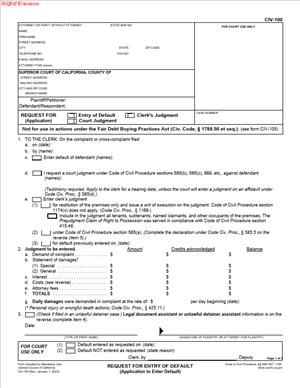
CIV-100 – Request for Entry of Default (Application to Enter Default)
Fill out nowJurisdiction: Country: United States | Province or State: California
The CIV-100 – Request for Entry of Default (Application to Enter Default) is a court form used in California civil cases when the other side has not responded on time. You file a motion to ask the court to officially note that the defendant failed to respond to your complaint. This step moves your case forward without their participation.
If you started a lawsuit and properly served the defendant, the law gives them a limited time to respond. When that deadline passes with no response, you may seek a default. This form is how you make that request in the Superior Court of California.
For many self-represented plaintiffs, this document feels like the next big step after filing and serving the complaint. It signals that the case can proceed toward a judgment based on the information you already filed. Understanding how it works helps you avoid delays or rejection.
This form does not decide the case by itself. It asks the clerk, or sometimes the judge, to formally record the defendant’s failure to respond. Once entered, it can limit the defendant’s ability to participate in the case unless the default is later set aside.
What is CIV-100 – Request for Entry of Default (Application to Enter Default)?
Clear definition
CIV-100 – Request for Entry of Default (Application to Enter Default) is a procedural court document. It tells the court that the defendant did not file a response within the required time after being served with the summons and complaint.
When the clerk enters a default, it creates an official court record that the defendant is in default. This changes the posture of the case. The defendant generally loses the right to file a late response without court permission.
The form also allows you to request related relief. In some cases, you may ask for entry of a clerk’s judgment at the same time, depending on the type of claim and the damages involved. In other cases, you request only entry of default and seek judgment later.
This document is part of the formal court process. It connects to earlier filings, including the complaint, proof of service, and any related case information. The court reviews it to confirm that all procedural requirements were met before entering the default.
Who typically uses this form?
This form is usually filed by a plaintiff in a civil lawsuit. The plaintiff is the person or business that started the case by filing a complaint.
Self-represented individuals often use this form in cases involving unpaid debts, property damage, contract disputes, or personal injury claims. Small business owners also use it when a customer or client does not respond to a lawsuit.
Attorneys file this form regularly as part of civil litigation practice. However, it is also designed to be accessible to people representing themselves.
In some cases, cross-complainants may use a similar process if a cross-defendant fails to respond. The structure of the request is similar, but it relates to the cross-complaint instead of the original complaint.
Why might you need this form?
You may need this form when the defendant does nothing after being served. If no answer, demurrer, motion to strike, or other responsive pleading is filed within the deadline, the case cannot move forward in the usual way.
Without the entry of default, the defendant still has the right to respond. Even if they are late, the court record will not show them in default unless you request it.
Filing this document allows you to move toward a default judgment. A default judgment can award money, confirm rights under a contract, or grant other relief requested in your complaint, as long as it is supported by the law and your filings.
In practical terms, this form helps prevent a case from sitting idle. It provides a structured way to continue the process when the other party does not participate.
Typical real-life scenarios
- You sue a former tenant for unpaid rent and property damage. The tenant is properly served but never files a response. After the response deadline passes, you prepare this form to ask the court to enter its default.
- You file a lawsuit over an unpaid invoice for services your company provided. The client receives the summons and complaint but does not answer. To move toward collecting the amount claimed, you submit this request.
- You bring a personal injury claim after a car accident. The defendant is served but does not respond within the required time. To continue the case without waiting indefinitely, you seek entry of default.
- You file a breach of contract case involving a written agreement. The defendant ignores the lawsuit. By requesting entry of default, you ask the court to formally recognize their failure to respond so that the matter can proceed toward judgment.
- In each of these examples, the key issue is the same. The defendant had notice of the lawsuit and did not act within the allowed time.
When would you use CIV-100 – Request for Entry of Default (Application to Enter Default)?
You use this form after the time to respond has expired. In most civil cases in California, a defendant has 30 days to respond after being personally served within the state. Different timelines may apply depending on how and where the service occurred.
Timing is critical. If you file too early, before the response deadline has passed, the clerk may reject your request. If you wait too long, the case may stall or become harder to manage.
This form is commonly used in unlimited civil cases, limited civil cases, and certain contract or collection matters. It is part of the standard civil procedure framework in the Superior Court of California.
You may also use it when multiple defendants are involved, and only some have failed to respond. In that situation, you can request entry of default against specific defendants while the case continues against others. The court record will reflect who is in default and who is still actively participating.
The form becomes relevant only after proper service. If the service was defective or incomplete, the court will not enter default. The request depends on proof that the defendant received a legally sufficient notice of the case.
Legal characteristics of CIV-100 – Request for Entry of Default (Application to Enter Default)
This form is procedural rather than substantive. It does not argue the facts of your case. Instead, it confirms that certain procedural steps occurred: filing the complaint, serving the defendant, and waiting for the response period to expire.
For the request to be effective, the court file must show valid proof of service. The dates must support that the response deadline has passed. The names of the parties must match exactly as they appear in the complaint.
Common reasons for rejection include incomplete sections, incorrect calculations of the response deadline, missing proof of service, or mismatched party names. Even small clerical errors can delay the entry of default.
The form may also require information about mailing notice of the request to the defendant. Courts often expect confirmation that a copy of the request was mailed to the defendant’s last known address. If that section is left blank or incomplete, the clerk may not process the filing.
This document does not automatically grant a judgment. Entry of default is one step. In many cases, you must submit additional documents to obtain a default judgment, such as declarations, calculations of damages, or court forms specific to the type of case.
Procedural rules can vary in detail depending on the type of case. For example, cases involving contracts, personal injury, or certain consumer matters may have additional requirements for proving damages before judgment is entered. The form itself remains the request for default, but what follows may differ.
Is it legally binding?
The entry of default, once processed by the clerk or ordered by the court, has legal effect. It limits the defendant’s ability to participate in the case without first asking the court to set aside the default.
However, the form itself is not a contract between parties. It is a request directed to the court. Its legal force comes from the court’s action in entering the default.
After a default is entered, the defendant generally cannot file a normal response unless the court grants relief from default. That can involve a separate motion and a showing of specific grounds.
Even after default, the plaintiff must still prove entitlement to the relief requested. A default does not guarantee that the court will award every item claimed. The requested relief must align with what was stated in the complaint and supported by law.
How to fill out CIV-100 – Request for Entry of Default (Application to Enter Default)
Step 1 – Complete the case caption
At the top of the form, fill in the court name, branch, and address exactly as they appear on your complaint. Enter the case number assigned by the court. List the plaintiff and defendant names precisely as they appear in the complaint, including any business designations or middle initials.
Step 2 – Identify the party in default
Indicate which defendant, or defendants, you are asking to have placed in default. If there are multiple defendants, name each one clearly. Make sure the names match the proof of service and the complaint without variation.
Step 3 – State the date of service
Provide the date on which each defendant was served with the summons and complaint. This date must match the filed proof of service. The court uses this date to determine whether the response deadline has passed.
Step 4 – Confirm that no response was filed
By completing the request, you are representing that no response has been filed within the allowed time. Review the court docket or file stamp carefully to confirm that no answer, motion, or other responsive document appears for that defendant.
Step 5 – Address any mailing requirements
If the form includes a section about mailing notice of the request, fill in the defendant’s last known address and the date you mailed a copy of the request. Provide the required declaration regarding mailing. This step shows that the defendant received notice of your request for default.
Step 6 – Specify relief related to judgment, if applicable
If you are also requesting entry of a clerk’s judgment, complete the sections that describe the amount demanded. Break down principal amounts, interest, costs, and any other sums claimed. The figures must match what was requested in the complaint and be supported by your filings.
Step 7 – Review for accuracy and consistency
Check every name, date, and dollar amount against your prior filings. Ensure that the case number is correct and that all required sections are completed. Confirm that your contact information is current and legible.
Step 8 – Sign and date the form
Sign the form in the space provided and enter the date of signing. If you are representing yourself, sign your own name and print it clearly. The signature confirms that the information provided is accurate to the best of your knowledge.
Step 9 – File the form with the court
Submit the completed form to the clerk of the Superior Court where your case is pending. Follow the court’s filing procedures for paper or electronic submission. Once processed, the court record will reflect whether the default has been entered.
Legal terms you might encounter in CIV-100 – Request for Entry of Default (Application to Enter Default)
- Default: A default happens when the defendant does not file a response within the required time after being served. On this form, you ask the clerk to officially record that failure. Once entered, the defendant generally loses the right to file a regular response without court permission.
- Clerk’s Entry of Default: This is the court clerk’s formal notation in the case file that the defendant is in default. It is not the same as a judgment. In this document, you request that the clerk make this entry based on the information you provide.
- Default Judgment: A default judgment is the court’s final decision in your favor after default is entered. The form includes sections where you may request judgment at the same time, if eligible. The judgment can award money, costs, or other relief you requested in your complaint.
- Proof of Service: Proof of service shows that the defendant was properly served with the summons and complaint. You must already have filed proof of service before asking for a default. The date of service listed on this form must match the proof of service in the court file.
- Declaration: A declaration is a written statement signed under penalty of perjury. Parts of this form require you to declare facts, such as that no response has been received. Your signature confirms that the information is true.
- Costs: Costs are specific expenses you paid to pursue the case, such as filing fees or service fees. The form allows you to list allowable costs if you are requesting judgment. You must enter accurate amounts and ensure they match your records.
- Interest: Interest may apply to money you claim, depending on what you requested in your complaint. If you seek interest in a default judgment, you must calculate and state it clearly. The amount should be consistent with what you originally asked for.
- Military Status Declaration: Courts require a statement about whether the defendant is in active military service. This protects service members from default judgments without certain safeguards. The form includes a section where you must provide this information.
- Dismissal of Other Defendants: If multiple defendants were named but you are only seeking default against one, you may need to address the status of the others. The form prompts you to clarify who is being defaulted. The court must understand the procedural posture of the entire case.
- Relief Requested: Relief refers to what you asked the court to award in your complaint. On this form, the relief you request in default cannot exceed what you originally demanded. The court compares this document to your complaint for consistency.
FAQs
Do I file this document before or after the defendant’s response deadline passes?
You file this document only after the defendant’s deadline to respond has expired. Check the proof of service in your court file to confirm the date the defendant was served. Then count the required response period from that date. If you file too early, the clerk will reject your request because the time to respond has not fully run.
How do I confirm the exact date to enter as the service date?
Look at the filed proof of service for the summons and complaint. The service date on this form must match the date listed in that proof exactly. Do not guess or use the mailing date unless that is what the proof states. If the dates do not match, the clerk may refuse to enter a default.
What if the defendant mailed me an answer but did not file it with the court?
Check the court docket to see whether an answer was officially filed. This document is based on what is filed with the court, not what was sent to you informally. If no response appears in the court record by the deadline, you may proceed. Keep any correspondence in your records in case questions arise later.
Can I request a default judgment at the same time I submit CIV-100 – Request for Entry of Default (Application to Enter Default)?
In some situations, yes. The form includes sections where you can request entry of default and default judgment together, depending on the type of case and relief sought. Review the parts of the form that ask for judgment amounts and costs. Make sure the amounts match your complaint and that you complete all required declarations before submitting both requests together.
What happens in the public court record once a default is entered?
Once the clerk enters default, the court docket will reflect that the defendant is in default. This means the defendant generally cannot file a standard response without first asking the court to set aside the default. The entry becomes part of the permanent case record and affects the next steps toward judgment.
Do I need to notify the defendant that I am requesting default?
This form includes a section where you state whether a copy was mailed to the defendant or their attorney, if known. Review the mailing section carefully and complete it if required. Enter the correct mailing address and the date you mailed it. Keep proof of mailing with your file in case the court asks for confirmation.
What if the defendant’s name is spelled differently on other documents?
Use the exact legal name as it appears in your complaint and in the proof of service. Consistency matters because the clerk compares this document to the case caption. Even small differences can cause delays. If there is a true error in the name, address it before seeking default.
What should I double-check before signing CIV-100 – Request for Entry of Default (Application to Enter Default)?
Before signing, confirm that the service date matches the proof of service, that no response appears in the court record, and that the relief requested does not exceed your complaint. Review all monetary amounts for accuracy. Make sure you completed any required declarations, including military status. Your signature confirms that everything stated is true and correct.
Checklist: Before, During, and After CIV-100 – Request for Entry of Default (Application to Enter Default)
Before
- Confirm that the defendant was properly served and that proof of service is filed.
- Calculate the response deadline based on the service date.
- Check the court docket to verify no response has been filed.
- Review your complaint to confirm the exact relief requested.
- Gather records of filing fees and service costs.
- Verify the defendant’s full legal name as listed in the complaint.
- Determine whether you are requesting entry of default only or default judgment as well.
During
- Complete the case caption exactly as it appears on prior filings.
- Enter the correct name of the defendant in default.
- Insert the exact service date from the proof of service.
- Confirm in writing that no response has been filed within the allowed time.
- Fill out the mailing section, if required, with accurate addresses and dates.
- List costs and interest clearly, if requesting judgment.
- Complete the military status declaration carefully.
- Review every section for consistency with your complaint.
After
- Make at least one copy of the completed form for your records.
- File the original with the court clerk using the accepted filing method.
- Note the filing date and keep any confirmation of submission.
- Monitor the case docket to see when the default is officially entered.
- Calendar the next step for requesting a default judgment if not requested together.
- Organize all related documents in your case file.
- Update your internal records to reflect the change in case status.
- Prepare for any hearing or additional paperwork if required for judgment.
Common mistakes to avoid with CIV-100 – Request for Entry of Default (Application to Enter Default)
- Mistake: Filing too early because you miscalculated the response deadline, which happens when you count from the wrong service date and can lead to rejection by the clerk; do not forget to verify the filed proof of service before calculating.
- Mistake: Listing a service date that does not match the proof of service, often due to copying from memory, which can delay entry of default; do not forget to cross-check the exact date in the court file.
- Mistake: Requesting more money than you asked for in the complaint, which happens when adding new damages or recalculating improperly, and can cause the court to deny judgment; do not forget that relief cannot exceed what was originally demanded.
- Mistake: Ignoring the military status section because it seems minor, which can result in the court refusing to enter judgment; do not forget to complete this declaration fully and accurately.
- Mistake: Failing to mail a copy to the defendant when required, often due to misunderstanding the notice section, which can delay processing; do not forget to complete the mailing information and keep proof.
- Mistake: Using an inconsistent defendant name, which happens when abbreviations or spelling variations creep in and may cause confusion in the record; do not forget to match the name exactly to the complaint.
- Mistake: Assuming entry of default automatically means you have a judgment, which leads to inaction and stalled enforcement; do not forget that default and default judgment are separate steps unless granted together.
- Mistake: Signing without reviewing all amounts and declarations, often due to rushing, which can create credibility issues or require correction; do not forget that your signature confirms everything is accurate under penalty of perjury.
What to do after filling out CIV-100 – Request for Entry of Default (Application to Enter Default)
Once you complete the form, shift your focus to proper filing and follow-up. Accuracy matters, but so does procedure. You want the court to process your request without delay.
Start by reviewing the entire document one more time. Compare it side by side with your complaint and the proof of service. Confirm that names, dates, and amounts match exactly.
- Step 1: Make at least two copies of the completed form—one for your records and one for mailing if required.
- Step 2: Organize supporting documents, including proof of service and any cost calculations, even if they are already filed.
- Step 3: Submit the original form to the court using the accepted filing method for your case.
- Step 4: If mailing is required, mail a copy to the defendant or their attorney and note the date of mailing.
- Step 5: Obtain confirmation of filing, such as a stamped copy or electronic receipt.
- Step 6: Check the court docket within several days to confirm that a default has been entered.
- Step 7: Record the date of entry of default in your case notes.
- Step 8: If you did not request default judgment at the same time, prepare the next required documents for judgment.
- Step 9: Calendar any deadlines related to proving damages or attending a hearing, if applicable.
- Step 10: Keep all confirmations, copies, and related documents in a dedicated case folder.
If the clerk enters a default, review the docket entry carefully. Make sure it names the correct defendant. If there is an error, address it promptly.
If the clerk rejects your filing, read the rejection reason closely. Correct the issue immediately and resubmit. Common corrections involve dates, missing signatures, or incomplete declarations.
Once the default is entered and, if applicable, judgment is granted, update your records to reflect the new status. This affects how you proceed with enforcement or collection efforts. Keep your paperwork organized. Clear records make the next stage of your case smoother and more efficient.
Disclaimer: This guide is provided for informational purposes only and is not intended as legal advice. You should consult a legal professional.