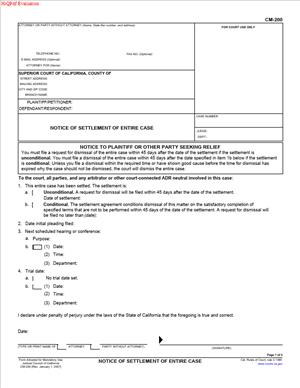
CM-200 – Notice of Settlement of Entire Case
Fill out nowJurisdiction: Country: United States | Province or State: California
The CM-200 – Notice of Settlement of Entire Case is a court form used in California civil cases to inform the court that all parties have reached a settlement. If you have an active lawsuit and the dispute has been resolved, this document tells the court that the case does not need to move forward to trial.
When you are representing yourself, this form can feel like the final administrative step after a long process. Even if you and the other side have signed a written agreement, the court does not automatically know your case has settled. The filing formally updates the court’s records.
The CM-200 – Notice of Settlement of Entire Case matters because courts manage busy calendars. Trials, hearings, and case management conferences are scheduled months in advance. Notifying the court of a full settlement allows those dates to be cleared and prevents unnecessary appearances.
This form is not the settlement agreement itself. It is a notice. It communicates that the entire case, including all claims and cross-claims, has been resolved.
What is CM-200 – Notice of Settlement of Entire Case?
Clear definition
CM-200 – Notice of Settlement of Entire Case is a standard California Judicial Council form used in civil cases to notify the Superior Court that the entire lawsuit has been settled. It applies when every issue between all parties has been resolved.
The form identifies the case, the parties, and the court department. It also states whether a request for dismissal will be filed and, if so, by what date. This helps the court track whether the case will be formally closed.
This document does not describe the terms of your agreement. It simply confirms that a settlement has been reached and that no further court proceedings are expected, subject to filing a dismissal.
Who typically uses this form?
Plaintiffs often file this form after reaching a settlement with the defendant. In some cases, defendants or cross-complainants may also file it, especially if they have filed claims of their own that are included in the resolution.
Self-represented litigants use this form when they have negotiated directly with the other party and resolved the dispute. Attorneys frequently file it on behalf of their clients as part of standard case management practice.
It is commonly used in civil matters such as contract disputes, personal injury claims, property disputes, employment matters, and other non-criminal cases handled by the Superior Court’s civil division.
Why might you need this form?
You may need this form if your case is already on the court’s calendar for a hearing, case management conference, or trial, and you have now settled all issues. Filing the notice alerts the court that those dates may no longer be necessary.
Courts often require prompt notice of settlement once an agreement is reached. This ensures court time is not reserved for a matter that will not proceed.
You may also need this form if the settlement agreement requires certain actions before dismissal, such as payment within a set period. The form allows you to inform the court of the settlement while indicating that a dismissal will follow.
Typical real-life scenarios
- Two drivers are involved in a car accident, and one files a lawsuit for damages. After negotiation, they agree on a payment amount. Once both sides confirm the agreement, the plaintiff files this notice to inform the court that the case has settled.
- A landlord sues a former tenant for unpaid rent and property damage. Before trial, the parties agree on a payment plan. They resolve all claims. The landlord files the form to notify the court that no further proceedings are needed.
- An employee brings a civil claim for unpaid wages. During mediation, the employer agrees to pay a negotiated amount. After signing a settlement agreement, the employee or their attorney files the notice to update the court.
- Two businesses are in a contract dispute. After exchanging documents and attending case management conferences, they reached a written agreement resolving all issues. One side files the notice so the trial date can be vacated.
When would you use CM-200 – Notice of Settlement of Entire Case?
You use this form after a full settlement has been reached in a California civil case and before the case is formally dismissed. The timing is important. The notice is typically filed once all parties agree to the terms, even if certain performance steps, such as payment, will occur later.
This form is used when the entire case is resolved. That means all claims by all parties are included. If there are cross-complaints, they must also be part of the agreement. If any issue remains pending, this form may not reflect the true status of the case.
You may file the notice after mediation, informal negotiations, or direct communication between parties. It applies whether the case is early in the process or close to trial.
If a trial date has already been set, courts generally expect prompt notification once a settlement occurs. The notice helps prevent unnecessary preparation by the court and witnesses.
Self-represented plaintiffs often use this form after confirming that the defendant has agreed in writing to resolve the matter. Defendants may also file it if they initiated claims or if they are taking responsibility for final paperwork as part of the agreement.
Legal characteristics of CM-200 – Notice of Settlement of Entire Case
This form functions as a formal communication to the court. It becomes part of the official case file once filed. It signals that the dispute is no longer contested, subject to dismissal.
For the notice to be effective, it must correctly identify the case number, court location, and party information. Errors in case numbers or party names can delay processing or cause confusion in the court record.
A common issue arises when the notice is filed, but a dismissal is never submitted. The court may set a follow-up hearing or issue an order to show cause to confirm the case status. The notice alone does not close the case.
Another common problem occurs when the settlement is not actually complete. If a party files the notice but the agreement falls apart, the court may need clarification. Filing prematurely can create procedural complications.
In California civil courts, the notice works together with a separate dismissal form. The dismissal formally ends the case. The notice simply informs the court that dismissal is expected.
This form does not create the settlement agreement. It does not enforce payment terms. It does not replace a written contract between the parties. Its role is administrative and procedural.
Is it legally binding?
The CM-200 – Notice of Settlement of Entire Case is not, by itself, a binding contract between parties. It does not contain settlement terms or signatures from all sides agreeing to specific obligations. The binding agreement is usually a separate written document signed by the parties.
However, the filing of the notice has procedural significance. Once submitted, it represents a statement to the court that the case has been resolved. Courts rely on that representation when managing their calendars.
If a party files the notice inaccurately, it may lead to court inquiries or procedural consequences. The notice reflects the status of the case but does not replace the enforceable settlement agreement.
How to fill out CM-200 – Notice of Settlement of Entire Case
Step 1 – Identify the court and case information
At the top of the form, enter the name of the Superior Court handling your case, including the branch location if applicable. Provide the full case number exactly as it appears on prior court documents. List the names of the plaintiff and defendant in the same format used in earlier filings.
Step 2 – Provide your contact information
Fill in your name, address, telephone number, and, if applicable, email address. If you are self-represented, indicate that you are appearing without an attorney. If you are filing on behalf of a party, make sure your role is clearly identified.
Step 3 – Confirm that the entire case has settled
In the main section of the form, indicate that the entire case has been settled. This means all parties and all claims are resolved. Review your settlement agreement to confirm that nothing remains pending before selecting this option.
Step 4 – State the expected date of dismissal
Enter the date by which a request for dismissal will be filed. This date may depend on the terms of your agreement, such as when payment is due. The court uses this information to track when the case should be formally closed.
Step 5 – Address any scheduled hearings or trial dates
Review the form to determine whether you must provide information about upcoming hearings, conferences, or trial dates. If the case has events scheduled, ensure the notice reflects that the settlement has occurred so the court can take appropriate administrative action.
Step 6 – Sign and date the form
Sign your name and enter the date of signing. By signing, you confirm that the information in the notice is accurate to the best of your knowledge. If you are self-represented, you sign on your own behalf.
Step 7 – File the form with the court
Submit the completed form to the clerk of the Superior Court handling your case. Filing procedures may vary depending on whether the court accepts electronic or paper submissions. Ensure the case number and party names are clearly visible on the filed document.
Step 8 – Serve the notice on all parties
Provide a copy of the filed notice to all other parties in the case. Service ensures that everyone is informed that the court has been notified of the settlement. Follow the applicable service method used in your case, and keep a record of how and when service was completed.
Step 9 – Follow through with the dismissal
After filing the notice, prepare and submit the appropriate dismissal form by the date listed in the notice. The dismissal formally closes the case in the court’s records. Confirm that the dismissal has been processed so the case status reflects that it is concluded.
Legal terms you might encounter in CM-200 – Notice of Settlement of Entire Case
- Settlement: A settlement is an agreement between all parties to resolve the dispute without continuing to trial. In this form, you are confirming that the entire case has been settled. The court relies on your statement to update its schedule and remove future hearings.
- Entire Case: This means every claim by every party has been resolved. It includes complaints, cross-complaints, and any amendments. If anything remains unresolved, this document may not be appropriate.
- Dismissal: A dismissal formally ends the case in court. On this form, you state the expected date by which the case will be dismissed. The dismissal is usually filed separately after settlement terms are completed.
- Conditional Settlement: This refers to a settlement that depends on certain actions, such as payment over time. The form allows you to indicate that dismissal will occur after those conditions are satisfied. The court may monitor the case until the dismissal is filed.
- Unconditional Settlement: This means the settlement is final and not dependent on future conditions. In this situation, dismissal should be filed promptly. The court expects closure without delay.
- Hearing Date: A hearing date is a scheduled court appearance before a judge. When you file this document, you must list any upcoming hearings. The court may vacate or cancel them based on your notice.
- Trial Date: The trial date is the scheduled date for presenting evidence and arguments in court. Reporting settlement helps the court remove the case from its trial calendar. This frees court resources for other cases.
- Proof of Service: Proof of service confirms that you provided a copy of the filed form to all other parties. It shows who was served, how, and when. Courts require this to ensure fairness and proper notice.
- Party or Attorney of Record: This refers to the individual or lawyer officially listed in the case file. Only a party or its authorized attorney should sign the form. The name must match the court’s records.
- Case Number: The case number is the court’s tracking identifier for your lawsuit. You must enter it exactly as it appears on prior court documents. Even a small typo can delay processing.
FAQs
Do I need to attach the settlement agreement to this form?
No. You generally do not attach the settlement agreement when filing this document. The court only needs to know that the entire case has settled and when dismissal is expected. Keep the signed agreement in your records unless the court specifically orders you to file it.
What date should I enter as the expected date of dismissal?
Enter a realistic date by which you believe the dismissal will be filed. If the settlement requires payment or another action first, choose a date after those conditions are completed. Make sure the date is clear and written in the correct format so the clerk can read it without confusion.
Who is allowed to sign CM-200 – Notice of Settlement of Entire Case?
The person signing must be a party to the case or the attorney of record. The name should match the court’s file exactly. If you are self-represented, you sign your own name and list your contact information as shown in prior filings.
What happens if I file this form but never file the dismissal?
The court may schedule a follow-up hearing or issue a notice asking about the status of the case. Some courts set an order to show cause if dismissal is not filed by the date you listed. Filing this form does not automatically close the case.
Will filing this document automatically cancel my upcoming court dates?
Not always. The court reviews the notice and may vacate hearings or trial dates. Until you receive confirmation or see the calendar updated, assume your court dates remain scheduled.
Can I file this form if only some of the claims have settled?
No. This document is used when the entire case has resolved. If any claim or cross-complaint remains active, you may need a different filing to notify the court of a partial settlement.
Does filing CM-200 – Notice of Settlement of Entire Case change the public record?
Yes. The case docket will show that a notice of settlement was filed. It signals that the matter is expected to be dismissed. The actual dismissal will later appear as a separate entry.
What if the other side refuses to sign or disagrees that the case has settled?
You should not file this document unless the settlement truly covers the entire case. If there is disagreement, the case may still be active. Make sure the agreement is confirmed and clear before you notify the court.
Checklist: Before, During, and After CM-200 – Notice of Settlement of Entire Case
Before
- Confirm that all parties have agreed to settle every claim in the case.
- Review the written settlement terms to verify whether they are conditional or unconditional.
- Check the court docket for all upcoming hearings and trial dates.
- Verify the exact case number and party names as they appear in prior filings.
- Decide on a realistic expected dismissal date.
- Confirm who is authorized to sign the form.
- Prepare current contact information for the signature block.
During
- Enter the court name and case number exactly as shown on earlier documents.
- List all parties as required by the caption.
- Indicate clearly that the entire case has settled.
- Mark whether the settlement is conditional or unconditional, if applicable.
- Provide the expected date of dismissal.
- Identify any upcoming hearings or trial dates.
- Sign and date the form with the correct printed name.
- Complete the proof of service section accurately.
After
- Make copies of the signed form for your records.
- File the original with the court using the accepted filing method.
- Serve a copy on all other parties.
- Confirm that the court has processed and entered the notice.
- Monitor the docket for cancellation of hearings.
- Calendar the deadline to file the dismissal.
- File the dismissal by the date you listed.
- Keep the settlement agreement and proof of filing in a secure place.
Common mistakes to avoid with CM-200 – Notice of Settlement of Entire Case
- Mistake: Filing the form before all claims are fully resolved, which happens when parties assume an agreement is final; this can mislead the court and create scheduling problems, so do not forget to confirm that every complaint and cross-complaint is included.
- Mistake: Entering the wrong case number or misspelling a party’s name, often due to copying from memory; this may cause rejection or misfiling, so do not forget to copy details exactly from prior court documents.
- Mistake: Listing an unrealistic dismissal date because you hope conditions will be completed quickly; this can trigger court follow-ups or hearings, so do not forget to choose a date that allows enough time.
- Mistake: Forgetting to serve all parties, which happens when someone assumes electronic filing is enough; this can delay closure of the case, so do not forget to complete proper proof of service.
- Mistake: Assuming hearings are automatically canceled after filing, which leads to missed appearances if the court does not vacate them; do not forget to verify the court calendar.
- Mistake: Failing to file the actual dismissal after submitting the notice, often because parties think the notice ends the case; this keeps the case open, so do not forget that dismissal is a separate required step.
- Mistake: Signing without proper authority, such as when someone other than the party or attorney signs; this may invalidate the filing, so do not forget to ensure the signer is authorized.
- Mistake: Leaving sections blank that require a response, which happens when you overlook small checkboxes; this can result in clerk rejection, so do not forget to review every line before filing.
What to do after filling out CM-200 – Notice of Settlement of Entire Case
Once you complete the form, slow down and review it carefully. Check every name, number, and date. Make sure the expected dismissal date matches your settlement terms. Confirm that you signed and dated it.
Make at least two copies. Keep one for yourself. Use the other for service on the opposing party or their attorney.
- Step 1: Review the entire document for accuracy and completeness.
- Step 2: Sign and date the form if you have not already done so.
- Step 3: Make copies for your records and for service.
- Step 4: File the original with the court using the approved filing method.
- Step 5: Serve a copy on all parties and complete the proof of service.
- Step 6: Confirm that the clerk accepted and processed the filing.
- Step 7: Check the court calendar to see whether hearings or trial dates were vacated.
- Step 8: Track the deadline you listed for filing the dismissal.
- Step 9: Prepare and file the dismissal document by that deadline.
- Step 10: Verify that the dismissal appears on the court docket.
After filing, monitor your mail and any electronic notifications from the court. If the court sets a status hearing because dismissal was not filed on time, attend that hearing or resolve the issue before the date.
Keep your settlement agreement, filed notice, proof of service, and dismissal together in one place. You may need these documents later for tax purposes, enforcement, or proof that the dispute was resolved.
Finally, update your personal records. If the case involved a business dispute, insurance matter, or property issue, make sure your internal files reflect that the case has settled and been dismissed. Clear documentation now prevents confusion later.
Disclaimer: This guide is provided for informational purposes only and is not intended as legal advice. You should consult a legal professional.