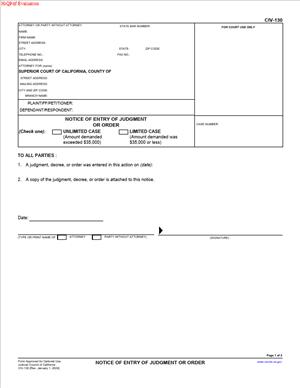
CIV-130 – Notice of Entry of Judgment or Order
Fill out nowJurisdiction: Country: United States | Province or State: California
The CIV-130 – Notice of Entry of Judgment or Order is a court form used in California civil cases to formally notify parties that a judgment or order has been entered by the court. If you are involved in a lawsuit and the judge has made a final decision, this document helps confirm that everyone has been officially informed.
You may encounter this form after a trial, a motion hearing, or another court proceeding where the judge signs a judgment or order. The CIV-130 – Notice of Entry of Judgment or Order does not decide the case. Instead, it records that notice of the court’s decision has been given.
This matters because many court deadlines begin running from the date notice of entry is served. For example, time limits for filing an appeal or asking the court to reconsider a decision are often tied to when notice is served, not just when the judge signs the order.
If you are representing yourself, understanding this form can help you track important dates and avoid missing deadlines. It also helps you properly complete and file the document if you are the one responsible for giving notice to the other side.
What is CIV-130 – Notice of Entry of Judgment or Order?
Clear definition
CIV-130 – Notice of Entry of Judgment or Order is a standardized California court form used to inform all parties in a civil case that a judgment or court order has been officially entered into the court record.
When a judge signs a judgment or order, it becomes part of the court file. However, the other parties must also be formally notified. This form documents that notice has been given and typically includes proof of service showing how and when the notice was delivered.
It acts as written confirmation that the decision is final in the court’s records and that the notification process has been completed.
Who typically uses this form?
This form is commonly used by the party that prepared the judgment or order for the court’s signature. Often, that is the prevailing party, meaning the party that won the motion or case.
Attorneys frequently complete and file this form after the court signs a proposed judgment. However, self-represented litigants also use it when they are responsible for giving notice of entry.
In some cases, the court clerk may mail a notice of entry. When that happens, a separate CIV-130 may not be required. In other cases, the responsibility falls on one of the parties.
Why might you need this form?
You may need this form to trigger the start of certain post-judgment deadlines. Once notice of entry is served, the clock may begin for filing an appeal or other post-judgment motions.
You might also use it to create a clear record that the other side received notice. This can reduce disputes about whether someone was properly informed.
In enforcement situations, having a documented notice of entry can help show that the judgment is final and that the opposing party had formal notice of the court’s decision.
Typical real-life scenarios
- After a civil trial, the judge signs a written judgment in favor of one party. The prevailing party prepares and files this form to confirm that notice of entry has been mailed to the other side.
- In a contract dispute, the court grants a motion for summary judgment. The moving party submits a proposed order, the judge signs it, and the party then serves notice of entry using this document.
- In a family-related civil matter handled in civil court, such as certain property disputes, a written order is signed after a hearing. The party that prepared the order completes the notice and serves it to ensure deadlines are clear.
- In a collections case, the plaintiff obtains a default judgment because the defendant did not respond. After the judgment is entered, the plaintiff serves notice of entry to formally notify the defendant of the outcome.
When would you use CIV-130 – Notice of Entry of Judgment or Order?
You use this form after a judge signs, and the clerk enters a judgment or order in a California civil case. It is not used before a decision is made. It comes into play only after the court has taken formal action.
If you prepared a proposed judgment and the judge approved and signed it, you may be responsible for serving notice of entry. In many civil cases, the court’s ruling from the bench is later reduced to a written order. Once that written order is entered, notice may be required.
You may also use this form when a motion results in a written order that affects the rights of the parties. Examples include orders granting or denying motions to dismiss, motions for summary judgment, or post-judgment motions.
The typical roles involved include the prevailing party, the opposing party, and sometimes the court clerk. The party that benefits from the ruling often handles the completion and service of the notice. However, practices can vary depending on the case type and local court procedures.
Legal characteristics of CIV-130 – Notice of Entry of Judgment or Order
This form is procedural. It does not change the substance of the judgment or order. Instead, it documents that notice of the entry has been provided in a formal way.
For the document to be effective, it generally must correctly identify the case name, case number, court, and the specific judgment or order entered. It must also accurately state the date of entry and include proper proof of service showing how the notice was delivered.
Common problems include incorrect dates, missing attachments of the judgment or order, incomplete proof of service, or serving the wrong address. These issues can lead to disputes about whether notice was properly given.
In California civil cases, service by mail is common, but other methods may be used depending on the circumstances. The effectiveness of the notice often depends on whether it complies with applicable service rules.
This form does not replace the judgment itself. It does not grant new rights, change deadlines on its own, or modify the court’s ruling. It simply confirms that the ruling has been entered and that notice has been served.
Is it legally binding?
The CIV-130 – Notice of Entry of Judgment or Order is not a contract and does not create new obligations by itself. Its legal effect comes from the fact that it provides formal notice of a court action.
Once properly served, it can trigger statutory deadlines. For example, time limits for appeals or certain post-judgment motions often run from the date notice of entry is served. In that sense, it has significant procedural consequences.
If the notice is defective or not properly served, there may be disputes about when deadlines began. The underlying judgment or order remains valid, but questions may arise about timing for further actions.
How to fill out CIV-130 – Notice of Entry of Judgment or Order
Step 1 – Complete the case caption
At the top of the form, fill in the court name, branch address, and case information exactly as it appears on other filed documents. Enter the names of the parties and the case number. Accuracy here is critical because the notice must match the official court record.
Step 2 – Identify the judgment or order
In the main section of the form, state the title of the judgment or order that was entered. Include the date the judgment or order was entered by the clerk. Make sure this date matches the court’s file stamp or official entry date.
Step 3 – Attach the filed judgment or order
Attach a copy of the signed and entered judgment or order to the notice. The attachment should clearly show the judge’s signature and the clerk’s filing stamp. This ensures the recipient can see exactly what was entered.
Step 4 – Complete the proof of service section
Fill out the proof of service portion of the form. Identify who served the notice, how it was served, and on whom it was served. Include the date of service and the addresses used. The person who serves the documents typically signs this section.
Step 5 – Review for consistency and accuracy
Carefully compare the information on the notice with the judgment, the court docket, and prior filings. Confirm that names, dates, and case numbers match. Small errors can create confusion about when notice was given.
Step 6 – File the form with the court
Submit the completed form, with attachments, to the court for filing. The court will add it to the case record. Once filed, it becomes part of the official file showing that notice of entry was served.
Step 7 – Keep copies for your records
Retain a filed copy of the notice and proof of service. This documentation can help you track deadlines and respond to any future questions about when notice was given.
Legal terms you might encounter in CIV-130 – Notice of Entry of Judgment or Order
- Entry of Judgment: This is the official act of the court clerk recording the judgment in the court’s records. The date of entry is critical because it often starts the clock for post-judgment deadlines, including appeals. On this form, you are notifying other parties that this entry has occurred.
- Order: An order is a written decision by a judge that directs someone to do or not do something. It may resolve part of a case or address a specific issue. This document can be used to give notice that such an order has been officially entered.
- Proof of Service: This section confirms that you mailed or otherwise delivered a copy of the notice and the judgment or order to all required parties. It includes details like who served the documents, how they were served, and when. Courts rely on this section to verify that proper notice was given.
- Party: A party is any person or entity directly involved in the case, such as a plaintiff or defendant. You must ensure that every party listed in the case caption receives notice. The names must match the court’s records exactly.
- Case Caption: The case caption appears at the top of the first page. It includes the court name, case number, and the names of the parties. This information must match the filed judgment or order.
- Date of Entry: This is the date the clerk officially entered the judgment or order into the court record. It is not necessarily the same as the date the judge signed the document. You must identify and report the correct entry date.
- Service by Mail: A common method of delivering legal documents. The person serving the documents must not be a party to the case and must be at least 18 years old. The date of mailing is important because it may affect deadlines.
- Appeal Deadline: The time limit within which a party may challenge the judgment or order. This deadline often begins to run from the date notice of entry is served. Accurate service information is essential because it can impact these time limits.
- Clerk’s Certificate of Mailing: In some cases, the court clerk may send notice directly. If that happens, the clerk’s mailing may appear in the court file. This document is used when a party, not the clerk, is giving formal notice.
FAQs
What date should I list as the date of entry?
You must list the date the clerk entered the judgment or order into the court record. Look at the filed copy of the judgment or order for a stamp or notation showing the entry date. Do not use the hearing date or the date the judge signed it unless that is also the official entry date.
Do I need to attach a copy of the judgment or order?
Yes. You should attach a filed-endorsed copy of the judgment or order that shows the court’s stamp. This allows the receiving party to see exactly what was entered and confirms the entry date you listed.
Who can serve this document?
The person serving must be at least 18 years old and not a party to the case. You cannot serve it yourself if you are involved in the case. The server must complete the proof of service section accurately.
What happens if I list the wrong case number?
If the case number does not match the court’s records, the filing may be rejected or misfiled. This can delay notice and affect deadlines. Always copy the case number directly from the court’s filed judgment or order.
Does filing CIV-130 – Notice of Entry of Judgment or Order change the judgment?
No. This document does not change the substance of the judgment or order. It simply provides formal notice that the court has entered it. The original judgment remains exactly as entered by the court.
When does the appeal period start?
In many situations, the appeal period begins when notice of entry is served. The date shown in the proof of service section becomes important. You should confirm the service date and keep records because it may affect time calculations.
What if the other party was not at the hearing?
Even if a party did not attend the hearing, you still must serve them with notice of entry if required. This document ensures they are formally informed of the outcome and the entry date.
What if the court clerk already mailed notice?
Check the court file to see whether the clerk issued a notice of entry. If the clerk already provided official notice, you may not need to file CIV-130 – Notice of Entry of Judgment or Order. Review the docket carefully to avoid duplicate filings.
Checklist: Before, During, and After CIV-130 – Notice of Entry of Judgment or Order
Before
- Obtain a field-endorsed copy of the judgment or order showing the entry date.
- Confirm the correct case number and party names from the court record.
- Verify whether the clerk has already mailed notice of entry.
- Identify all parties and their current mailing addresses.
- Choose a qualified person to complete the service.
- Review the form to understand each required field.
- Make enough copies for all parties and your records.
During
- Complete the case caption exactly as it appears on the court documents.
- Enter the correct date of entry from the court stamp.
- Clearly identify whether you are giving notice of a judgment or an order.
- Attach a filed-endorsed copy of the judgment or order.
- Ensure the server completes the proof of service section in full.
- Double-check dates for consistency between the attachment and the notice.
- Review all names and addresses for accuracy.
After
- File the original with the court if required.
- Confirm the filing was accepted and stamped.
- Keep a stamped copy for your records.
- Provide copies to all served parties.
- Calendar any deadlines triggered by the service.
- Store the proof of service with your case file.
- Monitor the court docket for updates.
Common mistakes to avoid with CIV-130 – Notice of Entry of Judgment or Order
- Mistake: Listing the hearing date instead of the official entry date because they look similar, which can misstate deadlines and cause confusion; do not forget to verify the clerk’s entry stamp.
- Mistake: Serving the documents yourself as a party to the case because it seems convenient, which can invalidate service and delay deadlines; do not forget the server must be a non-party adult.
- Mistake: Failing to attach the filed-endorsed judgment or order because you assume everyone has a copy, which may lead to rejection or disputes; do not forget to include the stamped version.
- Mistake: Using outdated addresses for parties because contact details changed during the case, which can result in ineffective service; do not forget to confirm the current mailing information.
- Mistake: Entering a case number with a typo because you rely on memory, which can cause filing errors or misfiling; do not forget to copy it directly from the court document.
- Mistake: Leaving parts of the proof of service incomplete because they seem minor, which can undermine the validity of the notice; do not forget every required field must be filled out.
- Mistake: Filing without reviewing whether the clerk already issued notice, which can create duplicate records and confusion; do not forget to check the docket first.
- Mistake: Ignoring the impact on appeal timelines because you assume they start at the hearing, which can cause missed deadlines; do not forget that service of notice may trigger time limits.
What to do after filling out CIV-130 – Notice of Entry of Judgment or Order
Once you complete the form, your focus shifts to proper filing, confirmation, and recordkeeping. Accuracy and timing matter at this stage.
- Step 1: Make copies of the completed notice and the attached judgment or order for each party and for yourself.
- Step 2: Have your designated server mail or otherwise serve the documents as indicated on the form.
- Step 3: Ensure the server fully completes and signs the proof of service section.
- Step 4: Assemble the original signed notice with the attached filed-endorsed judgment or order.
- Step 5: Submit the original to the court clerk for filing if required in your case.
- Step 6: Obtain a filed-stamped copy from the clerk or confirm electronic filing acceptance if applicable.
- Step 7: Review the filed copy to confirm the court accepted it without correction.
- Step 8: Calendar any deadlines that may run from the service date, including potential post-judgment motions or appeal periods.
- Step 9: Place the stamped copy and proof of service in your case file in chronological order.
- Step 10: Update any personal case tracking notes to reflect the date of entry and date of service.
- Step 11: Monitor the court docket to confirm the filing appears in the official record.
- Step 12: Keep all related documents together in case you need to demonstrate when notice was given.
By taking these steps, you create a clear record that notice was properly provided. That record protects you if timing or compliance is later questioned.
Disclaimer: This guide is provided for informational purposes only and is not intended as legal advice. You should consult a legal professional.