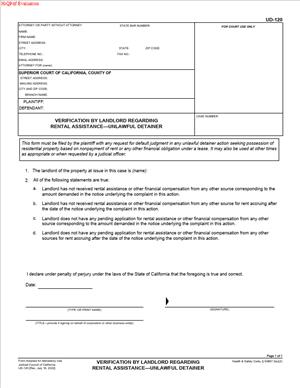
UD-120 – Verification by Landlord Regarding Rental Assistance – Unlawful Detainer
Fill out nowJurisdiction: Country: United States | Province or State: California
What is a UD-120 – Verification by Landlord Regarding Rental Assistance – Unlawful Detainer?
UD-120 is a California court form you use in an unlawful detainer (eviction) case to verify your actions regarding rental assistance tied to COVID‑19 rental debt. It asks you, as the landlord or property owner’s agent, to confirm whether you applied to a government rental assistance program for the tenant’s benefit, the status of that application, and what you did if the tenant did not cooperate or a program was unavailable. Courts use this information to decide whether you satisfied legal prerequisites before moving forward on an eviction based on nonpayment of rent that accrued during the defined COVID‑19 rental debt period.
This form belongs to the Superior Court of California’s landlord‑tenant case process. It focuses on nonpayment claims that include rent, utilities, or fees due during the state’s COVID‑19 emergency timeframes. Those laws required landlords to take specific steps—most notably applying for available governmental rental assistance—before a court could enter judgment for possession in nonpayment cases tied to that period.
Who typically uses this form?
Residential landlords, property owners, property managers, and their attorneys. You might also use it as a self-represented landlord. Tenants and tenant attorneys review it to confirm the landlord’s compliance.
Why would you need this form?
Because many California courts require a UD‑120 before they will let an eviction for nonpayment proceed when the claimed debt includes any months falling within the COVID‑19 rental debt period. If you did not apply (when you were required to) or cannot show you did, the court can delay or deny your request for judgment. UD‑120 provides a standardized, sworn statement that you complied—or explains why compliance was not possible.
Typical usage scenarios
- You filed an unlawful detainer for unpaid rent that includes months from the COVID‑19 period. You must show that you applied for rental assistance or that a qualifying exception applies, such as tenant refusal or a closed program.
- You are preparing to request a default judgment in a nonpayment case. The court will need proof that you completed the rental assistance step or waited the required time after submitting a complete application.
- You served a pay‑or‑quit notice for nonpayment that includes pre‑ and post‑COVID‑19 period rent. The court still requires verification related to the covered months.
- You manage property for an owner entity. You sign UD‑120 as an authorized agent under penalty of perjury and file it before trial.
The bottom line: UD‑120 is the court’s way of confirming that you followed California’s rental assistance protocols before it will allow an eviction to move forward for qualifying COVID‑19 rental debt.
When Would You Use a UD-120 – Verification by Landlord Regarding Rental Assistance – Unlawful Detainer?
You use UD‑120 when your unlawful detainer case for nonpayment includes any rental amounts that fall within the state’s defined COVID‑19 rental debt period. That period covered rent, utilities, or other sums that came due during specific dates set by state law. If your complaint or notice dates back to those months, the court will expect UD‑120.
For example, assume your tenant owes six months of rent, three of which fall in the covered period and three outside it. You still complete UD‑120 because the case includes covered months. Or imagine you started an eviction for rent due entirely in the post‑emergency period, but your ledger or notice references late fees or balance carryovers from the covered months. The court can require UD‑120 to confirm your compliance.
Another common situation: you applied for rental assistance through a government program. The application was denied, or funds were exhausted, or your tenant refused to complete their portion. UD‑120 captures those facts so the court can evaluate whether you satisfied the statutory requirements. If your application is still pending, UD‑120 helps the court decide whether to pause the case or let it proceed, depending on timing and completeness.
Typical users include:
- Individual landlords with a single‑family home or duplex whose tenant fell behind during the pandemic months.
- Property managers for small or large portfolios who must document assistance applications across several units.
- Attorneys preparing cases for owners and needing a sworn verification to attach to a default request or trial brief.
- Tenants and advocates reviewing landlord filings to challenge compliance or accuracy.
If your case involves only rent that came due entirely outside the COVID‑19 rental debt period, the court may not require UD‑120. But if any part of your claim touches that period, expect to file it. When in doubt, complete and file UD‑120 to avoid delay.
Legal Characteristics of the UD-120 – Verification by Landlord Regarding Rental Assistance – Unlawful Detainer
UD‑120 is a sworn verification submitted to the Superior Court in an unlawful detainer action. It is legally significant because you sign it under penalty of perjury. That makes the statements binding in your case. If the court finds your verification false or incomplete, you can face case sanctions, dismissal of your claim related to covered months, or other remedies. In extreme cases, knowingly false statements can expose you to perjury consequences.
What ensures enforceability?
First, the form operationalizes statutory conditions that restrict courts from entering judgment for possession in nonpayment cases involving COVID‑19 rental debt unless the landlord has taken defined steps. Those steps typically include submitting a complete government rental assistance application for the tenant’s benefit and waiting a specified period, or showing that the tenant refused to cooperate or that no assistance was available. UD‑120 functions as the court’s record of your compliance.
Second, UD‑120 ties to the court’s gatekeeping role. Courts use it to decide whether to issue judgments or writs based on covered debt. If your verification shows noncompliance, the court can delay proceedings, continue the trial, deny default judgment, or limit the scope of relief.
General legal considerations:
- Covered debt window. The duty to verify relates to amounts due in the COVID‑19 rental debt period defined by state law. If your claim includes those months, the court will likely require UD‑120.
- Completeness of the application. Courts look for evidence that you submitted a complete application to a government rental assistance program that served the property’s location and that you provided all required information. An “interest form” or waitlist entry usually does not satisfy the requirement.
- Tenant cooperation. If the tenant failed to respond or refused to participate after genuine attempts by the landlord and the program, UD‑120 lets you explain that. Courts often require specifics: dates you invited the tenant to apply, methods used to contact them, and program notices.
- Timing. If you submitted a complete application, courts typically require that you waited the prescribed period before seeking judgment. If the application was denied or funds exhausted, you document that and may proceed.
- Scope of relief. If assistance was approved and paid, you must credit those payments. Courts watch for accurate ledgers and adjusted claims. Overstating the amount due can undermine your case.
- Local program variations. State and local programs operated with slightly different processes, but the core requirement remained: show genuine pursuit of government assistance where available.
By filing UD‑120, you give the court a verified, concise record that allows your case to move forward within the legal framework governing COVID‑19 rental debt.
How to Fill Out a UD-120 – Verification by Landlord Regarding Rental Assistance – Unlawful Detainer
Prepare before you start. Gather the complaint, any amended complaint, your rent ledger, the notice you served, and all documents related to rental assistance: the application number, dates submitted, emails or letters from the program, approval or denial letters, evidence of tenant requests, text messages, and payment confirmations. You will pull specific facts and dates from these records.
Step 1: Complete the caption
- Court name and address. Use the exact Superior Court where your case is filed. Match this to your complaint.
- Case number. Copy it exactly from the complaint or court notice. If you do not yet have a case number at the time of drafting, leave it blank until the clerk assigns one, then add it before you file.
- Plaintiff and defendant names. List the landlord or owner entity as it appears on the complaint. List each tenant and occupant named as defendants with the same spelling and order.
Accuracy in the caption prevents filing delays and misindexing.
Step 2: Identify your role and the property
- Your role. Check the box showing whether you are the landlord/owner, property manager, or authorized agent. If you are an agent or manager, ensure you have the authority to verify on the owner’s behalf.
- Property address. List the full street address of the rental unit at issue, including the unit number. This must match your complaint and notice.
- Tenancy type. If the form asks, indicate whether the tenancy is residential (UD‑120 addresses residential nonpayment) and whether it is a single unit, multi‑unit, or mobilehome space.
Consistency matters. The court uses this information to confirm that the verification applies to the same property and tenancy in your case.
Step 3: Describe the rental assistance action you took
This is the heart of UD‑120. You will check the box that best describes your situation and provide supporting details. Be specific and factual.
Option A: You submitted a complete application to a government rental assistance program.
- Program details. Provide the program name as shown on your correspondence, and list the application or case number.
- Dates. State the date you submitted a complete application. If the program required tenant cooperation, note the date the tenant completed or failed to complete their portion.
- Status. Indicate whether the application was approved, denied, pending, or closed due to exhausted funds. If approved, list the approved amount and the rental months covered. If paid, confirm the date and amount received and that you credited it to the tenant’s ledger. If denied, state the denial date and the reason provided.
- Waiting period. If the application remains pending, indicate how long it has been pending since you submitted a complete application. If you waited the legally required period before seeking judgment, say so. Do not guess. Use your email or portal history to count days accurately.
Option B: No assistance program was available, or the program had closed.
- Unavailability. Briefly explain how you determined there was no applicable state or local program covering the property or time period, or that the program had closed or run out of funds by the time you attempted to apply.
- Dates. Provide the date you learned the program was unavailable or closed, and what communications or notices informed you.
Option C: The tenant refused to cooperate or failed to complete their part.
- Outreach. Describe your outreach to the tenant: dates you invited them to participate, how you reached out (email, letter, text, portal message), and any follow‑up attempts.
- Program outreach. If the program contacted the tenant and they did not respond, the program’s notice or log can help. State what the program reported to you and when.
- Result. Indicate that you attempted in good faith to secure participation, but the tenant did not cooperate, preventing a complete application.
When in doubt, attach a short, clear declaration that sets out the facts. Keep it factual and avoid argument. For example: “On October 12, I emailed Ms. Lopez the link to complete her application. On October 20 and November 3, I sent follow‑up emails and a text. The program notified me on November 15 that the tenant portion remained incomplete.”
Step 4: Identify the rent period and amounts at issue
- Covered months. List the months included in your case that fall within the COVID‑19 rental debt period. Specify dollar amounts for each covered month. If fees or utilities are part of the claim, note them separately.
- Non‑covered months. List any months outside the covered period. Courts often want to know the mix to tailor their orders.
- Credits. If you received assistance payments, list the amounts and the months those payments covered. Confirm that you credited them to the tenant’s account. Update your totals accordingly. Courts expect your claim to reflect all credits.
Use your ledger to ensure the numbers add up. The clearer your breakdown, the smoother your hearing or default request will be.
Step 5: Attach supporting documents (if the form allows or the court requires)
Typical attachments include:
- Application confirmation or receipt showing the program name, application number, and submission date.
- Approval, denial, or closure notices from the program.
- Payment remittance notices and proof of deposit.
- Emails or letters showing tenant outreach and responses (or lack of response).
- A current rent ledger showing debits, credits, and balances by month.
Label attachments clearly (e.g., “Attachment A – Application Receipt dated 09/14/2021”). If the form has a checkbox for attachments, check it and reference your labels in the body.
Step 6: Sign and date under penalty of perjury
- Signature. Sign the verification. Print your name and title. If you are an agent or manager, identify your capacity (e.g., “Property Manager for ABC Apartments, LLC”).
- Date and place. Provide the date and city where you signed.
You are making a sworn statement. Only sign if you have personal knowledge or reliable records supporting your statements.
Step 7: File and serve the form
- Filing. File UD‑120 in the same case in which you filed your unlawful detainer. Many courts require it before a default judgment or trial. If your court uses electronic filing, submit it through the e‑filing system. If your court accepts paper, file it at the clerk’s office.
- Service. Serve a copy on the tenant or the tenant’s attorney. Service by mail is typical. If electronic service is permitted and agreed to in your case, you can use that method. Complete a proof of service if your court requires it.
If you update UD‑120 later (for example, the program approves assistance after your initial filing), file a new verification or a supplemental declaration and serve it. Courts appreciate prompt updates that prevent unnecessary hearings.
Practical examples
- Application approved mid‑case. You filed an eviction including May–August 2021 rent. You applied for rental assistance in September and got paid in November for May–July. In your UD‑120, you list the application details, payment amounts, and months covered. You reduce your claim to seek only August rent and any non‑covered months. You attach the payment notice and an updated ledger.
- Tenant did not cooperate. You invited the tenant to apply, provided the link, and followed up three times. The program also contacted the tenant without success and closed the application as incomplete after 30 days. In UD‑120, you document dates and communications showing diligent efforts. The court can then evaluate your compliance and decide whether to proceed.
-
- Program closed or funds exhausted. You tried to apply but the program announced closure or exhaustion of funds. In UD‑120, you explain the closure and the date you learned of it. You attach the relevant notice if available. The court can accept that a complete application was not possible.
Common Mistakes to Avoid
- Vague statements. “We applied at some point” is not enough. Give dates, application numbers, and status.
- Missing credits. If assistance paid part of the debt, adjust your totals and ledger. Overstating the balance can delay or derail your case.
- Inconsistent captions. Ensure names, addresses, and case numbers match across all filings.
- Miscounting days. If the law required you to wait a set number of days after submitting a complete application before seeking judgment, count accurately from the date of completion, not the date you started the application.
- Assuming interest forms count. A pre‑application or waitlist entry is not a complete application. The court wants to see that you supplied required documents and information.
After you file UD‑120
- If the court needs more information, it may set a hearing or issue a notice requesting details. Respond promptly with a supplemental declaration and attachments.
- If the application status changes, update the court. For example, if your pending application gets denied, file an updated UD‑120 or a short declaration noting the denial date and reason.
- If assistance pays part or all of the covered rent, credit it and adjust your demand. You may still proceed for any remaining sums outside the covered months, if your notice and complaint support that relief.
- If the court continues the case or stays judgment pending the program’s decision, track deadlines and prepare to re‑calendar when the status changes.
Tips for completing UD‑120 efficiently
- Centralize documents. Keep the application confirmation, program emails, and ledger in a single folder with clear file names.
- Use consistent month labels. List months as “May 2021,” “June 2021,” etc., across your notice, ledger, and UD‑120.
- Keep outreach records. Save emails and texts inviting tenant participation. Screenshots with timestamps help.
- Delegate wisely. If you’re a management company, assign one person to maintain the master log of application statuses across units and to sign UD‑120 based on firsthand review.
- Review before signing. Compare UD‑120 against your complaint and ledger to ensure totals and months align.
If you are a tenant or tenant attorney reviewing UD‑120, check whether the landlord:
- Identified the correct months and amounts.
- Credited all assistance payments received.
- Accurately described application status and outreach efforts.
- Filed the verification in time for the hearing or default request.
If you find errors, raise them promptly in court papers or at the hearing. Accuracy on this form often affects whether and when the court allows a judgment for possession in a nonpayment case involving COVID‑19 rental debt.
In sum, UD‑120 is a focused, sworn report to the court. It confirms you made good‑faith efforts to secure available rental assistance for covered debt and that your claim reflects any assistance received. Complete it carefully, attach clear proof, and keep the record current. Doing so protects your case from avoidable delays and aligns your filings with California’s requirements for unlawful detainers that include COVID‑19 rental debt.
Legal Terms You Might Encounter
- Unlawful detainer. This is the court case a landlord files to regain possession of a rental. The form confirms what you did about rental assistance in that case.
- Rental assistance program. This is a public program that pays qualifying rent owed directly to a landlord or tenant. On the form, you state if you applied and the program name.
- Application or case number. Rental assistance programs assign an ID to each application. You list that ID on the form so the court can match your case to the program record.
- Pending. This means your rental assistance application is still under review. If that is your status, you mark it and give the date of your most recent update.
- Approved or paid. Approved means the program accepted your application. Paid means funds were issued. You disclose the approved amount and whether you received payment.
- Denied or closed. Denied means the program rejected your application. Closed often means no decision due to missing information or non-response. You state that status and explain if asked.
- Cooperation. Programs often require both the landlord and tenant to respond. The form asks if the tenant cooperated and if you cooperated. You check the boxes that match what happened.
- Verification. Verification means you confirm facts about rental assistance with your signature. You certify that the statements are true based on your knowledge.
- Penalty of perjury. You sign under penalty of perjury. That means lying on the form can lead to court penalties. Review every fact and date before you sign.
- Service. Service means you delivered a filed document to the other parties. After you file the form, you normally serve the tenant with a copy and keep proof of service.
FAQs
Do you need to file UD-120 in every eviction?
Not always. You use UD-120 when the court requires you to verify efforts around rental assistance. Many courts expect this in nonpayment cases. If you already filed it and the status changed, file an update.
Do you have to apply for rental assistance before you file the case?
You may not be required to apply in every situation. That said, courts often want to see that you tried, if a program was available. If you did apply, the form asks for facts like program name, application ID, and status.
Do you submit proof with UD-120?
Attach only what the court or local rules require. The form itself asks for concise details. Keep the full proof in your file. If the judge wants records, you can provide emails, letters, screen captures, or payment confirmations.
Do you complete one UD-120 per tenant?
You complete one UD-120 per case. List the case number and parties as shown on your complaint. If multiple tenants are named, you still file a single UD-120 that covers the household’s rental assistance situation.
Do you sign if you are a property manager or agent?
Yes, if you are authorized. Check that the name on the form matches the plaintiff on the complaint. If you sign as an agent, state your title and relationship. Make sure you have access to the rental assistance details needed.
Do you need the exact dates and amounts?
Yes. The court looks for specific facts. Include the date you applied, the amount requested, the amount approved, and any amounts paid. If you do not know an exact date, use the nearest accurate date and note it.
Do you need to update the form if the application status changes?
Yes. If the application moves from pending to approved, or if funds pay out, you should update the record. File an amended UD-120 or a declaration with the new facts, depending on the court’s preference.
Do you file UD-120 if the tenant refused to cooperate?
Yes. The form asks about both parties’ cooperation. State that you tried to participate, and the tenant did not. Give brief facts, like dates of outreach, if needed, in a declaration.
Checklist: Before, During, and After the UD-120 – Verification by Landlord Regarding Rental Assistance – Unlawful Detainer
Before signing: Gather your information
- Court case details: case number, courthouse, parties’ names, property address.
- Rental assistance program name and contact details.
- Application or case ID assigned by the program.
- Application submission date and the method used (portal, phone, in person).
- Current status: pending, approved, paid, denied, or closed.
- Amounts: rent owed, amount requested, amount approved, and amount paid.
- Proof of cooperation: emails or messages showing your participation.
- Proof of tenant outreach: dates you invited the tenant to apply or join.
- Program correspondence: notices of approval, denial, or requests for info.
- Payment confirmation: remittance letters or bank confirmations if funds paid.
- Your authority to sign: owner, agent, or property manager authorization.
- Calendar of any upcoming hearings or filing deadlines.
During signing: Verify the contents
- Confirm the case caption matches your complaint exactly.
- Check the property address for typos and unit numbers.
- Verify the program name is correct and consistent across pages.
- Confirm the application or case ID digits match your records.
- Select the correct status box (pending, approved, paid, denied, closed).
- Enter the most recent status update date accurately.
- State amounts using numbers, not ranges, and avoid estimates.
- Use the correct name and title for the signer. Do not sign as “landlord” if you are an agent.
- Read the penalty of perjury statement. Make sure every fact is true.
- If you attach pages, label them clearly with the case number and a short title.
- Sign and date in ink if filing paper. If e-filing, follow signature rules exactly.
After signing: Filing, notifying, and storing
- Make copies for the court, all parties, and your file.
- File UD-120 with the court clerk or through the e-filing system the court uses.
- Serve a filed copy on every named tenant and any other defendant.
- Use an approved service method and complete a proof of service form.
- Calendar a reminder to check the application status before hearings.
- If the status changes, file an updated UD-120 or declaration.
- Bring your backup records to any hearing involving rent amounts or assistance.
- Store all documents securely with your case file and email correspondence.
- Track payments received from the program and reconcile tenant ledgers.
Common Mistakes to Avoid
- Leaving out the application ID. Courts need to match your claim to the program file. Missing IDs cause delays. Don’t forget to enter the exact number.
- Guessing dates or amounts. Vague entries undermine credibility. If you guess and get it wrong, you risk sanctions or adverse rulings. Verify your data first.
- Claiming you applied when you did not. The form is signed under penalty of perjury. False statements can lead to fines, dismissal, or worse. Tell the truth, even if the answer is “no.”
- Not updating the court after approval or payment. Judges expect current information. If funds pay out and you stay silent, you may face continuances or orders to show cause. File an update promptly.
- Signing without proper authority. If a non-authorized person signs, the court can strike the form. That can stall your case. Ensure the signer is the plaintiff or an authorized agent.
What to Do After Filling Out the Form
- File the form with the court. Check whether your court requires e-filing or allows in-person filing. Use the case number on every page so the clerk links it to your file.
- Serve the tenants. Deliver a filed copy to each named tenant. Use a method the court accepts. Keep the proof of service with your records, and file it if the court requires.
- Prepare for the next hearing. Bring documentation showing your application status and any payments. Be ready to state whether funds are pending, approved, or paid, and for what amounts.
- Track changes in status. Check the program portal or correspondence weekly. If the status changes, file an amended UD-120 or a short declaration noting the change. Serve the tenants with any updates.
- Reconcile payments. If the program pays part or all of the rent, apply the funds to the correct months. Update your rent ledger. If the payment resolves the balance, consider what that means for possession and your claims.
- Coordinate with the tenant. If more documents are needed to unlock payment, reach out promptly. Document your outreach. Note dates and methods of contact.
- Keep your file audit-ready. Store application confirmations, emails, decision letters, and payment proofs. Label each item with the case number and date. This saves time if the judge asks for records.
- Review strategy with the new facts. If assistance is denied, you may choose to proceed with your case schedule. If approved, you may pause to see if funds pay out. Update your timeline and notify the court if required.
- Plan for corrections. If you spot a mistake after filing, prepare a corrected UD-120. File it with a short note identifying the correction. Serve it on the tenants the same day.
- Stay consistent. Make sure the facts in UD-120 match your complaint, declarations, and testimony. Align amounts, dates, and addresses across all filings.
Disclaimer: This guide is provided for informational purposes only and is not intended as legal advice. You should consult a legal professional.