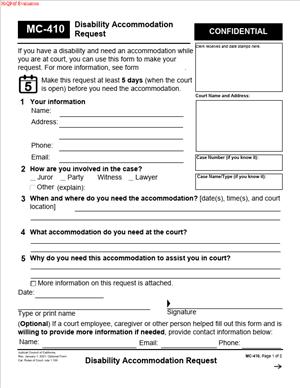
MC-410 – Disability Accommodation Request
Fill out nowJurisdiction: Country: United States | Province or State: California
What is an MC-410 – Disability Accommodation Request?
MC-410 is the official California court form you use to ask for a disability accommodation. It tells the court what you need to access court services, programs, and proceedings on equal terms. The form captures who needs the accommodation, what you need, when you need it, and why. The court then reviews the request and issues a written response on the same form.
People with disabilities use MC-410 to request support for any court-related activity. That includes court hearings, trials, mediations, mandatory programs, jury service, clerk’s office visits, and self-help center visits. You can submit the form even if you do not have a case filed yet. You can also request accommodations for people who support a case, like witnesses and jurors.
You might need this form if your disability affects how you get into the courthouse, communicate with court staff, follow hearing procedures, or complete court tasks. For example, you may need a sign language interpreter, CART captioning, an assistive listening device, an accessible courtroom, or extra time to read and respond. You can request large-print notices, electronic documents in accessible formats, or remote appearance options if needed for your disability. You can also request schedule changes that reduce fatigue or allow medical care.
Typical usage scenarios include in-person hearings, remote hearings, jury duty, and general public access to court buildings. You might use MC-410 to ask for an accessible witness stand, a seat with extra space, or permission to bring a service animal. You might ask for rest breaks, a quiet waiting space, or the ability to eat, drink, or take medication during long proceedings. If you are blind or have low vision, you might request screen-reader-compatible files. If you have a cognitive disability, you might need simple written explanations, slower pacing, or extra time. If you are D/deaf or hard of hearing, you can request interpreters or captioning. If chronic pain limits your travel, you can request remote access. The form is flexible, so you can describe what will work for you.
The form belongs to the California court system and is used statewide. It is free to file. You do not need to share a diagnosis. Focus on the functional limitations and the accommodations that will make court access possible for you. Confidential medical information should be protected and not placed in the public case file.
When Would You Use an MC-410 – Disability Accommodation Request?
Use MC-410 whenever a disability creates a barrier to your participation in any California court service. If you have an upcoming hearing and need an interpreter or captioning, you should submit MC-410. If you have a mobility impairment and the assigned courtroom is not accessible, use MC-410 to request a change. If your disability affects your ability to attend in person, request a remote appearance. If you need more time to complete court-mandated programs, ask for schedule or format changes. If you need accessible documents to understand notices, ask for the format that works for you.
Attorneys use the form to request accommodations for themselves or their clients. Self-represented litigants use it to get equal access to case procedures. Jurors and prospective jurors use it to request accessible jury service, including alternative arrangements. Witnesses and support persons use it to remove access barriers. Members of the public use it to access clerk’s counters, self-help centers, and public meetings at the courthouse.
You also use MC-410 when you have a long-running need. For example, you can request an ongoing accommodation that applies to all hearings in your case, such as captioning for every appearance or a standing remote appearance based on a disability. If your case is assigned to multiple departments or locations, you can ask that the accommodation follow your case. You can use the same form to request a temporary accommodation for a specific date, such as extra breaks during a long evidentiary hearing.
It is also appropriate to file MC-410 when you are not sure which accommodation will work best. Describe your barrier and propose options. The court can work with you to find a reasonable solution. You can file the request even on short notice if an urgent need arises, such as a sudden flare of symptoms that affects your ability to attend in person.
Legal Characteristics of the MC-410 – Disability Accommodation Request
The MC-410 is an official court form that triggers the court’s duty to review and respond. The request itself is not a contract. It is a formal application for a court decision on your accommodation. When the court grants an accommodation, that decision is binding within the court system. Court staff and judicial officers are expected to honor the granted accommodation unless circumstances change. If implementation issues arise, you can bring them to the court’s attention right away.
California courts must provide reasonable accommodations to ensure equal access for people with disabilities. Reasonableness depends on the need, the feasibility, and the effect on court operations. The court can offer an alternative accommodation if it meets your access needs without imposing undue burden. It can deny a request only for specific reasons, such as fundamental alteration, undue financial or administrative burden, or security concerns. In a denial or modification, the court should explain the reasons and, where possible, suggest alternatives.
Confidentiality is a core legal feature. You should not have to share a medical diagnosis. You should describe functional limitations that affect access. If you choose to provide medical details, the court must keep that information confidential and separate from the public file. The court should not serve your medical information on other parties. You and the court can limit the distribution of sensitive information to only those who need to know for implementation.
There is no fee to file MC-410, and your request does not waive any rights in your case. The court should avoid delays that would impair your access. If your request is time-sensitive, you can ask for an expedited decision. If the court denies or limits your request, you can seek prompt review by a judicial officer. You generally have a short deadline to seek review, so act quickly if you disagree. You can also renew your request if facts change or if the court’s suggested alternative does not work in practice.
A granted accommodation does not give you a tactical advantage in the case. It levels the field so you can understand, participate, and be heard. Opposing parties do not get to veto your accommodation. They may raise logistical concerns if relevant, but your privacy and access rights remain protected. The court balances these interests under established standards.
How to Fill Out an MC-410 – Disability Accommodation Request
Approach the form with one goal: explain what you need to access the court and when you need it. Be specific. Keep it functional. Submit it early when possible.
Step 1: Identify the person who needs the accommodation.
Enter the full legal name of the person who needs the accommodation. This can be you, your client, a witness, or a prospective juror. If you are completing the form for someone else, state your name and role as the requester. If you are an attorney, note that you are requesting on behalf of your client or yourself.
Step 2: Provide contact information.
List a mailing address, phone number, and email. Say which method you prefer for the response. If safety or privacy is a concern, use a secure contact method and note any limits on contact. If you are a juror, follow any jury office instruction for preferred contact.
Step 3: Identify your role and the setting.
State whether you are a party, attorney, witness, juror, or member of the public. Name the courthouse and, if known, the department or judge. If you do not have a case yet, say what service you need to access, such as the clerk’s office or self-help center.
Step 4: Add case information, if available.
If you have an open case, list the case name and case number. Include the hearing date, time, and department if set. If you need a long-term accommodation, say “ongoing” and list any upcoming dates you know. If you do not have this information, leave it blank and describe the expected timeframe.
Step 5: Describe the disability-related barrier in functional terms.
Describe how your disability affects your access. Do not list a diagnosis unless you choose to. A functional description is enough. For example, “I have low vision and cannot read standard print,” or “I cannot sit for more than 20 minutes without a break,” or “I need real-time captioning to follow spoken words.” Focus on the barrier, not medical history.
Step 6: Specify the accommodation you are requesting.
List exactly what you need. Use clear, concrete descriptions. Examples include:
- American Sign Language interpreter for all hearings in this case.
- CART captioning for the hearing on [date] at [time].
- Assistive listening device in Department [number].
- Large-print (18-point) notices and orders.
- Screen-reader accessible PDFs of all filings and minute orders.
- Remote appearance by video for all case events.
- Accessible counsel table with wheelchair clearance and line of sight to the witness.
- Extra 10-minute break every hour during trial days.
- Permission to have water and snacks at the counsel table due to medical needs.
- Quiet waiting area near the courtroom during jury selection.
- Service animal access with handler seating space.
If you are open to alternatives, say so. For example, “If CART is unavailable, I can use an assistive listening device.” If you need the court to arrange services, state that. If you can bring your own device or support, state that too. The clearer you are, the faster the court can implement.
Step 7: State when you need the accommodation and for how long.
Enter the date(s) and time(s) of the proceeding or service. If the need is ongoing, say “for all hearings in this case” or “for the duration of jury service.” If this is urgent, explain the timing and why expedited review is needed.
Step 8: Explain why the requested accommodation is reasonable and necessary.
Connect your functional barrier to the requested support. Keep it short. For example, “Captioning is necessary so I can follow the hearing in real time” or “Remote appearance is necessary because my condition prevents travel and prolonged sitting.”
Step 9: Attach supporting information if you wish, but keep it limited.
You are not required to submit medical records or a diagnosis. You can include a short letter from a healthcare provider or disability professional if it helps. If you include sensitive information, mark it confidential. Do not attach original records. Provide only what is needed to explain your functional need.
Step 10: Mark confidential information clearly.
If your request contains medical or disability details, flag it as confidential. Ask the court to keep that information outside the public file. If the form offers a place to note confidentiality, check it. If you attach pages with sensitive details, label them “Confidential – Disability Accommodation.” The court should limit who can view this material to those who need it to implement the accommodation.
Step 11: Sign and date.
Sign the form. If you are signing on behalf of someone, state your authority and relationship. If you need assistance signing, the court should accept an alternate signature method or a mark, with your name printed. Date the form.
Step 12: Make copies and submit.
Keep a copy for your records. Submit the form to the court as instructed. You can deliver it to the courthouse, the clerk’s office, or the court’s ADA coordinator. Many courts accept submission by mail, drop box, or electronic means if available. Choose the fastest method that matches your timeline. Do not serve the request or your medical details on other parties unless the court directs you to do so.
Step 13: File early when possible.
Submit your request as soon as you can. If you have a hearing, aim to file at least five court days before it. If the need arises on short notice, file immediately and explain the urgency. The court can act on urgent requests.
Step 14: Watch for the court’s response.
The court will complete the response section on the same form. The response will say whether your request is granted, granted in part, denied, or modified with an alternative. It should include reasons for any denial or change. It should also describe how to get review if you disagree. The court should send the response to the contact method you chose. If you do not hear back before your hearing, contact the court and bring a copy of your request to the hearing.
Step 15: Prepare to implement the accommodation.
If the court will provide services, confirm logistics. For interpreters or captioning, the court usually arranges providers. For assistive listening devices, ask where to pick up the device and when to return it. If a courtroom change is needed, confirm the new department. If you received permission for a support item or service animal, bring the response with you. If your accommodation involves remote appearance, confirm the platform, link, and any test requirements.
Step 16: If denied or modified, consider the next steps quickly.
If you disagree with the response, you can ask a judge to review it. You generally must act fast, often within about 10 days. Put your request for review in writing. Attach the original MC-410 and response. Explain why the accommodation is necessary and why any suggested alternative does not meet your needs. If a hearing is coming up soon, raise the issue with the assigned judicial officer right away. You can also renew your request if circumstances change or if the proposed alternative fails in practice.
Step 17: Update as needed.
If your needs change, file an updated MC-410. If your case gets reassigned, confirm that your accommodation remains in place. For long trials or complex cases, consider a brief check-in with the court to confirm ongoing logistics. If a granted accommodation is not being honored, notify the court immediately.
Key tips for a strong MC-410
Be specific about what you need and when. Keep the focus on access, not diagnosis. Offer alternatives that still meet your needs. Protect your privacy by marking sensitive material confidential. File early when you can, but do not wait if the need is urgent. Keep copies and bring them to court. If you get a denial, act quickly to seek review.
By following these steps, you give the court the information it needs to respond quickly and fairly. The result should be a practical plan that removes barriers so you can participate fully and be heard.
Legal Terms You Might Encounter
- “Disability” means a physical or mental condition that limits a major life activity. Reading, seeing, hearing, speaking, thinking, walking, or sitting are examples. On MC-410, you don’t need to name a diagnosis. You explain how your condition affects court access.
- “Reasonable accommodation” means a change that lets you access court services. It removes a barrier caused by your condition. On MC-410, you name the change you need. Examples include assistive listening, extra time, or accessible seating.
- “Effective communication” means you receive information in a way you can use. It matches your communication needs. On MC-410, you can ask for captioning, interpreters, or large-print notices to achieve this.
- “Auxiliary aids and services” are tools that support access. These include assistive listening devices, readers, or screen readers. On MC-410, you can list the tools you need for your hearing, vision, or speech needs.
- “Access coordinator” refers to the court staff who handles your request. They review MC-410 and manage logistics. You can direct your form to this person or office.
- “Undue burden” means a request would cause major difficulty or cost. If the court cannot grant your exact request, it may suggest options. On MC-410, you can list alternatives you would accept.
- “Alternative accommodation” is a different change that still works for you. The court may propose another option if your first choice is not possible. On MC-410, note what else would meet your needs.
- “Proceeding” means any court event or service. Hearings, trials, mediations, or clerk counters are included. On MC-410, list every event and date you need covered.
- “Confidential” means your request and details are restricted. The court handles these records with care. On MC-410, keep health details brief and focused on function.
- “Duration” means how long you need the accommodation. One hearing, a day, or the life of the case are examples. On MC-410, state the dates or time period for coverage.
FAQs
Do you need to be a party to file MC-410?
No. You can file if you need access to court services. Parties, lawyers, witnesses, jurors, and observers can all use MC-410. If you support someone who needs help, you can file for them. Say who you are and your relationship.
Do you need to attach medical records to MC-410?
No, not usually. The form focuses on what you need, not your diagnosis. Share how your condition limits access and what would fix it. Attach documents only if they help explain your need. Keep sensitive details minimal.
Do you have to serve MC-410 on the other side?
No. You usually submit MC-410 to the court, not the other party. The court may share scheduling changes, but not your private details. Do not serve the form unless the court tells you to do so.
Do you pay a fee to request accommodations?
No. There is no filing fee for MC-410. You should not be charged for an accommodation needed to access court services.
Do you need to file a new MC-410 for every hearing?
List all known dates in one request if you can. If new dates arise or needs change, submit an update. If your case continues for months, check if your arrangements carry forward. Renew if needed.
Do you need this form for language translation unrelated to disability?
No. MC-410 is for disability-related needs. If you need a language interpreter for a language barrier, use the court’s language access process. If your language need is due to a disability, you can note that on MC-410.
Do you have to accept a different accommodation than you asked for?
You can prefer a specific aid. The court tries to meet that choice. If it cannot, it should offer a workable option. If the option does not meet your needs, say why and propose another.
Do you still need to attend court if your request is pending?
Yes. Always plan to appear unless the court tells you otherwise. Bring a copy of your MC-410 and confirmation emails. If the setup is not ready, calmly ask court staff for help right away.
Checklist: Before, During, and After the MC-410 – Disability Accommodation Request
Before signing MC-410
Case details:
- Case name and number, if you have one.
- Court location and department, if known.
- Dates and times of all events you want covered.
Your role:
- Party, attorney, witness, juror, or visitor.
- Your contact information for scheduling.
Your needs:
- Clear description of your functional limits.
- Specific accommodations you are requesting.
- Any alternative options you would accept
- Whether you need in-person, remote, or both.
Timing:
- Whether you need an expedited review.
- Any deadlines, travel needs, or health risks.
Supporting materials:
- Short note from a provider, if helpful (optional).
- Diagrams or layouts if space changes are needed.
- A list of devices you will bring and need to use.
Privacy:
- Prepare to limit medical detail to what is necessary.
- Decide who can speak to the court on your behalf.
During the signing of MC-410
Verify:
- Your name is spelled correctly.
- Case number and court location are correct.
- Every relevant date is listed and accurate.
- The accommodation request is specific and clear.
- Alternatives are listed if you have them.
- Your preferred contact method is correct.
Confirm:
- The description focuses on access needs, not diagnosis.
- Any attached pages are labeled and referenced.
- You have signed and dated the form.
- You kept a full copy for your records.
After signing MC-410
Filing:
- Submit to the court’s accessibility office or clerk as instructed.
- Use the method the court accepts (in person, mail, or e-delivery if allowed).
- Keep proof of submission and the date.
Follow-up:
- Calendar a check-in date if you do not hear back.
- Respond quickly to any court questions.
- Confirm arrangements several days before the event.
Notification:
- Do not serve the other side unless the court tells you to.
- Share only logistical details with your team as needed.
Day-of:
- Arrive early to test equipment or seating.
- Bring the court’s response and your copy of MC-410.
- Have backup plans if you use personal devices.
Storage:
- Save a digital and paper copy in a secure place.
- Note what worked for future requests or dates.
Common Mistakes to Avoid MC-410 – Disability Accommodation Request
Waiting too long to request support
- Consequence: The court may not have time to arrange your needs.
- Tip: File as early as you can. Don’t wait for the hearing week.
Being vague about what you need
- Consequence: The court may guess and miss the mark.
- Tip: Name the exact aid, device, or change you need. Give examples.
Sharing too much medical detail
- Consequence: You disclose private information you do not need to share.
- Tip: Focus on access limits and accommodations. Keep diagnoses private.
Leaving out dates or locations
- Consequence: Your accommodation may not be available when you need it.
- Tip: List all events, departments, and backup dates if known.
Serving the other party by mistake
- Consequence: You may reveal private information unnecessarily.
- Tip: Submit to the court only, unless the court instructs otherwise.
Not confirming arrangements before the hearing
- Consequence: Devices or services may not be ready on arrival.
- Tip: Call or email the court contact a few days ahead. Don’t forget to reconfirm if dates change.
What to Do After Filling Out the Form MC-410 – Disability Accommodation Request
Submit the form to the right place
- Send MC-410 to the court’s accessibility coordinator or the clerk, as the court directs.
- Do not file it on the public case docket unless the court requires that method.
- Keep a copy of everything you submit.
Track and confirm
- Mark the date you submitted the request.
- Set a reminder to follow up if you do not receive a response.
- If you get a partial approval, read it carefully. Note any limits.
Coordinate logistics
- Confirm the location, time, and setup details for your hearing or visit.
- If equipment is involved, ask when and where it will be available.
- If remote access is part of your request, test your connection in advance.
Prepare for the day of court
- Bring the court’s response and your MC-410 copy.
- Arrive early to test devices or seating placement.
- Tell the clerk or bailiff your name and accommodation when you check in.
- Ask for help right away if something is missing or not working.
If your needs change
- File an amended MC-410 with the updated request.
- State what has changed and why. Include new dates if needed.
- Submit as early as possible to allow setup time.
If the court offers an alternative
- Review the proposed change to see if it meets your needs.
- If it does not, explain why and propose another workable option.
- Keep the discussion focused on access, not medical detail.
If your request is denied
- Read the reason for the denial carefully.
- Ask the court how to request a review of that decision.
- Consider narrowing the request or offering alternatives while you seek review.
- Continue to appear for your court dates unless told otherwise.
Keep your records organized
- Store your MC-410, the court’s response, and any emails.
- Note what worked well for future appearances.
- If your case lasts many months, set reminders to renew if needed.
Communicate clearly and promptly
- Reply to court emails or calls as soon as you can.
- Provide any clarifications requested, focusing on access needs.
- If you are represented, coordinate with your attorney on all updates.
Plan for future dates
- For ongoing cases, list all upcoming dates on any new MC-410.
- Reuse the language that worked for you before.
- Update only what has changed, and keep it concise.
Respect privacy and need-to-know
- Share logistics with your legal team or support person only.
- Keep medical information private unless strictly necessary.
- Ask the court how your information is protected, if you have concerns.
Stay flexible but clear
- Be open to equivalent solutions that meet your needs.
- If a proposed change won’t work, say so and explain why.
- Keep your goal in view: equal access to court services.
Document what happens
- After each appearance, note whether the accommodation worked.
- Record any issues and who you spoke with.
- These notes help with any follow-up requests or reviews.
Keep your focus on access
- MC-410 is about getting tools to participate fully.
- It does not change deadlines or legal rights.
- For scheduling or case relief, use the court’s separate processes.
Disclaimer: This guide is provided for informational purposes only and is not intended as legal advice. You should consult a legal professional.