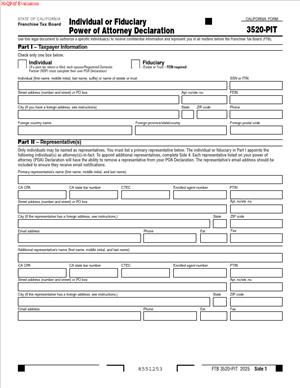
3520-PIT – Individual or Fiduciary Power of Attorney Declaration
Fill out nowJurisdiction: Country: United States | Province or State: California
The 3520-PIT – Individual or Fiduciary Power of Attorney Declaration is a California tax form that lets you name someone to act for you with state tax matters. It focuses on communication and authority with the tax agency. You complete it before filing or responding to tax issues.
This document matters when you want another person to receive information, discuss issues, or take limited actions on your behalf. It is commonly used when you cannot handle tax matters yourself. It is also used when a fiduciary manages affairs for someone else.
You may be filling this out right before submitting a return, answering a notice, or planning ahead. The form helps clarify who can speak for you and what they can do. Clear details reduce delays and confusion.
This guide explains what the form is, when it is used, and how to complete it accurately. It is written for people handling the process on their own. The goal is to help you understand each part before you write anything down.
What is 3520-PIT – Individual or Fiduciary Power of Attorney Declaration?
Clear definition
The 3520-PIT – Individual or Fiduciary Power of Attorney Declaration is a written authorization. It allows a named representative to interact with California’s tax authority for specific tax matters. The authorization is limited to what you state in the document.
This form is not a general power of attorney. It is focused on tax issues handled by the state. The authority granted is defined by the tax types, years, and actions listed.
The document works as a declaration. You sign it to confirm that the information is accurate and that you are granting authority intentionally. The tax agency relies on this declaration when deciding who it can communicate with.
Who typically uses this form/document?
Individuals use this form when they want a representative to manage or discuss their personal tax matters. This often includes wage earners, retirees, or self-employed people. It is not limited by income level.
Fiduciaries also use this form. A fiduciary may be a trustee, executor, or administrator acting for another person or an estate. In those cases, the fiduciary uses the form to show authority to act in a representative role.
Representatives named on the form are often professionals, but the form itself does not limit the role to one profession. The key point is that the representative is clearly identified and authorized.
Why you might need this form/document
You might need this form when you want someone else to handle communication with the tax authority. This can save time and reduce stress during audits, notices, or corrections. It can also help when you are unavailable.
The form is useful when tax matters feel complex. Having a representative can help ensure that responses are timely and consistent. The document tells the agency it may share information with that person.
It is also used when a fiduciary is legally responsible for managing tax matters for someone else. The declaration connects that responsibility to specific tax issues and years.
Typical real-life scenarios
- You receive a notice about a past tax year and want another person to speak with the tax authority for you. The form allows that communication to happen directly.
- You are managing an estate and need to resolve outstanding state tax filings. The declaration identifies you as the person authorized to handle those filings.
- You are temporarily unable to manage paperwork due to travel or health issues. The form allows a trusted person to receive information and take limited actions.
- You want a representative to prepare responses and discuss adjustments before you file or amend a return. The document sets the boundaries of that authority.
When would you use 3520-PIT – Individual or Fiduciary Power of Attorney Declaration?
This form is commonly used before or during interactions with California’s tax agency. It is often completed before submitting a return if a representative will be involved. It can also be used after receiving a notice or request for information.
You may use it when responding to audits, billing statements, or verification requests. The declaration allows the agency to speak directly with your representative. Without it, communication is typically limited to you.
Fiduciaries use the form when stepping into their role. This can occur after a death, during trust administration, or when managing someone else’s financial affairs. The timing often aligns with filing obligations.
The form is also used when you want to update or replace a prior authorization. New filings can clarify current authority and limit confusion. Each submission stands on its own terms.
Legal characteristics of 3520-PIT – Individual or Fiduciary Power of Attorney Declaration
This document becomes effective when it is properly completed and accepted by the tax authority. Acceptance depends on clear identification of parties and accurate information. Missing details can delay or prevent recognition.
Common problems include incomplete names, mismatched identification numbers, or unclear tax years. Illegible handwriting and unsigned forms also cause issues. Consistency across all sections matters.
The scope of authority is limited to what is written. Actions not listed are generally not covered. This helps protect against unintended authority.
Rules and practices can vary by jurisdiction. In California, this form is designed for state tax matters only. It does not automatically apply to federal taxes or other agencies.
The form does not transfer ownership of assets or create personal liability for the representative. It does not replace court appointments or broader legal documents. Its function is narrow and administrative.
Is it legally binding?
The declaration is legally binding for the purposes it describes. Once accepted, the tax authority relies on it to determine who can act and receive information. This reliance gives the document its effect.
The binding nature depends on accurate completion and proper signing. If the signer lacks authority, the declaration may not be recognized. Fiduciaries must sign in their representative capacity.
The document binds only within its stated limits. It does not create obligations beyond tax communication and actions listed. Its effect ends when it is revoked or replaced, or when the underlying authority ends.
How to fill out 3520-PIT – Individual or Fiduciary Power of Attorney Declaration
Step 1 – Identify the taxpayer or fiduciary
Begin by entering the full legal name of the individual or entity involved. Include any identification numbers requested, such as a social security number or tax identification number. Accuracy here helps the agency match the form to the correct account.
If a fiduciary is acting, identify both the person represented and the fiduciary role. This clarifies who holds authority and in what capacity. Consistent naming across documents reduces confusion.
Step 2 – Provide current contact information
List mailing addresses and contact details exactly as used in other tax filings. This information guides where correspondence is sent. Outdated addresses can delay notices.
If there are separate addresses for the taxpayer and the fiduciary, enter each in the correct place. Clear separation helps the agency route information properly. Avoid abbreviations that could be misread.
Step 3 – Name the representative
Enter the representative’s full name and contact information. This identifies who is authorized to interact with the tax authority. The agency relies on this section to allow communication.
Include professional titles only if the form asks for them. Focus on accuracy and legibility. Incorrect details can prevent recognition of the representative.
Step 4 – Describe the scope of authority
Specify the tax matters covered by the declaration. This may include types of taxes and specific years or periods. The authority is limited to what you list.
Clear descriptions help prevent overreach or misunderstandings. Vague entries can lead to delays or restricted access. Each line adds clarity about what the representative may handle.
Step 5 – Note any limitations or exclusions
Some versions of the form allow you to limit certain actions. If present, this section narrows what the representative may do. It helps tailor the authorization to your situation.
Leaving this section blank often means no extra limitations beyond the standard scope. Writing clear limits can protect against unintended actions. Each entry defines boundaries.
Step 6 – Review declarations and statements
Read any declarations carefully before signing. These statements confirm that the information is true and complete. They also describe how the tax authority will use the form.
Understanding these statements helps you know how the authorization works in practice. It also explains expectations for both you and the representative.
Step 7 – Sign and date the form
Sign the form where indicated using the appropriate capacity. Individuals sign for themselves, while fiduciaries sign in their representative role. Dates help establish when the authorization begins.
Unsigned or undated forms are commonly rejected. Clear signatures support acceptance. If multiple signatures are required, each must be provided.
Step 8 – Submit the completed document
Follow the submission instructions provided with the form. This step delivers the declaration to the tax authority for processing. Processing time can vary.
Keep a copy for your records. Copies help resolve questions later. Once accepted, the form guides how the agency communicates going forward.
Legal terms you might encounter in 3520-PIT – Individual or Fiduciary Power of Attorney Declaration
- Taxpayer: This is the individual or entity whose tax matters are covered by the declaration. On this document, the taxpayer’s legal name must match tax records exactly. If you use a nickname or old name, processing can stall.
- Fiduciary: A fiduciary is a person or entity acting on behalf of someone else, such as an executor, trustee, guardian, or conservator. If you sign as a fiduciary, you are stating you have legal authority to act for the taxpayer. The form relies on that statement to accept your signature.
- Power of Attorney: This is the authority you grant to another person to act for you on tax matters. In this document, the power is limited to what you describe in the scope section. Anything not listed is not authorized.
- Representative: The representative is the person you appoint to communicate with tax authorities and take actions allowed by the form. Their name, address, and contact details must be complete. If you list more than one, each one’s authority depends on how you describe it.
- Tax Matters: This term refers to the specific taxes, tax years, periods, or issues covered by the declaration. The form does not automatically cover all taxes. You must spell out what is included.
- Authorization Period: This is the time frame during which the representative’s authority is valid. Some people leave this open-ended, while others set clear start and end dates. The dates you enter control when the authority begins and stops.
- Revocation: Revocation means canceling a previously granted power of attorney. By signing this form, you may revoke earlier authorizations for the same tax matters unless you clearly say otherwise. This can affect who is allowed to act for you going forward.
- Declaration: A declaration is a signed statement that the information you provide is true and correct. On this form, the declaration gives the document its legal effect. Errors here can undermine the entire filing.
- Signature Authority: This refers to who is legally allowed to sign the document. An individual taxpayer signs for themselves, while a fiduciary signs based on their role. The form depends on the signer having proper authority at the time of signing.
FAQs
Can I use 3520-PIT – Individual or Fiduciary Power of Attorney Declaration to authorize someone for only one tax year?
Yes. In the tax matters section, you must list the specific tax year or period. If you write a single year, the authority is limited to that year. If you want multiple years, each one must be clearly included.
Does this form let my representative receive confidential tax information?
Yes, but only within the scope you describe. When you authorize representation for certain tax matters, you are also allowing access to related information. If you want to limit what they can see, you must limit what you authorize.
What happens if the name on this document does not match tax records?
Processing can be delayed or rejected. The name you enter should match exactly what appears on prior filings or official records. Even small differences can cause confusion.
Can more than one representative be listed on this form?
Yes. You can name multiple representatives. You must decide whether they can act separately or only together, and reflect that in how you describe their authority.
Do I need to attach proof that I am a fiduciary?
This document usually relies on your declaration that you have authority. However, the reviewing office may later ask for proof. You should keep copies of court orders or trust documents in case they are requested.
Does signing this form cancel an older power of attorney?
It can. If the new authorization covers the same tax matters, earlier ones may be treated as revoked. If you want an older authorization to remain in effect, you need to make that clear.
When does the authority become effective?
The authority usually starts on the date you sign, unless you write a different effective date. If timing matters, check the date carefully before submitting. A future date delays the representative’s ability to act.
How will I know if this document has been accepted?
Acceptance is often shown by the representative being allowed to communicate or act on your behalf. Some people receive written confirmation, while others notice acceptance through successful contact. Keep a copy so you can reference what was submitted.
Checklist: Before, During, and After 3520-PIT – Individual or Fiduciary Power of Attorney Declaration
Before
- Confirm the exact legal name and identification details used on prior tax filings.
- Decide who you want to appoint and confirm they agree to act as your representative.
- List the exact tax matters, years, or periods you want covered.
- Check whether you want to revoke any earlier authorizations.
- Gather any fiduciary documents you rely on for your authority.
- Decide if the authority should have a start or end date.
- Set aside time to review the form line by line before signing.
During
- Enter names and addresses exactly as they appear in official records.
- Double-check contact information for accuracy and completeness.
- Describe the scope of authority clearly and specifically.
- Note any limitations or exclusions you want to apply.
- Read the declaration statements before signing.
- Sign using the correct role, individual or fiduciary, as applicable.
- Date the form on the day you actually sign it.
After
- Make copies of the signed document for your records.
- Provide a copy to each representative you named.
- Submit the form using the required delivery method.
- Track when and how you submitted it.
- Watch for confirmation or signs of acceptance.
- Store the document with your other tax records.
- Update or replace the form if your situation changes.
Common mistakes to avoid with 3520-PIT – Individual or Fiduciary Power of Attorney Declaration
- Mistake: Using a nickname or shortened name, which happens when people rush, leads to processing delays, and you should not forget to match official records exactly.
- Mistake: Listing tax matters too broadly or too vaguely, often due to uncertainty, can cause limits on authority, and you should not forget to specify years and issues clearly.
- Mistake: Forgetting to sign or date the form, which happens easily, makes the document ineffective, and you should not forget to check the signature block.
- Mistake: Assuming prior authorizations stay active, which is common, can unintentionally revoke them, and you should not forget to state your intent.
- Mistake: Naming a representative without confirming their details, which leads to errors, can delay acceptance, and you should not forget to verify contact information.
- Mistake: Signing in the wrong capacity, often when acting as a fiduciary, can invalidate the filing, and you should not forget to indicate your role.
- Mistake: Leaving limitation sections blank by accident, which happens during quick reviews, can grant broader authority than intended, and you should not forget to review every section.
- Mistake: Failing to keep copies, which seems minor, causes problems later, and you should not forget to retain a complete record.
What to do after filling out 3520-PIT – Individual or Fiduciary Power of Attorney Declaration
Once the form is complete and signed, your focus shifts to proper handling and follow-up. This is where many problems are avoided. A little organization now can save weeks later.
- Step 1: Make at least two copies of the signed document. Keep one for your personal records and one ready to share if questions arise.
- Step 2: Provide a copy to each representative you named. They need it to understand the scope of their authority and to reference if asked.
- Step 3: Submit the original document using the accepted delivery method. Pay attention to whether the submission is by mail, upload, or another approved channel.
- Step 4: Note the date and method of submission in your records. This helps if you need to track processing time.
- Step 5: Watch for signs of acceptance. This may be written confirmation or successful contact by your representative.
- Step 6: Store the document with related tax filings and correspondence. Keep it accessible, not buried.
- Step 7: Monitor how the representative acts on your behalf. Confirm their actions stay within the authority you granted.
- Step 8: Update your internal records to reflect who is authorized to act for you. This avoids confusion later.
- Step 9: If your situation changes, prepare a new declaration rather than trying to correct an old one.
- Step 10: Review the document periodically, especially before new tax periods, to ensure it still reflects your intentions.
Disclaimer: This guide is provided for informational purposes only and is not intended as legal advice. You should consult a legal professional.