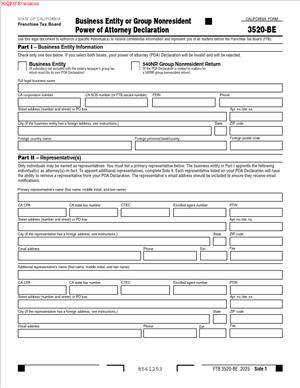
3520-BE – Business Entity or Group Nonresident Power of Attorney Declaration
Fill out nowJurisdiction: Country: United States | Province or State: California
The 3520-BE – Business Entity or Group Nonresident Power of Attorney Declaration is a California tax-related document used to name someone to act on behalf of a business entity or group that is not a California resident. You encounter it most often when dealing with state tax matters handled by the Franchise Tax Board.
This form matters because it controls who is allowed to communicate with the state about a business’s tax account. Without it, the state generally communicates only with the business itself. That can slow down filings, responses, and problem resolution.
If you are about to fill out this form, you are likely coordinating tax filings, resolving an account issue, or authorizing a representative to handle limited tasks. The form sets boundaries. It defines who can act, what they can do, and for which tax years or periods.
This document is not a general business authorization. It is focused on tax matters and on nonresident business entities or groups. Understanding that scope helps you avoid granting authority you did not intend.
The sections below walk through what the 3520-BE – Business Entity or Group Nonresident Power of Attorney Declaration is, when it is commonly used, and how to complete it accurately.
What is 3520-BE – Business Entity or Group Nonresident Power of Attorney Declaration?
Clear definition
The 3520-BE – Business Entity or Group Nonresident Power of Attorney Declaration is a written authorization. It allows a designated individual or organization to represent a nonresident business entity or group in California tax matters.
The document operates as a power of attorney limited to Franchise Tax Board interactions. It tells the state who is permitted to receive information, discuss the account, and take specified actions.
This form applies to business entities and groups that are not California residents but have California tax obligations. The authorization is tied to tax years, tax types, or specific issues listed on the form.
Once accepted, the state recognizes the named representative as acting in place of the business for the authorized matters.
Who typically uses this form/document?
This form is commonly used by out-of-state corporations, partnerships, limited liability companies, and other organized entities with California filing or payment obligations.
Groups of nonresident members, such as combined or unitary groups, also use this document when one representative handles tax communications for the group.
Business owners often complete it when they want an accountant, enrolled agent, or other tax professional to communicate directly with the state.
In some situations, an internal employee or officer is named as the representative, especially when centralized tax management occurs outside California.
Why you might need this form/document
You might need this document when the state requests clarification, documents, or responses related to a business tax account. Without authorization, the state may decline to discuss details with anyone other than the business itself.
The form also becomes relevant when filing returns, amending filings, or resolving balances due from outside California. It streamlines communication across state lines.
Another common reason involves audits or reviews. The declaration allows a knowledgeable representative to manage information requests and deadlines.
The form also helps maintain consistency. Instead of multiple people contacting the state, one authorized representative handles the interaction.
Typical real-life scenarios
- A corporation based outside California earns income from California sources. The tax department is handled by a professional located in another state. The form allows the professional to communicate directly with California tax authorities.
- A partnership with nonresident partners files a composite or group return. One individual is responsible for managing filings and responding to notices. The declaration formalizes that authority.
- A limited liability company receives a notice questioning a filing position. The owners want their tax advisor to respond and negotiate directly. This document allows that communication.
- A business entity restructures and assigns tax compliance to a centralized team. The declaration ensures the state recognizes the new contact for ongoing matters.
When would you use 3520-BE – Business Entity or Group Nonresident Power of Attorney Declaration?
This form is used when a nonresident business entity or group expects someone else to interact with California tax authorities on its behalf. Timing often aligns with filings, notices, or active account issues.
It commonly appears before or during the submission of tax returns, especially when the preparer is also expected to answer follow-up questions.
The document is also relevant after receiving correspondence from the Franchise Tax Board. Many notices require responses within specific timeframes, making authorized representation important.
In broader terms, any situation involving ongoing communication, document exchange, or negotiation with the state can trigger the need for this declaration.
Legal characteristics of 3520-BE – Business Entity or Group Nonresident Power of Attorney Declaration
This document functions as a limited power of attorney. Its effectiveness depends on accurate completion, proper signatures, and acceptance by the state.
Common issues arise from incomplete entity information, unclear authorization scope, or missing dates. These problems can delay recognition of the representative.
The form does not transfer ownership, management rights, or general decision-making authority. It is confined to tax matters described within the document.
Jurisdictional treatment can vary at a high level. While powers of attorney are broadly recognized, each state defines acceptable formats and limitations. This form reflects California’s administrative requirements.
Is it legally binding?
When properly completed and accepted, the declaration is legally binding for the limited purposes described. The state relies on it to determine who may act for the business.
The binding effect applies only within the scope listed on the form. Actions outside that scope are not covered.
The document’s authority typically ends when it expires, is revoked, or no longer applies to the tax periods listed.
How to fill out 3520-BE – Business Entity or Group Nonresident Power of Attorney Declaration
Step 1 – Identify the business entity or group
Begin by entering the full legal name of the business entity or group. Use the name as it appears on tax filings and official records.
Include all requested identifying numbers, such as state-issued or federal identification numbers. Accuracy here helps the state match the form to the correct account.
This section establishes whose authority is being delegated. Errors can cause processing delays.
Step 2 – Confirm nonresident status
Provide the information that shows the entity or group is nonresident. This often includes address details outside California.
Use a complete mailing address. The state uses this information for correspondence and verification.
Consistency with other filings reduces confusion during review.
Step 3 – Specify the representative
List the full name of the individual or organization being authorized. This is the person or entity the state will recognize as the representative.
Include contact information as requested. Clear contact details support timely communication.
If more than one representative is allowed, follow the form’s structure carefully to reflect that.
Step 4 – Define the scope of authority
Indicate the types of tax matters covered by the authorization. This may include income tax, franchise tax, or specific filings.
Limitations are set here. Only the matters listed are included in the representative’s authority.
Clarity in this section helps prevent misunderstandings later.
Step 5 – Identify tax years or periods
Enter the tax years or periods the authorization applies to. This can be a single year or multiple years.
The state generally relies on these entries to determine when the representative’s authority applies.
Leaving this section vague can lead to rejected or limited authorization.
Step 6 – Review acts allowed and excluded
Some forms include checkboxes or statements describing what the representative may do. Read these carefully.
This section often distinguishes between receiving information and taking affirmative actions.
Understanding these distinctions helps align expectations with the form’s effect.
Step 7 – Provide additional declarations if required
Some versions of the document include declarations related to group representation or combined filings.
Complete these statements if they apply to your situation. They clarify how the representative acts for multiple parties.
Incomplete declarations can interrupt processing.
Step 8 – Confirm mailing and communication preferences
Indicate where correspondence should be sent. This can affect whether notices go to the business, the representative, or both.
Consistency with other forms reduces misdirected mail.
This step influences how quickly issues are identified and addressed.
Step 9 – Review revocation or replacement language
The form may include language about revoking prior authorizations. Read this section closely.
Submitting a new declaration can replace earlier ones for the same matters.
Awareness of this effect avoids unintended changes.
Step 10 – Sign on behalf of the entity or group
An authorized person must sign the form for the business entity or group. The signer’s title or role is usually required.
The signature confirms that the entity grants the authority described.
Unsigned forms are typically not accepted.
Step 11 – Date the declaration
Enter the date of signing. This establishes when the authorization becomes effective.
The date also helps the state track current versus outdated authorizations.
Omitting the date can delay acceptance.
Step 12 – Review for completeness and consistency
Before submission, read the entire document from start to finish. Look for missing fields or inconsistent information.
Ensure names, numbers, and dates align with other filings.
This review reduces processing delays.
Step 13 – Prepare for submission
Follow the instructions on where and how to submit the completed form. Submission methods may vary.
Retain a copy of the completed document for your records.
Having a copy supports future reference and verification.
Step 14 – Monitor acknowledgment or correspondence
After submission, watch for confirmation or related correspondence from the state.
Processing times can vary. Notices may reference the authorized representative once accepted.
This step closes the loop on the authorization process.
Legal terms you might encounter in 3520-BE – Business Entity or Group Nonresident Power of Attorney Declaration
- Power of Attorney: In this document, this means the written authority you give to another person to act for the business entity or group. It is limited to what you list on the form. Anything not listed stays with you.
- Business Entity: This refers to the organization granting authority. It could be a corporation, partnership, limited liability company, trust, or another recognized group. The exact legal name you enter must match the name used in tax filings.
- Nonresident: This term describes an entity or group that is not considered a resident for certain state tax purposes. On this form, it affects how representation and communication with the tax agency are handled. You are declaring that status as part of the authorization.
- Representative: The representative is the individual you authorize to communicate and act on your behalf. Their name, address, and contact details must be complete. The form relies on this information to recognize them as your authorized contact.
- Tax Matters: This phrase refers to the specific issues the representative can handle. It may include filing, discussing returns, receiving notices, or resolving questions. The scope depends entirely on what you allow in the document.
- Tax Period: A tax period is the year or range of years covered by the authorization. This form does not automatically apply forever. You must clearly identify the periods the representative can act for.
- Declaration: A declaration is a formal statement made by an entity or group. By signing, you are confirming that the information provided is accurate. False or inconsistent declarations can cause processing delays.
- Revocation: Revocation means canceling a prior authorization. This form may replace earlier powers of attorney if you indicate that intent. If not clearly stated, older authorizations may remain active.
- Authorized Signer: This is the person who signs the form for the entity or group. They must have authority under the entity’s governing documents. Their title shows why they are allowed to sign.
FAQs
Who is allowed to sign this form for a business entity or group?
The signer must have authority to bind the entity. You need to confirm that the person signing holds a role that allows them to grant representation, such as an officer, managing member, or trustee. The title you write next to the signature is how the reviewing office checks that authority.
How specific do I need to be about the tax years or periods?
You need to list exact years or defined periods. Leaving this blank or writing “all years” can lead to rejection or limited acceptance. Look at the section where tax periods are listed and make sure every year you want covered is clearly written.
Can I authorize more than one representative?
This depends on how you complete the representative section. If space allows, you may list more than one individual, but each must have full identifying details. If you need different people for different tasks, you should be very clear about who can do what.
What happens if the representative’s name does not match other records?
If the name does not match what is already on file, the authorization may not be recognized. You should double-check spelling, middle initials, and suffixes. The form relies on exact matching to link the authority correctly.
Does this document replace an older power of attorney automatically?
Only if you clearly indicate that intent. Some forms include a checkbox or language about revocation. If you do not complete that part, older authorizations may still be valid alongside this document.
How does nonresident status affect how this form is used?
Nonresident status signals that the entity or group is treated differently for certain tax purposes. On this form, it helps define which declaration applies and why a special authorization is needed. You still need to complete all other sections fully.
Will the representative receive copies of notices and letters?
That depends on how you complete the communication preferences. Some sections allow you to direct where mail or notices go. If you want the representative to receive copies, you must explicitly allow it on the form.
How long does the authorization last once accepted?
The authorization lasts for the tax periods you list unless you revoke it earlier. There is no automatic expiration unless the form says so. To end it, you must submit a clear revocation or a new document that replaces it, such as the 3520-BE – Business Entity or Group Nonresident Power of Attorney Declaration.
Checklist: Before, During, and After 3520-BE – Business Entity or Group Nonresident Power of Attorney Declaration
Before
- Confirm the exact legal name of the business entity or group as used in tax filings
- Identify the correct nonresident status that applies to the entity or group
- Decide who will act as the representative and confirm their willingness
- Gather the representative’s full contact information
- Determine which tax years or periods need to be covered
- Check whether any prior authorizations exist
- Verify who has the authority to sign on behalf of the entity
During
- Enter the entity or group name exactly as it appears on official records
- Complete all nonresident declaration sections carefully
- List the representative’s information without abbreviations that could confuse records
- Clearly define the scope of authority being granted
- Specify tax years or periods in clear, unambiguous terms
- Review any revocation language and complete it if needed
- Have the authorized signer sign and date the form
After
- Make a complete copy of the signed document for your records
- Provide a copy to the authorized representative
- Submit the form using the required method for acceptance
- Watch for confirmation or acknowledgment of receipt
- Track any correspondence sent to you or the representative
- Update internal files to reflect who is authorized to act
- Revisit the authorization if circumstances change
Common mistakes to avoid with 3520-BE – Business Entity or Group Nonresident Power of Attorney Declaration
- Mistake: Using a shortened or trade name instead of the full legal name, which happens when people rely on everyday usage, leads to processing delays, and you should not forget to match the name exactly to tax records.
- Mistake: Leaving tax periods vague because it seems simpler, which can limit the representative’s authority, may cause rejection, and you should not forget to list every specific year needed.
- Mistake: Having someone sign without proper authority, often due to internal confusion, which can invalidate the document, and you should not forget to confirm the signer’s role.
- Mistake: Assuming old authorizations are automatically canceled, which happens from misunderstanding revocation rules, can leave multiple representatives active, and you should not forget to address revocation clearly.
- Mistake: Misspelling the representative’s name or contact details, usually from rushing, which prevents recognition, and you should not forget to double-check every character.
- Mistake: Forgetting to give the representative permission to receive correspondence, which happens when skipping optional sections, limits communication, and you should not forget to complete mailing preferences.
- Mistake: Submitting the form without keeping a copy, which happens when focusing only on filing, creates record gaps, and you should not forget to retain a complete copy.
- Mistake: Assuming nonresident status removes the need for full details, which happens due to misunderstanding the declaration, causes rejection, and you should not forget that all sections still apply.
What to do after filling out 3520-BE – Business Entity or Group Nonresident Power of Attorney Declaration
Once you complete the form, your next steps matter just as much as filling it out correctly. This document only works if it is properly submitted, tracked, and reflected in your internal records. Treat it as an ongoing authorization that you manage, not a one-time task you forget.
Start by making clean copies of the signed document. You should keep at least one copy in your central records and provide another to the authorized representative. This ensures both sides know exactly what authority was granted and for which periods.
- Step 1: Review the entire completed form one last time for missing signatures, dates, or sections.
- Step 2: Make digital and paper copies for your files.
- Step 3: Deliver a copy to the representative so they know when they can act.
- Step 4: Submit the form using the accepted filing or delivery method.
- Step 5: Note the date of submission and how it was sent.
- Step 6: Watch for confirmation, acknowledgment, or correspondence accepting the authorization.
- Step 7: Update your internal compliance or governance records to show who is authorized.
- Step 8: Monitor communications to ensure notices are going to the right party.
- Step 9: Revisit the authorization if tax years change or a representative leaves.
- Step 10: Prepare a revocation or replacement promptly if the authority needs to end.
Staying organized after submission prevents confusion later. If questions come up, you will be able to quickly show what authority was granted, when it started, and who can act for the entity or groups.
Disclaimer: This guide is provided for informational purposes only and is not intended as legal advice. You should consult a legal professional.