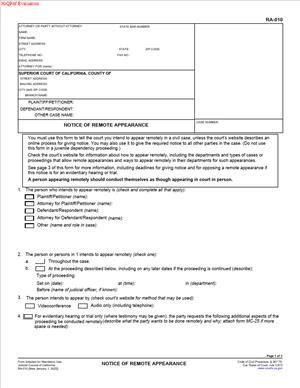
RA-010 – Notice of Remote Appearance
Fill out nowJurisdiction: Country: United States | Province or State: California
The RA-010 – Notice of Remote Appearance is a court form used in California to tell the court and the other parties that you plan to attend a hearing remotely instead of in person. If you are preparing for a court date and want to appear by video or phone, this document is often the first step.
You use this form to give formal notice. It lets the court know how you intend to participate. It also informs the other side so they are not surprised on the hearing date.
This form does not argue your case. It does not explain your position. It simply addresses how you will attend the hearing.
If you are representing yourself, this form can feel procedural and technical. Once you understand its purpose, it becomes straightforward. You are telling the court, in writing, that you will appear remotely for a specific proceeding.
What is RA-010 – Notice of Remote Appearance?
Clear definition
RA-010 – Notice of Remote Appearance is a procedural court form used in California to notify the court and all other parties that you intend to attend a scheduled hearing by remote means, such as video conference or telephone, if remote appearance is permitted.
It is a notice, not a request in the traditional sense. In many situations, remote appearances are allowed under general court rules. By filing this document, you formally inform the court of your choice to appear remotely.
The form identifies the case, the hearing date, the department or courtroom, and the party who will appear remotely. It becomes part of the official court record once filed.
Who typically uses this form?
Self-represented litigants commonly use this form. If you do not have a lawyer and prefer not to travel to the courthouse, you may file this notice.
Attorneys also use this form when appearing on behalf of clients. In some courts, lawyers routinely appear remotely for certain types of hearings.
Parties in civil, family, probate, and other matters may use it when remote appearance is allowed. The specific case type does not change the structure of the form, but it may affect whether remote appearance is available.
Witnesses do not typically use this form on their own. It is generally filed by a party or attorney of record in the case.
Why might you need this form?
You may need this form if your hearing is scheduled in a court that allows remote appearances and you do not plan to attend in person.
Travel distance is a common reason. If you live far from the courthouse, remote appearance can reduce time and expense.
Work and childcare obligations also influence this decision. A remote appearance can make it easier to attend without missing an entire day.
Health or mobility concerns are another factor. Remote access may make participation possible when in-person attendance is difficult.
The form creates clarity. It prevents confusion about whether you will physically appear in the courtroom.
Typical real-life scenarios
- You filed a civil complaint, and a case management conference is scheduled. You want to attend by video rather than drive to the courthouse. You complete and file the notice before the hearing date.
- You are responding to a motion filed by the other party. The hearing is short and procedural. Instead of taking time off work to attend in person, you notify the court that you will appear remotely.
- You are involved in a family law matter. A status conference is scheduled to review paperwork. You file the notice, so the judge expects you to appear by video.
- You are defending a small claims appeal in a higher court. The court permits remote appearances for certain hearings. You submit the notice, so your remote participation is properly recorded.
- In each situation, the purpose is the same. You are informing the court of how you will attend, not asking the court to decide your case differently.
When would you use RA-010 – Notice of Remote Appearance?
You use this form after a hearing has already been scheduled. It is tied to a specific date, time, and department.
The timing matters. Courts often require that notice be filed and served a certain number of days before the hearing. Filing too late may cause logistical issues or prevent remote access from being arranged.
You may use it in civil cases, including contract disputes, personal injury matters, or property disputes, when remote appearances are available. In family law, it may be used for case management conferences, motion hearings, or other non-evidentiary proceedings.
Attorneys use it when they represent a party and want to appear remotely on the client’s behalf. Self-represented parties use it to maintain control over their attendance method.
You generally would not use this form if the court has already ordered you to appear in person. In that situation, a different type of request may be required.
It is also not used to reschedule a hearing. If you need to change the date, that involves a separate process.
Legal characteristics of RA-010 – Notice of Remote Appearance
This form is procedural. Its effectiveness depends on proper completion, timely filing, and correct service on all other parties.
For the notice to be valid, it must clearly identify the case. That includes the correct case number, court name, and hearing details. Errors in these fields can cause confusion or delay.
It must also be filed with the court clerk and served on the other parties. Service ensures that everyone in the case knows how you plan to appear.
Common problems include incomplete information, incorrect hearing dates, or failure to serve the notice. If the other party does not receive proper notice, disputes may arise on the hearing date.
Court practices can differ. Some courts automatically allow remote appearances in many civil matters. Others may limit remote participation for certain types of hearings, such as trials or evidentiary proceedings. Always check whether remote appearance is generally available for your specific hearing type.
This form does not grant permission for remote appearance if court rules prohibit it. It also does not excuse you from attending the hearing. If remote appearance is not permitted and you do not appear in person, the court may proceed without you.
The document does not affect the substance of your claims or defenses. It only addresses the method of your participation.
Is it legally binding?
RA-010 – Notice of Remote Appearance is not a contract between parties. It does not create legal obligations in the way an agreement does.
However, once filed, it becomes part of the court record. It formally represents your stated intention to appear remotely at a specific hearing.
If you file the notice and then fail to appear remotely or in person, the court may treat it as a failure to appear. That can carry consequences depending on the type of case.
In that sense, the document has procedural significance. It shapes how the court prepares for the hearing and how the other parties expect you to participate.
It does not bind the judge to allow remote testimony in all circumstances. Judges retain authority to manage their courtrooms and may make case-specific decisions within general court rules.
How to fill out RA-010 – Notice of Remote Appearance
Step 1 – Identify the court and case information
At the top of the form, enter the name of the court exactly as it appears on your other case documents. Include the branch name if applicable.
Fill in the case number carefully. Double-check every digit and letter. The case number connects your notice to the correct file.
List the names of the parties in the same format used in earlier filings. Keep the order consistent with the complaint or petition.
Step 2 – Provide your contact information
Enter your name, address, and contact details in the space provided. If you are self-represented, indicate that you are appearing in pro per or self-represented.
If you are an attorney, include your bar number and firm information as required on the form.
Make sure your contact details are current. The court may use this information to send remote appearance instructions or updates.
Step 3 – Specify the hearing details
Locate the section that asks for the date, time, and department of the hearing. Copy this information directly from the notice of hearing or court order.
Be precise. An incorrect department number or time can result in appearing in the wrong virtual session.
If the hearing is for a specific motion or conference, identify it clearly in the designated area of the form.
Step 4 – Indicate who will appear remotely
The form will ask you to state which party or attorney intends to appear remotely. Mark or write the appropriate name.
If more than one person from your side will appear remotely, follow the form’s instructions for listing each individual.
Make sure the person named matches the individual who will actually log in on the hearing date.
Step 5 – Review service information
The form typically includes a section related to service. This confirms that you will provide a copy of the notice to all other parties in the case.
List the names and addresses or contact details of the parties or attorneys who must receive the notice, as required by the form.
Accurate service information is essential. The court expects all sides to have equal notice of remote participation.
Step 6 – Date and sign the form
Enter the date you are signing the document.
Sign your name in the designated signature line. If you are filing electronically, follow the court’s rules for electronic signatures.
By signing, you confirm that the information in the form is accurate to the best of your knowledge.
Step 7 – File and serve the notice
Submit the completed form to the court clerk or through the court’s electronic filing system, depending on how your court handles filings.
After filing, serve a copy on all other parties as required. Keep proof of filing and proof of service for your records.
Once filed and served, monitor your email or court communications for instructions on how to access the remote hearing.
Legal terms you might encounter in RA-010 – Notice of Remote Appearance
- Remote Appearance: This means attending your court hearing by video or telephone instead of going to the courtroom in person. In this document, you are formally telling the court and the other parties that you intend to appear this way. The court will rely on this notice to plan how the hearing will be conducted.
- Hearing: A scheduled court proceeding where a judge makes decisions about your case. The form requires you to list the exact date, time, and department or courtroom for the hearing. Accuracy matters because the notice applies only to the specific hearing you identify.
- Party: A person or entity involved in the case, such as the plaintiff, defendant, petitioner, or respondent. You must clearly state which party is giving notice of a remote appearance. If you are representing yourself, you are the party.
- Attorney of Record: The lawyer officially listed in the court file as representing a party. If a lawyer is appearing remotely, the form reflects that it is the attorney—not the client—who will attend by video or phone. The court uses this to track who is authorized to speak.
- Department: The specific courtroom or judicial officer assigned to your hearing. Courts often divide cases among departments. Listing the correct department ensures your notice is routed properly.
- Service: The act of delivering a copy of the filed document to the other parties in the case. After you complete this form, you must make sure all required parties receive a copy. The court expects proof that you gave proper notice.
- Proof of Service: A separate document that shows when and how you delivered the notice to others. It may state whether the service was done by mail, electronic transmission, or another approved method. Courts review this to confirm everyone was informed.
- Court Clerk: The court staff member who processes filed documents. The clerk accepts, stamps, and enters your filing into the official record. If the form is incomplete, the clerk may reject it.
- Electronic Filing (eFiling): A system that allows you to submit court documents online instead of on paper. If your court requires or allows eFiling, you may submit this notice electronically. Once accepted, it becomes part of the case record.
- Public Record: The official file maintained by the court. When you file this notice, it becomes part of that record. Anyone who reviews the case file can see that you elected to appear remotely for that hearing.
FAQs
Do I need court approval before submitting RA-010 – Notice of Remote Appearance?
In many situations, you do not need a separate order before filing this document. You are giving formal notice of how you plan to appear. However, you must confirm that the hearing type allows remote appearances and that you meet any stated requirements. Always check the hearing notice to confirm remote appearance is permitted.
What exact hearing details must match the court’s records?
You must enter the case number, case name, hearing date, time, and department exactly as shown on your official hearing notice. Even a small difference, such as the wrong department number or an outdated time, can cause confusion. Before filing, compare your entries to the most recent court notice to ensure they match word for word.
Can I change my mind after filing this form?
Yes, but you must act quickly. If you decide to appear in person instead, you should notify the court and the other parties as soon as possible. If you want to switch from in-person to remote after initially planning to attend in person, you may need to file this document and confirm it is accepted before the hearing date.
Who signs this document if I have a lawyer?
If you are represented, your attorney usually signs and files the notice. The signature shows who is responsible for appearing remotely. Make sure the name on the signature line matches the attorney listed in the court’s records, or, if self-represented, that your own name matches exactly as it appears in the case caption.
Do I need to attach any supporting documents?
Typically, you do not attach evidence or exhibits to this notice. It is a procedural filing that informs the court about your appearance method. However, you may need to include a proof of service document showing that you sent copies to the other parties.
What happens if the clerk rejects my filing?
If the clerk rejects it, you will usually receive a notice explaining what needs correction. Common reasons include missing signatures, incorrect case numbers, or incomplete hearing details. You must correct the issue and resubmit promptly to ensure your intended remote appearance is recognized.
Does filing this form change anything in the public record?
Yes. Once accepted, this document becomes part of the official case file. It records that you plan to attend the specific hearing remotely. It does not change the claims in your case, but it does document your chosen method of appearance.
How do I confirm that my remote appearance has been properly scheduled?
After filing, check the court’s docket or confirmation system to see that the document was entered into the case. You may also receive a file-stamped copy or electronic confirmation. Keep that confirmation and review any instructions the court provides for accessing the remote hearing platform.
Checklist: Before, During, and After RA-010 – Notice of Remote Appearance
Before
- Confirm that your hearing type allows remote appearances.
- Locate the exact case number and case name from your latest court notice.
- Verify the hearing date, time, and department.
- Decide who will appear remotely (you, your attorney, or both if permitted).
- Complete all required fields clearly and legibly.
- Sign and date the form where indicated.
- Prepare a proof of service for all required parties.
- Make copies for your records and for service.
During
- File the form using the approved method (electronic or paper).
- Ensure the clerk accepts and stamps the document.
- Serve copies on all other parties as required.
- Keep confirmation of filing or electronic acceptance.
- Review any instructions for accessing the remote platform.
- Test your video, audio, or phone connection in advance.
- Have your case number and hearing details ready on the day of the hearing.
After
- Check the court docket to confirm the notice appears in the record.
- Save a stamped copy in your case file.
- Calendar the hearing with a reminder that it is remote.
- Follow all court instructions for logging in or calling in.
- Join the remote session early on the hearing date.
- Keep proof of service and filing confirmation with your records.
- Update any personal case notes to reflect your remote appearance plan.
Common mistakes to avoid with RA-010 – Notice of Remote Appearance
- Mistake: Entering the wrong hearing date or department because you relied on memory instead of the latest notice, which can cause confusion or rejection; do not forget to verify every detail against the official court document.
- Mistake: Forgetting to sign the form because you focused on the case details, which can lead the clerk to reject it; do not forget that an unsigned form is usually not accepted.
- Mistake: Failing to serve the other parties because you assumed filing with the court was enough, which can delay proceedings; do not forget to complete and keep proof of service.
- Mistake: Waiting until the last minute to file, which can create technical or processing issues and leave your appearance status unclear; do not forget to allow enough time before the hearing.
- Mistake: Using a name that does not exactly match the court record, often due to nicknames or formatting differences, which may create inconsistencies; do not forget to copy your name exactly as shown in the case caption.
- Mistake: Assuming remote appearance guarantees technical flexibility, which can result in missed participation if your connection fails; do not forget to test your equipment and have a backup plan.
- Mistake: Ignoring court-specific instructions for accessing the remote session because you thought filing the notice was the final step, which can prevent you from joining properly; do not forget to read all follow-up instructions carefully.
- Mistake: Believing this notice changes your hearing date or obligations, which it does not, potentially leading to missed deadlines; do not forget that only the method of appearance changes, not the hearing itself.
What to do after filling out RA-010 – Notice of Remote Appearance
Once you complete the form, your next focus is proper filing and preparation. Accuracy and timing matter. A correctly filed notice helps avoid confusion on the day of your hearing.
- Step 1: Review every entry for accuracy, including spelling of names, case number, hearing date, time, and department.
- Step 2: Sign and date the form in the designated space, making sure the signer’s name matches the court record.
- Step 3: Make at least two copies—one for your records and one for each party who must be served.
- Step 4: File the original with the court using the approved method, whether electronic submission or in-person filing.
- Step 5: Confirm the filing was accepted by checking for a file stamp or electronic confirmation notice.
- Step 6: Serve the filed copy on all required parties and complete a proof of service document.
- Step 7: Keep the stamped copy and proof of service together in your case file.
- Step 8: Review any instructions from the court about how to log in or call in for the remote hearing.
- Step 9: Test your technology at least one day before the hearing to reduce the risk of connection problems.
- Step 10: Log in or call in early on the hearing date, using the exact case information you listed on the form.
After these steps, monitor your case for updates. If the court changes the hearing date or format, you may need to file a new notice or follow additional instructions. Keep all confirmations and correspondence organized so you can quickly reference them if questions arise.
Disclaimer: This guide is provided for informational purposes only and is not intended as legal advice. You should consult a legal professional.