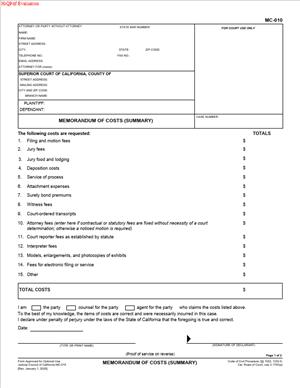
MC-010 – Memorandum of Costs (Summary)
Fill out nowJurisdiction: Country: United States | Province or State: California
If you won your case or obtained a judgment in California, you may be entitled to recover certain court-related expenses. The MC-010 – Memorandum of Costs (Summary) is the document used to claim those costs. It allows you to list what you paid and ask the court to add those amounts to your judgment.
This form is commonly used after a judgment has been entered. It is not about arguing the case again. Instead, it focuses on the money you spent during the case that the law allows you to recover.
If you are representing yourself, this document can feel technical. The language is brief, and the form assumes you understand which costs qualify. Before you fill it out, it helps to understand what it does and how courts treat it.
The MC-010 – Memorandum of Costs (Summary) matters because it can increase the total amount owed to you. Once approved, the listed costs may become part of the enforceable judgment. That can affect collection efforts, payment plans, and interest calculations.
What is MC-010 – Memorandum of Costs (Summary)?
Clear definition
MC-010 – Memorandum of Costs (Summary) is a California court form used to claim allowable litigation costs after judgment. It provides a structured way to itemize expenses and request that they be added to the judgment amount.
The form typically includes categories such as filing fees, motion fees, service of process fees, and other court-related expenses. You enter the amounts you paid and sign under penalty of perjury that the costs are correct and necessary.
It is called a “summary” because it lists totals by category. In some cases, you may need to attach additional documentation or a more detailed breakdown, depending on what you are claiming.
Who typically uses this form?
Most often, the party that won the case uses this form. That party is sometimes called the “judgment creditor.” If you obtained a money judgment, you may use this document to recover your eligible costs.
Attorneys frequently prepare and file this form for their clients. However, self-represented litigants also use it, especially in civil, limited civil, and small claims matters where costs are permitted.
In some situations, a party may use this form after post-judgment proceedings, such as enforcement actions. For example, if you incurred additional filing or service fees while trying to collect the judgment, those costs may be included if they qualify.
Why might you need this form?
Litigation can involve out-of-pocket expenses. Filing fees alone can be significant. If the court rules in your favor, you may be entitled to recover certain statutory costs from the other side.
Without filing this document, those costs may not automatically become part of the judgment. That means you could be leaving money unclaimed.
By completing and filing this form, you create a formal record of the costs you are seeking. If no objection is filed within the required time, the claimed costs may be added to the judgment by operation of law.
If the other party disputes your costs, the form also sets the stage for a court review. The court can decide which costs are allowable and adjust the amount if needed.
Typical real-life scenarios
- You file a civil lawsuit to recover unpaid rent. You pay a filing fee and a process server to serve the complaint. The court enters judgment in your favor. After judgment, you complete this form to claim the filing and service fees so they are added to the amount owed.
- You defend a case and prevail after a motion to dismiss. You paid motion filing fees and service costs for required documents. You use this form to request reimbursement of those expenses.
- You obtain a judgment, but the other party does not pay. You later file an application for a writ of execution and pay additional fees. Those post-judgment enforcement costs may be listed on the form so they can be added to the total judgment balance.
- You win a limited civil case involving a contract dispute. During the case, you paid for court reporters and necessary transcripts. If those costs are recoverable under the rules, you may include them in your submission.
- In each of these scenarios, the form serves the same purpose: it formally requests that specific, allowable costs be included in the final amount owed.
When would you use MC-010 – Memorandum of Costs (Summary)?
You typically use this form after the court has entered a judgment in your favor. Timing matters. In many cases, there is a specific period after notice of entry of judgment during which you may file your cost memorandum.
You may also use it after certain post-judgment proceedings. For example, if you incur new costs while enforcing a judgment, those costs are not automatically included in the original amount. A separate submission may be required to add them.
This document is commonly used in civil cases, including limited civil matters. It is less common in small claims, where cost recovery rules may be more limited and sometimes built into the judgment process itself.
The person using the form is usually the prevailing party. However, in some cases, a party that obtains dismissal or other favorable relief may also seek costs, depending on the outcome and the applicable rules.
If you are unsure whether your expense qualifies, the form itself will not answer that question. It provides categories, but the underlying rules determine what is recoverable. The timing and method of service are also important parts of the process.
Legal characteristics of MC-010 – Memorandum of Costs (Summary)
This form becomes effective through proper filing and service. Simply filling it out does not add costs to your judgment. It must be filed with the court and properly served on the other party.
You sign the form under penalty of perjury. That means you are declaring that the information is true and correct to the best of your knowledge. Inflating amounts or listing costs that were not actually incurred can create serious problems.
The form usually requires that costs be “reasonably necessary” to the conduct of the litigation and “reasonable in amount.” Courts may disallow items that do not meet those standards.
A common reason for rejection or challenge is improper timing. Filing too late may limit your ability to recover costs. Another issue is listing items that are not authorized by statute or rule.
Errors in calculation can also lead to objections. If totals do not match the individual line items, the court or the opposing party may question the accuracy of your submission.
In California, cost recovery rules are governed by statutes and court rules. While the basic structure is consistent statewide, local court practices may affect how documents are processed or how hearings are scheduled if there is a dispute.
It is important to understand what this form does not do. It does not change the underlying judgment on the merits. It does not reopen the case. It does not automatically create a payment plan. It simply addresses allowable costs.
It also does not guarantee that every listed cost will be approved. If the opposing party files a motion to tax costs, the court will review the items and decide which are allowed.
Is it legally binding?
The form itself is not a contract between parties. Its legal effect comes from the court process surrounding it.
If properly filed and served, and if no timely objection is made, the claimed costs may become part of the judgment by operation of law. At that point, the increased judgment amount is enforceable like any other judgment.
If the other party challenges the costs, the court’s ruling on that challenge determines the final amount. Once the court resolves the issue, the approved costs become binding as part of the judgment.
The binding nature does not come from your signature alone. It comes from compliance with procedural rules and the absence of a successful objection. In that sense, the form initiates a process rather than creating an immediate legal obligation on its own.
How to fill out MC-010 – Memorandum of Costs (Summary)
Step 1 – Caption and Court Information
At the top of the form, enter the court name, street address, city, state, and ZIP code exactly as they appear on your judgment or prior filings. Then fill in the case name and case number. These details must match the court’s records to ensure the document is filed in the correct case.
Step 2 – Party Information
Identify yourself as the party claiming costs. Use the same name format that appears in the judgment. If you are self-represented, list your contact information in the space provided. Consistency with earlier filings helps avoid processing delays.
Step 3 – Itemized Costs
Review each cost category listed on the form. Enter the amount you actually paid for each applicable category, such as filing fees or service of process fees. Only include amounts that relate to this specific case.
Take care to use accurate figures. If a category does not apply, leave it blank or enter zero, depending on the form’s layout. Do not combine unrelated expenses under a single category unless the form directs you to do so.
Step 4 – Additional Pages if Necessary
If your costs do not fit within the provided space, attach additional pages as allowed. Clearly label each attachment and reference the case number on every page. Make sure the totals on your attachments match the totals entered on the main form.
Step 5 – Credits and Payments
If the form asks about credits or payments already received toward costs, provide accurate information. This ensures the total amount requested reflects what is still owed. Do not ignore partial payments that affect the calculation.
Step 6 – Calculate the Total
Add the amounts listed in each category to determine the total costs claimed. Double-check your math. In addition, errors are a common source of disputes and can undermine confidence in your submission.
Ensure that the final total clearly matches the sum of all individual line items. If you made corrections, review the entire page again before signing.
Step 7 – Declaration and Signature
Read the declaration carefully. By signing, you state under penalty of perjury that the costs are correct and were necessarily incurred in the case. Sign and date the form where indicated.
Use the same name you used in the caption. If you are signing on behalf of an entity, ensure the signature line reflects your role as shown in prior filings.
Step 8 – Proof of Service
Prepare a proof of service as required for this type of filing. The other party must receive a copy of the completed form. The person who serves the document completes and signs the proof of service section or a separate proof of service form, depending on the format used.
Confirm that the method of service and the date are accurately recorded. Improper service can delay or invalidate the process.
Step 9 – Filing with the Court
Submit the completed form and any attachments to the court clerk in the same court where your case was decided. Follow the court’s standard procedures for filing, whether in person, by mail, or through an accepted electronic method.
Keep a copy of everything you file for your records. Once filed and served, the process for adding costs to the judgment will move forward according to the applicable timelines.
Legal terms you might encounter in MC-010 – Memorandum of Costs (Summary)
- Prevailing Party: This is the party that won the case or obtained a favorable judgment. On this form, the prevailing party is the one claiming reimbursement for allowable costs. Make sure the party name matches exactly how it appears in the judgment.
- Allowable Costs: These are specific expenses the law permits you to recover after judgment. In this document, you list only costs that qualify, such as filing fees or service fees. You cannot include personal time, travel time, or unrelated expenses.
- Memorandum of Costs: This is the formal written statement where you itemize the costs you are asking the court to add to your judgment. MC-010 – Memorandum of Costs (Summary) is the summary version used to total and declare those costs. It becomes part of the court record once filed.
- Proof of Service: This confirms that you properly delivered a copy of the completed form to the other party. The court requires this because the opposing side has a right to review and potentially challenge the costs. Without proof of service, your filing may be rejected or ignored.
- Judgment: This is the court’s final decision in the case. The costs you claim on this form are usually added to the judgment amount. Double-check the judgment date and amount so you reference the correct case outcome.
- Itemization: This refers to breaking down your total costs into specific categories. Even though this is a summary form, you must clearly identify each type of cost. If space is not enough, you attach additional pages.
- Credits: Credits are payments or reimbursements you have already received toward the claimed costs. You must subtract any credits from your total. Failing to disclose credits can cause objections or penalties.
- Motion to Tax Costs: This is a request by the other party asking the court to reduce or deny some of your claimed costs. After you file, the other side may file this motion if they believe your amounts are incorrect or not allowed. That is why accuracy and documentation matter.
- Declaration: This is your signed statement, under penalty of perjury, that the information on the form is true and correct. When you sign, you are confirming that the costs were actually incurred and are legally recoverable.
FAQs
How do I know if I can use MC-010 – Memorandum of Costs (Summary) in my case?
You use this form after a judgment has been entered and you are the party entitled to recover costs. Check your judgment to confirm that you are the prevailing party and that the court did not waive or deny costs. Make sure the case number and judgment date on this document match the official court record exactly.
What costs can I include in this document?
You may include costs that are typically allowed by law, such as filing fees, motion fees, service of process fees, and certain statutory costs. You must enter the amounts in the correct cost categories and confirm that each expense relates directly to your case. Do not include attorney fees unless a statute or contract specifically allows them and they are properly awarded.
What if I do not have receipts for every cost?
You are still required to list only costs you actually incurred. If you do not have receipts, review your court payment records or invoices from service providers to verify the exact amounts. When you sign this form, you declare under penalty of perjury that the costs are accurate, so you should confirm each figure before filing.
How do I calculate the total correctly?
Add each listed cost category carefully and double-check your math. Then subtract any credits or payments already received. The final number should reflect only what remains unpaid and recoverable, and it must be consistent throughout the document.
Do I need to attach additional pages?
If there is not enough space to clearly list all your cost categories, you should attach additional pages. Each attachment should include the case name and case number so it stays connected to your filing. Make sure your total on the main page includes all amounts from the attachments.
Who signs this form, and does it matter?
The party claiming costs or their authorized representative must sign. The signature confirms that the information is true and correct. If you are self-represented, you sign your own name exactly as it appears in the case caption.
What happens after I file this document with the court?
Once filed and served, the other party has a limited time to object to the claimed costs. If they do not object within that time, the costs may be added to the judgment automatically. If they do object, the court may schedule a hearing to decide which costs are allowed.
Will filing this form change the total amount of my judgment?
Yes, if approved, the allowable costs listed on this form are added to the judgment balance. That updated total becomes the amount you may enforce. Always keep a copy of the filed version so you know the exact updated amount owed.
Checklist: Before, During, and After MC-010 – Memorandum of Costs (Summary)
Before
- Confirm that a final judgment has been entered in your favor.
- Verify that you are entitled to recover costs under the judgment.
- Gather invoices, receipts, and court payment records.
- Review which categories of costs are legally allowable.
- Check the exact spelling of party names and the case number.
- Calculate any payments or credits already received.
- Make sure you know the deadline for filing after judgment.
- Prepare a blank proof of service form if required.
During
- Enter the court name and case number exactly as shown in the judgment.
- Identify yourself correctly as the prevailing party.
- List each cost in the appropriate category.
- Write amounts clearly and use consistent formatting.
- Add all amounts carefully and verify your math twice.
- Subtract any credits or partial payments received.
- Attach additional pages if you need more space.
- Sign and date the declaration section.
- Complete the proof of service accurately.
After
- Make at least two copies of the completed form.
- File the original with the court clerk.
- Serve a copy on the opposing party.
- Keep a stamped copy for your records.
- Calendar the deadline for any possible objection.
- Monitor the case docket for filings from the other party.
- Update your judgment balance to reflect claimed costs.
- Organize receipts and backup documents in a case file.
Common mistakes to avoid with MC-010 – Memorandum of Costs (Summary)
- Mistake: Listing costs that are not legally allowable because you assume all expenses count, which can lead to objections or reductions; do not forget to confirm that each cost category is permitted before including it.
- Mistake: Using incorrect party names or a wrong case number due to copying from memory, which can cause filing rejection; do not forget to match the caption exactly to the judgment.
- Mistake: Failing to subtract payments already received because you overlook partial reimbursements, which may damage your credibility; do not forget to account for every credit.
- Mistake: Making math errors when totaling costs because you rush through calculations, which can delay enforcement; do not forget to double-check all additions and subtractions.
- Mistake: Forgetting to sign the declaration because you focus only on the numbers, which makes the form incomplete; do not forget that an unsigned form may not be accepted.
- Mistake: Not serving the opposing party because you assume filing is enough, which can invalidate your cost claim; do not forget to complete and file proof of service.
- Mistake: Missing the filing deadline because you misunderstood the timeline after judgment, which can waive your right to claim costs; do not forget to confirm and calendar the correct deadline.
- Mistake: Attaching extra pages without identifying information because you overlook formatting details, which can separate them from your case; do not forget to include the case name and number on every attachment.
What to do after filling out MC-010 – Memorandum of Costs (Summary)
Once you finish completing the form, slow down and review everything line by line. Check spelling, numbers, and dates. Confirm that the total amount reflects all listed costs minus any credits. Make sure your signature and date are present.
- Step 1: Make at least two copies of the signed form, plus copies of any attachments.
- Step 2: Attach the proof of service form and ensure it is properly completed and signed by the person who served the documents.
- Step 3: File the original documents with the court clerk in the same court where your judgment was entered.
- Step 4: Ask the clerk to stamp your copies so you have proof of filing.
- Step 5: Serve a stamped copy on the opposing party using an approved service method.
- Step 6: Keep a complete set of copies in a secure folder for your records.
- Step 7: Mark your calendar with the deadline by which the other party may file a motion to challenge your costs.
- Step 8: Check the court docket periodically to see whether any objection or motion has been filed.
- Step 9: If no objection is filed within the allowed time, confirm that the costs are added to your judgment balance.
- Step 10: Update your internal records to reflect the new total amount owed, including the added costs.
- Step 11: If you are enforcing the judgment, use the updated total in any collection or enforcement paperwork.
- Step 12: Store all supporting receipts and court-stamped copies together in case the court later requests verification.
Staying organized after filing helps you enforce your judgment accurately. Clear records reduce confusion if the other party challenges the amount or if you need to reference the updated balance months later.
Disclaimer: This guide is provided for informational purposes only and is not intended as legal advice. You should consult a legal professional.